How view certificate used in RDP connection
1 vote

Hi all,
Wanted to view the certificate which is being used for RDP connection but seems that cannot find it, so I'm wandering if that is even possible,,,, :?
Using version: 2026.2.18.0 64-bit (PreJIT)
Windows native tool has this option, see attached.
Thanks,
Sok.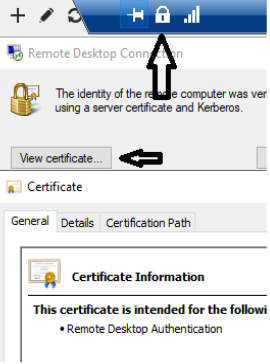
rdp-cert.png
All Comments (4)
Hello,
Thank you for your feedback.
This option isn't available in embedded or undocked RDP sessions in RDM. I moved your post to the Feature Request section.
Best regards,
Érica Poirier
Thank you @Erica Poirier
Hello,
A ticket has been created for this internally. We will keep you updated on any progress.
Best Regards,
Michaël Beaudin
Hello
I guess your RDP server certificate(s) are signed by an enterprise Active Directory CA, and properly trusted on your local machine? Rather than the common use case of just using the self-signed certificates that are automatically provisioned. The reason I ask this, is that I was not able to make the certificate information show up in mstsc after a quick test but it looks like this may just be because of certificate trust. When I use Kerberos authentication I do get the button, and it tells me "The identity of the remote computer was verified by using Kerberos". Anyway, that's more a matter of interest than something directly related to your request.
Can I ask the use case for this? And that is more than interest, because it drives how we might offer this. The Microsoft RDP ActiveX control (that we use for embedded RDP in the general case) doesn't offer a way to access the server certificate. I can see a few options:
- We can probe it out-of-band; i.e. open a socket to the server and run a TLS handshake. But that would be connect time (or before connection) and there's no guarantee (although the chances are slim) that the certificate didn't actually change between the probe, and opening the RDP session.
- We can look in the registry but that only gives us the thumbprint. It's enough for "did the certificate change" but it doesn't give us further details. And this may depend on the trust configuration (if the certificate is already trusted by the system, I'm not sure RDP saves the thumbprint, I'd need to check).
- We could use API hooking, which would mean intercepting the Windows API calls that the RDP control uses. It's a technique we use elsewhere but it's also technically quite challenging.
- We can offer this more easily using one of the third party RDP engines; but that could also be a downgrade in terms of other features and support (MS RDP is first class on Windows).
So, as you can see, the use case drives how we take this forward. Do you want to check the certificate live, inside the session? Is there a particular reason for that? Or are you wanting this separately (you want to review the certificate(s) being used, but don't necessarily want to connect to the machine at the same time by RDP).
Here's a separate trick that might help with the latter case: go to Tools, All Tools and search for "TLS Diagnostic". Enter the FQDN of the server and the RDP port (3389) and "Start"; RDM will do a TLS handshake with the server. The certificate (chain) will be printed in PEM format and you can also click it, and it will open the details in x509.io.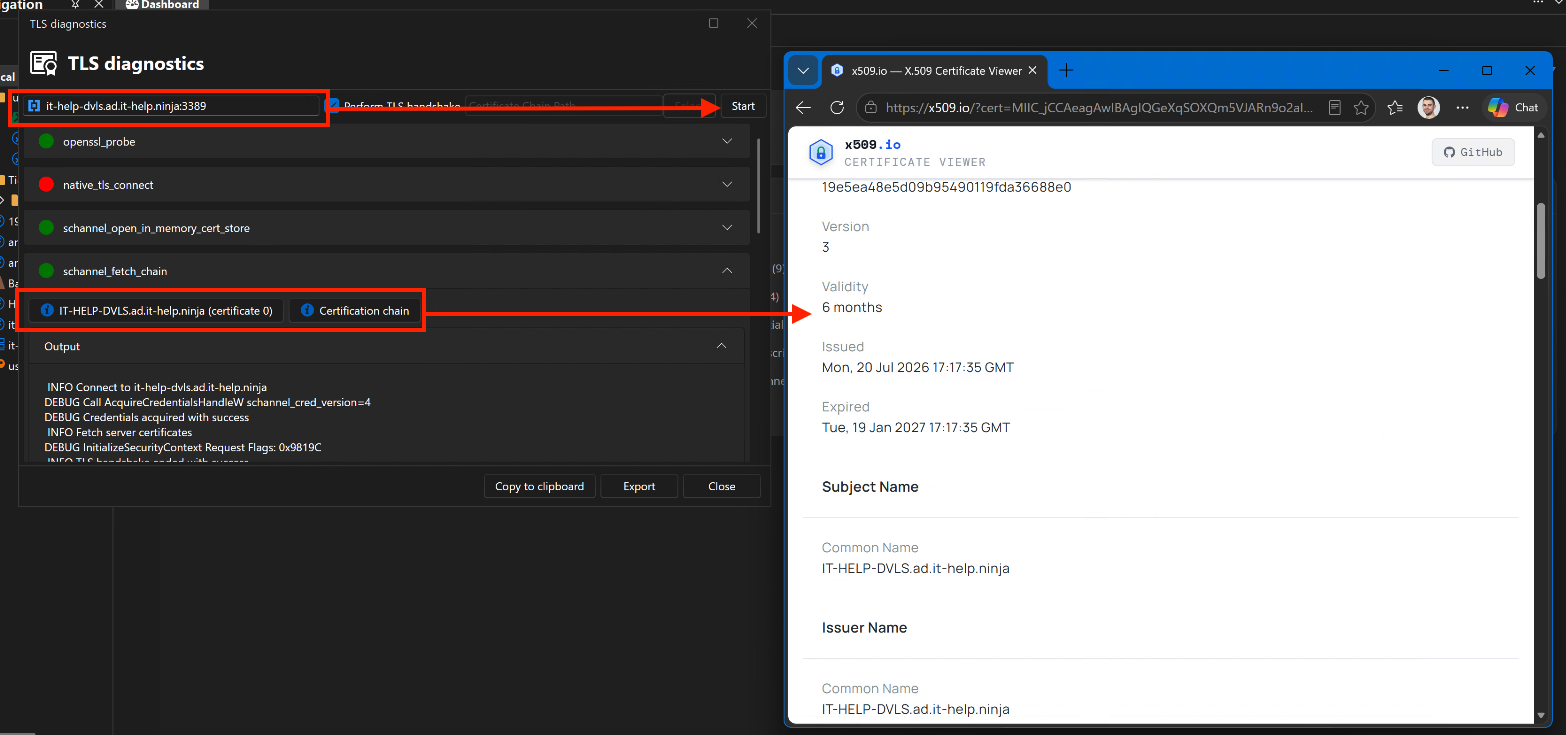
Let me know if you have any questions
Kind regards,
Richard Markievicz
Screenshot 2026-09-10 at 16.16.41.png