Feature Request: More Flexible TOTP Authentication Caching for Keeper Integration
Feature Request: More Flexible TOTP Authentication Caching for Keeper Integration
2 votes

Hello Devolutions Team,
We are using the Keeper Password Manager integration in Remote Desktop Manager (RDM) to manage and inject our credentials. Overall, the integration works quite well and we are happy with it.
However, we would like to suggest an improvement to make the user experience more practical and efficient.
Currently, whenever we open an RDM connection entry that requires credentials from Keeper, we are prompted to enter a TOTP code. Even though the prompt provides options to adjust the authentication validity period, RDM still requires a new TOTP verification for every newly opened connection. That is, the provided option do no have any effect.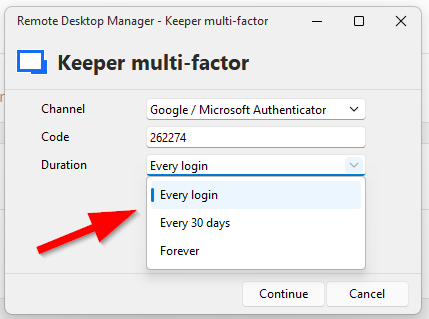
For administrators and support engineers who often open multiple connections within a short period of time, this becomes quite cumbersome. In practice, we sometimes have to wait for the next TOTP code to be generated before we can continue our work, which slows down workflows considerably.
We would therefore like request a fix of the problem and the ability to configure more practical authentication cache durations for the Keeper integration, for example:
- 30 minutes
- 1 hour
- Custom time period
This would provide a better balance between security and usability for environments where multiple connections are opened consecutively.
We completely agree that periodic re-authentication with a second factor is important and should remain part of the security model. One possible approach could be to require re-authentication after the configured time period expires, or alternatively after the workstation has been locked and unlocked again.
We would appreciate any consideration of this request, or recommendations for alternative ways to improve the usability of the current Keeper integration.
Thank you for your excellent product and for continuously improving Remote Desktop Manager.
Best regards
405258ca-91e6-4721-aea6-d03ca5f6d34a.png
All Comments (6)
Hello,
These duration values are provided by Keeper themselves, we don't have the liberty of adding custom values. But I can now see that since we first made the integration, they've added:
- Every 12 hours
- Every 24 hours
Would adding these durations work for you?
We'll also investigate the issue of the duration not actually being used and come back to you once we find anything.
Regards
Jonathan Del Signore
Hi Jonathan,
thanks for the quick reply.
If there is no other way, this would already be an improvement!
But isn't there a way to issue something like a 12-hour session and then invalidate the cached credential/session earlier from the RDM side if needed? I'm also thinking about the other proposal I mentioned: requiring an MFA re-authentication after a screen lock.
Invalidating the whole session (not just the 2FA) might be something we can do on our end, we'll do some testing and come back to you.
Just to make sure we cover all bases, are you using SSO or a username/password login?
Thanks
Jonathan Del Signore
We are using username/password login, since we would like to keep Keeper separated from our current identity provider.
But if this point comes up, I would also like to add the following suggestion (although it would probably be better submitted as a separate feature request):
It would be great if authentication with Keeper could additionally be implemented using a passkey (WebAuthn), specifically with FIDO2 security keys such as a YubiKey.
To achieve a true passwordless login experience.
Keeper already supports this type of login in general.
Whether it would technically work with the RDM integration, however, I honestly do not know.
Thanks for the precision, we should be able to look into that soon.
And yes for the YubiKey support we should keep the discussion in the other thread to avoid too much noise: https://forum.devolutions.net/topics/39333/u2f-security-key-support-for-keeper-integration
Spoiler - I just implemented it locally and it works
Jonathan Del Signore
And yes for the YubiKey support we should keep the discussion in the other thread to avoid too much noise: https://forum.devolutions.net/topics/39333/u2f-security-key-support-for-keeper-integration
Spoiler - I just implemented it locally and it works
These are amazing news.
Alright, I'll keep that in mind and continue the YubiKey discussion there.
Thank you for your efforts!