Clipboard randomly stops working between macOS and RDP sessions
Clipboard randomly stops working between macOS and RDP sessions

Hi,
I'm having an issue with Remote Desktop Manager on macOS Tahoe.
I'm currently using Remote Desktop Manager 2026.2.4.4 (latest and greatest) and when using the clipboard between my Mac and RDP sessions to different Windows hosts, the clipboard randomly stops working. This happens quite often.
There are no errors or warnings. Copying something on my Mac and trying to paste it into the Windows RDP session simply stops doing anything.
I found that I can get the clipboard working again by going into the RDP session and copying something from the Windows side first. After doing that, clipboard functionality is restored, and I can once again copy something on my Mac and paste it into the RDP session.
So basically:
Mac → Windows RDP: randomly stops working
Copy something inside Windows RDP: restores it
Mac → Windows RDP: works again
Has anyone else run into this with macOS Tahoe, or is this a known issue?
All Comments (17)
Hello
Sorry for the inconvenience. I haven't seen any other reports like this.
From your description, it sounds like our understanding of the pasteboard change count (a system-provided number that gets incremented every time the pasteboard changes) is getting out-of-sync with reality.
Are you using any third party clipboard management software (e.g. Maccy)? Are you using the built-in universal clipboard to share pasteboard data between devices (this means - "Allow handoff" is enabled in System Settings > Airdrop and Continuity > Allow Handoff, and you have other devices like a phone or iPad consuming the feature)? Do you have clipboard history enabled for Spotlight (System Settings > Spotlight > Clipboard history...)?
All of those things would help me understand the situation better
Thanks and kind regards,
Richard Markievicz
Hello,
Thanks for the answer.
Yes, I do have Maccy installed and running, so that could potentially be related to the issue.
Handoff is enabled on my Mac.
For Spotlight, clipboard history is disabled
Hello,
Thank you for the additional information.
Since Maccy is currently installed and running, could you temporarily disable it and see if the clipboard issue occurs again while using RDP sessions in Remote Desktop Manager?
This would help us determine whether Maccy may be interfering with the macOS clipboard synchronization.
Please let us know if the issue still occurs with Maccy disabled.
Best regards,
Carl Marien
Hello,
Thank you for the additional information.
Since Maccy is currently installed and running, could you temporarily disable it and see if the clipboard issue occurs again while using RDP sessions in Remote Desktop Manager?
This would help us determine whether Maccy may be interfering with the macOS clipboard synchronization.
Please let us know if the issue still occurs with Maccy disabled.
Best regards,
@Carl Marien
Hello
Thank you for the suggestion.
I have configured Remote Desktop Manager as an ignored application in Maccy. Maccy also allows certain pasteboard types to be ignored, although I’m not sure whether that would help in this particular case.
I’ll test with these settings and see if they resolve the clipboard issue I was experiencing. If the issue persists, I’ll temporarily disable Maccy completely and test again.
I’ll let you know the results.
Hello,
Thank you for the update!
Please let us know how it goes with these settings. If the issue persists, we can continue investigating from there. 🙂
Best regards,
Carl Marien
I don't know if it's related, but the copy username and password action doesn't work at all, even when Maccy isn't running.
Hello
The implication is that something is interfering with clipboard handling, and maybe seizing the clipboard contents on a local copy in a way that we're not anticipating.
When you copy username / password, RDM tags the copied values in a way that is supposed to stop a password manager intercepting them (because, typically, you don't want a copied password for example showing up in your clipboard history).
It's possible that the clipboard contents are still getting seized, but with those copies "flagged" whoever seized the clipboard now has nothing to paste.
To be clear - I'm not saying the issue you see isn't on the RDM side, just something that we're not expecting that we need to account for.
If you temporarily disable handoff as well, does the copy username/password start working as expected?
Thanks for your patience
Kind regards,
Richard Markievicz
Hello
The implication is that something is interfering with clipboard handling, and maybe seizing the clipboard contents on a local copy in a way that we're not anticipating.
When you copy username / password, RDM tags the copied values in a way that is supposed to stop a password manager intercepting them (because, typically, you don't want a copied password for example showing up in your clipboard history).
It's possible that the clipboard contents are still getting seized, but with those copies "flagged" whoever seized the clipboard now has nothing to paste.
To be clear - I'm not saying the issue you see isn't on the RDM side, just something that we're not expecting that we need to account for.
If you temporarily disable handoff as well, does the copy username/password start working as expected?
Thanks for your patience
Kind regards,
@Richard Markiewicz
Hello,
Thanks for the explanation. I did some further testing and was able to trace the issue to BetterTouchTool. Once BetterTouchTool is disabled, the “copy username and password” actions in RDM work as expected.
It looks like BetterTouchTool is interfering with the clipboard handling, probably by capturing or modifying the clipboard contents after RDM places the protected values there.
Edit:
I found the cause of the issue. I have a custom hotkey configuration in BTT that types the clipboard contents. I guess I’ll have to live without this RDM feature because I can’t disable BTT — I rely on it too much for my workflow.
Hello,
Thank you for the additional information.
Since Maccy is currently installed and running, could you temporarily disable it and see if the clipboard issue occurs again while using RDP sessions in Remote Desktop Manager?
This would help us determine whether Maccy may be interfering with the macOS clipboard synchronization.
Please let us know if the issue still occurs with Maccy disabled.
Best regards,
@Carl Marien
Update to this. Adding RDM as ignored application in Maccy did not solve the issue.
Hello
Thanks for the update, this is important information.
BTT has it's own clipboard manager that continuously polls the clipboard and records what it sees. Do you have that feature enabled? Note from the thread, that toggling that feature requires a restart of BTT. If it's the case we could be seeing an interaction between BTT, Maccy and RDM.
With regard to it breaking the copy username / password feature, that might be something we can address independently.
Thanks and kind regards,
Richard Markievicz
Hello
Thanks for the update, this is important information.
BTT has it's own clipboard manager that continuously polls the clipboard and records what it sees. Do you have that feature enabled? Note from the thread, that toggling that feature requires a restart of BTT. If it's the case we could be seeing an interaction between BTT, Maccy and RDM.
With regard to it breaking the copy username / password feature, that might be something we can address independently.
Thanks and kind regards,
@Richard Markiewicz
I don’t directly use BTT’s own clipboard as I use Maccy as my clipboard manager. However, because I have a custom function in BTT that I created “Type Clipboard”, it kind of partially activates BTT’s clipboard functionality.
Hello
Just to restate, I'm not saying these issues aren't our bugs, but in order to play nicely with other programs that manage the clipboard we have to understand what they are doing.
because I have a custom function in BTT that I created “Type Clipboard”, it kind of partially activates BTT’s clipboard functionality.
Yes, that's what I was wondering - if just using a clipboard function in BTT activates their clipboard manager.
I'm trying to reproduce this on my side, but I'll be honest that I'm lost in BTT. Can you share how your custom clipboard function is set up, so I can recreate it on my side?
Thanks and kind regards,
Richard Markievicz
Hello
Just to restate, I'm not saying these issues aren't our bugs, but in order to play nicely with other programs that manage the clipboard we have to understand what they are doing.
because I have a custom function in BTT that I created “Type Clipboard”, it kind of partially activates BTT’s clipboard functionality.
Yes, that's what I was wondering - if just using a clipboard function in BTT activates their clipboard manager.
I'm trying to reproduce this on my side, but I'll be honest that I'm lost in BTT. Can you share how your custom clipboard function is set up, so I can recreate it on my side?
Thanks and kind regards,
@Richard Markiewicz
It's configured as a keyboard shortcut like this. 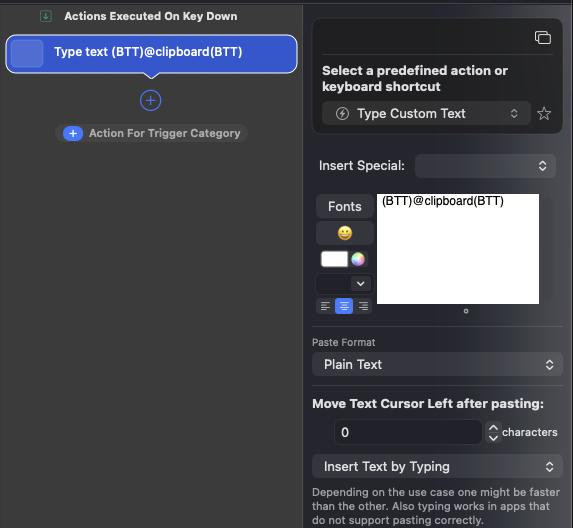
CleanShot 2026-08-18 at 20.58.11.png
I tried deleting the Type Clipboard shortcut, but it didn't fix the issue with RDM, so it must be caused by one of the other configurations. I just couldn't find anything else related to the clipboard when I searched. I have lots of different configurations in BTT, so it's hard to know which one is causing the issue. But it must be related to BTT, because if I shut it down, the RDM clipboard works without any issues.
Hello again
When you say it works without any issues; do you mean the original (RDP) clipboard problem, or the copy username/pasword specifically? Or everything is working well?
Thanks and kind regards,
Richard Markievicz
I mean "copy username and password" works when i close BTT.
It might be that BTT is also causing the other clipboard issue—the one that made me start this thread in the first place. But that one is harder to reproduce because it happens randomly, although often enough to be annoying. :)
Hello
When you use the "type clipboard" action you have set up in BTT, indeed it does take the clipboard (it reads what is in the clipboard, and then replaces it; I'm not sure why but I can see it adding it's own marker types to what is offered on the clipboard). I can see how that would break the "copy username and password" feature and it's probably intractable from our side.
When you use that feature in RDM; we first put the username in the clipboard and then wait for someone to paste it. Once that happens, we put the password in the clipboard and then leave it there until someone pastes it or a timeout elapses. In this case, when you use the BTT action, it "pastes" (takes the first value from the clipboard) but then it overwrites the clipboard with it's own value. That will certainly break things.
As for the RDP issue, I cannot say if it's related. Here we have multiple applications all trying to manage the clipboard, to one degree or another, and there is probably a timing issue that breaks the RDM side intermittently. This stuff can be hard to get right: personally, I use Windows App quite regularly for RDP and using the clipboard constantly causes Slack to freeze; the only way to get my system back (Slack running and clipboard operational) is to force-quit Slack, but I'm sure the problem is on the Windows App side.
It might be that the best I can do is to add some extra diagnostics in RDM to give a better understanding of why this issue occurs, so this might take a bit of time to get the bottom of and resolve. I will work on that and let you know once I have some more information.
Thanks and kind regards,
Richard Markievicz