Tabs Cannot Be Reordered When Single-Row Tab Bar Overflows Available Width
Tabs Cannot Be Reordered When Single-Row Tab Bar Overflows Available Width

In the latest macOS RDM release (2026.2.4.4), I have observed an issue with tab reordering when the total width of open tabs exceeds the available width of the tab bar.
When a tab is located beyond the visible portion of the tab bar and is selected, it is correctly displayed on the far right side of the visible tab area. This behavior is expected and appears to be functioning as designed.
However, once the tab bar enters this overflow state, tabs can no longer be reliably rearranged. As long as the total tab width exceeds the available pixel width of the tab bar, drag-and-drop reordering either does not work at all or behaves unexpectedly. In some cases, attempting to move a tab causes it to automatically reposition itself as the second tab from the left. I'm not sure why this specific location is chosen, but it is consistently what I've observed. After the tab is moved to that position, it cannot be moved back to its original location and effectively becomes stuck.
I previously reported Tab Not Displayed for Current Tab if Single Row Width is Enabled, which was subsequently fixed. This new issue may be related to the changes made for that fix, although I cannot confirm that. It is also possible that this tab reordering problem existed prior to this release and simply went unnoticed because of the previous tab visibility issue.
Expected Behavior
- Tabs should remain fully draggable and reorderable regardless of whether the tab bar has exceeded its available width.
- Selecting a tab that is outside the visible area should not affect the ability to reposition tabs.
Actual Behavior
- Once the tab bar overflows the available width, tab reordering becomes unreliable or stops working entirely.
- Attempting to move a tab may unexpectedly relocate it to the second position from the left.
- Tabs that have been relocated in this manner cannot be moved back to their intended position.
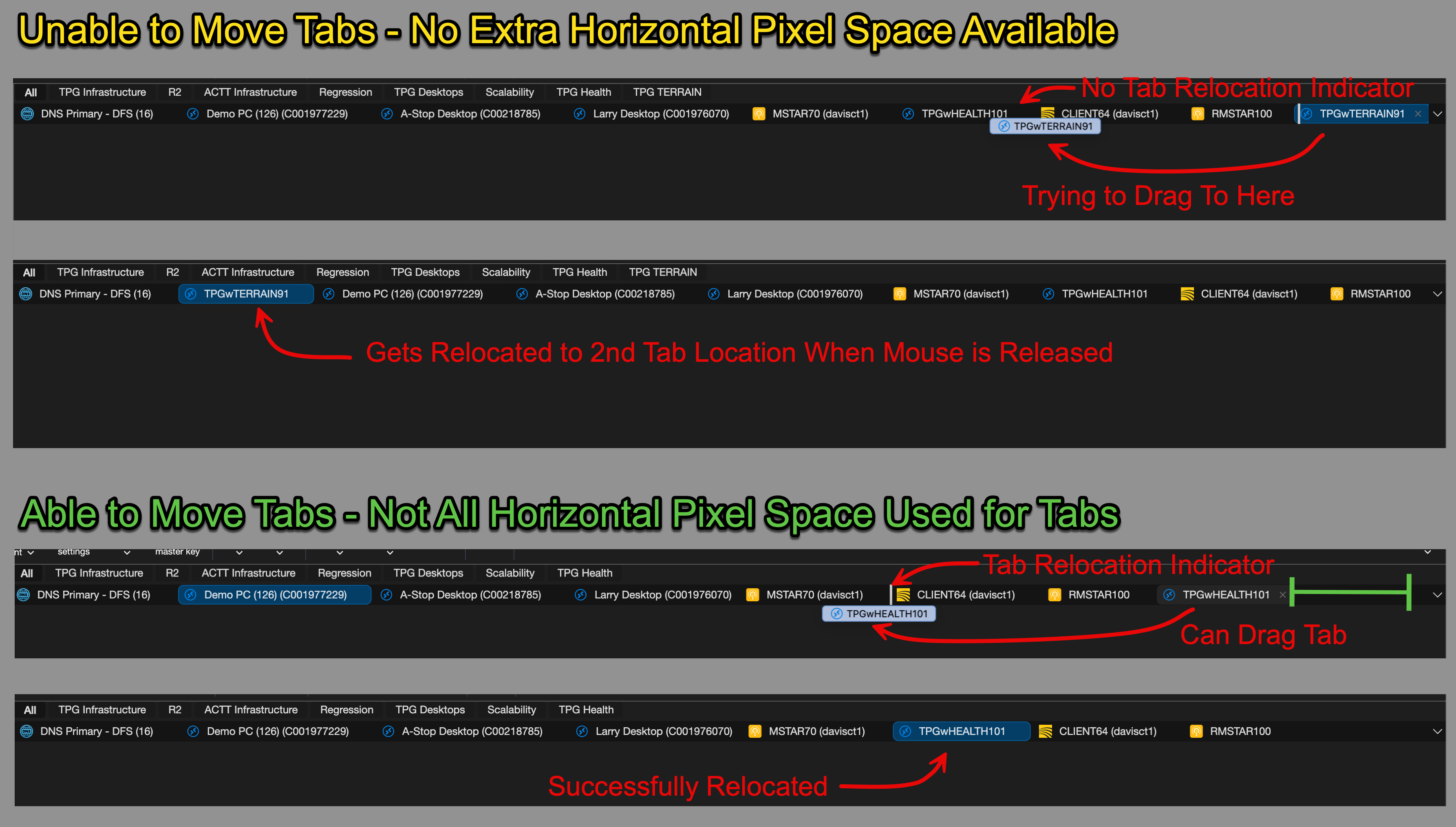
59820f07-5048-4d6b-9a67-714e43c0c1d6.png
All Comments (3)
Hello,
Thank you for reaching out to us regarding this.
Before we look further into this, could you confirm which option you currently have set for "Show tabs in multiple rows" in the tab bar dropdown (downward arrow)? Is it enabled?
Once we know your current setting, we'll be able to try to reproduce this on our end and confirm whether it's tied to the single-row width behavior.
Best regards,
Samuel Dery
I have the the "Show tabs in multiple rows" disabled as I also have the dynamic auto-reconnect so that the RDP sessions reconnect with the current available screen resolution fo the window. WHen I enable the mulitple rows feature, the RDP sessions all reconnect/resize when it overflows to a second row, so I disabled that option.
Hello,
Thank you for your reply,
I see, I have opened a case with our QA department to see if they are able to reproduce the issue.
I will keep you updated with any news I receive,
Best regards,
Samuel Dery