Online\Offline Icons?
1 vote

For the life of my I swear I used to be able to enable an option that shows the icon next to an asset as green for online or red for offline. Anyone able to help point me in the right direction?
Recommended Answer
Hello,
Thanks for confirming the versions and testing this on both.
You're not missing a setting - this is expected behavior. Per our documentation, the Is Online feature only flags unavailable hosts in red; there's no corresponding green state for hosts confirmed online in the tree view. The green circle with the white triangle you're seeing is a different indicator (an actively connected session), not an online/reachability status.
I understand this isn't quite what you remembered from before, and it would genuinely be useful for the mass restart/shutdown workflow you described. I'll log this as a feature request on your behalf. In the meantime, red-for-unavailable should still help you filter out offline assets before a batch action.
Thanks again for the detailed testing across versions - that helped confirm this quickly.
Best regards,
Tommy Sanders
All Comments (5)
 For reference, this is what i see.
234fd85a-2812-4700-aed7-f9b927d203cc.png
Hi mcmasterslj,
What you're describing sounds like the Is Online feature. Here's how to enable it:
- Go to File → Background Services → Is Online.
- Check Enable check for server availability. Once enabled, RDM will ping (or port scan, depending on your detection method) each entry's host. Per our documentation, hosts that are not reachable are shown in red in the tree view.
- You can also set Execute automatic check every X minutes so this runs on a schedule instead of manually.
- Under Online detection, choose between Ping or Port scan as the method used to determine availability.
Could you confirm a couple of things so we can make sure this matches what you're after:
- Which RDM version are you currently running, and which workspace type are you using (DVLS, SQL, or Cloud)?
- Once you enable this and the host comes back online, does the icon turn green in your tree view? I want to confirm that on your version, since I can only confirm the red "unavailable" state from our documentation.
If it's still not behaving as expected after enabling this, feel free to share a screenshot of your Background Services settings and we'll dig further.
For reference, here's our documentation on this feature:
https://docs.devolutions.net/rdm/ribbon-menu-bar/file/background-services
Best regards,
Eduard Sepulveda Lopez
Eduard,
Thank you so much this is exactly what I was looking for! For some reason I thought the icon turned a solid green/red for online/offline but I may be thinking of a different remote program I used to use in the past. This is working perfectly and gives me the information I needed, mainly for when I was trying to select multiple assets for mass restart/shutdown as it would fail sequentially in the sequence if an asset was offline. This helps me identify the online ones so it doesnt error out.
I just noticed I was using 2025.3.28.0 with I believe SQL Lite [default at install]
It does not turn Green in the tree view, only the name turns red for offline. it will only give me a green circle with a white triangle in it if i am actively remoted into an asset.
I updated to 2026.16.0 64bit (PreJIT) and has the same behavior, hope this helps! Thanks again!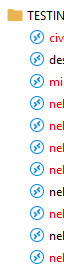
Screenshot 2026-07-22 144527.png
Hello,
Thanks for confirming the versions and testing this on both.
You're not missing a setting - this is expected behavior. Per our documentation, the Is Online feature only flags unavailable hosts in red; there's no corresponding green state for hosts confirmed online in the tree view. The green circle with the white triangle you're seeing is a different indicator (an actively connected session), not an online/reachability status.
I understand this isn't quite what you remembered from before, and it would genuinely be useful for the mass restart/shutdown workflow you described. I'll log this as a feature request on your behalf. In the meantime, red-for-unavailable should still help you filter out offline assets before a batch action.
Thanks again for the detailed testing across versions - that helped confirm this quickly.
Best regards,
Tommy Sanders
Hello,
Thanks for confirming the versions and testing this on both.
You're not missing a setting - this is expected behavior. Per our documentation, the Is Online feature only flags unavailable hosts in red; there's no corresponding green state for hosts confirmed online in the tree view. The green circle with the white triangle you're seeing is a different indicator (an actively connected session), not an online/reachability status.
I understand this isn't quite what you remembered from before, and it would genuinely be useful for the mass restart/shutdown workflow you described. I'll log this as a feature request on your behalf. In the meantime, red-for-unavailable should still help you filter out offline assets before a batch action.
Thanks again for the detailed testing across versions - that helped confirm this quickly.
Best regards,
@Tommy Sanders
Tommy,
The red text for offline is working perfectly for what I need it for currently. Thanks so much for adding it as a feature request!