Unexpected folder creation from Bitwarden Synchronization process
Unexpected folder creation from Bitwarden Synchronization process

Issue: Bitwarden folders are interspersed within a synced collection.
Here is an example to illustrate the unexpected behavior. Here is my test Bitwarden vault and collection structure: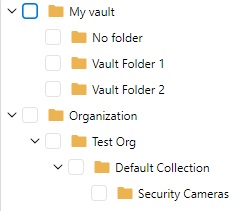
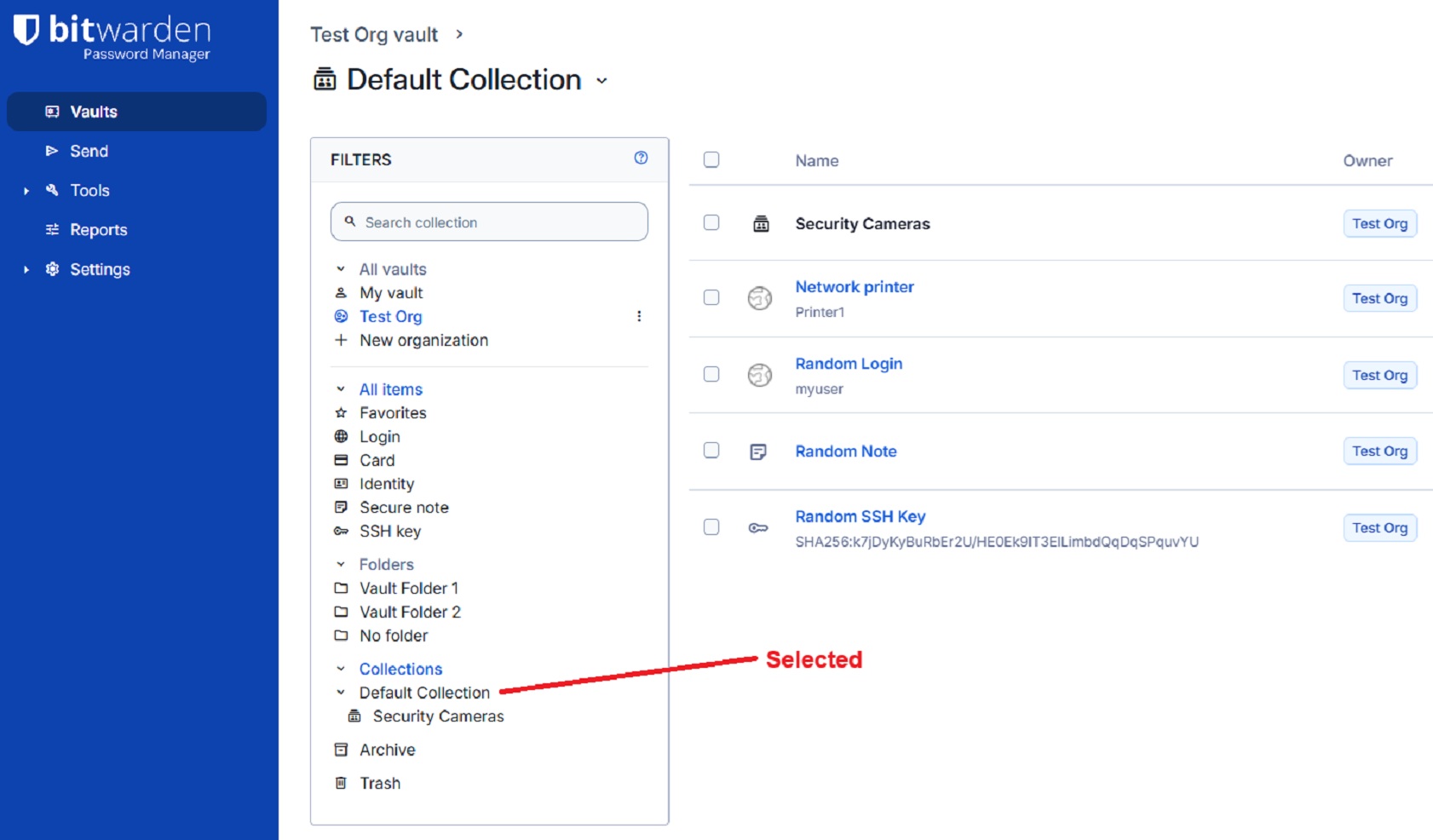
There is one entry in "Vault Folder 1" which is "Security Camera 1". There is also one entry in "Vault Folder 2" which is "Security Camera 2". There is a "Security Camera 3" which is not in any vault folder. All three security cameras are members of the collection "Security Cameras" which is nested underneath the "Default Collection".
Other Bitwarden items exist under "Default Collection", but I do not want them to sync with my RDM vault.
Here is a screen shot of my Bitwarden test vault with the Default Collection selected.
Here is a screen shot of my Bitwarden test vault this time with the Security Camera collection selected.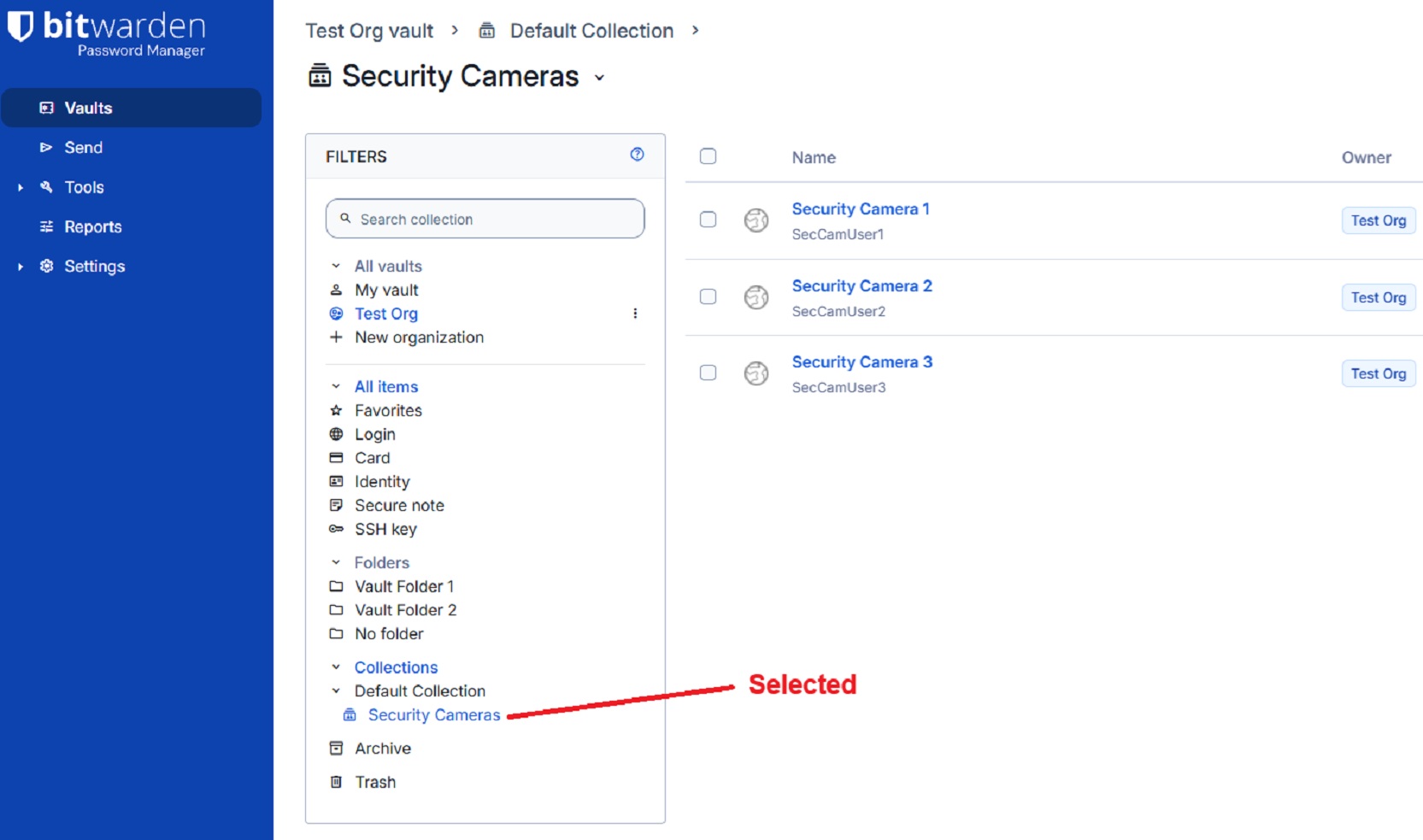
On the general tab of the Bitwarden Synchronizer I select a specific destination folder. On the filter tab of the Bitwarden Synchronizer, I select the "Security Cameras" collection like the image below. The setting "Synchronize automatically" is unchecked. Note that "Default Collection" has been touched to change it from being a blue check mark to just being an open blue box to prevent entries other than those under "Security Cameras" from being synced.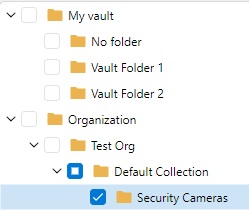 The filter is saved.
When I click the Synchronize button this is the sync result.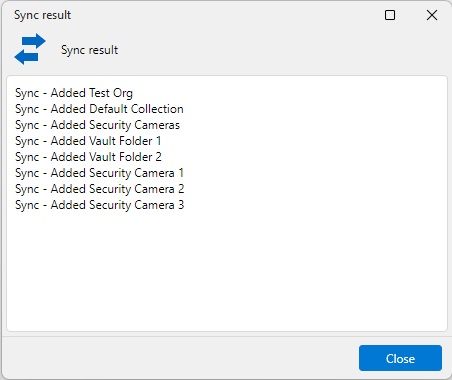
I was not expecting "Vault Folder 1" or "Vault Folder 2" to be in the above list. Below is the resulting hierarchy in my RDM vault.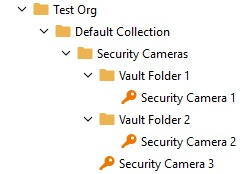
Bitwarden folders and collections are separate things. I was not expecting to see Bitwarden folders interspersed within the "Security Cameras" collection. Especially since I did not select any vault folders on the filters tab.
The expected result was that I would see only the three security camera credential objects directly under the "Security Cameras" folder. No vault folders would be created.
I am using RDM version 2026.2.14.0 64-bit (JIT).
RDM-sync-issue_example-bitwarden-structure.jpg
RDM-sync-issue_example-bitwarden-default-collection.jpg
RDM-sync-issue_example-bitwarden-security-camera-collection.jpg
RDM-sync-issue_example-filter-tab-selections.jpg
RDM-sync-issue_example-sync-result-dialog.jpg
RDM-sync-issue_example-sync-result-RDM-vault-hierarchy.jpg
All Comments (10)
Bump.
Hello,
Thank you for reaching out regarding this matter, and thank you for providing such a detailed report.
I'll need to set up a similar environment on my end to reproduce the issue. Once I've been able to replicate it, I'll report the behavior to our development team for further investigation.
Could you please confirm the workspace type you're using in Remote Desktop Manager (RDM), along with its version? This information will help me accurately reproduce your setup.
I look forward to your reply.
Best regards,
Jacob Lafrenière
Hello,
Thank you for reaching out regarding this matter, and thank you for providing such a detailed report.
I'll need to set up a similar environment on my end to reproduce the issue. Once I've been able to replicate it, I'll report the behavior to our development team for further investigation.
Could you please confirm the workspace type you're using in Remote Desktop Manager (RDM), along with its version? This information will help me accurately reproduce your setup.
I look forward to your reply.
Best regards,
@Jacob Lafrenière
I am using the default workspace in RDM for Windows 2026.2.16.0 64-bit (JIT).
Hello,
Thank you for the follow-up.
I tested this behavior extensively across multiple workspace types but was not able to reproduce the issue consistently. I was able to reproduce it the first time I synchronized BitWarden. However, after launching my recording tool, I was no longer able to reproduce the issue on any workspace type.
Could you let me know if the issue still occurs after deleting the BitWarden folder structure and synchronizing the workspace again?
I also tested the behavior using RDM 2026.2.16.0, and I was unable to reproduce the issue there either. If you have not already done so, it would be worthwhile to update to this version and test whether the issue persists.
I look forward to your reply.
Best regards,
Jacob Lafrenière
Hello,
Thank you for the follow-up.
I tested this behavior extensively across multiple workspace types but was not able to reproduce the issue consistently. I was able to reproduce it the first time I synchronized BitWarden. However, after launching my recording tool, I was no longer able to reproduce the issue on any workspace type.
Could you let me know if the issue still occurs after deleting the BitWarden folder structure and synchronizing the workspace again?
I also tested the behavior using RDM 2026.2.16.0, and I was unable to reproduce the issue there either. If you have not already done so, it would be worthwhile to update to this version and test whether the issue persists.
I look forward to your reply.
Best regards,
@Jacob Lafrenière
I upgraded to 2026.2.16.0 64-bit (JIT) and I am still able to reproduce this issue at will when deleting the synced hierarchy structure in Remote Desktop Manager between synchronization attempts. I am using the Local (SQLite) workspace.
Hello,
Thank you for the follow-up.
I looked into this further and found that groups are also interpreted as folders, resulting in an additional folder layer being created directly in RDM. If both All Folders and All Groups are selected in the Filter tab of the Bitwarden Synchronizer entry, it creates a large number of duplicated folders and entry shortcuts.
I will report this on my end, as I believe this is not the intended behavior.
I will follow up here once the development team has either resolved the issue or added a setting that allows you to choose whether groups should be interpreted as folders.
Thank you for your patience.
Best regards,
Jacob Lafrenière
Hello,
Thank you for your patience.
After further review by the RDM development team, this behavior is not currently considered a bug. The team has recommended that this request be submitted as a feature request instead.
I would recommend creating a new topic in the Feature Request section of our forum. Alternatively, with your approval, I can move this existing topic to that section on your behalf.
Please let me know how you would like to proceed.
I look forward to your reply.
Best regards,
Jacob Lafrenière
Thank you for your response. If development doesn't think duplicated folders and entry shortcuts are an issue, then I think they also unlikely to accept a feature request to sync without creating duplicates. I am going to abandon this bug report and also abandon my use of the feature. Thanx anyway.
Hello,
Thank you for the follow-up.
I understand your point and your decision not to proceed with this feature. However, I will still create a feature request, as I believe this behavior could be improved to provide a better user experience.
I will update this message with a link to the feature request as soon as it has been created.
Thank you for bringing this behavior to our attention.
Best regards,
Edit: https://forum.devolutions.net/topics/56142/better-handling-of-bitwarden-synchronizer-entry-creation-when-groups-a
Jacob Lafrenière
Hello jnkjunk,
I'd like first to apologize as there seems to have been some misunderstandings. The reason we don't want to treat this as a bug (and change the behavior for everyone using Bitwarden) and would rather you open a feature request is because the folders synced are the ones that are actually set up on the entries you are syncing. Judging from your original screenshots (with Security Camera), I'm fairly confident that if you select "Security camera 1" in bitwarden (the object itself) and edit it, you will see that its folder path (or collection, depending on your layout) includes "Vault Folder 1" (I've included a screenshot for clarity). And that is why we are syncing with the folder. When we receive data from Bitwarden, it is already displayed as such, but unlike them, we do not split it into multiple tree view.
We are open to making new features to help "filter out" bitwarden and how it handles itself so its clearer in your RDM setup. But that is not so much a bug, as it would be us "trimming" what Bitwarden provides as information. Bitwarden entries can be a little odd to look at when they exist inside a single tree view (like in RDM), since in their own layout, they appear in multiple tree views that each display only a portion of their folder paths (Collections vs actual folders).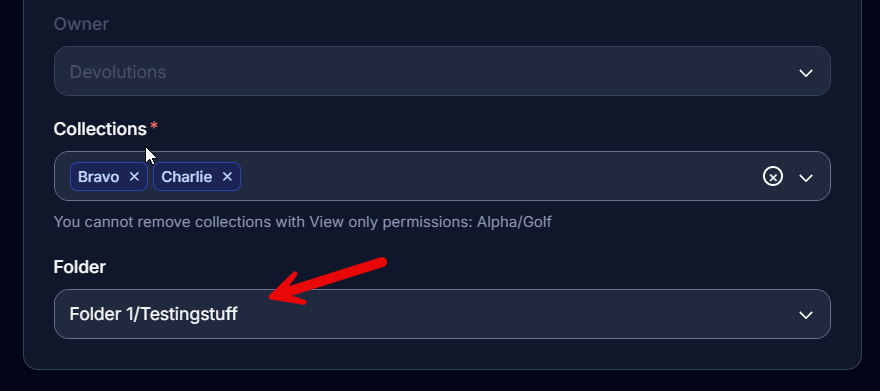
Regards,
Jafran Majeau
7cfb7890-e834-4f69-933d-2b74e2b43bf6.png