Stored credential for Yubikey doesn't work in version 2026.2.14.0
Stored credential for Yubikey doesn't work in version 2026.2.14.0

Hi,
Today we upgraded to the newest version of the free edition, and since then the Yubikey entries stored in the Credential Vault give the error message "An authentication error has occurred. Authentication failed because NTLM authentication has been disabled." When I try to logon with user/password and then I choose the Yubikey entry, then it works ok, only the entry stored in the vault produces the error message. I tried several things, but none of them helped:
- I tried to change the entries from hostname to FQDN
- I enabled the local resource "Smart Cards or Windows Hello for Business"
- Tried to re-create the credential entry, however by pushing the "Test configuration" I get the correct certificate that is also stored on the Yubikey
- I tried to change the default RDP type in the general configuration
None of these helped. When I uninstall the new version and install the previous one 2026.2.13.0 it suddenly starts to work again.
Did anyone had the same or similar experience? Do you have any ideas how to solve the issue?
Thanks!
Recommended Answer
Hello
I'll just follow up on what my colleague wrote - I'm a little confused by the error and the answers to Tommy's questions will be important here.
However, I have one further suggestion; you can switch back to 2026.2.14 or later and try opting-out of the fix that Tommy mentions?
To do this
- Close RDM completely
- Locate the RemoteDesktopManager.cfg file (typically in %localappdata%\Devolutions\RemoteDesktopManager)
- Make a backup of that file before editing it
- Before the closing
</Option>tag, add the line<DisableSmartCardKerbCertificateLogon>true</DisableSmartCardKerbCertificateLogon> - Save the file and relaunch RDM
Do things work correctly again? This is valuable information because ti will show us that it's this fix causing an issue for you, and also give you a viable workaround for upgrading to and past .14 for now.
Let me know if something isn't clear
Kind regards,
Richard Markievicz
All Comments (17)
Hello,
Thank you for contacting us on that matter,
This looks tied to a specific change in the newest release (2026.2.14.0, July 15, 2026), which includes: "Fixed smart card certificate and PIN RDP logon that was broken by Windows update KB5066835."
This fix changed how RDM negotiates smart card/PIN-based RDP logon (which covers your YubiKey entries). It's likely that this change altered the authentication negotiation in a way that now falls back to or attempts NTLM in certain configurations — which would explain why entries fail specifically when NTLM is disabled on the target/network, while manual username/password + Yubikey selection still works (different code path).
Since reverting to 2026.2.13.0 resolves it, this strongly points to a regression introduced by that specific fix rather than a general NTLM/network issue on your end.
Recommendation: stay on 2026.2.13.0 for now if this is blocking your team.
To reproduce this on our end and report it properly to the team looking at the KB5066835 fix, could you share a few screenshots of your configuration?
- The Credential entry's configuration (Credential Vault → the Yubikey/smart card entry → its properties, especially the authentication/logon settings and certificate selection).
- The RDP session entry that uses this credential — specifically the Credentials tab and any Security / logon settings (NLA, protocol, etc.).
- The Advanced or Security settings under the session's RDP configuration, if smart card / "Redirect smart cards" or similar options are shown.
- Your Windows version/build on the machine running RDM (Settings → System → About), so we can confirm KB5066835 is installed.
- If possible, confirm whether NTLM is disabled via Group Policy on the target server/domain (Local Security Policy or GPO setting related to NTLM restriction).
This will let me reproduce the exact setup and pass it along to our team with the right details for the fix.
Best regards,
Tommy Sanders
Hello
I'll just follow up on what my colleague wrote - I'm a little confused by the error and the answers to Tommy's questions will be important here.
However, I have one further suggestion; you can switch back to 2026.2.14 or later and try opting-out of the fix that Tommy mentions?
To do this
- Close RDM completely
- Locate the RemoteDesktopManager.cfg file (typically in %localappdata%\Devolutions\RemoteDesktopManager)
- Make a backup of that file before editing it
- Before the closing
</Option>tag, add the line<DisableSmartCardKerbCertificateLogon>true</DisableSmartCardKerbCertificateLogon> - Save the file and relaunch RDM
Do things work correctly again? This is valuable information because ti will show us that it's this fix causing an issue for you, and also give you a viable workaround for upgrading to and past .14 for now.
Let me know if something isn't clear
Kind regards,
Richard Markievicz
Hello Richard,
Thanks for the tip, this worked perfectly, now we can use again our stored credentials.
Regards,
Csaba
Hello Tommy,
I'll collect all the required info and come back to you with details, however so far the workaround from Richard seems to solve our problem. Unfortunately going back to version 2026.2.13.0 is tricky, as we would need to alter Intune as well to avoid updates for RDM.
Regards,
Csaba
- The Credential entry's configuration (Credential Vault → the Yubikey/smart card entry → its properties, especially the authentication/logon settings and certificate selection).
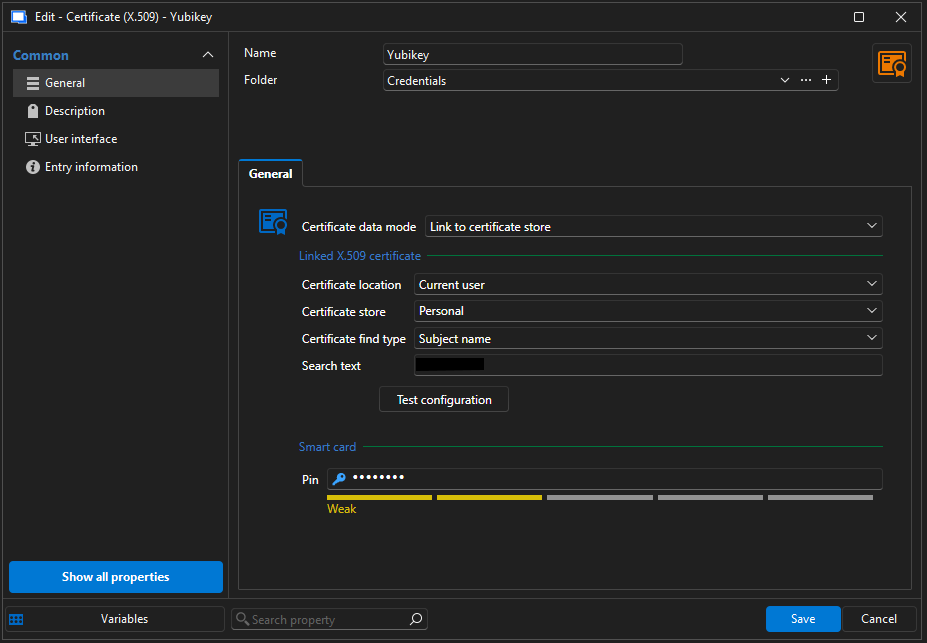
- The RDP session entry that uses this credential — specifically the Credentials tab and any Security / logon settings (NLA, protocol, etc.).
There is no Credentials tab, only Authentication. Here we didn't change anything, we left it all default. Now I saw the "Enable emulated smart cards" option, tried it too with the unchanged config file, but that does not solve issue unfortunately.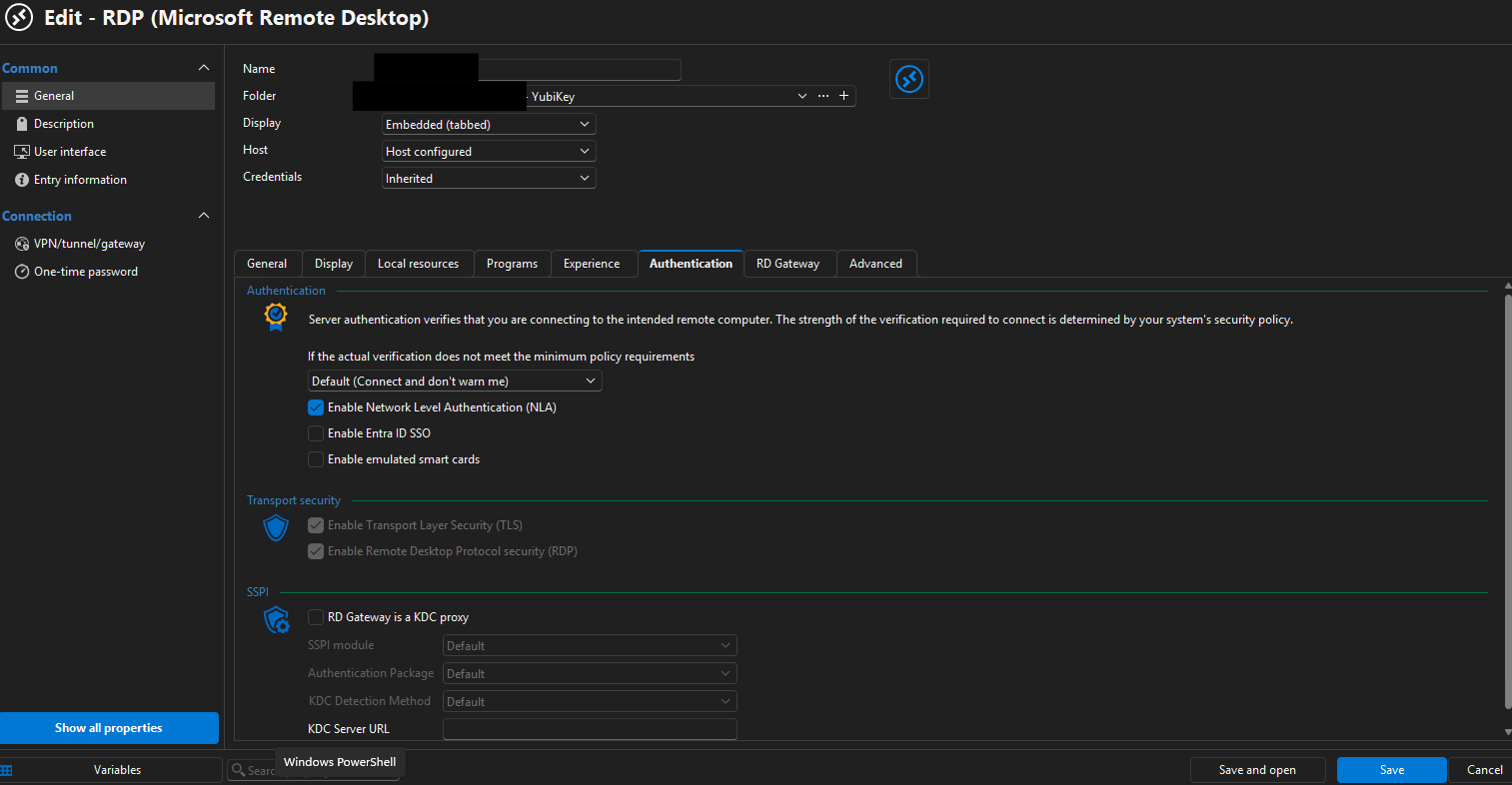
- The Advanced or Security settings under the session's RDP configuration, if smart card / "Redirect smart cards" or similar options are shown.
On the Advanced tab again everything is default, and I don't see any smart card related settings here: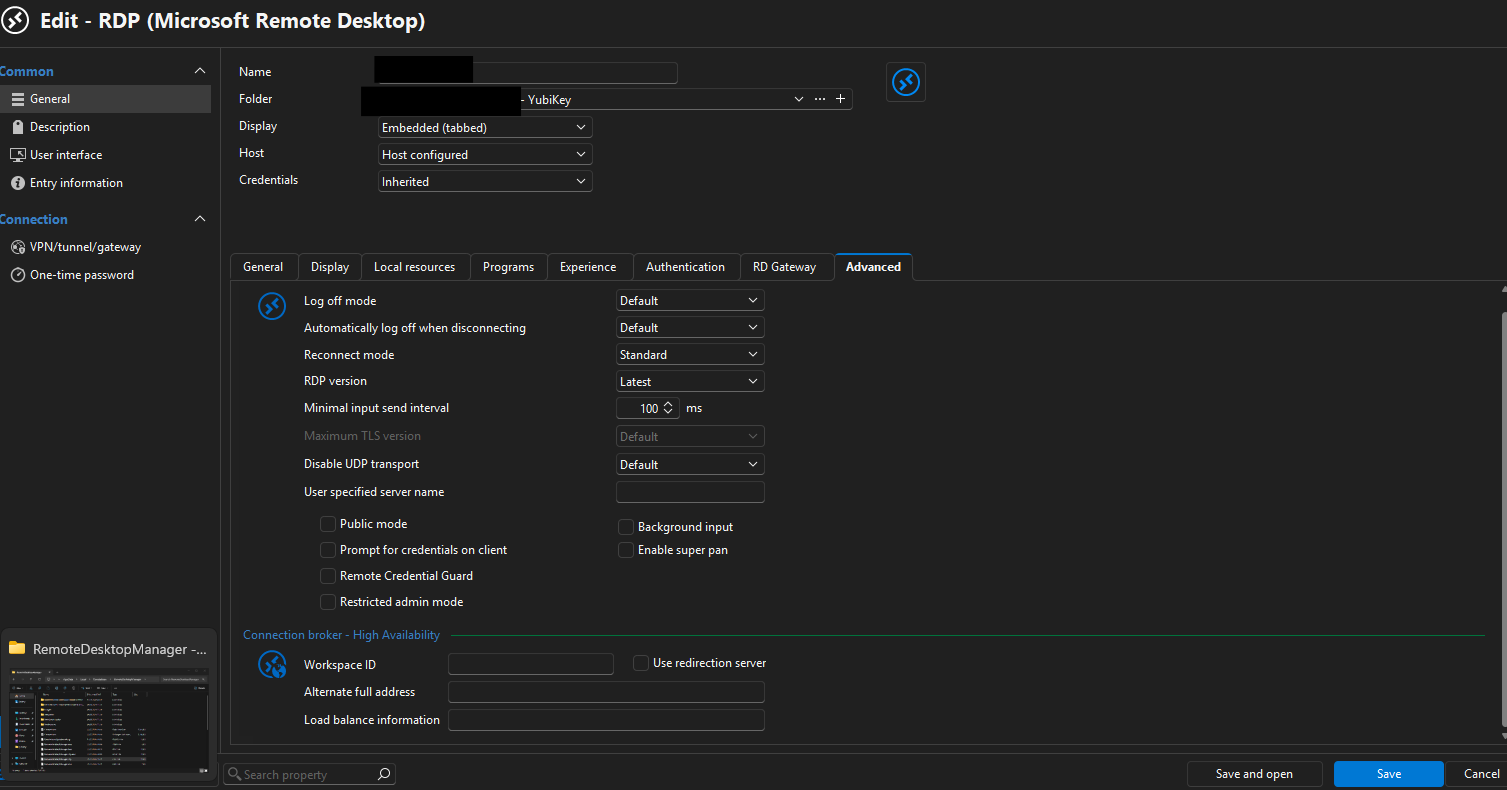
On the Local Resources tab the "Smart cards or Windows Hello for Business" is active, but for the stored credential this does not have an effect, it is apparently only needed if we logon manualy: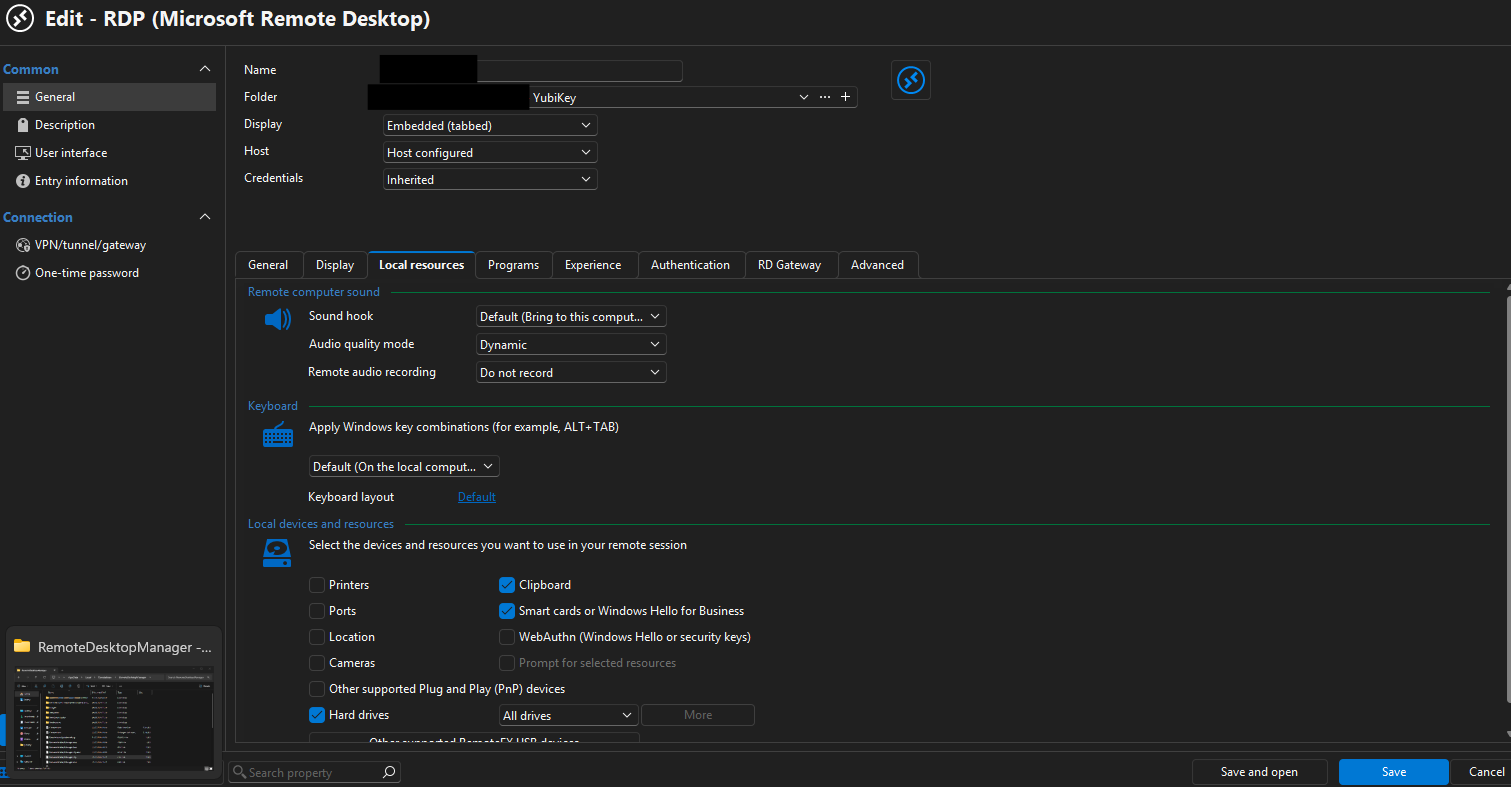
- Your Windows version/build on the machine running RDM (Settings → System → About), so we can confirm KB5066835 is installed.
The system is a Win11 VDI running on Citrix:
Edition Windows 11 Enterprise
Version 25H2
Installed on 02.09.2025
OS build 26200.8655
Experience Windows Feature Experience Pack 1000.26100.315.0
- If possible, confirm whether NTLM is disabled via Group Policy on the target server/domain (Local Security Policy or GPO setting related to NTLM restriction).
Here comes the fun part: NTLMv1 is disabled, only Kerberos and NTLMv2 are enabled. So theoretically NTLM should actually work too.
Hope this helps, regards,
Csaba
67a4ef98-f2c2-4ef0-b583-5f59e44df949.png
51d409d2-a66c-44c8-a552-2f73b748b9ac.png
cddfb414-b918-43bc-9c6b-da64158951a9.png
7b1a7541-530d-4719-9b53-dc14967b29c7.png
Hi Csaba
I'm glad the workaround is letting you move forward.
If you don't mind a little more back and forth here, I'd really like to understand what's going on.
The error message you wrote was "Authentication failed because NTLM authentication has been disabled". And in your last message "Kerberos and NTLMv2 are enabled. So theoretically NTLM should actually work too."
Actually it's not true, or we're missing a piece of the picture. Is this a regular Windows domain environment and you're using integrated smart card logon for RDP? i.e. When it works; you're not prompted for credentials at any point, you briefly see the WinLogon screen which transitions to logging on and then arrives in the user session?
Because, for smartcard logon over NLA to work, Kerberos is a hard requirement. At least - in a regular Windows domain environment. I'm aware of methods to do something similar outside of a domain, but I want to check that your setup is straightforward. Is there anything else that might be considered special about your setup?
Please let me know if something isn't clear
Kind regards,
Richard Markievicz
Hi Richard,
Thanks for coming back. I'm not entirely sure though if I understand you. It indeed is a domain environment, but during logon we are prompted for a password, where we can choose the smart card logon as well. Here then we need to enter the PIN of the Yubikey. That's actually the main reason, why we need the stored credential in RDM - that way RDM passes over the credential, and we don't need to enter anything.
Regards,
Csaba
Hello
Thanks for entertaining my continued questions.
So - in the normal case, if you didn't have a credential linked or set; you get the Windows authentication dialog where you would choose your smart card and enter the PIN? And your setup (that got broken) is the linked credential pointing at a smartcard logon X.509 certificate with the PIN stored in RDM? That all sounds normal and "vanilla".
Two more questions, if you don't mind:
- Does your system have the KB5066835 installed?
- Do you have multiple smart card / readers attached to the system?
Thanks and kind regards,
Richard Markievicz
Hello again!
One more thing, since the workaround is helpful in your environment. I know that updating the RemoteDesktopManager.cfg is not very ergonomic, but there's also a group policy you can use to apply the workaround across the board.
This article explains how to use RDM group policies.
In this case, the policy is %Root%\SOFTWARE\Policies\Devolutions\RemoteDesktopManager\DisableSmartCardKerbCertificateLogon
I hope this information is helpful
Kind regards,
Richard Markievicz
Hello,
"So - in the normal case, if you didn't have a credential linked or set; you get the Windows authentication dialog where you would choose your smart card and enter the PIN? And your setup (that got broken) is the linked credential pointing at a smartcard logon X.509 certificate with the PIN stored in RDM? That all sounds normal and "vanilla"."
This describes exactly how we use RDM and the stored credential for Yubikey.
As for your questions:
- Our systems do have KB5066835 installed
- There are no other smartcard readers attached, but bear in mind, that - as described in my original post - the machines we use are Citrix VDIs, and the physical Yubikey is forwarded to them.
Thanks for the tip with the GPO, in our case it only affects a handful of people, so we can set the config file manually, but it is definitely a useful tip for the future, should we want to expand the circle of Yubikey users.
Regards,
Csaba
Hello again
Thanks for your answers
the machines we use are Citrix VDIs
Ah, I've missed this detail in your earlier post. So - you connect to the Citrix VDI, forwarding the smart card from your local system; and from there you run RDM and RDP using the smartcard credential, is it right? This might be the elephant in the room here. Do you know if the Citrix system has the Yubico smartcard mini driver installed?
Thanks and kind regards,
Richard Markievicz
Hi,
So - you connect to the Citrix VDI, forwarding the smart card from your local system; and from there you run RDM and RDP using the smartcard credential, is it right?
Yes, that's right.
Do you know if the Citrix system has the Yubico smartcard mini driver installed?
Not from the top of my head, and I'm only back in the office on Monday. I'll come back to you with this detail.
Regards,
Csaba
Hello
Thanks again. So; I see Citrix actually use their own virtual channel for smart card redirection (and in fact they have two different versions - v1/v2 (default) and v3 (fast smart card)). I also note it's probably possible to redirect certain smart cards over USB, and again Citrix has their own implementation here.
I would be interested to know about the mini driver status; and also if you know which method you are using in Citrix. But this is more for my information, if the issue comes up with another customer.
Since things are working for you with the workaround (i.e. this was never broken in the first place on your environment) then going forward we'll probably leave it as-is. Actually I will probably promote the setting up to the UI as well as having the .cfg file and policy approaches.
Thanks a lot for your patience with this, and I am sorry for the inconvenience
Kind regards,
Richard Markievicz
Hello,
On the VDI and on the machines we try to logon to the Yubikey minidriver is installed. The Citrix hosts and the whole Citrix implementation is out of my responsibility and neither have I experience with that. I'll ask the correspondig team on Monday.
Regards,
Csaba
Hello
Just a follow up here; I'm pretty sure this is related to Citrix. 2026.2.18 will contain additional fixes which may let you run with the standard options, but since things are working well for you now it might be best to just leave it alone. I have lifted the setting up to the UI; in Entry Types > Sessions > Remote Desktop (RDP) > Advanced, unchecking "Use Kerberos certificate logon for smart card sessions" will have the same effect as the manual .cfg edit I proposed above.
Please let me know if something isn't clear or you have other questions
Kind regards,
Richard Markievicz
Hello,
Sorry, I forgot to ask the colleagues, but my guess is that the Yubikey Minidriver is not installed on the Citrix Hosts - those are XenServer and act as hypervisors anyways. On the VDI Desktop that we use, the Minidriver is installed.
I have tried to install RDM on my laptop, and with the 2026.2.17 version I get the same result: the stored credential drops the same error, and logging on with the username + password option, then choosing the Yubikey from the pop-up window works. Now here comes the fun part: the workaround doesn't seem to work here, when I change the cfg file I get this error: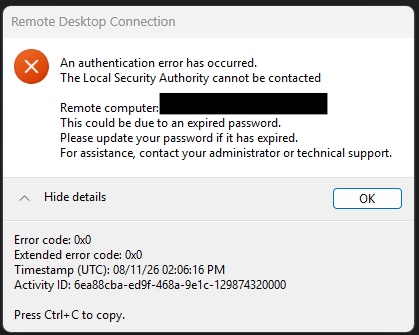
I imagine on my laptop there are more restrictions, than on the Citrix VDI, but still interesting, as with the normal logon window I can still log on without any issues with Yubikey as well.
I couldn't find the referenced setting here, so I guess it will come in the 2026.2.18 version.
Regards,
Csaba
7d3514c5-6a81-47c4-a346-eab0f314fcb4.png
Hello
Aha - what it looks like is, your laptop is hitting the same Microsoft bug that our workaround is supposed to address.
If you don't mind to try again with 2026.2.18 when it's released, the result will be revealing and if it still doesn't work we can troubleshoot further.
In the meantime, I believe you can still use the stored credential but simply without the PIN saved. At least the smart card should be pre-selected in the authentication dialog, and you'll only need to enter the PIN.
Please let me know if you have any questions
Kind regards,
Richard Markievicz