Custom fields resolution when exporting

When a folder name is dynamically generated with the usage of custome fields, the resolution of the folder name doesn't work when exporting.
Example:
- the folder is named
Customer - Rome - 1234, where Rome and 1234 are respectivelySITE_CUSTOM_FIELD2andSITE_CUSTOME_FIELD3 - the export dialague suggest the name
Customer - $SITE_CUSTOM_FIELD2$ - $SITE_CUSTOM_FIELD3$.rdm
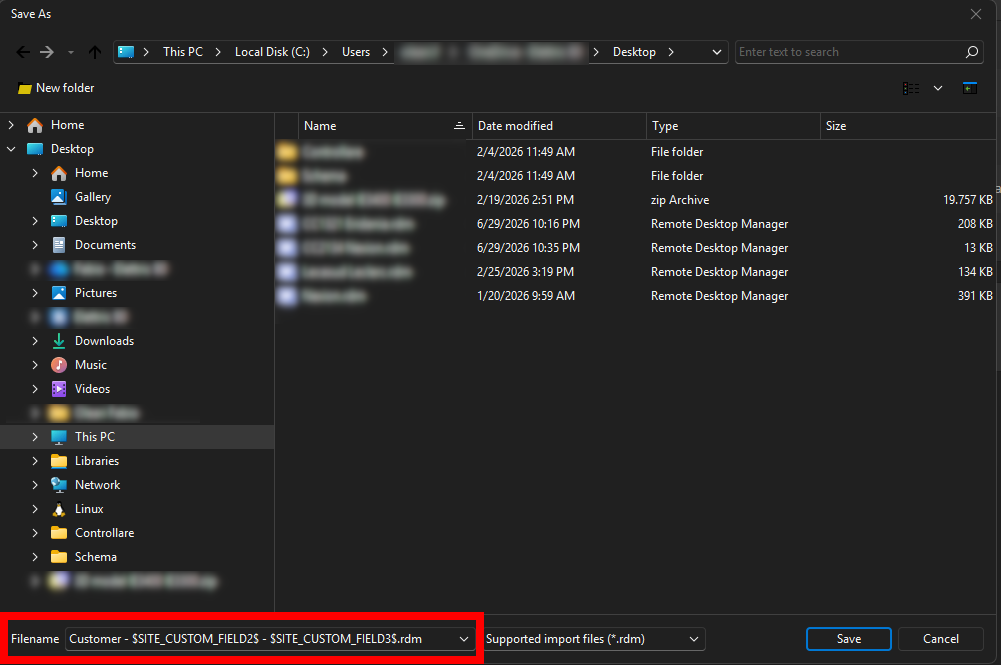
Please double check this name resolution of folder/sites because the same issue may apply to different contexts like scripts.
1e72c204-fd15-4bf8-bcad-245d3d696a07.png
All Comments (4)
Hello,
Thank you for contacting us on that matter,
To help us investigate further, could you confirm a few details:
- Which version of RDM are you currently running?
- Since when have you noticed this issue (does it happen on every export, or did it start after a specific update)?
- Could you walk me through the exact steps you take to export the folder (e.g., right-click menu used, any specific export options selected)? I'd like to try reproducing the same behavior on my end.
Once we have that, we'll be able to move forward with the investigation.
Thanks,
Tommy Sanders
Hi, here are my answers:
- RDM version: 2026.2.13.0, 64-bit (JIT)
- This is the first time I have tried exporting a folder with a variable in its name. However, I am certain that I have encountered similar behavior in the past involving variables not being resolved correctly, although I cannot recall the exact scenario. I will perform some additional tests over the next few weeks and let you know if I find anything relevant.
- To reproduce the issue:
- Create a folder entry with a variable in its name.
- Set the variable to CUSTOM_FIELD1 for the same entry.
- In the RDM tree, the folder name is displayed correctly.
- Right-click the folder and select Export > Selection > Current Folder (.rdm), using the standard options.
- The variable is not resolved in the exported file name.
Hello,
Thank you for your response,
I've been able to reproduce your issue and I have reported it to the developers, I will keep you updated when I get a feedback from them.
Best regards,
Tommy Sanders
Hello,
Thank you for being so patient!
I'm pleased to inform you that a new version of RDM (2026.2.18.0) has been released, featuring the fix for your issue.
Latest Version: Download RDM
Please let us know if this works or if you encounter any issues.
Best regards,
Maxim Robert