Mac users get black screen when trying to launch RDP connection to the CyberArk Privilege Cloud since this past Monday
Mac users get black screen when trying to launch RDP connection to the CyberArk Privilege Cloud since this past Monday

No changes have been made to the RDM configuration or the CyberArk Privilege Cloud. The Windows version, of RDM, works without issues.
All Comments (13)
Hi,
A few questions to help narrow this down:
Which version of Remote Desktop Manager Mac are you using?
Which version of macOS are the affected users running?
Does the black screen appear immediately after connecting, or does the session authenticate successfully first?
Best regards,
Jesse Galarneau
Jesse,
The RDM version is 2026.2.2.1 and the macOS version is 26.5.1 (Tahoe). When the user clicks "Open Session" they immediately get the black screen. Prior to Monday they would get prompted with a QR code and URL to authenticate to the CyberArk Privilege Cloud.
Thanks,
Hugo
I am also suffering from the same issue, have altered the rendering engine in settings and codec in the RDP session. This has not resolved the issue.
RDM Version : 2026.2.2.1
MacOS : 26.5.1 (25F80)
I believe it may be after the MacOS update I recently executed.
Is there any update on this or is there anything needed to help find the solution to this issue?
@hgarcia I resolved this on my side, by reducing the display properties to 15bit.
No other properties worked for me.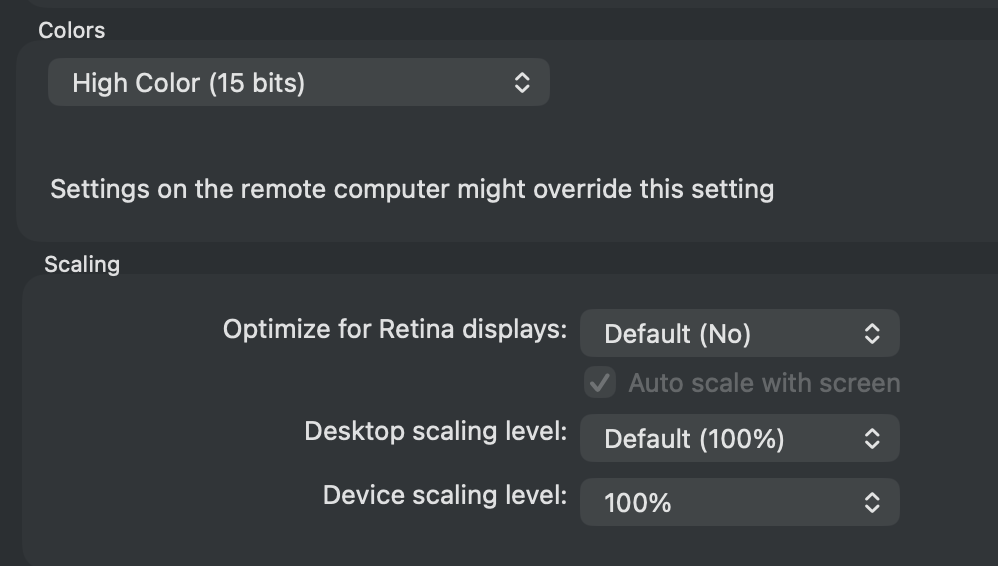
476455ad-387c-4d66-ad62-a357ff5223ca.png
Thank you @rahelahmed. We will try that.
@rahelahmed That did not work for us. @Jesse Galarneau Can we open a case for this to troubleshoot and see what we can do to work towards a resolution?
@Jesse Galarneau Can we please open a case for this? If possible we can jump on a call to troubleshoot the issue. Please advise. Thanks.
Hello hgarcia,
We have opened a ticket for this issue. We were able to reproduce it. However, it seems like it may be a change on Cyberark's side that caused it rather than RDM, so it might be more difficult to find a fix or a workaround. We will let you know when we have updates.
Until then, on my side, I get a black screen while the session is connecting and once it is ready, it works. Do you have the same behavior ? If it works after waiting a bit, it would at least allow you to work like before.
Best regards,
Maxim Buisson
@Maxim Buisson Thank you for the update. We checked with several of our users and they do not experience what you are seeing. Their black screen persists until they close it. Just to make sure were you able to reproduce the issue connecting to the CyberArk Privilege Cloud?
After further review and talking with our CyberArk expert, it seems like the issue we reproduced is not exactly the same. They are looking into it to try to reproduce your issue.
Best regards,
Maxim Buisson
@Maxim Buisson Thank you for the response. For some reason the users we have checked with, this morning, are no longer experiencing the issue. We will continue to monitor.
I also don't seem to get the temporary black screen issue I had before. Maybe CyberArk fixed something on their end. Please let us know your results.
Best regards,
Maxim Buisson