User specific settings - embedded password gone switching from 2025 version to 2026.2.8
User specific settings - embedded password gone switching from 2025 version to 2026.2.8

Hello Devolutions Support,
I recently upgraded Remote Desktop Manager from version 2025.1.33 to 2026.2.8.0 and encountered two issues:
First, after starting the new version, my user-specific settings for credential inheritance were reset.
In our setup, we use a top-level folder called “Server” where our admin account is stored via Pleasant Password Server. This is normally used for credential inheritance.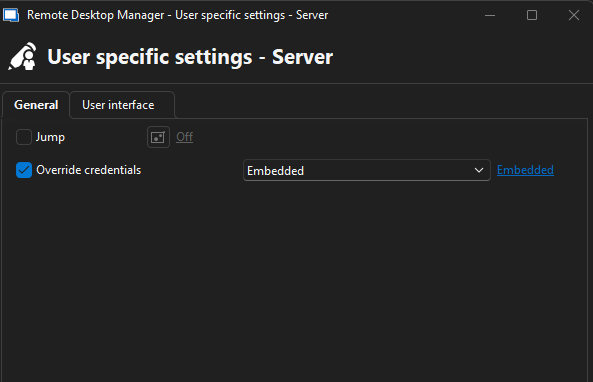
After the update, this configuration was empty and I had to reconfigure it manually. Can you explain why these settings were removed or overwritten during the upgrade?
Second, with version 2026.2.8.0 I can no longer connect to our switches. I now receive a popup asking for interactive authentication, which was not the case before.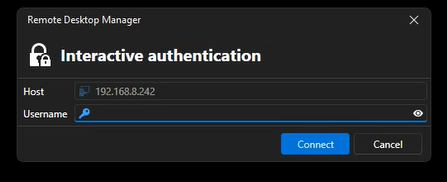
With version 2025.1.33 everything works as expected using the stored credentials. Because of these issues, I have rolled back to version 2025.1.33 for now.
Could you please help identify the cause and provide a solution?
Thank you in advance.
Best regards,
Dennis Grimmen
eef1545c-fc30-4ebf-b869-ae402bc6d3af.png
2ca00120-158c-41cd-aa8f-37285c7deec8.png
All Comments (15)
Hello,
Thank you for contacting us on that matter.
The Embedded credential option has been deprecated for more than 5 years and was removed in 2026.2.5, as mentioned in the Release notes. You will have to extract all embedded credential entries, save them in your user vault as Credential entries and refer to them using the User Specific Settings with the Linked (user vault) option.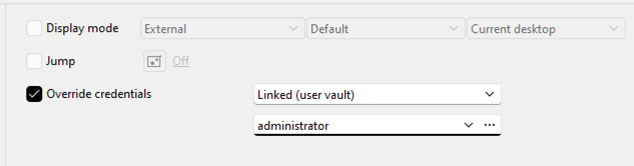
Are your switches configured with the Embedded credential option too? If so, extract the credentials and create entries in shared vaults or user vaults to bind them to the switch entries.
After completing that operation, upgrading to 2026.2 won't cause any problems.
Let us know if that helps.
Best regards,
Érica Poirier
7c1e4898-54b3-4803-8635-eea46f1589f0.png
Hello dgrimmen,
User specific settings (important information please read)
To add to what Erica has said we have made it so existing Embedded entries will continue to work even in 2026.2. Currently the only thing that was removed is the possibility to configure new entries with the embedded credential mode.
However, we missed the user specific settings causing a UI bug that showed your user specific settings as being empty even though they are not. The setting is still saved in your user specific settings just not displayed.
Version 2026.2.10.0 should restore the Embedded option in your user specific settings for existing entries that already have them configured (newly created ones wont have the option). You can convert your entries slowly from the 2026.2.10.0 version as one day the embedded credential mode will most likely be taken out completely as the support for it is over.
What you need to do
We intend to release version 2026.2.10.0 later this week and I would highly recommend upgrading back to it once it is released. The reason I say so is because the 2026.2 version also included a breaking change where we changed the way user specific settings are saved which means a migration occured. This migration is automatic and only occurs once on your user to avoid performance issues of repeated useless migrations.
This means that because you already went through 1 migration the first time you used RDM 2026.2, any new user specific settings you add in your 2025.1.33 version wont be subject to a new migration once you use 2026.2 the second time and will be lost.
If you edited some entry's user specific settings in the last few days on the old version you may have to redo those entries by hand in the 2026.2 due to the lacking 2nd migration I just spoke of.
Please do let us know if you encounter any issues after upgrading to the upcoming 2026.2.10.0.
Interactive authentication
Since the embedded credentials not being there was only a display issue it shouldn't have any impact on you connecting to your entries. After upgrading back to 2026.2.10.0 and confirming the state of your user specific settings please try to connect again. I believe this might be another issue entirely and is unrelated to the embedded credential mode. If that turns out to be the case we can investigate this problem with you further after knowing more.
Best Regards,
Michaël Beaudin
Hello dgrimmen,
The version 2026.2.11.0 of RDM has been released with the fix. Please read my previous post carefully as it contains very important information for your case and let us know if any issues still occur after updating.
Best Regards,
Michaël Beaudin
Hello dgrimmen,
The version 2026.2.11.0 of RDM has been released with the fix. Please read my previous post carefully as it contains very important information for your case and let us know if any issues still occur after updating.
Best Regards,
@Michael Beaudin
Good morning,
Unfortunately I still get the interactive authentication screen when trying to connect to switches.
The password of the switch is still embedded on a parent folder like this: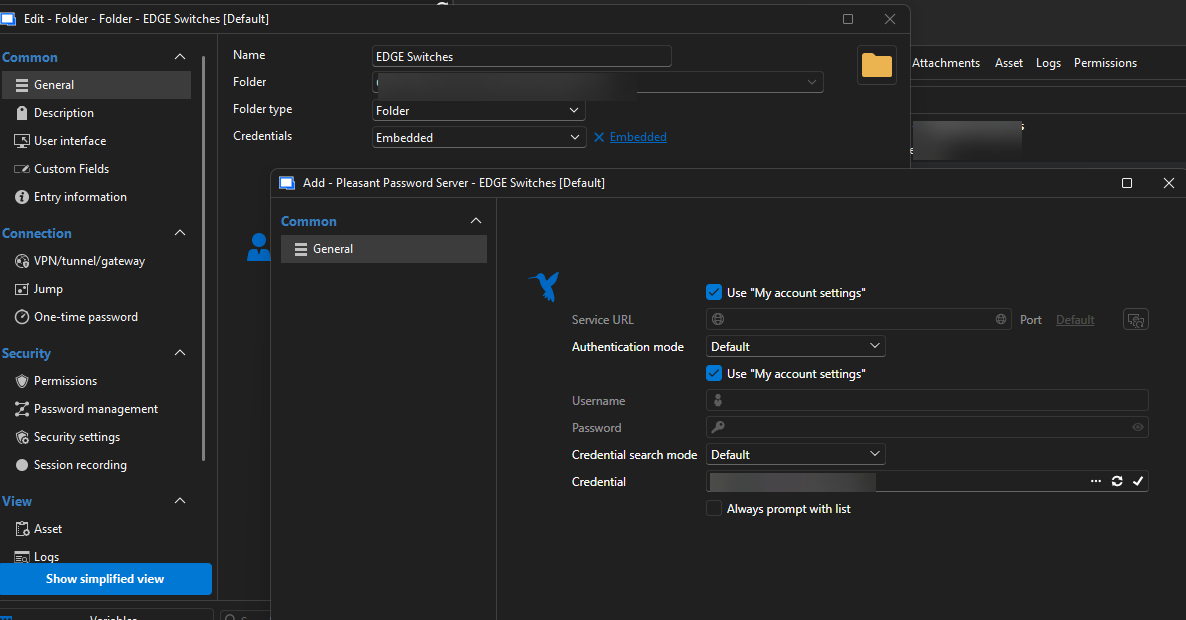
The issue with the user specific settings has been fixed. Only the issue with the interactive authentication remains.
Best regards
Dennis
43cada91-a963-4a0d-ae61-d912e6297b5a.png
Hello,
Thanks for keeping us up to date. For the interactive authentication, we would need to know more to start investigating.
- Is this interactive authentication prompt related to your pleasant password credential or to a specific session type entry you are trying to feed this credential to?
- If it's a specific entry type, what is that entry type?
- If it's a specific entry type, are there any specific settings you changed from the default on that entry?
A good way to know if it's related to your entry or your credential would be to create a duplicate entry of the session you are opening to get this error but change the password mode and set the credentials directly in the entry instead of using Pleasant Password. If you still get the interactive authentication it would be linked to the entry and if not it would be linked to Pleasant Password
Basically, we are hoping to know more about the reproduction steps.
Best Regards,
Michaël Beaudin
Hello,
Thanks for keeping us up to date. For the interactive authentication, we would need to know more to start investigating.
- Is this interactive authentication prompt related to your pleasant password credential or to a specific session type entry you are trying to feed this credential to?
- If it's a specific entry type, what is that entry type?
- If it's a specific entry type, are there any specific settings you changed from the default on that entry?
A good way to know if it's related to your entry or your credential would be to create a duplicate entry of the session you are opening to get this error but change the password mode and set the credentials directly in the entry instead of using Pleasant Password. If you still get the interactive authentication it would be linked to the entry and if not it would be linked to Pleasant Password
Basically, we are hoping to know more about the reproduction steps.
Best Regards,
@Michael Beaudin
Hi Michael,
it is related to my pleasant password credential. If I create a duplicate and enter the username and password within the object itself, it is working fine.
Best regards
Dennis
Additionally, what is the best way to use a password from our password manager in the future for everyone within the IT team?
We have passwords in our password manager and I would like to link them to certain entries within RDM. Everyone in our IT team should automatically have them in their RDM as well. We were using the "Embedded" option before. How to do this now?
Hello,
We have created a ticket for the Pleasant Password entry's bug and will contact you for more information if we cannot reproduce it on our end. We will keep you updated on the progress.
The best way to use credentials depends on your use case.
If everyone using the entry will login using the same credential
then you can create your Pleasant Password entry in the vault, select a credential in your Pleasant Password entry properties (or always prompt with list) and then link your session to that credential through the credential mode Linked (vault) or Linked (external vault)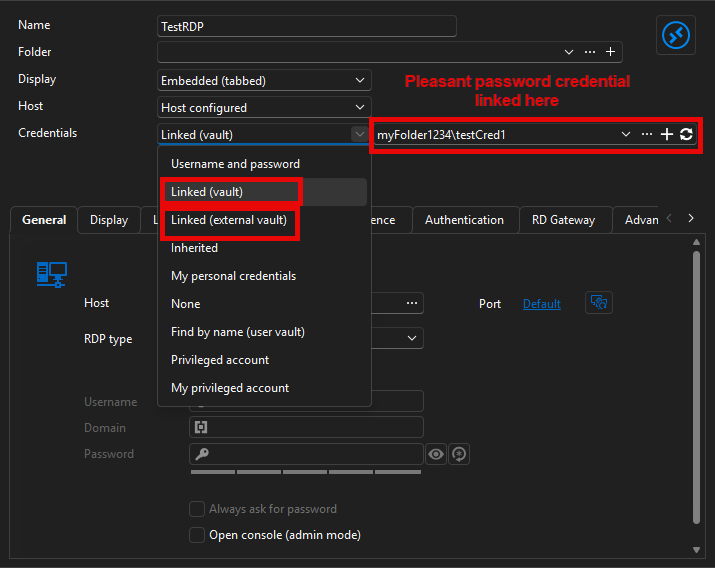
The difference with Linked (external vault) is that you can save your credential entry in another vault and still go fetch it from your current vault while linked (vault) is only the current vault.
If everyone using the entry will login using different credentials
First way - Find by name (user vault)
You can then use the "Find by name (user vault)" mode. In this way, you tell everyone in your company "create a pleasant password entry with name X in your user vault and when you open your server, it will fetch the credential from there". The reason the name needs to be the same for everyone is that the config is the same for the RDP I am using in the following screenshot. This means that the Pleasant Password entry in the user vault can only be found by name because the ID will be different for each users. 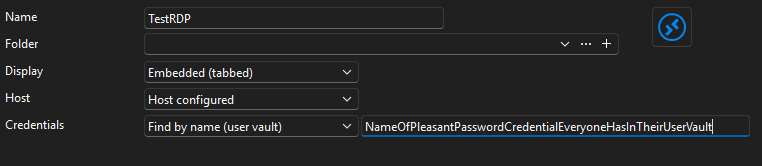
Second way - User specific settings -> Linked (user vault)
In this case, you can leave the credentials of the RDP session empty and in the same logic as the first one, users create a pleasant password entry in their user vault but here the name doesn't matter. The reason for that is that each user has their own user specific setting so they can link with the entry's ID directly in their user vault.
Option 1 is advantageous in the sense that you only need to create an entry with the proper name and it will work for everyone without the need to configure and extra user specific setting.
Option 2 is fine as well. It is an extra configuration step for the user but does not require a specific name and you can leave the credentials of the RDP entry empty.
Please do let me know if anything is unclear or if I didn't cover your exact case.
Best Regards,
Michaël Beaudin
3aa871bc-40bc-42f6-ac2f-a84e08ddea78.png
b631c1fa-95d1-46bc-883e-fe81fb7addbd.png
6f8a6dcf-303a-4701-9571-fa707b52c6fe.png
Hello,
We have created a ticket for the Pleasant Password entry's bug and will contact you for more information if we cannot reproduce it on our end. We will keep you updated on the progress.
The best way to use credentials depends on your use case.
If everyone using the entry will login using the same credential
then you can create your Pleasant Password entry in the vault, select a credential in your Pleasant Password entry properties (or always prompt with list) and then link your session to that credential through the credential mode Linked (vault) or Linked (external vault)
The difference with Linked (external vault) is that you can save your credential entry in another vault and still go fetch it from your current vault while linked (vault) is only the current vault.
If everyone using the entry will login using different credentials
First way - Find by name (user vault)
You can then use the "Find by name (user vault)" mode. In this way, you tell everyone in your company "create a pleasant password entry with name X in your user vault and when you open your server, it will fetch the credential from there". The reason the name needs to be the same for everyone is that the config is the same for the RDP I am using in the following screenshot. This means that the Pleasant Password entry in the user vault can only be found by name because the ID will be different for each users.
Second way - User specific settings -> Linked (user vault)
In this case, you can leave the credentials of the RDP session empty and in the same logic as the first one, users create a pleasant password entry in their user vault but here the name doesn't matter. The reason for that is that each user has their own user specific setting so they can link with the entry's ID directly in their user vault.
Option 1 is advantageous in the sense that you only need to create an entry with the proper name and it will work for everyone without the need to configure and extra user specific setting.
Option 2 is fine as well. It is an extra configuration step for the user but does not require a specific name and you can leave the credentials of the RDP entry empty.
Please do let me know if anything is unclear or if I didn't cover your exact case.
Best Regards,
@Michael Beaudin
Thanks a lot. That explains it very well. As you have mentioned before, the "embedded option" will be removed in the future. Then I suggest that we already move over to use "Linked (vault)".
Regards
Dennis
Hi, just wanted to follow up on the issue with embedded credentials. This is currently preventing us from upgrading to a newer version.
Best regards
Hello,
From my understanding of our previous conversation, the embedded credentials were fixed and the only issue left was with credential integration giving you the "interactive authentication" prompt?
From our previous conversation where you seemed to confirm embedded credentials were working again I created a separate ticket to investigate the credential itself.
Side note, I really want you to be careful of everything I mentioned in this message as if you already went back and forth between versions and tried to change stuff in your old RDM afterwards its normal that you lose your more newly setuped user specific settings even if they work in older versions. Only whatever was migrated to the newer model when you installed 2026.2 the first time will be available in 2026.2
https://forum.devolutions.net/topics/55276/user-specific-settings--embedded-password-gone-switching-from-2025-ver?message=237354#237354
Other than that, if you think the embedded credentials are still the issue, maybe you could do 1 more test for us to make sure it is really the problem:
Configure a new RDP (or whatever session type you use) entry in 2026.2.12.0 and do not add any user specific settings. Set the credential mode to "Linked (vault)" and link it to your pleasant password credential. Open your entry and see if the interactive prompt still happens. If it does then the issue has no relation to the embedded credentials.
PS. We currently have a ticket opened for the interactive authentication issue but it is created under the assumption that the credential has an issue and not the user specific settings embedded credentials.
Best Regards,
Michaël Beaudin
Hi Dennis,
I'm the developer investigating this one. I believe I've found a fix, but before I add it I'd like to validate a couple of things about your setup to make sure it covers your exact case.
We've reproduced an issue where a legacy Embedded credential resolved through inheritance comes back empty when opening a session, which matches the interactive‑authentication prompt you're seeing on your switches. Could you confirm two things on a switch entry that shows the prompt?
- Its Credentials mode is Inherited (inheriting from the parent folder), rather than a credential set directly on the switch.
- The credential it inherits is configured as Embedded, either on the parent folder or through User Specific Settings. Could you let us know which of the two you use?
Once you confirm, we'll include the fix in an upcoming minor release. Thanks again for your help pinning this down!
Best regards,
Léon Le Brun
Hi Dennis,
I'm the developer investigating this one. I believe I've found a fix, but before I add it I'd like to validate a couple of things about your setup to make sure it covers your exact case.
We've reproduced an issue where a legacy Embedded credential resolved through inheritance comes back empty when opening a session, which matches the interactive‑authentication prompt you're seeing on your switches. Could you confirm two things on a switch entry that shows the prompt?
- Its Credentials mode is Inherited (inheriting from the parent folder), rather than a credential set directly on the switch.
- The credential it inherits is configured as Embedded, either on the parent folder or through User Specific Settings. Could you let us know which of the two you use?
Once you confirm, we'll include the fix in an upcoming minor release. Thanks again for your help pinning this down!
Best regards,
Léon Le Brun
@Léon Le Brun
Hi Léon, sorry I was on vacation.
We are using the second option.
In one case, we are using the "embedded" as "User specific settings" and in another case we are using the "embedded" from a parent folder.
Regards
Dennis
Hi Dennis,
Thank you for your reply and for your patience.
The issue should be fixed in our next minor version, 2026.2.17.0. Your credentials will then resolve properly, without requiring you to enter them in an interactive authentication prompt.
Best regards,
Léon Le Brun
Hello,
Thank you for being so patient!
I'm pleased to inform you that a new version of RDM (2026.2.17.0) has been released, featuring the fix for your issue.
Latest Version: Download RDM
Please let us know if this works or if you encounter any issues.
Best regards,
Maxim Robert