Master password is being mangled on save

[update: if I save, and then exit RDM and restart it, the password is now the expected one.]
I use inherited credentials for the RDP sessions under a master folder.
For years I've updated the password when it expires without problem.
Today, for some reason, the password is getting mangled after I save it.
Halp!
(these passwords are no longer valid, of course)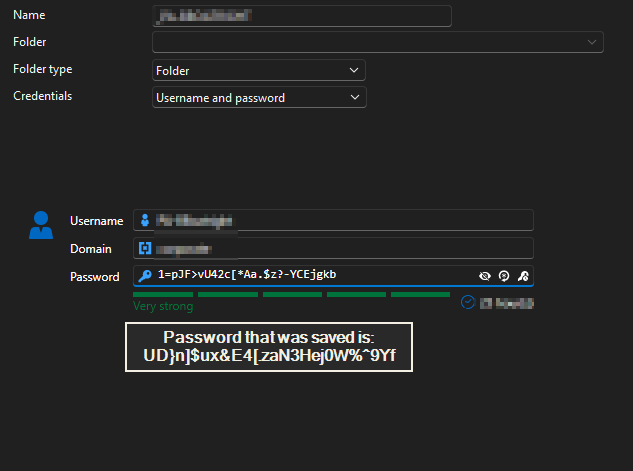
e4f33de9-d326-4dd4-ab37-f7d117143b2d.png
All Comments (22)
Hi bboatright,
Thanks for the clear report and the screenshot, and especially for the note that the correct password comes back after you restart Remote Desktop Manager. That detail is the key one: it tells us the password is being saved correctly to your data source. What you see right after saving looks like the entry editor showing a stale value on screen, not the stored password actually changing. So your credentials should be safe.
To understand the behavior better and, if needed, report it accurately to our development team, could you help with three quick things?
- Right after you save (before restarting RDM), please launch one of the RDP sessions that inherits this credential. Does it connect normally with the correct password? This tells us for certain whether the issue is only the on-screen display or something more.
- Your exact RDM Windows version (Help > About).
- The data source this folder lives in: Devolutions Server (DVLS), SQL Server, or Devolutions Hub / Cloud.
With those answers we'll have a much better understanding of what's happening here.
Best regards,
Eduard Sepulveda Lopez
To understand the behavior better and, if needed, report it accurately to our development team, could you help with three quick things?
******Right after you save (before restarting RDM), please launch one of the RDP sessions that inherits this credential. Does it connect normally with the correct password? This tells us for certain whether the issue is only the on-screen display or something more.
No, the RDP session fails with an 'incorrect credentials' type of message
*******Your exact RDM Windows version (Help > About).
2026.2.7.0 64-bit (JIT)
********The data source this folder lives in: Devolutions Server (DVLS), SQL Server, or Devolutions Hub / Cloud.
SQLite, local data source
My workstation is Win11 25H2.
Also notable, I can no longer run sessions configured to run ISE, CMD, etc. with the inherited credentials. This is after I've performed the workaround (enter new password, save, exit RDM, restart RDM) and also after RDP sessions successfully connect.
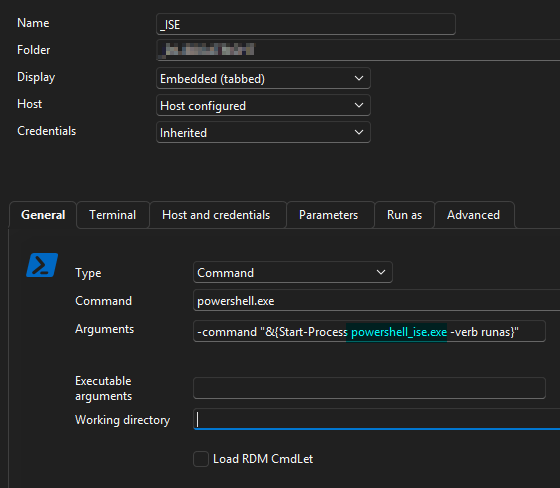
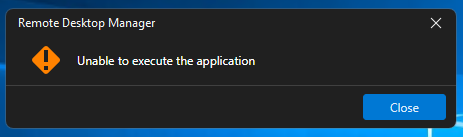
4f5cc2d3-f2d9-467c-a291-bc365d22656f.png
92fcdd13-2016-4473-b00b-b195d0a867b6.png
Hi bboatright,
Thanks for testing this and for the details. Since the RDP session actually fails to connect, this is a real issue with this version of RDM, not just something on screen.
Could you try this?
- Back up your data first. Since it's a local file, just make a copy of it (or use File > Backup in RDM).
- Update RDM to 2026.2.8.
- Open the affected credential, re-enter the password if it looks wrong or empty, and save.
- Test an RDP session and one of your ISE/CMD sessions, and let us know if they work.
If the issue is still there after updating, just let us know and we'll open a ticket for our development team to investigate further.
One last thing for context: did this start right after you updated to 2026.2.7.0, and do you remember which version you had before?
Best regards,
Eduard Sepulveda Lopez
I've updated to 2026.2.8 and I noticed my favorites sorting is back to my preference.
The password-mangling is still happening. Workaround of saving password, exiting/restarting app still works.
Still getting "unable to execute application" message when attempting to run my ISE/CMD sessions.
Hi bboatright,
Thanks for testing and confirming. Since 2026.2.8 didn't resolve it, we're going to open a ticket for our development team to investigate further, and we'll keep you posted on their findings.
To help them, one quick question: do you recall which RDM version you were on before this started, and whether it began right after an update? If you remember, great; if not, no problem.
Thanks for your patience.
Best regards,
Eduard Sepulveda Lopez
I'm not sure what the last working version number was, but I use PatchMyPC so I stay updated daily.
I updated to 2026.2.11.0 64-bit (JIT) and I've discovered it's not just the password not saving unless I promptly exit RDM and restart: I'm getting new, more-informative errors: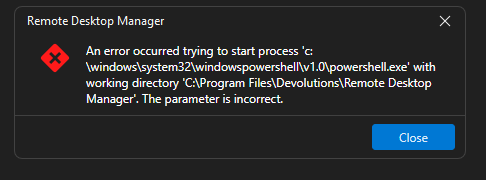
I don't believe I ever needed to fill out the working directory in the CMS and ISE sessions previously. But, just for the grins, I used the working directory (after a save-and-restart) to the 64-bit powershell.exe: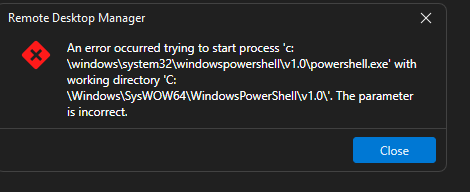
ef9cbf1b-a725-4284-87d7-8357c55d60af.png
d364e5c4-92ea-4839-852f-7e6fb3511c70.png
Hi bboatright,
Thanks for digging into this and grabbing that error message. That extra detail actually helps a lot. It indicates the problem occurs when RDM tries to launch your command sessions using the inherited credentials, and it aligns with a change we've seen in the 2026.2 releases that affects exactly that part. So this isn't something you're doing wrong on your end.
And your instinct was right, you shouldn't have to fill in a working directory for those sessions, so go ahead and clear that field again.
I'm passing this along to our team to dig into it properly, and I'll keep you in the loop as I hear back. Thanks for bearing with me through all the testing, it's been genuinely useful.
Best regards,
Eduard Sepulveda Lopez
@Eduard Sepúlveda López When I update the password every day, I am still having to exit RDM and restart for the password to be usable. If I don't the new password is not successfully inherited by the sessions under the folder. My version of RDM is 2026.2.16.0
Do you know if anything is being done to fix this problem?
Hi bboatright,
Thanks for the update, and for staying on top of this. Good to know you're now on 2026.2.16.0.
To answer your question: yes, our team is actively investigating this. To help us move as quickly as possible and make sure we're testing against a setup that matches yours exactly, could you fill in a few details for me?
- Where does your RDM database file live, on a local drive, or on a network share or synced folder like OneDrive or Dropbox?
- If you edit something harmless on the credential, like the description, and save without touching the password, does the same thing happen?
- Does it occur when you create a brand-new credential from scratch, or only when editing an existing one?
- And do you happen to recall the last RDM version where everything was working as expected?
These will help us zero in on the cause and get this sorted for you. Thanks again for your patience and for all the detail you've shared, it's been a big help.
Best regards,
Eduard Sepulveda Lopez
@Eduard Sepúlveda López
Where does your RDM database file live, on a local drive, or on a network share or synced folder like OneDrive or Dropbox?
%LOCALAPPDATA%\Devolutions\RemoteDesktopManagerFree\Connections.db
If you edit something harmless on the credential, like the description, and save without touching the password, does the same thing happen?
If I type some text in the description field, save and re-open, the text has disappeared.
Does it occur when you create a brand-new credential from scratch, or only when editing an existing one?
I've only been updating the password in the folder below which all RDP sessions inherit the credential.
And do you happen to recall the last RDM version where everything was working as expected?
I believe the last version was whatever was current in May, as I stay as current as possible.
Hi bboatright,
Good progress on this. It looks like the issue is tied to how RDM caches your data, and there's a quick way to confirm that and get you working normally in the meantime.
Could you try this?
- Open your SQLite data source settings and go to the Advanced tab.
- Tick Disable caching, click Save, then fully close and reopen RDM.
- Re-test as usual: update the inherited password, then launch an RDP session and a PowerShell/CMD session.
Let me know how it goes. If that clears it up, it pins down the cause and should spare you the daily close-and-reopen routine.
Thanks again for your patience, this is a real step forward.
Best regards,
Eduard Sepulveda Lopez
I disabled caching, exited and restarted RDM, but changing any text field (e.g. Description) doesn't save without exiting and restarting.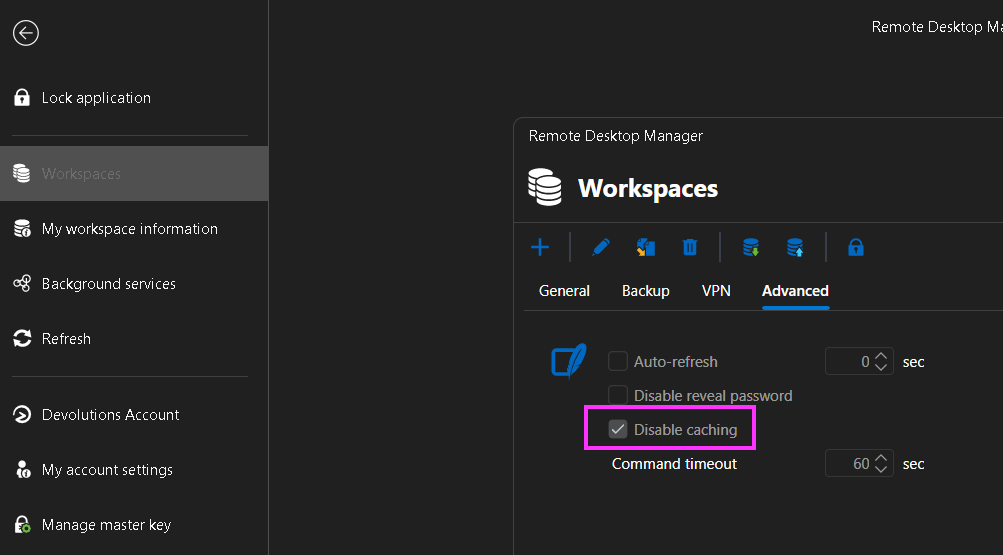
e8519763-ae33-4bfc-8f23-c51d4515b533.png
Hi bboatright,
Thanks, and good to know the caching change is in place. Could you finish one more part of the test with caching still disabled? It'll tell us whether it made any difference for the actual sessions:
- Update the inherited credential's password and save.
- Launch one of the RDP sessions.
- Launch one of the PowerShell/CMD sessions.
Just let me know how each of the three behaves. That's the piece our team is waiting on.
Best regards,
Eduard Sepulveda Lopez
Hi Eduard - the disabling the caching seems to have no effect.
This is what I get if I update the inherited credentials and attempt to launch a RDP session: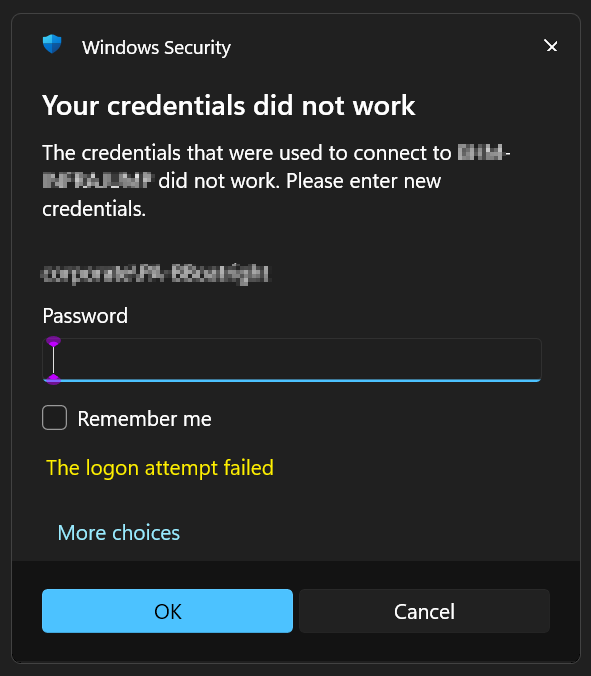
And this is what I get if I attempt to launch a PowerShell ISE session: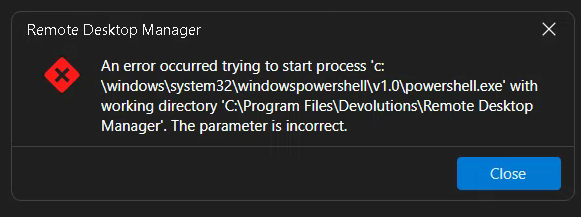
This is how I have that ISE session configured. I've changed nothing in the CMD, ISE configs. They just stopped working one day.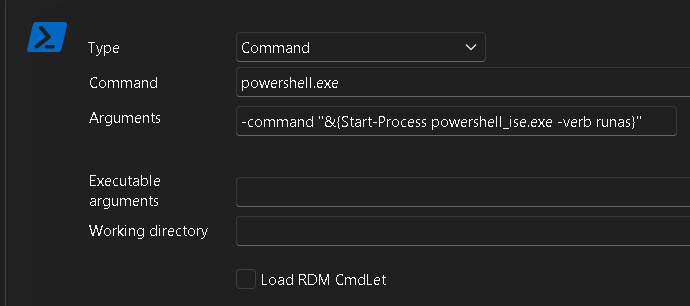
ad413b59-1bc7-4270-88bf-0969b7942a1b.png
e5f6ec48-f6f1-4137-b378-12d34a0b8e7e.png
4325e358-16ea-48e7-b49a-0a23fbfe7b20.png
Hi @Eduard Sepúlveda López -
I updated RDM to ver. 2026.2.18.0 this morning and the new password successfully stay configured as expected.
Oddly, if I specify a working directory for one of my PowerShell 'run-as' sessions to start processes.exe (e.g. powershell_ise, chrome, CMD) I'm still getting the Working Directory error. If I configure a working directory, the change does not save to the session.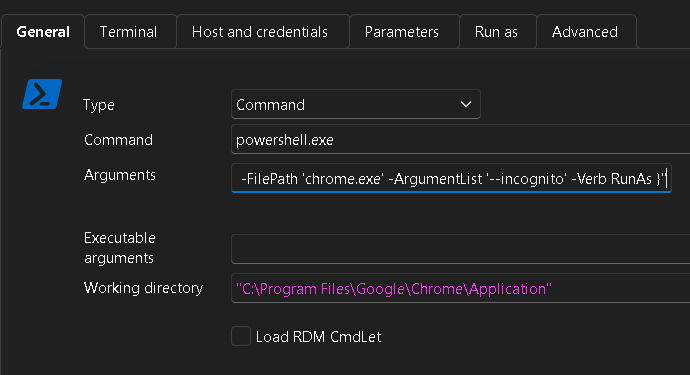
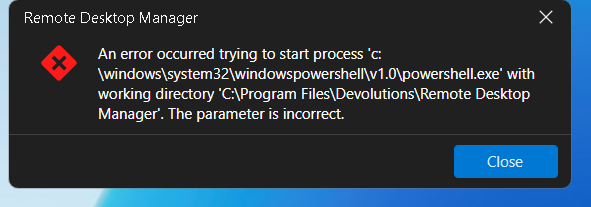
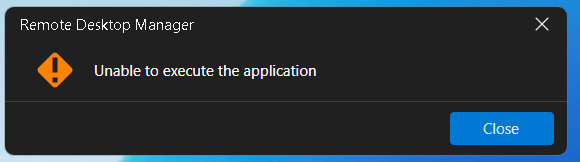
504ff9de-b010-4358-8c6b-d5ad84b138b3.png
11cbcf88-6bb3-4a54-aa0b-d9cf4851e2dc.png
715edbc5-7328-4946-9c34-ce4310757ee4.png
Hi bboatright,
That's great news on the password, thanks for confirming it holds after the 2026.2.18.0 update.
For the "run-as" sessions still failing, and the Working directory not saving, I'm taking that back to our team as the remaining piece and will keep you posted. Appreciate your patience through all of this.
Best regards,
Eduard Sepulveda Lopez
@Eduard Sepúlveda López - I spoke too soon. This morning the saved password still reverted back to yesterday's when I attempted to run a RDP session without first exiting-restarting RDM. 🤔
Hi bboatright,
I'll make sure the team has this. We`re keeping both pieces open with them: the password not sticking without a restart, and the "run-as" sessions failing with the working directory error. We'll be in touch as soon as we have something for you.
Thanks again for your patience and for working through all of this with us.
Best regards,
Eduard Sepulveda Lopez
@Eduard Sepúlveda López - if I should reinstall, I don't mind. I would just want the instructions on how to export my configured sessions (with passwords) and then import them in the new install.
Hello,
Thanks for your patience while we dug into this.
Our Developer team believes this issue points to a known bug where renaming a folder through Edit > Rename Folder can leave behind a duplicate "ghost" folder entry in the data source. When that happens, RDM can start behaving inconsistently such as credentials not sticking after a save, Run As sessions failing to launch with the "parameter is incorrect" error, working directories not saving because two folder entries with different IDs end up conflicting with each other.
Would you be able to try the following to help us confirm this is the case?
1. Confirming the diagnosis (optional)
If you'd like to verify before making changes, you can open your Connections.db file (located in %LOCALAPPDATA%) in Notepad and search for the name of the folder that holds the inherited credential. If that folder name shows up more than once with different IDs, that confirms the ghost-folder scenario.
2. Recommended workaround — rebuild the data source
Whether or not you inspect the .db file, the fix is the same, and you can go straight to this step if you prefer:
- In RDM, select all entries in your current SQLite data source, right-click, and choose Clipboard - Copy entries — make sure to include credentials and everything.
- Create a new SQLite data source.
- Paste the entries into the new data source.
This clears out any ghost folders and gives you a clean structure, which should resolve both the password-revert-on-save behavior and the PowerShell ISE / CMD / Chrome Run As launch failures.
Before you start, I'd recommend making a backup copy of your existing Connections.db file, just so you have a safe rollback point.
Please let us know how you get on. Thank you in advance!
Best regards,
Hello,
Thanks for your patience while we dug into this.
Our Developer team believes this issue points to a known bug where renaming a folder through Edit > Rename Folder can leave behind a duplicate "ghost" folder entry in the data source. When that happens, RDM can start behaving inconsistently such as credentials not sticking after a save, Run As sessions failing to launch with the "parameter is incorrect" error, working directories not saving because two folder entries with different IDs end up conflicting with each other.
Would you be able to try the following to help us confirm this is the case?
1. Confirming the diagnosis (optional)
If you'd like to verify before making changes, you can open your Connections.db file (located in %LOCALAPPDATA%) in Notepad and search for the name of the folder that holds the inherited credential. If that folder name shows up more than once with different IDs, that confirms the ghost-folder scenario.
2. Recommended workaround — rebuild the data source
Whether or not you inspect the .db file, the fix is the same, and you can go straight to this step if you prefer:
- In RDM, select all entries in your current SQLite data source, right-click, and choose Clipboard - Copy entries — make sure to include credentials and everything.
- Create a new SQLite data source.
- Paste the entries into the new data source.
This clears out any ghost folders and gives you a clean structure, which should resolve both the password-revert-on-save behavior and the PowerShell ISE / CMD / Chrome Run As launch failures.
Before you start, I'd recommend making a backup copy of your existing Connections.db file, just so you have a safe rollback point.
Please let us know how you get on. Thank you in advance!
Best regards,
@Sam Moynihan
I opened Connections.db in Notepad, but because of all special characters, I could not discern any duplicates.
Instead, I had ChatGPT inspect the db and it replied with:
I was able to open Connections.db and inspect the Remote Desktop Manager data.
I found 90 folder records, and there are 6 folder paths that exist twice—so 12 records are involved in exact duplicates:
The parent folder whose credentials I update every day was not one of the duplicates, but I let ChatGPT repair the db - I still have the original, just in case.
I updated to 2026.3.12.0 today, so I'll report back on how things are working.