After updating to 2026.1.22.0 64-bit (PreJIT) the RDM app is very slow to open
After updating to 2026.1.22.0 64-bit (PreJIT) the RDM app is very slow to open

Team,
After updating to 2026.1.22.0 64-bit (PreJIT), the RDM app is very slow to open, approximately 5-10 minutes and then the splash screen shows up.
The process is already up and running after clicking on the Remote Desktop Manager (RDM) application on the taskbar or desktop.
How can this be rectified, as it is slowing down productivity?
All Comments (6)
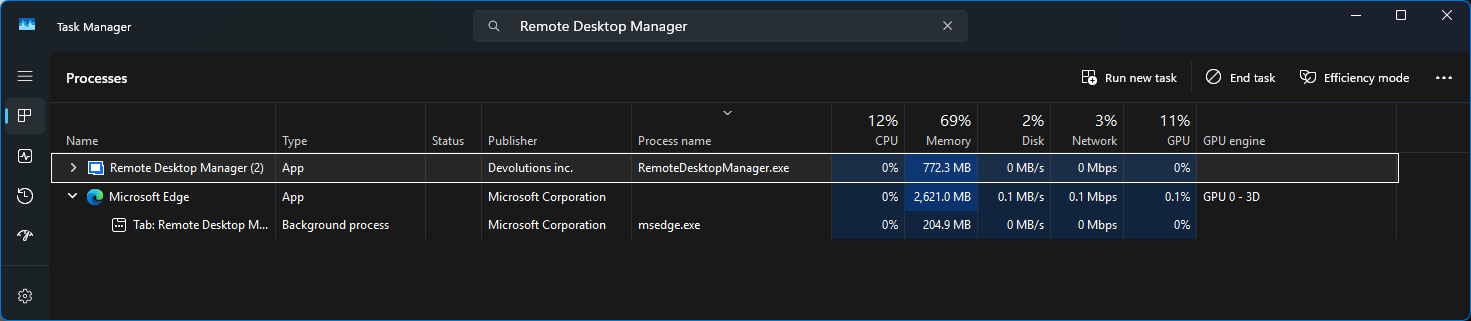
027dbc69-f75b-4732-876b-47e2f32f5065.png
PS C:\Windows\System32> dotnet --list-runtimes
Microsoft.NETCore.App 8.0.26 [C:\Program Files\dotnet\shared\Microsoft.NETCore.App]
Microsoft.NETCore.App 9.0.15 [C:\Program Files\dotnet\shared\Microsoft.NETCore.App]
Microsoft.NETCore.App 10.0.7 [C:\Program Files\dotnet\shared\Microsoft.NETCore.App]
Microsoft.WindowsDesktop.App 8.0.26 [C:\Program Files\dotnet\shared\Microsoft.WindowsDesktop.App]
Microsoft.WindowsDesktop.App 9.0.15 [C:\Program Files\dotnet\shared\Microsoft.WindowsDesktop.App]
Microsoft.WindowsDesktop.App 10.0.7 [C:\Program Files\dotnet\shared\Microsoft.WindowsDesktop.App]
Hello,
Thank you for the information.
Since the RDM process starts immediately but the splash screen only appears after several minutes, we would like to collect a bit more information to determine what is blocking the application during startup.
Could you please try the following?
- Temporarily disable any antivirus/security scanning for Remote Desktop Manager, or add an exclusion for the RDM installation folder, then test the startup again.
- Try launching RDM as administrator and confirm if the delay is the same.
- Rename the local configuration folder, https://docs.devolutions.net/rdm/kb/how-to-articles/reset-rdm-to-default-settings/
- This will allow RDM to start with a clean local profile. Your data source content will not be deleted, but local preferences/cache may be reset for the test.
- If the issue persists, please send us the RDM logs from:
- %LOCALAPPDATA%\Devolutions\RemoteDesktopManager\Logs
Also, could you confirm whether this happens only with the PreJIT installer, or if the standard 64-bit installer starts normally on the same machine?
Best regards,
Carl Marien
@Carl Marien,
The directory %LOCALAPPDATA%\Devolutions\RemoteDesktopManager\Logs cannot be found?
Where can I send the logs, or should we create the Support ticket for this one instead?
Not sure what the PreJIT installer is, this RDM is the only installation I have.
Running it as Administrator, I have the same symptoms with long delays in opening the Splash screen.
7386a448-bd50-431e-b829-9e07d03b158d.png
Hello,
Thank you for the update.
Since the issue still occurs when running RDM as an administrator, I would like to observe the behavior myself during a support session. This will allow me to see where the startup delay occurs and check the relevant local paths and settings directly.
I will create a case on my end and send you a link for the remote session.
Best regards,
Carl Marien