Export vault with OTP / Secrets included
2 votes

The ability to export complete vaults, including OTP secrets, would be extremely helpful. This feature is essential, especially when exporting customer vaults, for example, to hand them over to the customer.
The export itself doesn't necessarily have to be done via the RDM client; using PowerShell would suffice, in my opinion.
All Comments (15)
Hello,
Just to confirm with you, we currently have a way to export the entries stored within a vault through RDM. The ".rdm" file format contains the entirety of the information stored within the entry. There's also checkboxes to include the credentials, attachments, etc. One important point to this export is that the sensitive data like passwords will be encrypted, and not human-readable. So, depending on the need, that may not be what you need.
Is your goal here to have this same export but in cleartext so customers can read it? Is it for audit or backup purposes? I'd like to make sure I understand your use case before we think of a solution to solve this.
Regards,
Hubert Mireault
Hello,
Specifically, we have the following situation: we host our customers' passwords; we have one vault per customer.
If a customer requests an export of "their" passwords, or if, for example, the business relationship is terminated, the customer should receive their passwords. And for this to work, the OTP secret must be included.
Since (unfortunately) not every customer uses RDM, this needs to be done in a universal format (CSV, XML, etc.).
Regards
Thank you for the additional information. I understand the need here.
At the moment, I would recommend using the CSV export, which includes the cleartext data of the passwords. Here's an example of an export I did with a test entry in RDM.
If you right click your selection, you can choose to export in CSV. You can also export the entire vault this way if you need.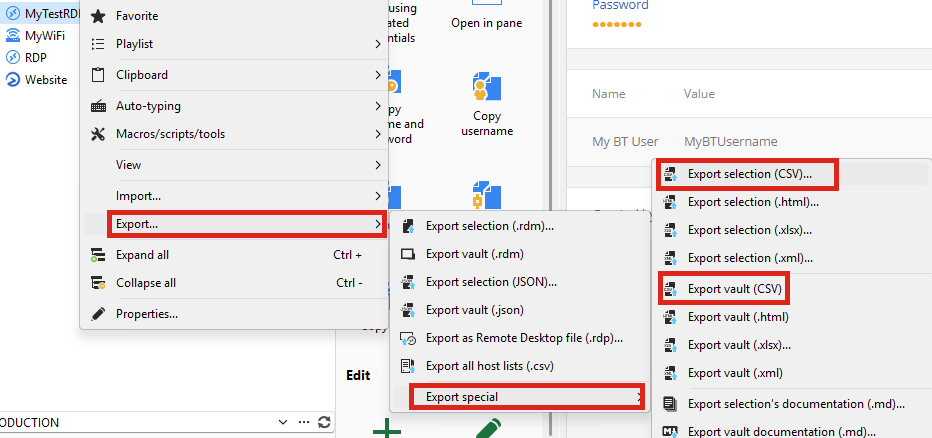
Once exported, the CSV file will contain the host and credentials of the selection:
The downside of this export type is that it does not include every possible field of the entry.
Do you think that, for now, this is still usable for what your clients might need?
To get every field, the RDM or JSON export types should be used, but the passwords are currently not human-readable when using those export types. We could see about allowing these export types to have cleartext passwords, but it would involve some work on our end as the export wasn't made to work this way.
Regards,
Hubert Mireault
e599bb2d-ca24-4908-8ea3-f3ef41176204.png
3a81ebfe-2afb-47e6-951d-a10f55b25c55.png
Also, I forgot to mention, but we could improve the CSV export to include the OTP secret as well if the entry is an OTP type. Adding one field like this should not be complicated, it's supporting the whole breadth of fields that's difficult with CSV.
Regards,
Hubert Mireault
Exporting the OTP secrets is the crucial point ;-) The CSV export itself works perfectly...
Perfect then, if the scope of the CSV export works well and you only need the OTP secret in addition to what's already offered, then it's much easier for us to add.
I will open a ticket for this.
Regards,
Hubert Mireault
Hi! I have an opinion if you don't mind 😅
The OTP secret should be write-only by design and not exportable. If a user (or even admin) can read the key, the OTP doesn't add any security, and worse, it adds a false sense of security.
So I would rather tell the customer to enroll their own OATH compatible authenticators and reset the keys, than provide them an existing key.
Best regards,
Daniel
Hello Daniel,
At the moment, the OTP secret is already visible by administrators (and only administrators). We didn't want to have this bound to the same permission check as the password (the view password permission), understandably, so we opted for only administrators (who have total control) to be able to view that secret. For this export, only an administrator would be able to export this information, we aren't allowing this for anyone with the right to export.
If you compare RDM to other applications that handle TOTPs like Google Authenticator or Microsoft Authenticator, they also allow you to export your OTP information, including the secret, so that it can be either reimported into the same application, or a different application. This is usually achieved through the otpauth URI format, either directly or through a QR code, which looks like this:
otpauth://totp/Issuer:AccountName?secret=BASE32SECRET&issuer=Issuer&algorithm=SHA1&digits=6&period=30
If an OTP should only be usable by a specific user and the secret not visible to others, they should not store it in a shared vault, and instead use the My Personal Credentials or their user vault, for example.
Let me know if this helps clarify our reasoning behind the way we handle OTP secrets.
Regards,
Hubert Mireault
Thank you! That makes sense. Arguably you shouldn't use TOTP for shared accounts anyway. Instead used named accounts and SSO if possible.
And maybe I exaggerated by saying it "doesn't add any security". It still prevents a leaked password from being used later. But if the user can read the key, you can't call it "multi-factor authentication" any more, because the key becomes something you know rather than something you have, reducing it to a single factor.
Hello everyone,
I completely agree with your point regarding security; OTP secrets are, in my view, particularly worthy of protection; therefore, it's perfectly acceptable that only an administrator should be able to view these values. However, as in our case, it's sometimes necessary to export these secrets in plain text.
I would greatly appreciate it if this feature request could be implemented soon ;-)
There's a balance we need to strike with putting up additional security measures for users and allowing them to use our products to fit their needs and workflows. I would say the way we handle the OTP secret is part of this balance, and we settled on only letting administrators view the secret once configured in an entry, for a lack of a specific permission.
For your information, we've also been working on reworking parts of our permission system since 2026.1, with the goal of adding a lot more granularity so there's less of a reason to use "administrator" accounts. You would instead configure the exact permissions you need a user to have. This work is still in progress but we've been laying some groundwork in 2026.1 and our current development versions of 2026.2, with no current user-facing impact. I'm mentioning this as well since this would hopefully reduce the amount of daily use of administrator accounts, which means a lower chance of such an account being compromised and viewing OTP secrets.
When it comes to adding this to the export, our ticket is opened and assigned to a developer. I can't give you an estimate on when it will become available, but it's definitely in our short-term plans.
Regards,
Hubert Mireault
Hello,
This will be available in the next major version, 2026.2. The CSV export will include an OTPSecret column containing the full OTP configuration (secret, algorithm, digits, period) in the standard otpauth:// format. Visibility of this column is restricted to administrators, in line with how credential passwords are handled. Re-importing the CSV will also automatically restore the OTP on the entry.
Best regards,
Léon Le Brun
Very cool—quite a few other companies could take a leaf out of your book when it comes to this kind of flexibility and customer service! ;-)
Of course, now I "have" to ask if there's an approximate release date for 2026.2 yet ;-)
Thanks, that’s very kind of you to say!
As for 2026.2, the current plan is to release on June 1st if all goes well.
Hello,
Thank you for being so patient!
I am pleased to inform you that the requested feature has been implemented in version 2026.2.3.0of Remote Desktop Manager. As of now, the latest version 2026.2.3.0 is only available in Beta.
We strongly recommend upgrading in a Staging environment before installing this version in the production environment.
https://devolutions.net/remote-desktop-manager/download/
The full 2026.2 release (non-beta version) will be available in June.
If you have any further questions, please don't hesitate to let us know.
Best regards,
Maxim Robert