Question about Permission Inheritance

Hello,
I just have a question about permission inheritance. We are just starting to look closely at the granular permission model in RDM, since previously we didn't really use it (all our users up to this point have been admins of the RDM tool itself and have full access to all shared entries within it). But now we are starting to add users that will not have full access, so I am trying to understand how the permissions work.
One thing I'm confused on is the inheritance. I see we have several "levels" we can set permissions to, including "inherited" and "inherited+custom". When I set to "inherited+custom", it shows the people to the right that are inherited, and the people underneath that are "custom" (i.e.explicit permissions set on this object), which is helpful.
However, when I set to "inherited", I notice it only displays the permissions being inherited sometimes but not others. For example, it will show "disallowed" for permissions that are still at their default "disallowed" state on the parent, but for other permissions that have been customized at the parent level, the child folder does not show those as inherited.
In this screenshot, we can see examples of all the above scenarios - the "view" and "edit" permissions both show inherited permissions. However, for some reason even though the "add" permission is also set to "inherit", it shows nothing even though it's parent folder does in fact have an explicit/custom permission configured for "add". The only difference between the "add" and "edit" permissions on the parent is that "add" is customized at the parent while "edit" is not.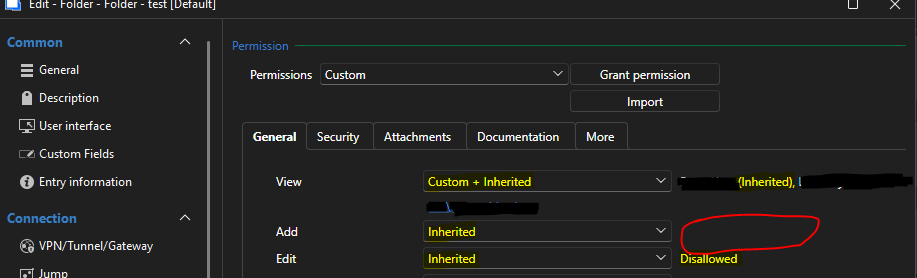
So I am not sure if this is all by design , or it is a bug or maybe I am missing something here. But I would think, based on how it shows the inherited permissions in the other two scenarios ("view" and "edit"), then it should do the same for "add" since that is also set to "inherited". Is that accurate or is there a reason it is not showing? Any advice is appreciated!
Edit - After some more testing, I see this is consistent - anywhere I have custom permissions configured on the parent, child objects (folders or entries it appears) will show blank when set to "inherited". But, if the same child object is instead set to "custom+inherited" and add a custom permission, then it will show the inherited permission to the right as well.
This is RDM v2026.1.16 using SQL Server data source.
Best regards,
David Willis
ac22dd66-cc62-43d3-a9b5-6a6d6969f006.png
All Comments (4)
Hello,
Thank you for the detailed report and the additional testing you did.
I was unable to reproduce the behavior on my end, so I was wondering if you could try recreating the entry from scratch and check if the issue persists.
Please let us know what you observe after doing so.
Best regards,
Carl Marien
Hi Carl,
Thanks for the response and sorry for the delayed reply. I'm now running v2026.1.24 and after checking the same folder that was having the issue before (on v2026.1.16), it now shows correctly the inherited permission on the right when set to "inherited" (even if the parent has that permission configured explicitly). So I can't reproduce the issue anymore - not sure if it got resolved in an update or perhaps was just a transient client-side issue on my side. But in any case I think I'm good for now, but will post back here if the issue does reappear.
Appreciate the help.
Best regards,
David Willis
Actually @Carl Marien sorry, maybe I spoke too soon on my earlier reply - something still seems off. I just added some new permissions on a parent folder, set to custom+inherited with some custom group permissions I added, but when I looked at the folders afterwards, it is not showing correctly.
On the child folder under the one where I set the new permissions, I can see the new group being inherited on the dashboard "permissions" tab. Plus, I confirmed with the user in that group that the permission actually did take effect. However, when I right-click that folder and go into its properties -> Permissions page, it does not reflect this - see screenshot below.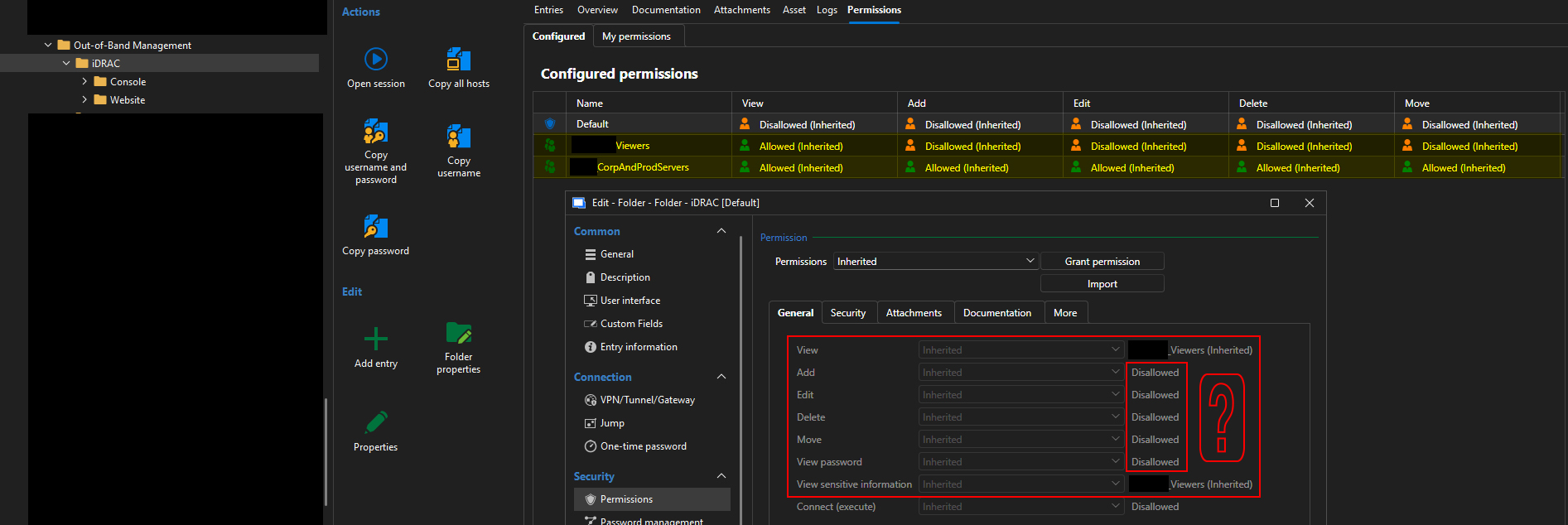
I know it might be a little difficult to decipher since I had to redact pieces for security but I tried to leave enough detail to show what I think is wrong - you can see the group whose name ends in _Viewers is shown as inherited in both the dashboard page and in the folder properties - that is the group whose permissions are assigned higher up in the tree. Then the group whose name ends in _CorpAndProdServers is the one that was assigned explicit permissions (using custom+inherited, so it should keep inherited permissions and add on the explicit ones) on this folder's parent. Both of those are reflected in the dashboard's Permissions tab (shown in the background), however only the _Viewers inheritance is shown in the folder's properties (foreground). The permissions outlined in red with the question mark are the ones I'd expect to see showing the _CorpAndProdServers group as having inherited permissions on, but it does not.
This is on v2026.1.24. Any help is appreciated.
Best regards,
David Willis
InheritedPermissionsNotShownInObjectProperties.jpg
Hello David,
Thank you for the additional details and the follow-up screenshots. Based on your testing, it looks like the actual permission enforcement is working correctly (the effective access for your user matches what is configured), but there is a display issue in the object's Properties > Permissions page: it is not consistently showing which group a permission is being inherited from when that permission was explicitly customized on a parent folder (as opposed to left at its default state).
We can also see that the Dashboard "Permissions" tab for the same folder correctly reflects the inheritance from the group you added, so the discrepancy appears to be isolated to how the inline inheritance hint is rendered in the Properties dialog, not to the permission logic itself.
To help us confirm and escalate this properly, could you let us know:
- In your latest screenshot, does the same missing inheritance hint occur only when editing the "Default" entry, or also when you open the entry for the group itself (for example, the _CorpAndProdServers row)?
- If possible, would you be able to reproduce this on a minimal test folder structure (two folder levels, two groups) so we have a clean, isolated case to pass along for further investigation?
In the meantime, please be assured that this does not appear to affect actual access control, only the informational display in that dialog.
Best regards,
Carl Marien