Cisco break command not working in 2025.3.32.0 64 bit Free

Per subject - the Cisco Shift+Ctrl+6 break does not seem to be working in the referenced version - 2025.3.32.0 64 bit Free. Tested to same Cisco device using Tera Term SSH and the sequence stops the traceroute. In a RDM SSH session, does not work. The only thing that seems to happen is that the tab shows [B6] after using the sequence. The sequence toggles to [B6} on and off. Keeps you occupied while waiting for the traceroute to die.
All Comments (11)
Hi
I had same issue and reported here https://forum.devolutions.net/topics/39542/controlshift6-key-didnt-work-in-terminal#225297
Hello,
Thank you for reaching out to us regarding this,
As Neil mentioned, we have already received reports of this issue and our development team is currently investigating.
We will keep you updated with any news we have,
Best regards,
Samuel Dery
Hi
Looks this problem has been fixed in version 2026.1.16, what was wrong?
Hello,
Thank you for your reply,
I'm glad to hear this is now working as expected.
Let me discuss this with our development team as the change does not seem to have been implemented yet,
Best regards,
Samuel Dery
Trying to install the 2026.1.16 now to see if the problem has been corrected.
Well, this is fun - start RDM, log into a Cisco switch, start a traceroute. Break sequence works. Yea! Wait...try it again - Fails. Goes back to the [B6] coming and going in the tab. 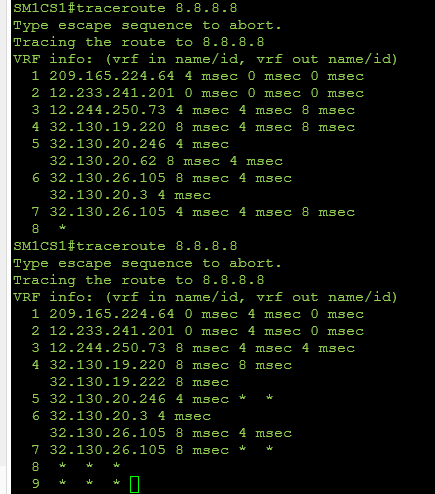
EDIT - if you exit RDM for "a while - 30 minutes or so" and then open it up and go back into a switch, it again works one (1) time.
591c8560-cedf-4205-9354-8feda7bc54e4.png
Hello,
Thank you for your reply,
I have validated with our development team and the fix for this was released with the latest version.
That is odd. Do you encounter the same behaviour with a portable instance of RDM?
https://docs.devolutions.net/rdm/kb/how-to-articles/portable-rdm-installation/
Let me know,
Best regards,
Samuel Dery
This is a desktop use of RDM. I did some testing here, and the only thing that seems consistent is that 1) I get one shot then it's not passing the command (usually three ctrl-shift-6). Opening other tabs on other switches after the "one works" also fail, the B6 thing in the tab is the only thing that happens. Exit RDM for about 20 minutes, go back in - works one time. I restarted this Win11 box a couple of times to try and make sure it was running clean and nothing was hanging things up. Weird behavior for sure. Will keep poking at it to see if I learn anything more substantial.
Hello,
Thank you for your reply,
The test with the portable instance of RDM will allow us to validate if the issue is related to your local installation, as Neil does not seem to be experiencing the same problem, or at least has not reported it so far.
Best regards,
Samuel Dery
Remembered that I have an idle laptop with RDM on it that has been sitting "a while". Fired it up, worked through the missing updates for local things like Teams and such. Updated RDM first to 2025.3.32.0 64 bit. The Cisco break didn't work at all. Then updated to 2026.1.18.0 64 bit. I see the same thing on it - break works one time, does not work after that.
Hello,
Thank you for your reply,
I see, I will check with our QA department to see if they can reproduce this,
I will keep you updated with any news I receive,
Best regards,
Samuel Dery