RDM stops responding

I've been a user of RDM free version for years. After this latest update, I've begun investigating alternatives due to my frustration with Remote Desktop Manager.
I downloaded and installed version 2026.1.14.0 last week (17-March-2026) and since that time, RDM will freeze and become non-responsive. Sometimes it's after a few hours, today it was less than an hour before it froze. There's no error being logged, it simply shows in Task Manager as "not responding". Nothing in eventlogs, no other process is having problems.
Today I uninstalled the application, downloaded the .EXE again, rebooted, then installed RDM again as administrator. Less than an hour later, I have to use Task Manager to kill the non-responsive application again. Ugh.
I'm running Windows 11 version 25H2 (OS Build 26200.8039).
I'll be glad to include whatever information would be helpful to help identify why my computer doesn't seem to want to run this program any longer.
RDM About.txt
All Comments (49)
This is indeed odd. We did solve a possible freeze on startup with v2026.1.11.
Next time the app freezes, could you please capture the state via a mini-dump file?
Attention: you must follow the steps outlined here and read the disclaimer.
https://docs.devolutions.net/rdm/kb/troubleshooting-articles/hung-rdm-dump-file-creation/
Stéfane Lavergne
I downloaded and installed RDM 2026.1.15.0 yesterday evening.
I started using it this morning and it just froze again, after 3 1/2 hours of starting the program.
I followed the instructions and have contacted support.
thank you.
Thanks, I haven’t looked at your files yet, but in the meantime, could you please answer this question?
At the time of the freeze, did you have one or more web entries open? If so, how many? Had they been open for long?
We believe there may be an issue with polling in the WebView2 control, where the polling interval is shorter than what the control can handle, causing it to be overwhelmed until it hangs. This is the theory we arrived at with another client. In the next version, we have an option to adjust the polling interval as a test to see if it makes a difference. Once we pinpoint the exact issue, we can implement a more permanent fix.
Best regards,
Stéfane Lavergne
I did have a web connection to a local URL open.
I have closed the web site now and will report if the restarted application freezes again.
Case number is 00114855
The RDM application is frozen again. This time, I do not have a web connection open. This froze when I logged off of a server which closed my connection to that server. I have one other connection to a different server.
I did open Task Manager and captured the "wait chain" for Remote Desktop Manager that shows threads in a wait status. Using Process Explorer, I highlighted each of the three threads identified and took screen shots. I also created another mini-dump.
As I mentioned above, I did contact support, they assigned a case number, I'm just waiting to hear how I can get files to you.
Ugh. Ok, it happened again, also when I logged off a server and my connection closed.
I still have (had) one connection open to a different server but since the application is not responding, I cannot access the connection tab.
Hello
I've looked at the files you've provided and there is a smoking gun, but I don't have a definitive underlying reason for the freeze.
Here is what happens: embedded RDP is provided by the Microsoft RDP ActiveX control, which is a component they provide and works as something of a black box. When we tear down an embedded RDP session, first we ask the ActiveX control to "Disconnect". In normal cases (99% of the time) disconnection is almost instant, a second or two at most. Shortly after we tear down the tab and tell the ActiveX to release it's resources.
If the ActiveX is still waiting to disconnect, the call to release resources (which must happen on the UI thread) will block and freeze the application. This is an issue that's come up over and again over the years and we don't understand why it happens, nor can we easily reproduce it. There is an existing workaround in the application that gives the ActiveX an additional 8 seconds to answer the call to disconnect; then the release is deferred for a further two seconds. But if the control is still blocked at that point, the next time we try to callback to the UI thread the application deadlocks.
I've submitted a change to RDM Windows that takes a different strategy. If the 8 second wait to disconnect passes, we'll poll the control for a further 60 seconds (in the background) waiting for it to disconnect. If it disconnects in that time - perfect, everything will proceed as normal. If it still hasn't disconnected, we'll simply leave it - leaking the control and its resources (which can be fairly heavy - at least 6-10 threads and numerous handles). Ultimately I'd argue that's better than a freeze and shouldn't be an issue unless this happens repeatedly, and the RDM process itself is very long-lived. I don't see another solution than moving the RDP embedding out of process, which is a huge task. I do blame issues like this on Microsoft, because although the ActiveX control shares code with mstsc it's a completely different process model, and Microsoft themselves don't use the ActiveX in any of their products; so they don't really hit or address these kinds of problems.
I hope to get that fix merged into RDM Windows and in an imminent update, and we can see if it helps your situation.
In terms of concrete steps you can take right now: often this condition is directly attributed to RDP using the UDP/multitransport channel but I can see from your files that this is not the case. The other things I can think of are high network latency (not sure if that's the case) and misbehaving virtual channels. Virtual Chanels are things like drive redirection: if you're not using things like drive redirection, printer redirection and audio in/out redirection, I'd recommend turning off those that you don't use and see if it helps. It's worth a try. RDPGFX (the RDP 8.1 graphics channel) could also be implicated but that's much harder to disable.
I do apologize for the inconvenience, and thank you for your patience. I hope that my fixes will help and we'll let you know once that's available. Don't hesitate with questions or comments in the meantime.
Thanks and kind regards,
Richard Markievicz
I did have local resources (printers, hard drive) shared, but have since disabled those.
I also set Remote computer sound - Sound hook to "Do not play" instead of the default value.
Looking around at other connection properties, would it make a difference changing the Advanced > Log off mode from "Default" to another value? Or change the RDP version from "Latest" to another value?
Hello
No, that should not make a difference. I'm hoping that the RDP ActiveX is just taking long to disconnect; and the suspects I have in that case are UDP (not used in your environment) and virtual channels (mainly device redirection; although as I said graphics can use the same mechanism and that's harder to switch off). Some of the channels are just generic "virtual channels" so they don't tell me what they are in the mini dump.
It would be an interesting data point if the issue persists after disabling redirections.
A side note - are you using any third party RDP extensions? I don't see any in the mini dump, but such things can sometimes masquerade as system files...
Moving forward as I said, I've made a change here that will be available in 2026.1.16 that I hope should alleviate the problem. Your results will be very interesting once that is released and you have a chance to try it.
Thanks again for your patience, and sorry for the inconvenience
Kind regards,
Richard Markievicz
First off - no apologies are necessary. I truly am grateful for the product and the assistance.
I had to ask ChatGPT about 3rd party RDP extensions. Funnily enough, RDM was mentioned as one.
It also mentioned Citrix, which we do use for connecting to some client sites, and I do have installed and use occasionally when connecting to these clients.
For desktop-to-desktop support, we normally use Windows' Quick Assist or Microsoft Teams.
Hello
I think Citrix uses it's own protocol rather than tying directly into the RDP stack.
RDM 2026.1.16 is available and it has some improvements. Can you let me know if things are better after updating?
Thanks and kind regards,
Richard Markievicz
I downloaded and installed 2026.1.16 Tuesday morning. Tuesday afternoon, it froze again when I logged off of a local server that has information in the Advanced tab, in the Connection broker - High Availability" section. I had not excluded local resources, so I chalked up the freeze to missing this entry when I removed local resources on my connections.
Today, I used Advanced Search to find all instances of these servers (I have multiple connections defined to them) and started editing each entry to unselect local resources (except clipboard).
The program pauses frequently, but then will work again. After editing 2 connections, it hangs for about 15 seconds before continuing. While it's frozen, I can work in other applications, so I know it's not the PC, just the RDM application.
I've been editing entries, unselecting local resources for about 1/2 hour now and this pausing behavior is consistent. I do not have any connections open in RDM.
I made the following modifications to settings.
- data source backup folder changed to local drive instead of network drive
- Application > Paths > Document. Changed to local drive instead of network drive.
- Background services > Synchronizers. Unchecked "Enable the execution of synchronizers" even though none exist.
I then stopped and restarted RDM.
I'll follow up if any of my modifications make a difference.
Hello
The idea of the changes in 2026.1.16 was to avoid a freeze entirely if the RDP control is slow to answer the disconnect. So at that point the forwarding of local resources should not make a difference.
Do you have anything relevant logged in Help > Application Logs?
Based on what you wrote the performance issue seems to be more systemic, so maybe the freeze when disconnecting is a symptom of something bigger as well.
What kind of data source are you using? If it's a local data source (SQLite for example) is it on a local disk? Since you mentioned the backup folder being a network drive.
Thanks and kind regards,
Richard Markievicz
From Help > Application Logs for today:
[4/1/2026 5:35:28 AM - 2026.1.16.0 - 64-bit] Error silent: System.TimeoutException: The operation has timed out.
   at System.IO.Pipes.NamedPipeClientStream.ConnectInternal(Int32 timeout, CancellationToken cancellationToken, Int32 startTime)
   at System.Threading.ExecutionContext.RunFromThreadPoolDispatchLoop(Thread threadPoolThread, ExecutionContext executionContext, ContextCallback callback, Object state)
--- End of stack trace from previous location ---
   at System.Threading.ExecutionContext.RunFromThreadPoolDispatchLoop(Thread threadPoolThread, ExecutionContext executionContext, ContextCallback callback, Object state)
   at System.Threading.Tasks.Task.ExecuteWithThreadLocal(Task& currentTaskSlot, Thread threadPoolThread)
--- End of stack trace from previous location ---
   at Devolutions.RemoteDesktopManager.Business.NowAgent.NowProtoPipeTransport.Connect(String pipeName, Nullable`1 timeout, CancellationToken cancellationToken)
   at Devolutions.RemoteDesktopManager.Business.NowAgent.NowAgent.Connect(Guid sessionId, CancellationToken cancellationToken)
   at Devolutions.RemoteDesktopManager.Frames.Embedded.FreEmbeddedRDP.<>c__DisplayClass175_0.<<ConnectNowAgent>b__0>d.MoveNext()
This same time out message was logged 14 times yesterday.
My data source is a local data source using SQLite on a local drive. Always has been. It was only the backups that were on the network drive.
Hello
Ok, I understand this is frustrating and I'm sorry about that.
The error logged is quite benign; this should probably be a "Debug" level rather than recorded as an error. I'll try to fix that.
In the meantime, I wonder if this is indeed related to logging off the RDP servers.
I did receive a mini dump from support and I think that correlates with your post on March 25th.
Later on the 25th you wrote
Case number is 00114855 [...] I also created another mini-dump.
I'm wondering if I saw the first dump you created, or the second....
Regardless, and I'm sorry to ask this - if it freeze again, on the 2026.1.16 - especially while logging off a server - can you repeat the mini dump exercise one more time, and provide the file to the support team?
I appreciate your patience
Kind regards,
Richard Markievicz
If it freezes again, I will create the mini dump file and submit it.
Thank you!
Just wanted to drop a quick note to say that since I moved file references (Backup, Document) from network to local drive and restarted, RDM hasn't locked up.
I'm hopeful the issue was due to access to these other drives.
-- Continuing to monitor --
No freezing with RDM. It appears having the references to network drives was the cause.
Hello
Thanks for the follow up. I was holding off to answer you before to see if you had issues again.
I can't explain the behaviour but I don't know that side of RDM very well. I will log a ticket to investigate the issue. In the meantime let us know if you have other problems or questions.
Thanks for your patience
Kind regards,
Richard Markievicz
Hello
Just to follow up, I did find a smoking gun for what the issue might be here. A developer is assigned to fix that and we'll update this post once it's done.
Thanks again and sorry for the inconvenience
Kind regards,
Richard Markievicz
Latest update. I saw there was an update tab in RDM this morning, I installed the latest version (Version 2026.1.18.0).
I just now had to use Sysinternal's Process Explorer to restart the program because it froze once again. Actually it froze yesterday, too, but I was hoping this newer version would resolve the program becoming non-responsive. It does not look like it has.
I created a mini-dump if that would be of any assistance, or if the "smoking gun" you last referred to is still forthcoming, that dump may not be useful?
Once again, sorry to be a bother!!
- Dave
Hi, I just upgraded from a 2025 version to 2026.1.18 today and get a similar issue.
RDM hangs immediately when it tries to start and the only option is to kill it in task manager.
I am running on Windows 11.
Regards George
Hi, I just upgraded from a 2025 version to 2026.1.18 today and get a similar issue.
RDM hangs immediately when it tries to start and the only option is to kill it in task manager.
I am running on Windows 11.
Regards George
@RemoteDesktopManager02
Hi All, discovered my issue and hoping this might help someone.
Also be good if RDM popped up a warning or message to make it more obvious.
I discovered that holding the connections in Dropbox is now not supported so the whole app just freezes on start-up (message would be helpful here!!).
Ended up renaming RemoteDesktopManager.cfg so it created a new file, then specified a new data source of connections.xml, and then copied my Dropbox .xml file over the top of this local one, and all was ok when I started RDM.
Regards
Hello @dschopp
No need to apologize, I'm sorry for the ongoing inconvenience. It seems like we've caught a few freezes but they are symptoms rather than the actual problem (i.e. something is tying up the main thread, and then later something else wants to run on the main thread and is blocked, causing a deadlock). Do you still have your backups going to a local drive? If so, please do send the mini dump you caught to support and I will look at it ASAP.
@RemoteDesktopManager02 Thanks for the input and I'm glad you got your issue solved. Are you talking about a Dropbox data source? Or you had your RDM data files stored on Dropbox?
Thanks and kind regards,
Richard Markievicz
Hello @dschopp
No need to apologize, I'm sorry for the ongoing inconvenience. It seems like we've caught a few freezes but they are symptoms rather than the actual problem (i.e. something is tying up the main thread, and then later something else wants to run on the main thread and is blocked, causing a deadlock). Do you still have your backups going to a local drive? If so, please do send the mini dump you caught to support and I will look at it ASAP.
@RemoteDesktopManager02 Thanks for the input and I'm glad you got your issue solved. Are you talking about a Dropbox data source? Or you had your RDM data files stored on Dropbox?
Thanks and kind regards,
@Richard Markiewicz
I too updated to 2026.1.18.0 today and have the hang on startup issue. I captured the mini-dump if you'd like to let me know how to get it to you.
Hi @mbiracree,
Thanks for capturing the mini-dump that’s very helpful.
I’ll send you a secure upload link via private message so you can safely share the file with us. Once you’ve uploaded it, please let us know so we can take a look as soon as possible.
Thank you!
Carl Marien
@Richard Markiewicz - I just uploaded my latest RDM mini dump file, named SF-114855.dmp.
I exported my settings and searched for ":\" to identify all drive paths defined. These are the results
<DefaultSaveAsDocumentPath>C:\Users\dschopp\Documents\RDM</DefaultSaveAsDocumentPath>
<AutoHotKeyInstallationPath>C:\Program Files\AutoHotkey\v2.0.21</AutoHotKeyInstallationPath>
<CitrixInstallationPath>C:\Program Files (x86)\Citrix\ICA Client</CitrixInstallationPath>
When viewing Settings > Application > Paths, all entries point to C:\Users\dschopp subfolders (local drive). This drive has plenty of free space.
Hi Carl,
Thanks for the quick reply, I just uploaded the file.
Mike
Hello @mbiracree
Can you please try (with RDM closed) navigating to %localappdata%\Devolutions\RemoteDesktopManager and deleting, renaming or moving any file with a .lyt extension. I might recommend renaming them or moving them, but it's quite low risk - these are the saved layouts for things like window positions and so on.
Then try launching RDM - does the issue persist?
Thanks and kind regards,
Richard Markievicz
Hello @dschopp
Thanks for your patience. When I look your .dmp file, we're almost back where we were at the start - the Microsoft RDP ActiveX control is hanging at disconnection time, we defer the cleanup and that blocks the main thread. The next time some other part of the code tries to enter the main thread, we deadlock. So why isn't this covered by my earlier fix? Because the RDP control is properly answering disconnect in this case (it tells us it's disconnected) but it's now hanging in cleanup.
We might be able to work around this but I'd prefer to find the root cause. So I've dug deeper into the file you provided.
The Microsoft RDP control's internal thread pool is deadlocked cleaning up virtual channels. I can see you have no third party virtual channels loaded, only the standard device redirections. A mini dump doesn't give enough fidelity to see exactly who's causing this, and I don't want to ask for a full dump because it can contain e.g. sections of your system memory. Digging deeper, I can see one thread is stuck in a printer subsystem call. I can also see that FXSRES is loaded - that's the fax virtual printer driver and it must be enumerated if you're redirecting printers.
I think this is being caused by printer redirection, and most likely the root cause of that is a bad printer driver on your system or the virtual fax driver. Do you use printer redirection in RDP? Can you try disabling it across the board and see if things are better? It could be something else but the evidence I have here is pointing at this.
Thanks again for your patience
Kind regards
Richard Markievicz
Hello @mbiracree
Can you please try (with RDM closed) navigating to %localappdata%\Devolutions\RemoteDesktopManager and deleting, renaming or moving any file with a .lyt extension. I might recommend renaming them or moving them, but it's quite low risk - these are the saved layouts for things like window positions and so on.
Then try launching RDM - does the issue persist?
Thanks and kind regards,
@Richard Markiewicz
Hi Richard,
I renamed the 2 .lyt files, upgraded to 2026.1.18.0, and got the same hang. It didn't create any new .lyt files. I captured a new DMP file and uploaded it.
Thanks!
Mike
Hi @mbiracree
If you disable the splash screen and that works, it would be a useful data point and workaround.
Since you can't get into RDM to change the setting, go to %localappdata%\Devolutions\RemoteDesktopManager and locate RemoteDesktopManager.cfg. Maybe take a backup of the file incase you make a mistake before editing it.
Open the file in a text editor and see if you have an existing key for `ShowSplashScreen`. If you do, set it to "false" like this<ShowSplashScreen>false</ShowSplashScreen>
If the key doesn't exist in the file, add it at the end before the closing </Option> tag, like this
<ShowSplashScreen>false</ShowSplashScreen>
</Option>
Save the file and launch RDM. Does the issue persist?
Kind regards,
Richard Markievicz
Hi Richard,
It appears to be ignoring the flag, I added it and it's still showing the splash screen and then hanging.
Thanks,
Mike
Hi @mbiracree
I'm sorry, I've made a typo on my post - it should be ShowSplashscreen (screen with a lower case "s"); and it is case-sensitive.
My apologies for that
Richard
Richard Markievicz
That got rid of the spash screen, but it still hangs. Uploaded another dump as I did it on my other laptop, so I can still work on my main with RDM :)
Mike
Hello @mbiracree
Thanks, that's helpful. Back in the same directory please try to rename RemoteDesktopManager.ext and RemotDesktopManager.qtb (preserve the files, but just change the names so RDM doesn't find them). Does it help?
Kind regards,
Richard Markievicz
Nope. I did notice this time (i just happened to have explorer still open) that it's creating a new empty folder every launch with a name that looks like a GUID.
Hello @mbiracree
Ok, thanks for you patience. As I explained up-thread to @dschopp , a mini dump gives some clues to the problem but doesn't provide the whole picture. So there is still some investigative work involved here. Further @dschopp I realize this thread has diverged from your OP, I hope you saw my post above regarding printer redirection. If you have some questions please don't hesitate to reach out.
@mbiracree We have a somewhat clear picture from the 3 minidumps I have that RDM is getting hung up while our UI library is performing layout work. There are some clues, but the actual reason is not really clear.
The next thing I'd like you to try is providing an explicit theme setting. You'll need to do it in the RemoteDesktopManager.cfg again. Look for a top level <Theme> tag and if it doesn't exist, create one with a value of Office2016. If it does exist already, replace the value with Office2016.
Importantly, we want a top-level tag here, an immediate child of <Option>. So like this: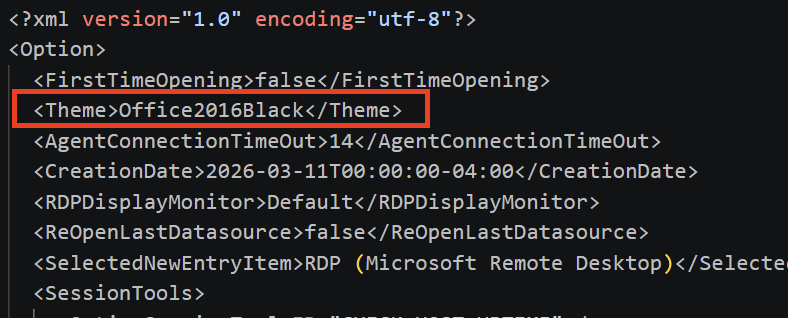
Not like this, where it's nested in another setting; that's something separate to the main application theme and we should leave that alone: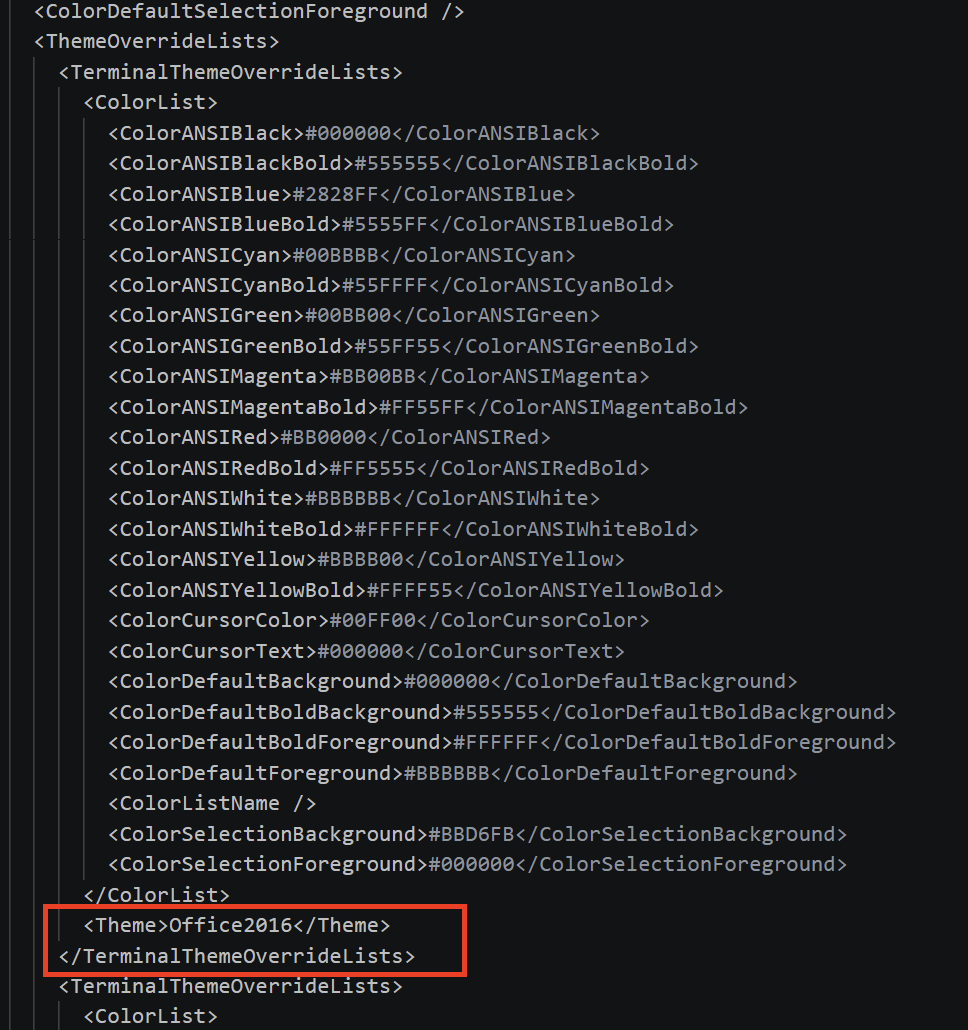
Let me know if it helps. If it doesn't help, please try renaming the %localappdata%\Devolutions\RemoteDesktopManager directory and let me know if that helps.
Broadly, I wonder in the first case if there is a problem loading the theme. There are some clues that point to that. In the second case, I wonder if your issue is still about some invalid cached state.
Thanks a lot for your patience, I look forward to getting to the bottom of this
Kind regards
Richard Markievicz
Screenshot 2026-04-17 at 22.23.43.png
Screenshot 2026-04-17 at 22.23.19.png
@Richard Markiewicz - I did see your reference to redirection. I removed all redirection - this also made my security officer happy! :-)
The only checkbox on my RDP local resources tab for each entry is for the clipboard.
@Richard Markiewicz I added that line and it did change the theme but still same results it hung after a couple of seconds. I uploaded another mini dump and my .cfg. You mentioning the theme triggered a thought. I use Stardocks Start11 to change the interface back to look like Win10, it's never caused an issue before but could it now? I did capture a full dump as well if you want me to upload that.
Appreciate all the work, I don't think I'd survive a workday w/o RDM!
Hi @dschopp
This definitely lines up with printer redirection and a misbehaving printer (or virtual fax) driver.
I would recommend running for a while and see if you have problems, then starting to re-enable redirections (if your security officer is happy), ending with printer redirection. If you start getting the issue again we'd want to see what printers and faxes are getting forwarded to the remote machines.
The trouble is that fundamentally these kinds of issues exist in Microsoft's RDP stack, but they don't manifest in mstsc.exe because it's a single process - single connection model. The process can still be torn down even with a hung virtual channel. That doesn't work for an app like RDM, but since Microsoft don't use the RDP ActiveX control in any of their stuff the issues don't get visibility or fixes.
Appreciate your follow up here as this could be significant if other users face the same problems. And thank you for your patience.
Richard Markievicz
Hello @mbiracree
In every snapshot I've seen from you, the main UI thread in RDM is running a layout pass - calculating where every button, toolbar, panel, etc goes. The layout is started by a background thread basically saying "hey, UI thread, re-do the layout when you get chance". The three snapshots are all in different places of layout, but all steps of the same layout pass. We can see:
- It's not stuck in one place. Layout is progressing
- Every time the UI thread finishes one layout pass, another is already waiting, so it starts again immediately. It never gets the chance to catch up, so it looks like a hang. I bet while you are hung in this state the CPU is not idle for RDM.
- It could've been caused by a corrupt saved layout, but we see it's not
One thing that's the same in every snapshot is the outermost code - the Windows message that arrives in RDM and triggers the layout. The open question is who is posting that "please relayout" request?
I thought the theme might be related. When something theme-ish changes on the system (light/dark mode, accent colour, HDR, some display events) a message is broadcast telling applications on the system and that causes us to reapply the theme (an expensive operation). There's a bug fix from 3 weeks ago that catches something similar to what you're seeing related to that message being rebroadcast during wake/sleep or dock/undock (essentially when the display is reconnecting). That's why I thought forcing a theme on RDM might help - we explicitly side step this message in that case. But we see it's also not the problem.
What you wrote about Start11 is interesting. Traditionally RDM Windows is a Windows Forms application but we've always heavily used DevExpress custom controls. We're migrating more and more of our code to another framework (Avalonia) with every release. So we have at least 3 UI frameworks here and one of them is becoming more heavily used with each release.
My current hypothesis is that Start11 hooks into the DWM (Windows' compositor) to repaint title bars. The DevExpress control that provides our ribbon also customize the titlebar. The Avalonia compositor also connects to the DWM. It's possible that the DWM reports "something changed", Avalonia says "relayout" to Windows Forms, WinForms does the layout which causes a window to move; Start11 tweaks the window, which Avalonia sees as another change, which... Never stops. Why would this start occurring now? A new release means more Avalonia control hosts, which causes more compositor-to-WinForms messages, and at some point the volume crosses a threshold where the loop can't unwind and "working fine" becomes "hangs on launch".
It's just a theory. Can you experiment with disabling Start11 temporarily and see if the problem goes away? That would be the lowest effort way to move forward. I had trouble finding documentation for Start11 but this seems like a good thing to try. Unfortunately while a full memory dump may hold all the answers, I can't look at it for liability reasons. It will contain sections of your system memory and could contain credentials, personal information, etc.
Please let me know if you have some questions
Kind regards,
Richard Markievicz
@Richard Markiewicz I disabled Start 11 and same result under my user account. On a lark, I logged in as a different user onto the same laptop that had never run RDM before and it launched fine, brought me up right to the setup for the data source.
Should i try exporting my data source, delete the %localappdata% folder then re-import under my user account?
Hello @mbiracree
Interesting! So that does suggest a problem with a corrupted setting or layout, but I thought we covered all those cases.
Before deleting anything, can you simply rename the %localappdata%\Devolutions\RemoteDesktopManager folder to something else and try to start in your regular user account? Does it launch? No need to go through the onboarding and etc.
If it works, two things - we might want to see (some) of the settings / configuration in your existing directory to discover the source of this; and my colleagues in the support team may have a better idea of how to patch over the problem without export/delete/import.
Let me know
Kind regards,
Richard Markievicz
@Richard Markiewicz That worked! Happy to send you any of the files from the original folder.
Hello,
Thank you for confirming that renaming the folder resolved the launch issue. This is very helpful.
We would like you to send us the contents of the following folder for further investigation: %localappdata%\Devolutions\RemoteDesktopManager
However, before sending the folder, please remove any file resembling connection.db and set it aside, as this is a local data source file that may contain sensitive information we do not need access to.
A private message with a secure upload link will follow shortly.
Once the files are sent, please follow the steps outlined in this article and let us know if the issue persists: https://docs.devolutions.net/rdm/kb/how-to-articles/reset-rdm-to-default-settings/
Best regards,
Carl Marien
@Carl Marien @Richard Markiewicz I did the reset and was able to install and run 2026.1.18 and update it to 1.19 this morning. Thanks for the help, and I hope you can debug what happened. I saved the original folder if you need me to test anything.
Mike
Hello,
Thank you for the update. We are glad to hear the reset worked and that you are up and running on 2026.1.19.
To continue the investigation, please use the secure upload link I sent you in a private message to send us the contents of the original folder. Remember to remove any file resembling connection.db before uploading, as it may contain sensitive information we do not need access to.
Best regards,
Carl Marien
Hello @mbiracree
You can disregard Carl's comment, I saw your file.
What I think this is, is an incompatibility between a saved layout and the "never show in Taskbar" option. Definitely a bug on our side, but a really esoteric one (and I'll have to talk to the RDM Windows team about it because I don't understand the version stamped saved layouts).
But just to be sure we're on the right path: the upload contained the file "RemoteDesktopManagerLayout20253.lyt". Is it possible you didn't rename/delete this in a an earlier troubleshooting step?
Thanks and kind regards,
Richard Markievicz