Azure Bastion RDP to Virtual Machine Scale Set (vmss) instance
Azure Bastion RDP to Virtual Machine Scale Set (vmss) instance

Can Devolutions RDM be configured to connect RDP session via Azure Bastion to Azure Virtual Machine Scale Set (vmss) instance(s)? Devolutions RDM can access 'regular' Azure VM via Bastion (RDP native client) just fine; it is not clear how to configure connection for RDP to vmss instance(s).
some details:
-Azure cli to vmss instance(s) works fine, so it seems this should work with Devolutions RDM as well. (azure cli az network bastion rdp command)
-a 'regular' Azure VM has a resource ID like '/subscriptions/<subscriptionID>/resourceGroups/<resourceGroupName>/providers/Microsoft.Compute/virtualMachines/<vmName>'
-a vmss instance has a resource ID like '/subscriptions/<subscriptionID>/resourceGroups/<resourceGroupName>/providers/Microsoft.Compute/virtualMachineScaleSets/<scaleSetName>/virtualMachines/<instanceID>' where the <instanceID> is 0,1,2, etc. (note, a vmss instance also has a machine/hostname)
-when connecting to a vmss instance via the azure cli (az network bastion rdp command), the generated .rdp file has content/parameters like:
full address:s:<scaleSetName>_<instanceID>:3389
alternate full address:s:<scaleSetName>_<instanceID>:3389
use multimon:i:1
gatewaycredentialssource:i:5
gatewayusagemethod:i:1
gatewayprofileusagemethod:i:1
gatewayhostname:s:bst-<guid>.bastion.azure.com
for example, if the vmss name is 'MyVMSS', the full address value is MyVMSS_0 (MyVMSS_1, etc). see attached screenshot for reference.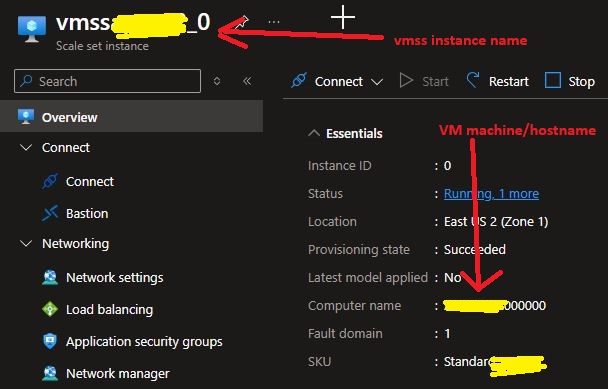
vmss.jpg
All Comments (9)
Hello,
Thank you for contacting us regarding this matter.
Could you please review the following document for guidance on configuring Bastion:
https://docs.devolutions.net/rdm/kb/how-to-articles/configure-azure-bastion-entry/
Please let us know if this helps.
Best regards,
Tommy Sanders
yes, i already have Bastion working for 'regular' Azure VMs as indicated, but RDM fails to connect to Azure vmss instances.
Hello
I have to check this on my side. The underlying mechanics are not really different between `az` CLI and RDM; but the problem is likely the difference in the resource ID. IIRC we build the resource ID based on what you have configured in RDM for Host, resource group and subscription ID (which may be inherited from the Bastion entry).
So - there is not a mapping from the RDP options in RDM to a resource ID that would resolve to a vmss.
If that's all correct, and I think it is, this might be tricky to add in the middle of a major release cycle (adding new fields to the sessions also involves coordination with several teams like Devolutions Server and Hub). I also need to figure out how we'd leet this be configured in RDM, because we likely don't want to clutter the RDP sessions with a lot of Azure Bastion specific options (scale set name, instance ID). Perhaps the best scenario is just to allow a single override where the full resource ID can be configured explicitly.
So, it's an integration problem rather than a deep technical one, but it does mean it's unlikely that we can have this before 2026.2. I'll make a ticket here and talk to the team about what can be done, but I'd say that's the earliest timeline we can add this.
If you're really blocked on this in the meantime, I might be able to propose a PowerShell pre connect script that could make this work for you. Let me know if that's interesting.
Hope it makes sense; please don't hesitate if you have other questions or comments
Kind regards
Richard Markievicz
Hello
I have to check this on my side. The underlying mechanics are not really different between `az` CLI and RDM; but the problem is likely the difference in the resource ID. IIRC we build the resource ID based on what you have configured in RDM for Host, resource group and subscription ID (which may be inherited from the Bastion entry).
So - there is not a mapping from the RDP options in RDM to a resource ID that would resolve to a vmss.
If that's all correct, and I think it is, this might be tricky to add in the middle of a major release cycle (adding new fields to the sessions also involves coordination with several teams like Devolutions Server and Hub). I also need to figure out how we'd leet this be configured in RDM, because we likely don't want to clutter the RDP sessions with a lot of Azure Bastion specific options (scale set name, instance ID). Perhaps the best scenario is just to allow a single override where the full resource ID can be configured explicitly.
So, it's an integration problem rather than a deep technical one, but it does mean it's unlikely that we can have this before 2026.2. I'll make a ticket here and talk to the team about what can be done, but I'd say that's the earliest timeline we can add this.
If you're really blocked on this in the meantime, I might be able to propose a PowerShell pre connect script that could make this work for you. Let me know if that's interesting.
Hope it makes sense; please don't hesitate if you have other questions or comments
Kind regards
@Richard Markiewicz
thanks, really appreciated!
Hello again
I've been giving this some thought and I'll need to extend the RDP session type in RDM to make it aware that the connection is part of a scale set.
I don't know a lot about this feature in Azure and yours is the first request we've had for this, so I'd like to understand better how you see this working.
The most straightforward approach would be to extend the Azure-specific options in RDP to allow entering a scale set and instance ID.
That quickly becomes unworkable if you have many instances, because you'd need to configure manually for each one. So perhaps a better approach is to allow the scale set to be inherited from a higher level structure (like a folder). But presumably you wouldn't want to manually specify the instance ID on each connection either.
I'd envisage that this should be dynamic; perhaps the instance ID should be coming from a variable. Or maybe we need to support a template style approach; where you have a template containing the RDP options and scale set, and then provide the instance ID at connection time.
Do you have strong opinions on how this should work?
Thanks and kind regards,
Richard Markievicz
Hello again
I've been giving this some thought and I'll need to extend the RDP session type in RDM to make it aware that the connection is part of a scale set.
I don't know a lot about this feature in Azure and yours is the first request we've had for this, so I'd like to understand better how you see this working.
The most straightforward approach would be to extend the Azure-specific options in RDP to allow entering a scale set and instance ID.
That quickly becomes unworkable if you have many instances, because you'd need to configure manually for each one. So perhaps a better approach is to allow the scale set to be inherited from a higher level structure (like a folder). But presumably you wouldn't want to manually specify the instance ID on each connection either.
I'd envisage that this should be dynamic; perhaps the instance ID should be coming from a variable. Or maybe we need to support a template style approach; where you have a template containing the RDP options and scale set, and then provide the instance ID at connection time.
Do you have strong opinions on how this should work?
Thanks and kind regards,
@Richard Markiewicz
thank you very much for your reply!
I would be happy with configuring a full Azure resource ID in order to connect to a vmss instance, but i understand the concern for vmss with high instance counts.
Perhaps there could be a configuration entry to the vmss itself and within a 'discover instances' process (clickable button in the UI?) to populate entries for connecting to the vmss instances? the 'discover instances' could thereafter function as a refresh of the instance entries as scaling events occur? anything close to this elegant for managing connections to vmss instances would be an amazing feature. there seems to be some options in this regard, as per https://learn.microsoft.com/en-us/azure/virtual-machine-scale-sets/virtual-machine-scale-sets-manage-cli
my only other thought here is could the VM be identified by VM computer name vs. just the instance id, or both? displaying the computer name might be a nice option. please see my earlier screenshot which indicates these different values.
i do not have strong opinion here; im sure anything you find to be reasonable will be a great feature for managing connections to vmss instances. thanks again!
Hello
Thanks for your thoughts. I'm still chewing over the best way to implement this. I've created a ticket to track it and you can be informed once it's available; but since this means changing some of the shared data structures across our different products and platforms it won't be available until at least 2026.2.x (early summer).
In the meantime, thanks for your patience and please don't hesitate if you have further questions or comments
Kind regards,
Richard Markievicz
Hello
I've been doing some improvements and bug fixing in the Azure Bastion integration, and it was a neat time to circle back to this.
I'd like to ask some extra questions.
Are you using flexible or uniform scale set(s)? Based on your original question, I believe it's uniform but I want to double check.
The neatest thing from my side would be an (e.g.) RDP entry representing the scale set, and then a picker that lets you choose the instance (dynamically queried from Azure). We could include search, and maybe an option to pick up the instance you used last time you connected). That doesn't cover creating an entry that points to a specific instance, always. How important would that be? I'm trying to understand the workflow. Do you often need to connect to the same instance, in such a way that an entry just for that instance is relevant? Or does the dynamic picker approach better match your workflow anyway?
I suppose it's also relevant to know how many instances, and are they autoscaled? e.g. Three stable instances would work for typed connections, but an autoscale of, say, 2-50 makes a picker much more worthwhile.
Thanks and kind regards,
Richard Markievicz
yes, we use Uniform scale sets. yes, we often connect to all of the specific instances in a given vmss - in most environments, our scale sets have 2-4 instances (non-production environments are capped largely for cost reasons but we still verify autoscaling functionality). in production environments, we generally do have higher instance counts, but not massively so. Most of the time we are around 6-8 instances in a single vmss and ramp up for certain periodic process, such as month-end. we only rarely see above 20 instances in any single vmss. we are constantly working to improve our automation and scripting such that RDP to individual instances will be less necessary, but current troubleshooting methods often require connecting via RDP for investigation.
thanks again for your efforts towards this feature!