2026.1.12.0 killed my custom keystrokes

Hi - I was happily using 2026.1.9.0 and my custom keystrokes were working, as late as last night in fact. Upgraded to 2026.1.12.0 this morning and my three custom keystrokes are still in the config, but not showing on the menu, and not working.
I tried the following:
- Set custom keystrokes to none, exit application, start application, reset custom keystrokes, exit application, restart application, no joy.
- uninstalled and downgraded back to 2026.1.9.0, re-execute #1. No joy.
- Reset keyboard settings to default, restart application, reset custom keystrokes, restart application, no joy.
the three things I put keystrokes on are type username (ctrl-shift-z), type password (ctrl-shift-x), and type otp (ctrl-shift-c). Any thoughts?
I'm going to stay at 2026.1.9.0 for now, since I see there seem to be other clipboard issues with .11 and .12. Let me know if I need to do anything...
All Comments (6)
Well now I don't know what to think. The keystrokes are working now in 2026.1.9.0. They used to appear on the menu here: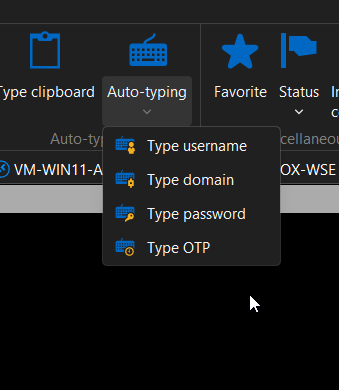
But now they don't, but they still work. Now I'm afraid to re-upgrade to 2026.1.12.0.
e9420f15-97fa-4ffc-9da4-7af1d28640ac.png
Hello,
Thank you for contacting us regarding this matter.
This may have been a regression that has since been fixed in this version.
Please let me know if the issue comes back.
Best regards,
Tommy Sanders
Hi Tommy - I installed 2026.1.14.0 this morning and it killed the keystrokes again. I can set them in the settings, but they do not appear on the menu, and they do not function after program restart or system reboot.
Just updating to say that I tried different keystrokes than before to see if it was some kind of conflict, and still no joy - I used control - alt - z, x, & c instead of control-shift z, x, & c. I am still unable to make this work...
Hello,
Thank you for your response, and please accept our apologies for the delay.
This is a known issue on our end, and our developers are currently working on a fix. The resolution is expected to be included in version 2026.1.15.0 of RDM.
Best regards,
Tommy Sanders
I've downloaded and installed 2026.1.15.0 and it has fixed this issue - thanks!