1Password SSO Issues

Hello, we are experiencing an issue with the new 1Password SSO integration that came with this Beta. We originally were having this issue on version 2026.1.6.0 64-bit. We updated to 2026.1.8.0 64-bit today and can still replicate the issue.
Environment info:
- Windows 11 25H2 - 26200.7840
- 1Password for Windows 8.11.23 (81123001)
- 1Password SSO is configured using Entra ID, with a conditional access policy that requires a hardware token be used
We have configured 1Password inside Remote Desktop Manager (RDM) by doing the following:
- Click File
- Click "My account settings"
- Click "My personal credentials"
- In the bottom left corner click 1Password
- Change the "Host" field to our company 1Password domain <company>.1password.com
- Change "Login Method" to SSO
- Enter Username and authenticate
- Transfer the encryption key from 1Password into RDM
- Select a credential from the Private folder as our default
We have an RDP entry setup with a full host name, and "Credentials" set to "My personal credentials". See below screenshot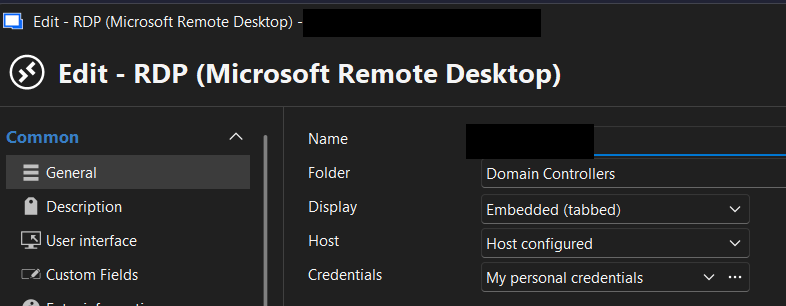
Upon trying to connect to this server, we get the below error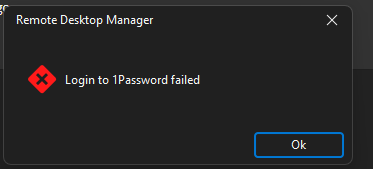
One time while doing the steps to setup 1Password in RDM, we got a 2nd "Transfer encryption key request" within 1Password. However no window ever appeared in RDM for us to input the key. I suspect that this may be related to, or is the cause of, our issue.
830590dd-4516-492d-bbae-f15d256654fc.png
87463383-b69c-4cdf-b125-7b78e3a7ea95.png
Recommended Answer
Hey Carl,
Good news - it seems that version 2026.1.12.0 fixed our issue! I updated to it today and am unable to reproduce our issue. I also had a colleague test and they are good as well.
I'm not sure if this thread had any contribution to the issue being fixed, but regardless, I appreciate your responsiveness!
All Comments (9)
Hello,
Thank you for reaching Devolutions support
To make sure we address this correctly, I’ll need to reproduce the behaviour on my side with a comparable setup (1Password SSO via Entra ID + Conditional Access requiring a hardware token). I’ve already reached out to our IT department to provide me with a test environment/configuration so I can validate the workflow end-to-end and confirm where it’s failing (including the encryption key transfer prompts you mentioned).
As soon as I’m able to complete that testing, I’ll get back to you with what I find and any recommended workaround or next steps.
Best regards,
Carl Marien
Hello,
Thank you for reaching Devolutions support
To make sure we address this correctly, I’ll need to reproduce the behaviour on my side with a comparable setup (1Password SSO via Entra ID + Conditional Access requiring a hardware token). I’ve already reached out to our IT department to provide me with a test environment/configuration so I can validate the workflow end-to-end and confirm where it’s failing (including the encryption key transfer prompts you mentioned).
As soon as I’m able to complete that testing, I’ll get back to you with what I find and any recommended workaround or next steps.
Best regards,
@Carl Marien
Thank you Carl! Some additional info on our setup that your IT department should find useful:
- Our conditional access policy specifically requires "Phishing-resistant MFA" be used, under the Grant section
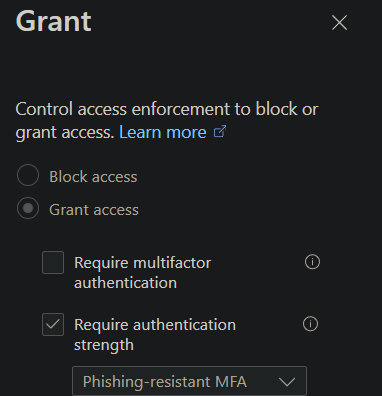 We use a Yubikey 5 NFC as our hardware token
- I did not see any sign in logs in Entra ID related to this issue after we tested yesterday - so I don't think this is related to conditional access
If you need further info or have trouble replicating our issue please let me know, I'd be more than happy to help however possible!
0dd2be97-81f8-427e-a6b9-e8bc6c13bf4b.png
Hello,
Thank you for your patience.
I now have a similar setup to yours (1Password SSO via Entra ID with Conditional Access requiring phishing-resistant MFA and a YubiKey 5 NFC). Unfortunately, I was not able to reproduce the issue on my end.
However, I recently had a session with another user experiencing the same behavior, and we found that reverting Remote Desktop Manager back to version 2025.3.31 resolved the issue.
Could you please try reverting to that version and let me know if the issue persists on your side?
If it does, we can continue investigating further together.
Best regards,
Carl Marien
Hey Carl,
We tried downgrading to 2025.3.32 and 2025.3.30 (.31 is not available for download it seems), and unfortunately had issues getting setup to test (not 1Password related).
However, my understanding is that the 1Password SSO feature was just added in the 2026 release, based on this forum post: https://forum.devolutions.net/topics/39365/1password-azure-ad-sso#223076. So testing with the old version wouldn't have worked anyway it seems.
I can DM you my email address if you'd like to coordinate on some further investigation
Hello,
Thank you for the additional information, that’s very helpful.
To properly investigate this, I’ve contacted our IT department to help recreate an environment as close as possible to yours (1Password SSO with Entra ID and a Conditional Access policy requiring phishing-resistant MFA with a YubiKey). The goal is to reproduce the full authentication flow, including the encryption key transfer process you mentioned.
Once the environment is ready and I’m able to run through the same configuration steps, I’ll report back with my findings and any potential workaround or fix.
If needed, we can also coordinate directly to gather additional details from your setup.
Best regards,
Carl Marien
Hello,
Thank you for the additional details.
One thing that could explain the behavior you’re seeing is if the RDP entry contains user-specific settings that override the credentials configuration.
Could you please verify the following on the RDP entry:
- right click the RDP entry
- Go to User specific settings
- Check if there are any user-specific credentials configured
If user-specific settings are present, they may override the “My personal credentials” setting used by the entry and could lead to the authentication failure you're seeing.
If possible, please also try temporarily disabling or removing any user-specific credentials and test the connection again.
Let me know what you find and we can continue the investigation if needed.
Best regards,
Carl Marien
Good afternoon,
I have confirmed that we do not have any User Specific Settings on these RDP connections. For good measure we re-tested and the issue is still occuring.
Thanks!
Hello,
Thank you for confirming and for performing those tests.
At this point, it would likely be easier to investigate the issue together in real time. I will send you a link shortly so we can start a support session and review the configuration and behavior directly on your system.
Best regards,
Carl Marien
Hey Carl,
Good news - it seems that version 2026.1.12.0 fixed our issue! I updated to it today and am unable to reproduce our issue. I also had a colleague test and they are good as well.
I'm not sure if this thread had any contribution to the issue being fixed, but regardless, I appreciate your responsiveness!