User Vault Improvements

Hi Team,
Due to how we are required to segment out our energy sites, we have a large population of domains in our environment (over 115 currently and growing every month). Each domain has 10+ servers. Each user of RDM needs their own User Vault and credentials stored, which includes username, password, and domain. This is sometimes painful to keep everyone updated with the latest domains across our user base. It's also not always easy to onboard new users and quickly setting them up (importing a template User Vault file for example). That last point is painful since, as an Administrator to DVLS, I can't preload User Vaults for my teammates (unless I'm not aware).
Currently, we use the process by Maxim from this thread to auto inject our unique credentials:
https://forum.devolutions.net/topics/42889/rdp-username-and-password-credentials-injection-issue
"Another solution is to create separate folders based on the domain name and then add the credential entries in each respective folder. In the Parent Folder, for the credentials setting, choose "Find By Name (User Vault)." Set the entries in the domain folders to "Inherited." Be sure to enter the exact name of the credentials entry that each user needs to create in their User Vault. Ensure the name is correct, as users will need to create a Username/Password entry with their own username, password, and the domain related to the appropriate folder, matching the name in the Parent Folder."
It would be super beneficial if we could just instead bake in the domain to the entries (or folder group they are within) and then just use a singular entry within the User Vault to inject just the username and the password. We'd essentially only need 1 listing in the User Vault this way.
That said, we haven't yet implemented our PAM feature, but plan to within the next month or two, so I'm unsure how my suggestion would affect that.
Thanks for any advice you may have to help make this process more efficient.
All Comments (5)
Hello,
I think I have an idea on how to setup your environment that could help simplify this for you and your users. I'll go into details as to how I've configured things, so if I've misunderstood your need, it should be easy to correct where I went wrong.
So, first off, I'm assuming you're using domain-type folders, with entries like RDP underneath them, like this: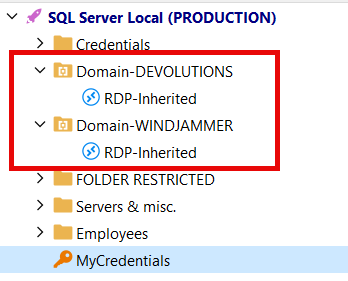
In this scenario, my RDPs have their credentials set to "inherited", so they can take their credentials from its parent folder.
Where it gets interesting is how these folders are configured. Here's how I've configured the one called "Domain-DEVOLUTIONS":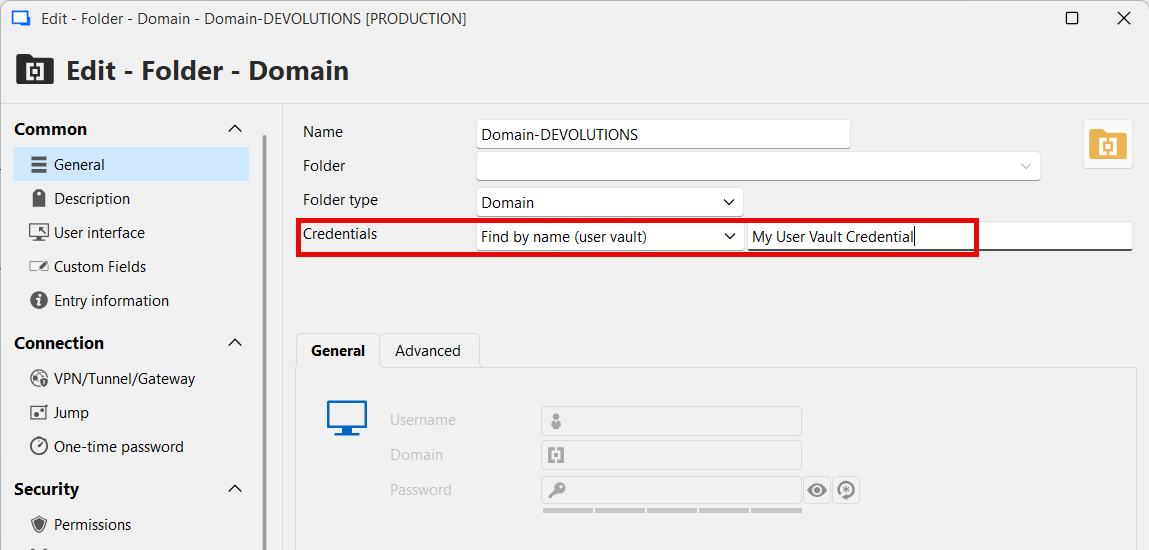
Just to be closer to your current setup, I've also configured the credentials of this folder to use the "Find by name (user vault)" feature.
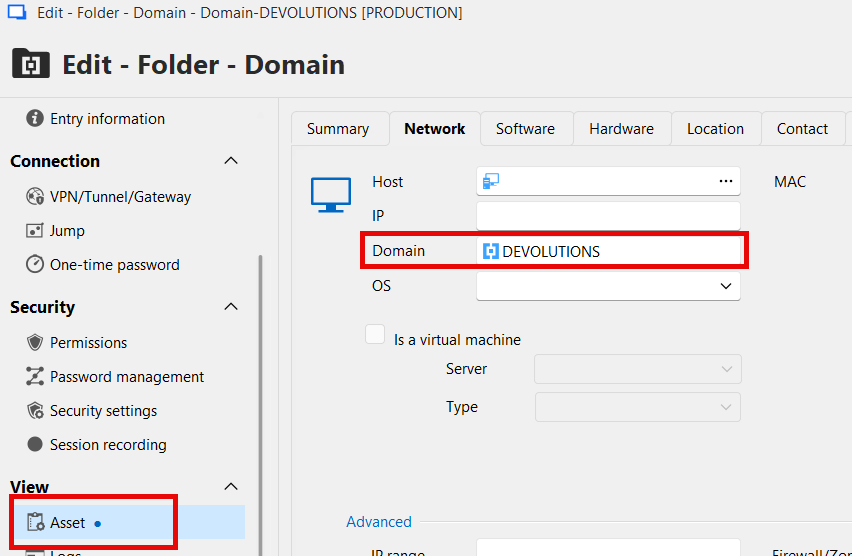
More importantly, in the Asset section, you need to configure the value for the domain you'd like in the Domain field. In my case, this is "DEVOLUTIONS", for testing purposes.
Then, in your user vault, ensure you have a credential entry called "My User Vault Credential" (to match with the name configured previously), and configure the domain with the value "$DOMAIN_MACHINE_DOMAIN$":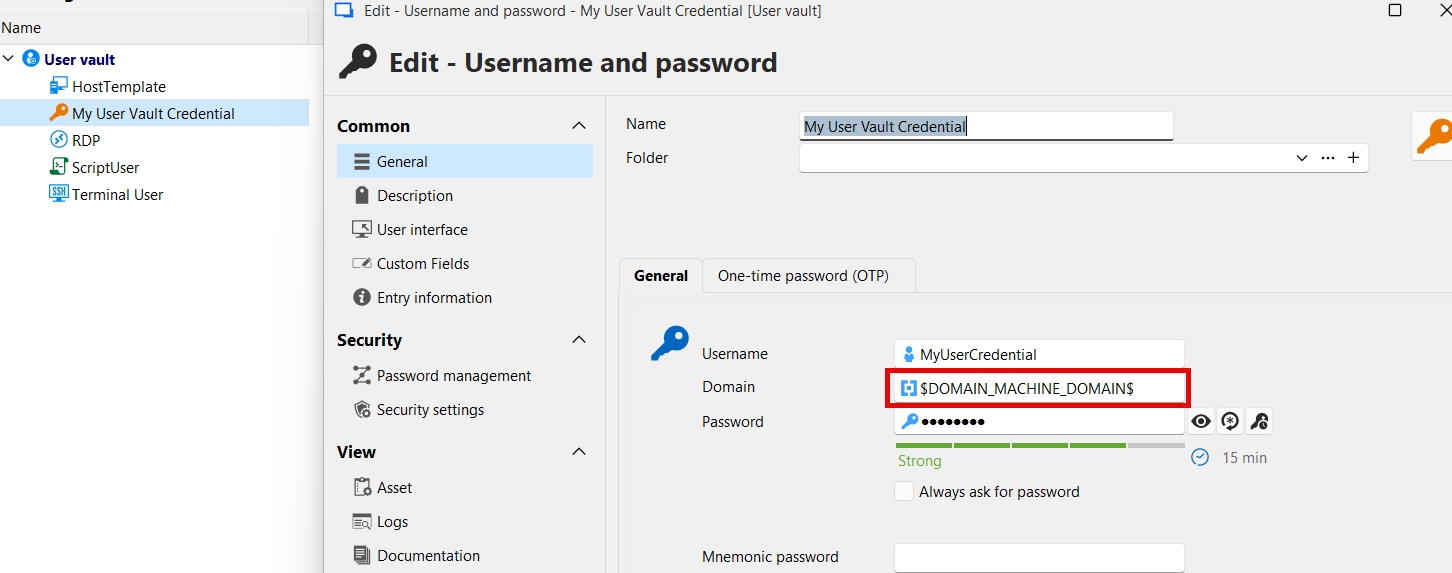
What does $DOMAIN_MACHINE_DOMAIN$ mean in this case? The first part of the variable, "DOMAIN_", is a prefix to resolve this variable against the domain-type folder the entry is located in. Depending on the folder types you are using, you might want to use a different prefix. The second part of the variable "MACHINE_DOMAIN", is the value stored in the Asset->Network->Domain field of an entry. You can read more about variables here: https://docs.devolutions.net/rdm/concepts/intermediate-concepts/variables/
So, now, when you try and view the password of an RDP entry within the "Domain-DEVOLUTIONS" folder, you will see that the username and password are static, but the domain will be based on the value entered in the folder: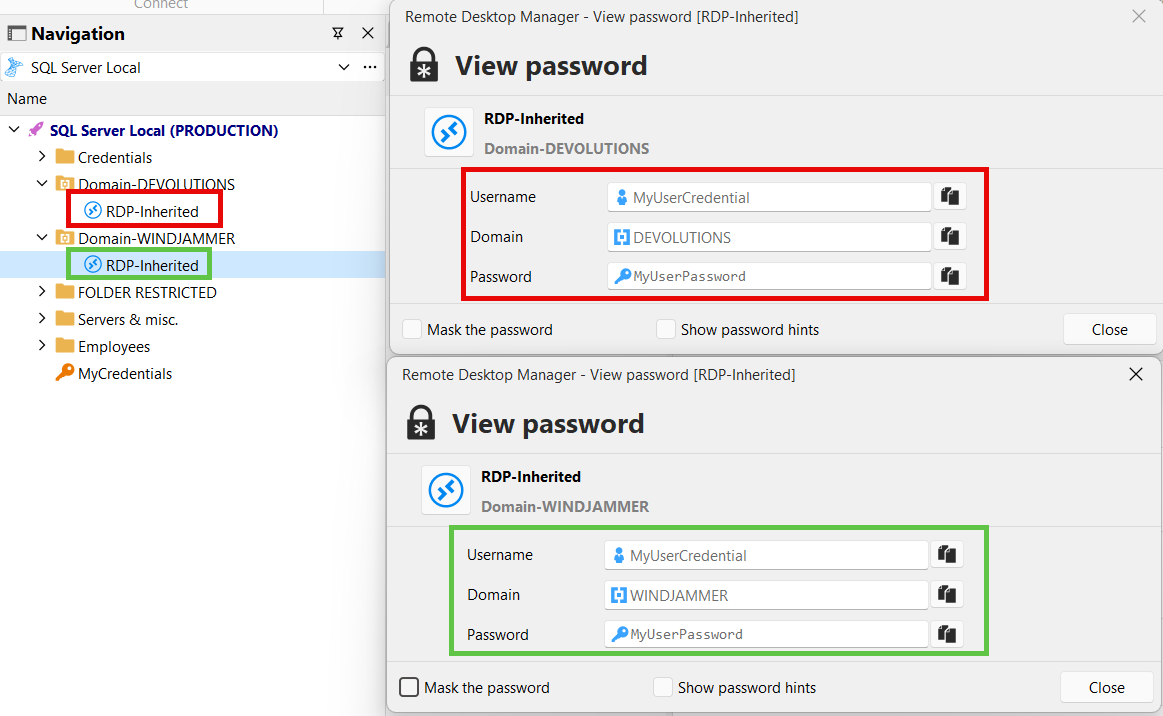
Let me know if I've captured your need properly. Variables are really powerful and they can enable you to simplify configurations drastically, provided you understand how they resolve and their limitations. In my example, I used the "find by name (user vault)" mode, but it's also possible to use this concept with other modes, like "My personal credentials".
I don't think you can avoid user training in this case, though, since new users will not know to configure this variable in their credential. You mention you're on DVLS, so you could leverage the feature of secure messages to send entries, and mark the message as "high priority" so the user is prompted immediately when they receive it: https://docs.devolutions.net/server/kb/how-to-articles/share-entries-dvls/
Regards,
Hubert Mireault
16c47d5d-6431-4a7d-972a-0ad61ce7b19f.png
af251eeb-916e-4484-b9b0-4288368589b9.png
4213ea7b-aea0-4c88-941e-62a21fd293b3.png
db0ab893-da9a-4798-83ac-ce85d330c0a3.png
548fdb8f-d676-4677-87cc-81ff5a760bf1.png
@Hubert Mireault thank you, this was BRILLIANT! It worked perfectly and has reduced us down to no more than 5 User Vaults (at this time). That is a reduction in over 110! Awesome!
Question: I haven't yet implemented Devolutions PAM, but it is coming. Will this play into that just fine? I have some learning to do around your PAM, so please forgive my ignorance at this time.
Thanks again!
Perfect, I'm glad this can help simplify your environment this drastically!
As for PAM, we'll have to perform some tests to see if it's something that can work. Without having tested, we're unsure if things like password rotation or other features would be functionnal when using variables this way. At minimum, it would involve the administrator modifying the PAM accounts manually since the synchronization would obviously not set the domain as a variable. I'll try to get back to you as soon as possible for that.
Assuming the worst case of it not being possible to support variables in this way, we could see about what other kinds of solutions could improve this flow.
Regards,
Hubert Mireault
@Hubert Mireault thank you kindly. I am hopeful this will work with PAM or a similar solution. At the least, can the developers look into options for using variables with PAM?
I just had my immediate team switch to this new method you gave us, and we are rolling it out across the full team by EOM.
With appreciation!
From some testing we did, it might be possible to achieve this with PAM as well, the only thing is it might require your users to create a DVLS PAM entry in their user vault, so not very different from what you're already doing.
When you're at the point of trying out our PAM offering, I would encourage you to book a demo with our customer support team so you can go in-depth about your scenario and your environment to ensure that you start the configuration of your environment on the right foot, and that what you're trying to achieve is feasible (and if not, how we can address it).
I hope this answers your questions for the moment.
Regards,
Hubert Mireault