RDP Username and Password Credentials Injection Issue

Hi Team,
I have a massive list of servers in my RDM that I'm about to share with my team using Devolutions Server. Each server has a different domain, and each teammate will have their own username within those domains. I'm trying to make it easier for them to adapt to by storing the domains within each entry properly, such as seen below. However, when one goes to connect, it either doubles up the domain (if they've logged into that server before), OR it injects the domain from their local PC login (if they've never logged into that server before). It seems that RDM requires both the username and domain to be present in properties of each entry in order to inject such properly.
What options do we have to get around this without having to build so many user credentials vaults?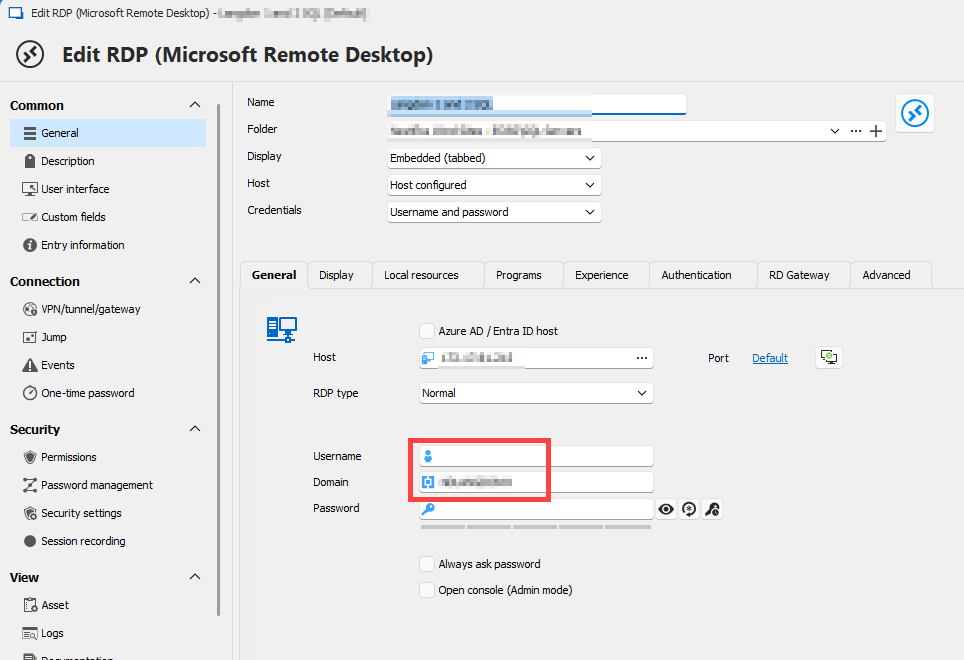
7733d10b-ce3a-4f95-8bb0-2b12aad704e5.png
All Comments (8)
Hello Jimmy,
Thank you for getting in touch with us. To better assist you, could you kindly provide us with the following information:
- Your current RDM version.
- The data source you are utilizing.
- Would the Username and Password be the same for users but on different RDP entries? If yes, I would suggest setting up the Local-Specific Settings and overwriting the credentials. Here's a helpful topic regarding this. Let me know if this is not possible or if it is not working.
https://docs.devolutions.net/rdm/commands/edit/batch/batch-edit/#edit-entries-local-specific-settings
Once we have this information, we will be better equipped to diagnose and resolve the issue.
Best regards,
Maxim Robert
Hi Maxim, and appreciate your reply! :-)
Latest RDM, 2024.2.21.0. Data source is from DVLS Enterprise (latest version there, too).
The usernames for each teammate will be different, but the same for each server they log into, regardless of the domain. We have about 100 different domains currently, and each domain has ~10 servers we log into. We will add about 15+ new domains a year, along with 10+ new servers per domain. It's a LOT to upkeep.
Last week, we bought DVLS Enterprise so we can share a single configuration. Prior to that we were each using local data sources (batch-edit was our best friend), but keeping up with changes and growth amongst dozens of users has been a nightmare, hence why we just bought DVLS Enterprise. We're trying to simplify this with DVLS so we don't need multiple configs and upkeep still. Just to make sure I'm clear with your suggestion, are you saying we should go back to local configs again?
It would be lovely if RDM could inject the domain but leave the username blank, so that this can be typed during the connection. Maybe there's some RDP requirement that both have to be passed at the same time. Seems like a coding update could work.
Thanks,
Jimmy
Hi Team, any updates to share? Thx!
Hello Jimmy,
Thank you for your response, and I am sorry for the delay!
If you create a credential entry with the domain and check "Always ask for a password" when linking it to the RDP session, it will prompt the user for the username and password with the domain already pre-filled. .png)
.png)
Another solution is to create separate folders based on the domain name and then add the credential entries in each respective folder. In the Parent Folder, for the credentials setting, choose "Find By Name (User Vault)." Set the entries in the domain folders to "Inherited." Be sure to enter the exact name of the credentials entry that each user needs to create in their User Vault. Ensure the name is correct, as users will need to create a Username/Password entry with their own username, password, and the domain related to the appropriate folder, matching the name in the Parent Folder.
Here’s documentation on how to use the "Find By Name (User Vault)" feature if needed.
https://docs.devolutions.net/rdm/kb/rdm-windows/knowledge-base/credentials-find-by-name/
If you have any other questions, feel free to let us know.
Best regards,
Maxim Robert
image (71).png
image (70).png
Excellent! The first solution you gave is working. I'll definitely look at the second solution, as well, and report back. Thank you so much.
Hey there Maxim, I'm unable to get your second solution to work. I believe I'm misreading your instructions. Here's what I'm running into.
1: I have the Parent folder "Test" (this will be changed to the Domain Name) set to "Find by name (user vault) and manually typed the name of the credential entry (blurred below)
2: I have just the domain name in the credential entry with "Always ask password" checked
3: I have the RDP session set to "Inherited".
0607b166-98c8-4c89-b2d5-d51cfa903c19.png
I have this figured out, I do believe.
1: I created a "User Vault" credential entry with the domain name, and my username and password inside of it
2: Back in DVLS, I have a parent folder (we will call "Test") set to "Find by name (user vault) and manually typed the name of the credential entry
3: Inside this "Test" parent folder, I have RDP entries that are set to "Inherited" (from parent folder)
I was able to log in just fine this way. I assume I can just create an export of my User Vault, remove my username and password, and have them just update it with theirs and import into their User Vault. :)
I do like this second option. However, in either case, RDM errors when exporting credential entries. Bummer. This will hurt trying to make a quick import for the team with over 100 entries. I posted this up in the RDM forum for bugs.
https://forum.devolutions.net/topics/42987/bug-exporting-username-and-password-entry-to-csv-error