SSO with embedded Microsoft Remote Desktop entry in RDM does not work
SSO with embedded Microsoft Remote Desktop entry in RDM does not work

In our environment, we have two Privileged Access Workstation (PAW). Circumstance has it that one of them is running Windows Server 2019, the other is running Windows Server 2022.
On both PAW we have Remote Desktop Manager installed and they are both set up with the same data source that is running on dedicated Microsoft SQL Server. Both PAW is running RDM version 2025.3.16.0 and .NET 9.0.3.
We now have a issue with the SSO when we use embedded Microsoft Remote Desktop entry in RDM on the PAW running WS2022. We use smart card authentication when logging in to PAW, and we get the error message "Your credentials did not work" "The credentials that were used to connect to X did not work. Please enter new credentials." "The logon attempt failed". See attached screenshot. In the same window we can reauthenticate picking the correct credential and enter the PIN (More choices in screenshot). We are then logged in. The SSO works fine on the other PAW, or if we use External in RDM on both PAW.
I'm afraid I do not know when this issue first occurred, but this have worked at some point on the PAW with WS2022.
Anyone with any tips as to resolve this issue? =)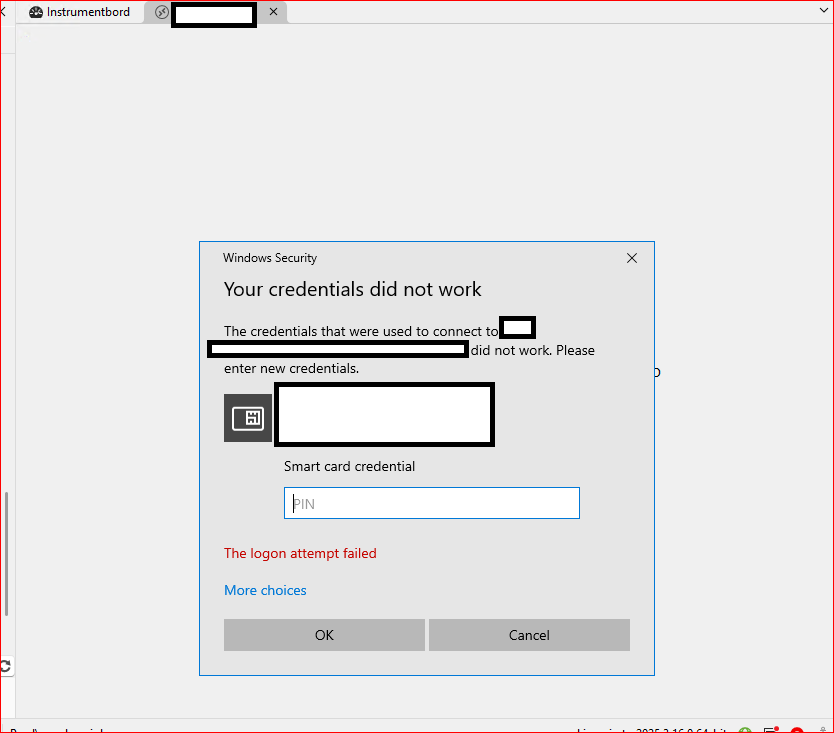
Skjermbilde 2025-12-04 101348 – Kopi.png
All Comments (11)
Hello
You wrote
We use smart card authentication when logging in to PAW,
But it's a bit unclear; I think you mean "we use smartcard authentication when logging into another server from RDM on the PAW". Is that right? Or you're having trouble connecting to the PAW itself?
Assuming I'm correct, can you check if the affected PAW (2022) has Microsoft KB5066793 installed?
Thanks and kind regards,
Richard Markievicz
Hello. Thank you for the response =)
We initially log on to our PAWs from our own laptops. When we log on to our PAWs, we use privileged accounts that are different from the standard employee accounts we use to logon to our laptops. These privileged accounts are set up with "Smart card is required for interactive logon" in the Active Directory user account options. We have enrolled certificates for smart card logons to these user accounts on YubiKeys.
There's no problem logging into our PAWs which we use standard Remote Desktop Connection for. When we use Remote Desktop Manager to connect to a server from one of the two PAWs, with RDP entry configured to use integrated screen, the SSO does not work. SSO works when we use RDP outside of RDM on our PAWs, or if we configure the RDP entry in RDM to use external screen.
Regarding the mentioned KB, it is not installed on the PAW with the issue. As I can see, the KB is not for the version of Windows Server we run. The latest CU we have installed on our PAW is KB5068787 (2025-11 CU for Microsoft Server 21H2).
Hello
Ok, I think I understand. So - when you hop to another Remote Desktop session from the PAW, you're also using the same smartcard credential?
I'm guessing that the X.509 entry in RDM is up-to-date with the certificate you want to use? All we're doing is passing the certificate thumbprint and PIN to RDP. So if the certificate was renewed or recreated but RDM was not updated, the thumbprint would no longer match.
Otherwise, you don't have the KB I mentioned installed, but I'm not surprised if the specific security update I'm interested in was rolled into another KB for that OS. Microsoft has made some changes that have broken X.509 login from RDM and we have a ticket open for that currently. In the meantime there is a workaround that can be used. I'm not sure it's the case here, because the error message you are getting is not what I'd expect to see, but that might be related to the double-hop. Can you try applying the workaround in this article on the affected PAW, if only for testing purposes, and let me know if it starts working again?
Thanks and kind regards,
Richard Markievicz
Yes, the smart card credential that we use to log on to our PAW, is reused when remoting from PAW to another server.
The way we use RDM is to have a managed application window in which we have plain Remote Desktop Connection entries to all of our servers in our environment. The Remote Desktop Connection entries contain only the name of the servers. We simply double click them to remote from PAW to our servers. The nice part about using RDM is that we can have all the remote sessions in tabs instead of individual windows if we used Remote Desktop Connection outside of RDM. We do not have any X.509 entries in RDM that we use with process of remoting from PAW to our servers. If I launch Remote Desktop Connection on our PAW, the currently logged on credential is automatically used (which is my smartcard credential I used to log on to the PAW). See attached screenshot.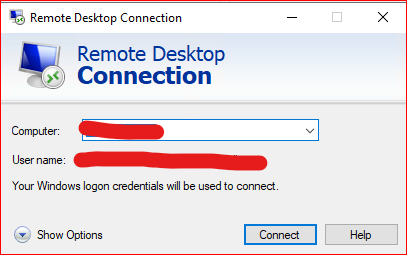
The SSO process (when we reuse the credential we logged on PAW with when remoting to servers) works fine outside of RDM on both PAWs, and with RDM on the PAW running WS2019.
Originally the registry key "DisableCapiOverrideForRSA" was set to value 1 on the PAW that have the issue. I set it to 0 and rebooted. Did another test, but the issue remains.
Skjermbilde 2025-12-08 094435.png
Hello
Thank you, I understand. So in this case your current credentials are just being delegated for SSO to the remote machine. I think the fact that it's a smartcard credential is probably not relevant. Obviously the server and client setup is correct since it works with mstsc.
It seems clear that in the embedded mode, the wrong (or no) credential is being delegated, but only on that one workstation.
I'm afraid I don't have an immediate answer for what is going wrong. Can you try (on the affected PAW) navigating to File > Settings > Entry Types > Sessions > Remote Desktop (RDP) > API Hooking and
(1) Check that API hooking is "Enabled"
(2) Set the Log Level to "Trace"
(3) Provide the path to a directory where the log files can be created
Save the changes and restart RDM.
Now, try your connection - first in "embedded" mode, then in "external" mode. You should get a pair of log files created in the directory you specified (one for the embedded, one for the external). Please send the files to me by PM. Afterwards you can revert the log level back to "Off". It has a performance impact.
Thanks and kind regards
Richard Markievicz
Sorry for the delay. I've had a busy week, and will get to your troubleshooting steps as soon as I can.
hello,
Thank you for your response,
We will wait for your feedback,
Best regards,
Tommy Sanders
Hello. Happy new year and thank you for the patience.
I have sent the log files to you @Richard Markiewicz in PM.
Hello
Thanks for sending the log files over. They're not a silver bullet (the MS RDP ActiveX doesn't really expose much diagnostics, we're using API hooking to log certain function calls and code paths) but they do give some hints.
In the embedded (failure) case I do see
sspi_InitializeSecurityContextW(pszTargetName: TERMSRV/{server} fContextReq: xxx phCredential=xxx ptsExpiry=xxx), status: 0x8009030E
Where the status is "SEC_E_NO_CREDENTIALS"; meaning that CredSSP has a hard failure - it cannot obtain a usable default credential from the current logon for SSO.
When I compare the settings that the embedded and external modes are using, one interesting thing stands out:
RestrictedLogon - embedded enabled, external disabled
RedirectedAuthentication - embedded disabled, external enabled
RestrictedLogon is "Restricted Admin Mode" and RedirectedAuthentication is "Remote Credential Guard". These correspond with the settings here: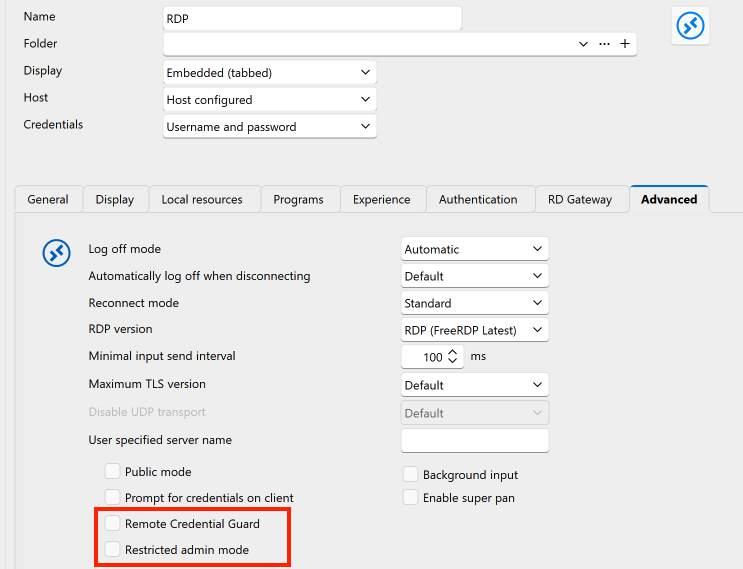
Now, one or both of these settings could be relevant to your problem but there's two things that don't make sense:
- Why would the setting(s) be applied differently between embedded and external mode? I see no reason in the code for that (although I don't rule out a bug I can't see right now)
- Why would you get different behaviour across the two PAWs; where both are using the same data source and therefore (presumably) the same settings?
At least in the case of Restricted Admin Mode, it can also be controlled by a GPO; I'm not sure about Remote Credential Guard.
There's also the question of if you're enabling either of these (either explicitly or via policy) on the "client" side (the first machine that you use to RDP to the PAW(s)). Although, I don't think you specified this, but I guess you're just using mstsc for that first hop, and the setup is the same for either PAW?
A couple things that would help further are:
- What do you have configured in RDM or GPO for these settings? i.e. Are you expecting RA or RCG? Given your scenario, I'd imagine you're expecting to use RCG.
- How are you making that first "hop" connection to the PAW itself? Do you have RA or RCG applied on that connection? Is the setup the same for both the 2019 and the 2022?
- It would be really good if you can reproduce the logging above, but from the working case (i.e. the Win2k19 machine connecting using embedded mode), to let me compare it to the failure case.
- In either of the PAWs, you're not launching RDM "as administrator" are you? Either by explicitly choosing that when you open RDM, or by having it configured somewhere else?
Mainly to provide a hint for my future self: if the above doesn't yield any results; the next things to try will be adjusting the RDP version on the Win2k22 box to an earlier version (to match the Win2k19 box), and querying through the RDP ActiveX operational logs to see if it yields any clues. But that's not for now.
As always, please let me know if you have any further question or comments
Kind regards,
Richard Markievicz
Screenshot 2026-01-06 at 14.54.15.png
Hello.
We ended up setting up a two new servers acting as PAWs with Windows Server 2025 installed. They both work as expected with Remote Desktop Manager. I think that we can consider the case "closed".
I can still try to answer your questions though:
I can see that there's a group policy setting "Restrict delegation of credentials to remote server" set to Enabled for the PAWs with "Use the following restriced mode: Require Remote Credential Guard".
The first hop is done using standard Remote Desktop Connection from Windows 11. RCG is set to disabled, and I can't see anything regarding RA. The setup should be same for 2019 and 2022 as both computer objects are on the same location in Group Policy OU.
RDM is not launched as administrator on the PAW.
Hello
Thanks for the follow up.
So, in this case, I think that the issue was likely that RDM was not applying the RCG setting to embedded connections. I'm not sure why, and since this is working for you now I won't troubleshoot it further at this point. But if the problem does reoccur please let us know, and we know what to look for.
I'm glad things are working for you now. As I said, don't hesitate with further questions or comments.
Kind regards,
Richard Markievicz