SFTP Window resize problem - RDM 2025.3.20.0

Hello tech team,
just installed RDM 2025.3.20.0 on WIndows 11 25H2, build 26200.6899.
Coming from MobaXTerm, I really like your program ; however, up to now I found 2 annoying problems regarding the SFTP panel, here is the first one, related to SFTP panel resize.
Using an SSH session, i open the SFTP panel, and:
1a/ Resizing the panel to make it narrower, after a point, the scroller in SFTP panel disappear
1b/ After the panel has been resized and the scoll bar is no more visible, so is the panel separator ; no way to make it wider again, as the panel separator seems to be "under" the console panel -- mouse cursor wont change to "resize" mode anymore.
Here are 2 screenshots: top part shows how I can resize the SFTP panel (see the mouse cursor),
bottom part shows the same after it has been resized... cursor wont change, no resize possible.
You can see a small visible portion of the scroll bar...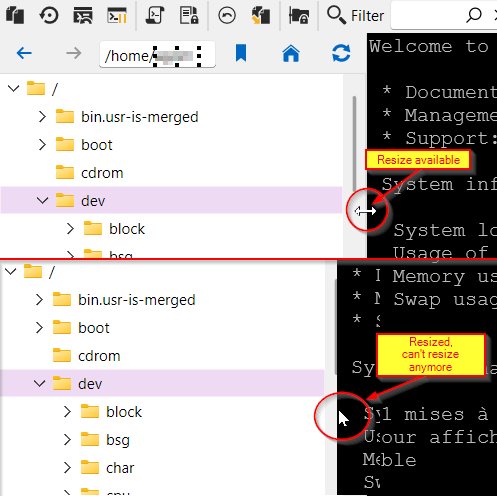
I hope you will be able to fix this :)
Suggestion:
1/ Use less space between SFTP top icons
2/ Allow these toolbar elements to wrap when resizing.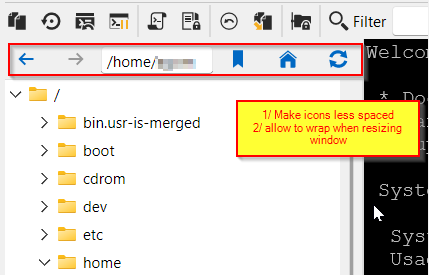
Best regards
Chris
33d49462-af9d-4e45-8d02-4d0b1e80a3ad.png
25dd83a3-14be-4170-bf20-25eeecf5abb6.png
All Comments (2)
Hello Chris,
Thank you for the feedback. I agree that the wrapping of the toolbar would make sense. I've also noticed that the grabbable edge is something like a single pixel too, which is very infuriating to use in my opinion, and I'm sure other users probably do not enjoy it 🙂 I wasn't able to reproduce the issue where the scroll bar can be "lost" when resizing too small but I will open a ticket for this and all of the other points I've mentioned so we can investigate for a solution.
Regards,
Hubert Mireault
Thanks a lot for the quick reply, i noticed also the very tiny grabbable edge which is indeed annoying :-)
Generally in my own windows programs, i use something like 4 pixels for the resize line, and sometimes I add a flashy green color that cleraly shows the grabble area...
Well, in this case just a bit more pixels would be ok I guess.
best regards,
Chris