Password not autofilling when autocomplete="off"

Hello
I have some RDM entries type website where I want to autofill login and password but when there is a autocomplete="off" on webpage code the password is not provided in RDM. What`s strange when i use your browser extension the password is autofilled without a problem.
There is a code for the password section for one of the websites with this problem.
<input data-v-4fed9be4="" type="password" autocomplete="off" id="1" class="form-control" style="background-image: url("data:image/svg+xml;base64,PD94bWwgdmVyc2lvbj0iMS4wIiBlbmNvZGluZz0iVVRGLTgiPz4KPHN2ZyBpZD0iYSIgZGF0YS1uYW1lPSJMYXllciAxIiB4bWxucz0iaHR0cDovL3d3dy53My5vcmcvMjAwMC9zdmciIHZpZXdCb3g9IjAgMCAzOCAzOCI+CiAgPHBhdGggZD0iTTI1Ljg4LDIxLjY3aC0uMDV2LS4wOWwuMDUtLjA1di4xNFoiIGZpbGw9IiM4MzgzODMiIHN0cm9rZS13aWR0aD0iMCIvPgogIDxjaXJjbGUgY3g9IjI2LjY2IiBjeT0iMjYuNTQiIHI9IjExLjM0IiBmaWxsPSIjODM4MzgzIiBzdHJva2Utd2lkdGg9IjAiLz4KICA8cGF0aCBkPSJNMjkuMjIsMzQuMDhoLTMuMTh2LTguN2wuMDMtMS40My4wNS0xLjU2Yy0uNTMuNTMtLjg5Ljg3LTEuMSwxLjA0bC0xLjczLDEuMzktMS41My0xLjkxLDQuODQtMy44NmgyLjYxdjE1LjA0WiIgZmlsbD0iI2ZmZiIgc3Ryb2tlLXdpZHRoPSIwIi8+CiAgPHBhdGggZD0iTTEzLjQxLDMwLjU0Yy0uOTctMS4yMi0xLjU3LTIuNzUtMS41Ny00LjQzLDAtLjY0LjA5LTEuMjYuMjYtMS44NS4yNi4yMy41NC40Mi44Mi42Mi4xNC0xLjE5LjQ0LTIuMzMuODYtMy40MS0xLjItMS4yNy0xLjk0LTIuOTctMS45NC00Ljg1LDAtMy45MywzLjE5LTcuMTIsNy4xMi03LjEyLDIuNTIsMCw0LjcsMS4zMyw1Ljk3LDMuMy41Ny0uMDcsMS4xNS0uMTIsMS43NC0uMTJzMS4yMS4wNSwxLjgxLjEzYy0xLjA4LTIuNjgtMy4yMi00LjgyLTUuOTQtNS44MywxLjI5LTEuMzcsMy4xLTIuMjMsNS4xMy0yLjIzLDMuOTMsMCw3LjEyLDMuMTksNy4xMiw3LjEyLDAsMS4wNy0uMjUsMi4wOC0uNjgsMi45OS4yNC4xNS40Ni4zMS42OS40Ny42Ny40MiwxLjMxLjg4LDEuODksMS40MS43OS0xLjQ1LDEuMjYtMy4xLDEuMjYtNC44NywwLTUuNjgtNC42LTEwLjI4LTEwLjI4LTEwLjI4LTMuNjMsMC02LjgsMS45LTguNjMsNC43NS0uMDIsMC0uMDUsMC0uMDcsMC0uMDMsMC0uMDUsMC0uMDcsMC0xLjgyLTIuODQtNC45OS00Ljc1LTguNjItNC43NUM0LjU4LDEuNjEtLjAyLDYuMjEtLjAyLDExLjg4czQuMjEsOS44Niw5LjU0LDEwLjI0Yy0uNTIsMS4yMy0uODQsMi41Ny0uODQsMy45OSwwLDQuNjcsMy4xMSw4LjYxLDcuMzgsOS44Ni0xLjAzLTEuMzMtMS44MS0yLjg1LTIuMzEtNC41LS4xMi0uMzEtLjI0LS42Mi0uMzMtLjk0Wk04LjY4LDE2LjYzYzAsLjc3LjA5LDEuNTIuMjUsMi4yNC0zLjI5LS42Mi01Ljc5LTMuNTEtNS43OS02Ljk4LDAtMy45MywzLjE5LTcuMTIsNy4xMi03LjEyLDIuMDMsMCwzLjg0Ljg2LDUuMTMsMi4yMy0zLjkyLDEuNDUtNi43MSw1LjIxLTYuNzEsOS42M1oiIGZpbGw9IiM4MzgzODMiIHN0cm9rZS13aWR0aD0iMCIvPgo8L3N2Zz4="); background-repeat: no-repeat; background-position: calc(100% - 5px) 50%; background-size: 20px; cursor: auto;" data-com.dwl.browser.filled="yes" data-com.dwl.browser.user-edited="yes">
All Comments (16)
Hi,
To enable autofill in Remote Desktop Manager (RDM), you’ll need to identify the login fields on your website. You can do this by using the Automatic or Discover button, or by adding the fields manually.
You can find some instructions in the following resources:
https://docs.devolutions.net/rdm/kb/knowledge-base/website-authentication/
https://academy.devolutions.net/student/activity/2404924-automating-website-logins-with-autofill-in-rdm
In this case, the Password ID should be set to 1.
Best regards,
Olivier Désalliers
Hi Olivier,
I know about the identity for login fields. I`m wondering why it is working on Chrome and not working i RDM. When i change password ID from [password] to [1] it`s stopped working in chrome and isn`t working in rdm.
Hi,
The main difference between the extension and RDM (other than RDM using WebView2) is that the extension doesn’t require the [UserName] or [Password] tags to instruct RDM’s embedded browser to automatically detect the input fields.
The brackets are only unnecessary to have the "Automatic" mode. In other modes, you should use the exact IDs as they appear in the input DOM (e.g., without brackets).
If you’d like, you can send me the website URL via direct message if it’s a public website. We can then analyze it to understand why the extension running in Chrome and RDM with WebView2 might behave differently on your site.
Best regards,
Olivier Désalliers
Sadly this website aren`t publicly available. The issue is mainly with mgmt sites for HPE 3PAR/Alletra, hitachi disk arrays etc
Hi,
We’ll check if we can reproduce the issue on those pages.
If possible, you can send us the webpages via private message so we can analyze what’s happening. You can do this by following these steps:
Saving and Sharing a Webpage
- Save the Complete Webpage
- Follow the steps in this guide: https://www.wikihow.com/Save-a-Webpage
- Make sure to save the page with all its resources (HTML, CSS, images, etc.) in a complete folder.
- Compress the Saved Webpage
- Locate the folder containing the saved webpage files.
- Right-click the folder and choose “Compress” or “Send to → Compressed (zipped) folder” to create a .zip file.
- Send the Zipped Folder to Support
- Attach the .zip file to an email and send it to our support team.
Thank you for your cooperation!
Best regards,
Olivier Désalliers
Hi
Here is another similar case
https://forum.devolutions.net/topics/51461/web-site-link-with-autofill-loginnative-application
Maybe should have better way to deal with this auto fill.
I attached some pages that auto fill doesn`t work in RDM but works in browser.
tcPDU.html
Storage.html
Hi,
Regarding tcPDU.html, can you confirm that the issue you’re seeing with RDM is the following: the username and password fields are both filled, but immediately after filling, the website clears the password field? This is the behavior we were able to reproduce on our side, and we will investigate why this happens in RDM.
For Storage.html, the username and password fields are filled correctly and remain visible. Is the issue that, although the fields look filled, the website does not recognize that the credentials were entered?
Best regards,
Olivier Désalliers
I attached video of the issue. When i run the web the password filed isn`t filling up, on storage login and password isnt working.
storage.webm
tcPDU.webm
Hi,
Regarding the tcPDU website, a potential fix for the RDM issue will be included in the next RDM minor release.
This update may also resolve the issue on the “storage” website.
We will let you know as soon as it becomes available.
Best regards,
Olivier Désalliers
Hello,
Thank you for being so patient!
I'm pleased to inform you that a new version of RDM (2025.3.25.0) has been released, featuring the fix for your issue.
Latest Version: Download RDM
Please let us know if this works or if you encounter any issues.
Best regards,
Maxim Robert
I have the same/similar problem:
- Username and password fields are both filled, but immediately after submitting (Login button), the password field is cleared.
- webpage autocomplete=off
- RDM 2025.3.26.0
- DVLS 2025.3.8
- embedded browser (Edge)
- https://dev.oftec.org/
RDM 2025.3.25.0 or better doesn't fix the problem for me. Thanks.
Kind regards, Jim.
Hi,
Just to confirm, is this the login page you’re using?
https://dev.oftec.org/portal
The login form is being filled correctly, and the password remains in the field before we click Login. This is different from the original issue, where the password field was being cleared before submission.
On https://dev.oftec.org/portal, after submitting the form the page is reloaded. Due to the website’s cache, the email address stays filled in, but the password field does not. We then see the following error message:
“The Username or Password provided is incorrect.”
This is expected, as we do not have valid credentials for this website.
Could you confirm whether you see any error message below the login form after you click Login? If so, what does it say?
Best regards,
Olivier Désalliers
Hi Olivier
Thanks for your quick response.
Yes, dev.oftec.org/portal is the correct URL for the login page. Apologies, I should have made that clear in my previous post.
When I double click on the RDM entry, the page opens and the user name and password are auto-filled. When I then click the Login button, the user name field remains filled, but the password field is cleared. Below the login box, the message "The reurnUrl field is required." is displayed. Thanks.
Regards, Jim.
Hi,
We sometimes see the message “The returnUrl field is required” and sometimes “The Username or Password provided is incorrect.” This happens whether we use RDM with autofill or type the username and password manually in Chrome Guest Mode without RDM: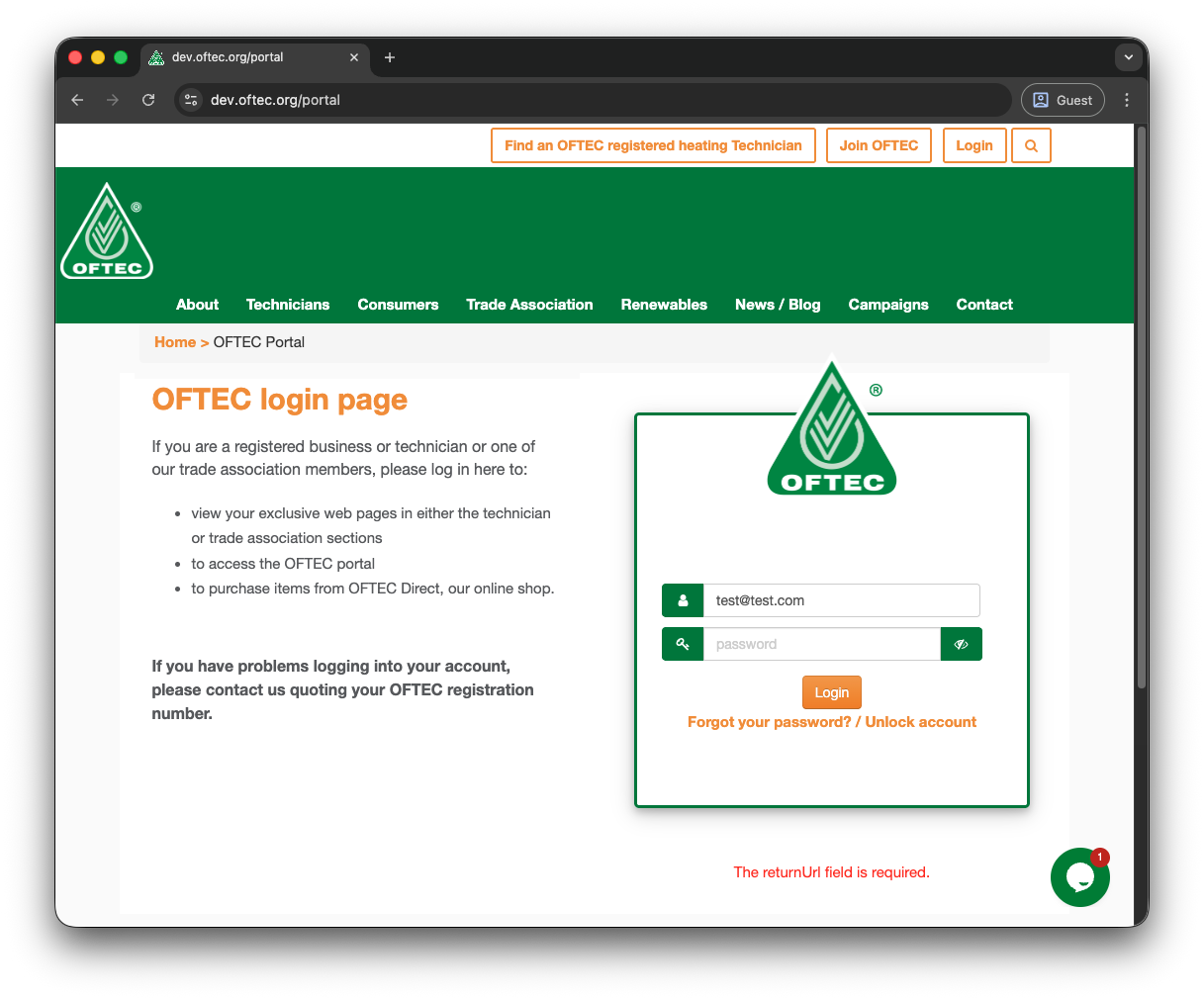
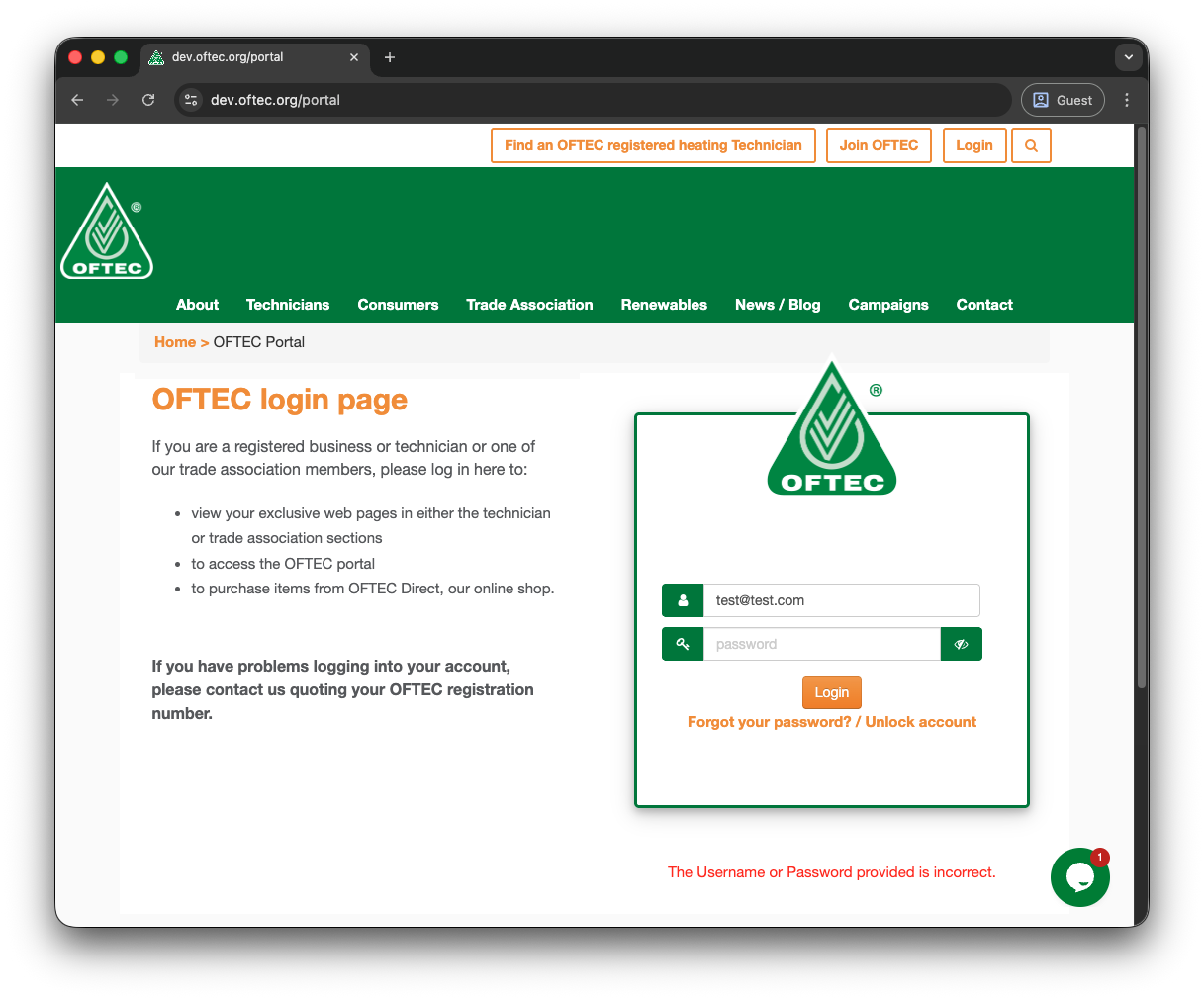 If you autofill the website again after getting “The returnUrl field is required”, does the login then work, or do you get the same error (or a different one)?
Best regards,
Olivier Désalliers
oftecUsernameAndPasswordProvidedIsIncorrect.png
oftecTheReturnUrlFieldIsRequired.png
Hi Olivier
Thanks for spotting that “The returnUrl field is required” error occurs (sometimes) in Chrome guest mode outside of RDM. I'll contact the website developers.
Kind regards, Jim.