Error message when connecting to PowerShell Remote session

RDM version 2025.3.20
When connecting to PowerShell remote session, the following error message appears before remote machine prompt:
MethodInvocationException: Exception calling "Load" with "1" argument(s): "Unable to load DLL 'C:\Program Files\Devolutions\Remote Desktop Manager\runtimes\win-x64\native\jetify.dll' or one of its dependencies: The specified module could not be found. (0x8007007E)"
The abovementioned error appears when connection is established using remote Powershell 7 configuration name. Using Windows PowerShell configuration, there is no error message.
In both cases, the local PowerShell that connects to remote machine, was PowerShell 7.5.4 .
The affected configuration choice in session: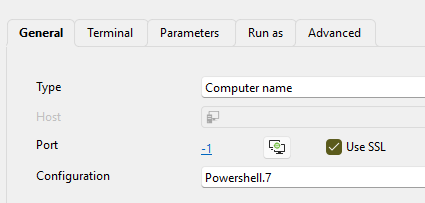
076db3f7-909a-438f-87bf-c42327a38851.png
All Comments (10)
Hello,
Thank you for your feedback.
Could you send us the Windows version you are currently using? You can get the information with the winver command.
It's possible that the Windows Terminal isn't supported on your Windows version.
Best regards,
Érica Poirier
OS is Windows 11 v23H2
Hello,
Thank you for your feedback.
It seems that the RDM installation you are using is missing the 'C:\Program Files\Devolutions\Remote Desktop Manager\runtimes\win-x64\native\jetify.dll' file.
Could you try to repair your RDM installation or try with a portable installation?
Let us know if that helps.
Best regards,
Érica Poirier
portable installation has exactly the same problem, pointing to missing file in portable folder. And looking into folder, the mentioned file exists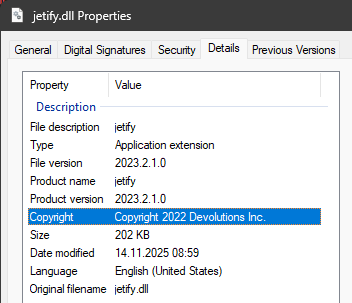
The same file exists in installed version folder
792bc28d-10a8-4802-ac90-af1bd3cd4b07.png
did update to version 2025.3.22 . The error still exists.
Here is more detailed error description from PowerShell (result of Get-Error cmdlet):
Exception             :
    Type           : System.Management.Automation.MethodInvocationException
    ErrorRecord    :
        Exception             :
            Type    : System.Management.Automation.ParentContainsErrorRecordException
            Message : Exception calling "Load" with "1" argument(s): "Unable to load DLL 'C:\Program Files\Devolutions\
Remote Desktop Manager\runtimes\win-x64\native\jetify.dll' or one of its dependencies: The specified module could not b
e found. (0x8007007E)"
            HResult : -2146233087
        CategoryInfo          : NotSpecified: (:) [], ParentContainsErrorRecordException
        FullyQualifiedErrorId : DllNotFoundException
        InvocationInfo        :
            ScriptLineNumber : 1
            OffsetInLine     : 405
            HistoryId        : 1
            Line             : if ($PSEdition -eq 'Desktop') { Add-Type -Namespace System.Runtime.InteropServices -Name
 NativeLibrary -ErrorAction SilentlyContinue -MemberDefinition '[DllImport("Kernel32.dll", EntryPoint="LoadLibraryW", C
harSet=CharSet.Unicode, SetLastError=true)] public static extern IntPtr Load(string fileName);'};$JetifyDll="C:\Program
 Files\Devolutions\Remote Desktop Manager\runtimes\win-x64\native\jetify.dll";[System.Runtime.InteropServices.NativeLib
rary]::Load($JetifyDll);;$Username = 'myuser';$Password = 'mypassword';$SecurePassword =
 ConvertTo-SecureString $Password -AsPlainText -Force;$Credential = New-Object System.Management.Automation.PSCredentia
l @($Username, $SecurePassword);
            Statement        : [System.Runtime.InteropServices.NativeLibrary]::Load($JetifyDll)
            PositionMessage  : At line:1 char:405
                               + … jetify.dll";[System.Runtime.InteropServices.NativeLibrary]::Load($Jet …
                               +               ~~~~~~~~~~~~~~~~~~~~~~~~~~~~~~~~~~~~~~~~~~~~~~~~~~~~~~~~~
            CommandOrigin    : Internal
        ScriptStackTrace      : at <ScriptBlock>, <No file>: line 1
    TargetSite     :
        Name          : ConvertToMethodInvocationException
        DeclaringType : [System.Management.Automation.ExceptionHandlingOps]
        MemberType    : Method
        Module        : System.Management.Automation.dll
    Message        : Exception calling "Load" with "1" argument(s): "Unable to load DLL 'C:\Program Files\Devolutions\R
emote Desktop Manager\runtimes\win-x64\native\jetify.dll' or one of its dependencies: The specified module could not be
 found. (0x8007007E)"
    Data           : System.Collections.ListDictionaryInternal
    InnerException :
        Type       : System.DllNotFoundException
        Message    : Unable to load DLL 'C:\Program Files\Devolutions\Remote Desktop Manager\runtimes\win-x64\native\je
tify.dll' or one of its dependencies: The specified module could not be found. (0x8007007E)
        TargetSite :
            Name          : <LoadFromPath>g____PInvoke|1_0
            DeclaringType : [System.Runtime.InteropServices.NativeLibrary]
            MemberType    : Method
            Module        : System.Private.CoreLib.dll
        Source     : System.Private.CoreLib
        HResult    : -2146233052
        StackTrace :
   at System.Runtime.InteropServices.NativeLibrary.<LoadFromPath>g____PInvoke|1_0(UInt16* __libraryName_native, Int32 _
_throwOnError_native)
   at System.Runtime.InteropServices.NativeLibrary.<LoadFromPath>g____PInvoke|1_0(UInt16* __libraryName_native, Int32 _
_throwOnError_native)
   at CallSite.Target(Closure, CallSite, Type, Object)
    Source         : System.Management.Automation
    HResult        : -2146233087
    StackTrace     :
   at System.Management.Automation.ExceptionHandlingOps.ConvertToMethodInvocationException(Exception exception, Type ty
peToThrow, String methodName, Int32 numArgs, MemberInfo memberInfo)
   at CallSite.Target(Closure, CallSite, Type, Object)
   at System.Dynamic.UpdateDelegates.UpdateAndExecute2[T0,T1,TRet](CallSite site, T0 arg0, T1 arg1)
   at System.Management.Automation.Interpreter.DynamicInstruction`3.Run(InterpretedFrame frame)
   at System.Management.Automation.Interpreter.EnterTryCatchFinallyInstruction.Run(InterpretedFrame frame)
CategoryInfo          : NotSpecified: (:) [], MethodInvocationException
FullyQualifiedErrorId : DllNotFoundException
InvocationInfo        :
    ScriptLineNumber : 1
    OffsetInLine     : 405
    HistoryId        : 1
    Line             : if ($PSEdition -eq 'Desktop') { Add-Type -Namespace System.Runtime.InteropServices -Name NativeL
ibrary -ErrorAction SilentlyContinue -MemberDefinition '[DllImport("Kernel32.dll", EntryPoint="LoadLibraryW", CharSet=C
harSet.Unicode, SetLastError=true)] public static extern IntPtr Load(string fileName);'};$JetifyDll="C:\Program Files\D
evolutions\Remote Desktop Manager\runtimes\win-x64\native\jetify.dll";[System.Runtime.InteropServices.NativeLibrary]::L
oad($JetifyDll);;$Username = 'myuser';$Password = 'mypassword';$SecurePassword = Convert
To-SecureString $Password -AsPlainText -Force;$Credential = New-Object System.Management.Automation.PSCredential @($Use
rname, $SecurePassword);
    Statement        : [System.Runtime.InteropServices.NativeLibrary]::Load($JetifyDll)
    PositionMessage  : At line:1 char:405
                       + … jetify.dll";[System.Runtime.InteropServices.NativeLibrary]::Load($Jet …
                       +               ~~~~~~~~~~~~~~~~~~~~~~~~~~~~~~~~~~~~~~~~~~~~~~~~~~~~~~~~~
    CommandOrigin    : Internal
ScriptStackTrace : at <ScriptBlock>, <No file>: line 1The abovementioned error occurs inside the remote session. And there is no Remote Desktop Manager installed on remote machine. The code visible above is first command in remote session history (visible as result of Get-History -id 1)
And that code does not run in remote PowerShell 5.1 session, because in remote session, the variable PSEdition is not initialized and the type [System.Runtime.InteropServices.NativeLibrary] does not exist.
Hello,
Thank you for your feedback.
I'm still unable to reproduce this issue. Do you have an antivirus that could block the usage of this file?
I'll ask our QA team to try to reproduce the issue you are experiencing.
Thank you for being so patient.
Best regards,
Érica Poirier
The .dll is searched for in PowerShell remote session. And that machine does not have RDM installed. So the error message is expected. But i don't understand, why that .dll is searched in remote machine. Or even more, why the scriptblock visible above is at all started in remote session.
The error only occurs when connecting to remote session for PowerShell 7 (configurationName PowerShell.7.*). But command history in remote session contains same command in remote PowerShell 5.1 session too.
Hello,
Thank you for your feedback.
Our QA team has successfully reproduced the issue. A ticket has been submitted to the development team.
We will post it here once a fix is available
Thank you for being so patient.
Best regards,
Érica Poirier
Hello,
A fix for this issue has been implemented and will be available in version 2025.3.24.0.
Regards
Jonathan Del Signore