RDM keeps randomly closing

Running RDM 2025.3.16 (also happens on .17) with a SQL datasource
Seems to keep crashing according to event logs: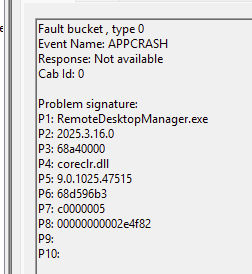
Unfortunately this file is not available
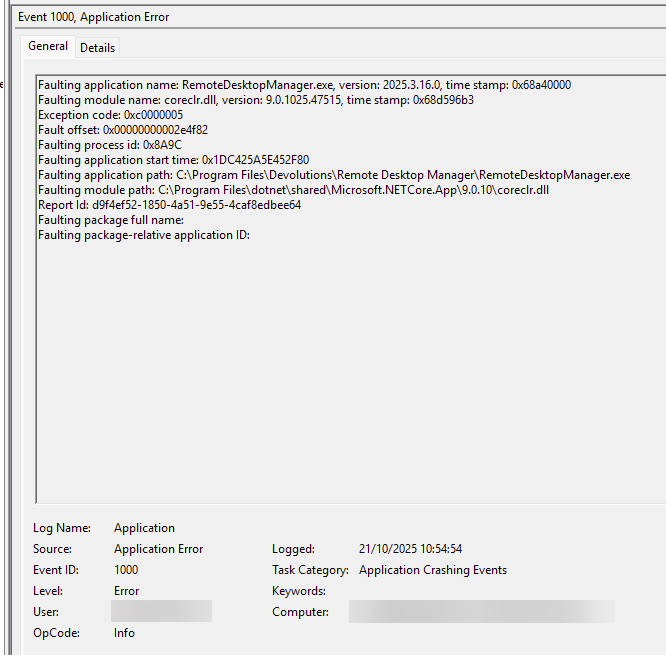
Thanks
Iain
Version 2025.3.23.0 64-bit
Data Source SQL
7866576f-d772-4a88-b0c3-ec2276070732.png
1a2e090e-8344-45b8-ac17-0915d3df9e3d.png
4ae23c7a-715a-4316-8601-aba4c148cbfe.png
08e01b47-bab6-4cad-bca0-9b8ee1cf8ea4.png
All Comments (54)
This has happened several times today already. Please let me know what further information I can provide to find the root cause.
Thanks
Iain
Version 2025.3.23.0 64-bit
Data Source SQL
Another crash 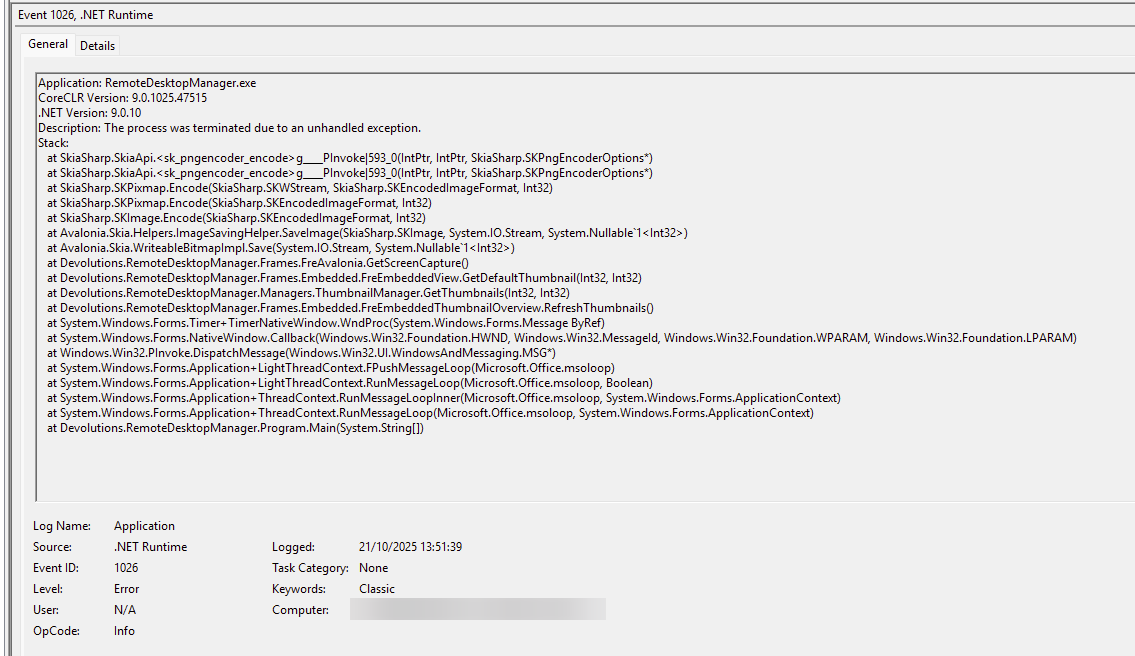
Thanks
Iain
Version 2025.3.23.0 64-bit
Data Source SQL
aa9da5fd-bf70-455c-b1ef-bbc8def30aea.png
Hello Iain,
This appears to be a crash generating the thumbnail image for some of the session types that we recently converted to Avalonia. Can you let me know the types of sessions that you have open when it crashes? For example do you have Active Directory sessions open? Or other types?
Thanks,
Paul
Hi Paul.
Yes I do have the AD session dashboard open (now closed!)
Regards
Thanks
Iain
Version 2025.3.23.0 64-bit
Data Source SQL
Hello Iain,
Ok just trying to reproduce the crash. Does it happen after a certain amount of time of the AD connections being open? Does crash immediately, or does it take 5 minutes, 1 hour or more?
How many other connections and connection types would you say you have open when it happens?
Thanks again for your patience,
Paul
Hi Paul,
So I have the AD dashboard open on startup.
Crashes today have ranged from straight away, within minutes and hours.
Hence why it seemed random.
Most of the session I have had open today and been web entries.
Thanks
Iain
Version 2025.3.23.0 64-bit
Data Source SQL
Hi Iain,
I've had a bunch of sessions open with the Thumbnails view, so far no crashes a few hours later. The exception points to some sort of memory limitation issue, is it possible your system is somewhat running low on memory or you have very large screen resolutions set? Also the version of Windows may have an effect. Just trying to reproduce the same conditions.
One way to prevent the issue from happening temporarily is simply closing the Thumbnails view, but i'm sure you are probably using that feature for a reason.
Thanks,
Paul
Windows 11 was recently updated, I do also have quite a number of large monitors!
Memory should be fine, 32GB (RDM was one reason it was bump from 16GB).
Thumb nail view I can kill it does have it uses but can live with out it.
Will see how RDM behaves tomorrow with the AD dashboard and thumbnail view closed.
Thanks
Iain
Version 2025.3.23.0 64-bit
Data Source SQL
I've got the same problem. RDM crashing randomly (can be a couple minutes but also a couple hours). I recently updated from Windows 11 24H2 to 25H2. My error message: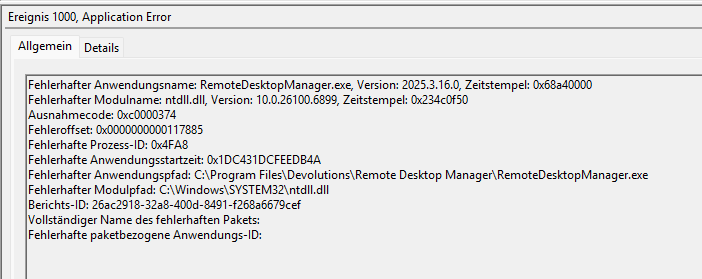
Laptop got 32GB RAM so that shouldn't be the problem. I only have some RDP sessions open, nothing unusual.
grafik.png
Morning,
Here are the specs of the laptop and configuration: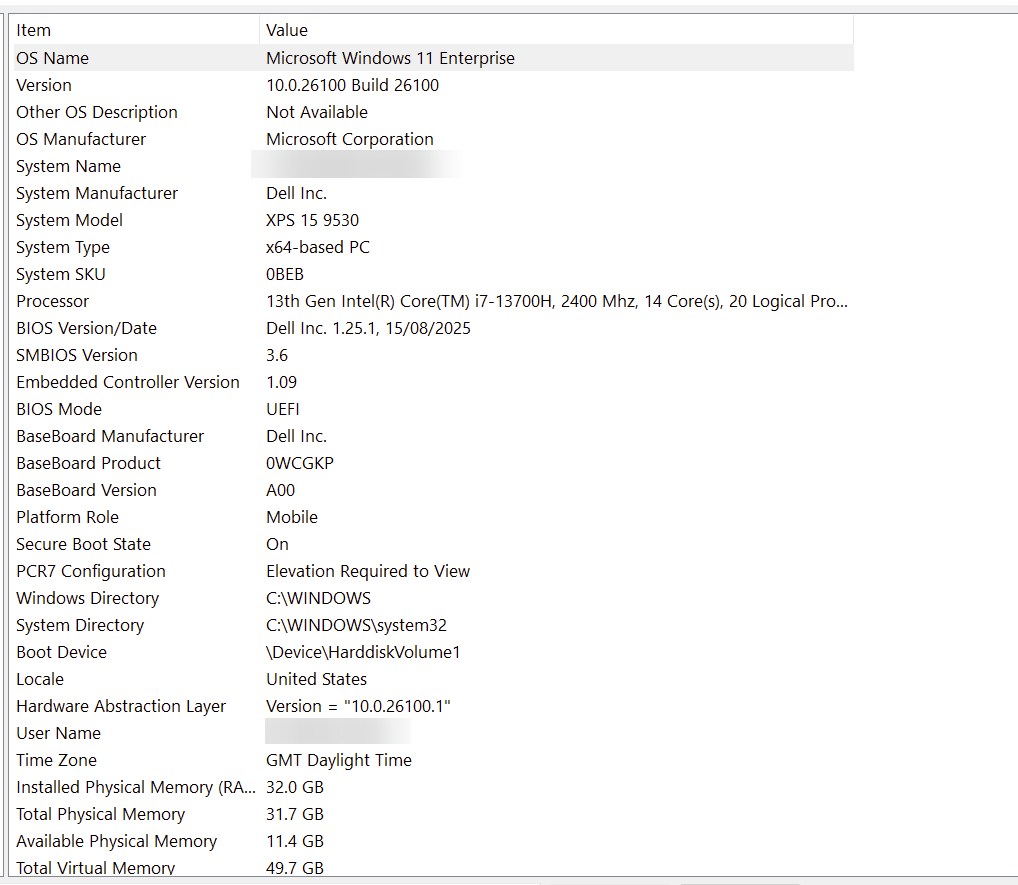
I'm in the office today so running off 3 smaller screens, but no AD dashboard open or thumbnail view.
I have also updated to the latest version of RDM so now running 2025.3.17.0 (as was seeing the issues on this version and .16)
So far RDM has not crashed, been about 2 hours so far, so early days!
Thanks
Iain
Version 2025.3.23.0 64-bit
Data Source SQL
eddaa7b3-f95b-4078-9ad0-512677cfc67a.png
Hello Iain,
Great, your crash is related to the combination of the Thumbnails view and any Avalonia view open (in your case the Active Directory Dashboard). I'll be curious to see if you open those 2 while in the office on the smaller monitors if you still get the same crash. For some reason it's failing to capture the screenshot of the Avalonia view for the thumbnails view at some point.
Thanks for you patience helping us reproduce this,
Paul
I've got the same problem. RDM crashing randomly (can be a couple minutes but also a couple hours). I recently updated from Windows 11 24H2 to 25H2. My error message:
Laptop got 32GB RAM so that shouldn't be the problem. I only have some RDP sessions open, nothing unusual.
@dkloter
Do you see the Stack trace in the logs as the other user did as well? Do you have the Thumbnails view open?
Thanks,
Paul
Will open them up now and run them as its been stable all day without them.
Thanks
Iain
Version 2025.3.23.0 64-bit
Data Source SQL
Hello
I'll chime in here without a fix, but possibly a workaround (at least, something to try).
We've had the same issue reported a few months ago in this thread.
The user reported that when they disabled the three Avalonia composition modes in File > Settings > Advanced > Rendering, the problem went away.
Actually; we need at least one composition mode to be enabled: if you deselect all of them, that's the same as only selecting "Enable redirection surface composition mode".
Xavier on that thread was not able to explain how it helped, because it doesn't seem strictly related to the crash, but the error is the same. It would be a useful data point if the same workaround works for the users in this thread.
Let me know if something isn't clear.
Thanks and kind regards,
Richard Markievicz
I've got the same problem. RDM crashing randomly (can be a couple minutes but also a couple hours). I recently updated from Windows 11 24H2 to 25H2. My error message:
Laptop got 32GB RAM so that shouldn't be the problem. I only have some RDP sessions open, nothing unusual.
@dkloter
Do you see the Stack trace in the logs as the other user did as well? Do you have the Thumbnails view open?
Thanks,
Paul
@Paul Dumais
Here you go: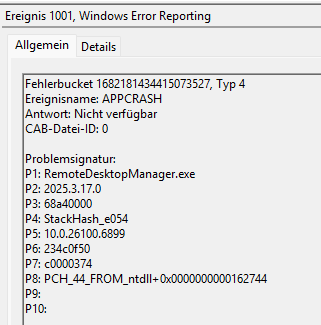
No, I don't have the Thumbnails view open.
grafik.png
Hello
@dkloter You aren't using the thumbail view, but are you using session recording? The backend is likely the same as thumbnail generation.
Can you check if the %localappdata%\crashdumps folder contains any core dumps (.dmp) corresponding to the crash? Let me know, but don't attach them to the forum. We'll provide you a provide upload link.
Thanks and kind regards,
Richard Markievicz
Hello
@dkloter You aren't using the thumbail view, but are you using session recording? The backend is likely the same as thumbnail generation.
Can you check if the %localappdata%\crashdumps folder contains any core dumps (.dmp) corresponding to the crash? Let me know, but don't attach them to the forum. We'll provide you a provide upload link.
Thanks and kind regards,
@Richard Markiewicz
Yes, I got some core dumps in that folder.
Yeah thumb nail view with AD dashboard is my issue!
AD dashboard on its own was fine, but with 20 minutes of the thumb nail view being open its crashed.
Thanks
Iain
Version 2025.3.23.0 64-bit
Data Source SQL
@Iain Can you try the fix that @Richard Markiewicz mentioned up above, that may fix the issue.
Thanks,
Paul
Apologies appears my response never got posted!
I can't locate anything for rendering under Advanced?
Thanks
Iain
Version 2025.3.23.0 64-bit
Data Source SQL
Hi Iain
Apologies - the proper place is Performance > Avalonia.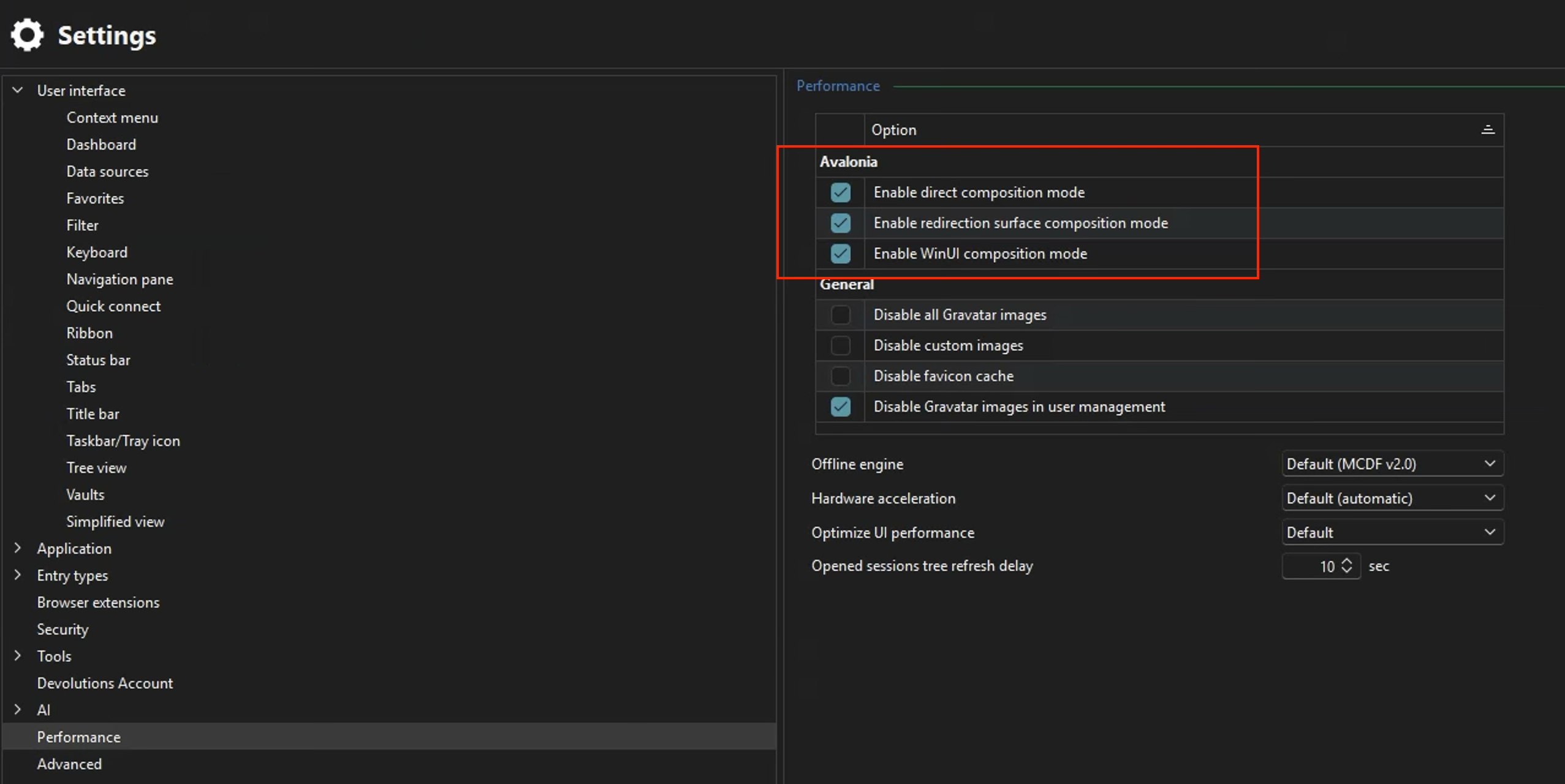
Thanks and kind regards,
Richard Markievicz
Screenshot 2025-10-24 at 08.57.29.png
Ah yes I see them now, all three currently enabled. Which two should I disable?
I am AL next week so won't be able to test behavior till I'm back.
Thanks
Iain
Version 2025.3.23.0 64-bit
Data Source SQL
Hi Iain
You can disable all three, or leave only "Redirection Surface" enabled. The result is the same.
Let me know if something's not clear
Thanks and kind regards,
Richard Markievicz
Ah! got it.
Will see how behaves with thumbnail view and the AD dashboard now.
Thanks
Iain
Version 2025.3.23.0 64-bit
Data Source SQL
Crashed already with those settings applied!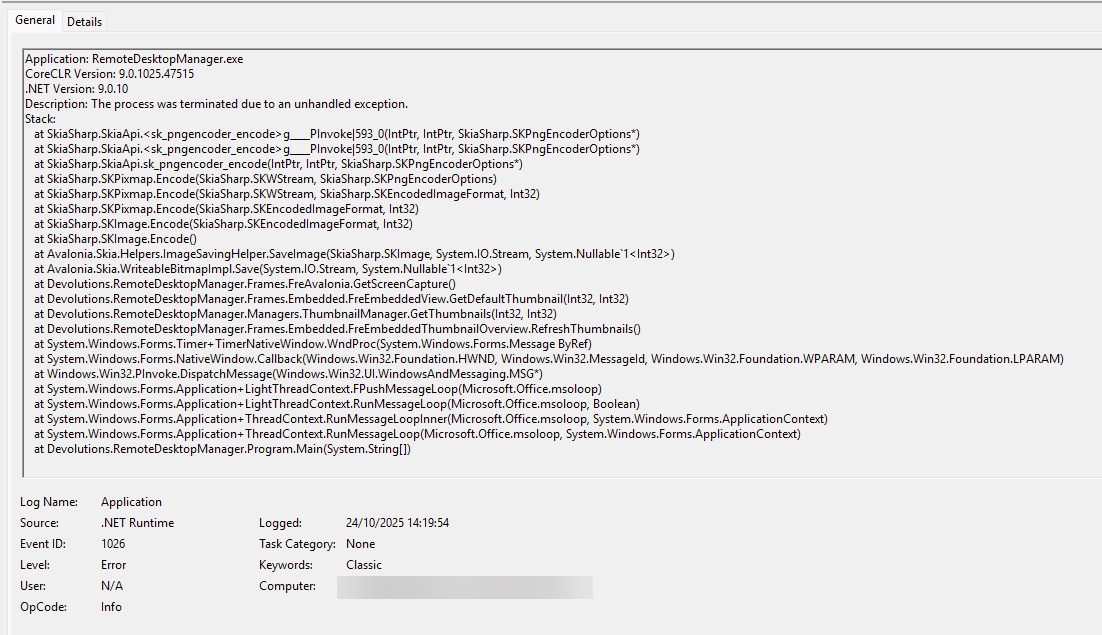
Thanks
Iain
Version 2025.3.23.0 64-bit
Data Source SQL
eb2ded0d-1538-42dd-bb03-34bd3fcf8b7b.png
Hello
Ok, sorry to hear that but I'm not totally surprised (like I wrote, I'm not sure how it changed something for the user in the other thread).
@Iain Do you have any corresponding memory dumps (.dmp) in %localappdata%/crashdumps?
@dkloter Support team have told me they reached out to you, please let us know any issues
Thanks and kind regards,
Richard Markievicz
Hello @dkloter
I've taken a look at the memory dump you provided, so thanks for that. I think you are seeing a separate issue to @Iain.
RDM is crashing due to memory corruption inside a third party DLL that is being injected into the RDM process (i.e. it is not our code that is running). It seems like the anti-virus on your machine, is it correct to say that you are using Trend Micro? Can you check for available updates, or disable Trend Micro from injecting code into RDM (I'm not familiar with their products and what level of control you have of their behaviour for individual applications)? Basically, try excluding RDM completely from Trend Micro and see the problem still occurs.
Please let me know if you have some questions or something isn't clear
Kind regards,
Richard Markievicz
It is closing here also. Even expanding a folder in navigation causes it to crash. Never had this happen until I went with 2025.3.x
I am using "Devolutions Server"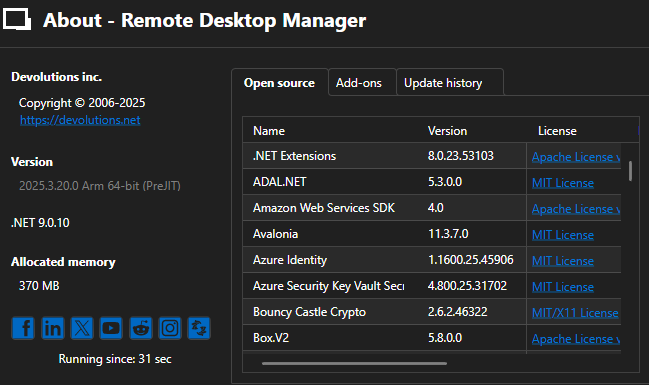
Faulting application name: RemoteDesktopManager.exe, version: 2025.3.20.0, time stamp: 0x68270000
Faulting module name: coreclr.dll, version: 9.0.1025.47515, time stamp: 0x68d59629
Exception code: 0xc0000005
Fault offset: 0x000000000032c98c
Faulting process id: 0x4A44
Faulting application start time: 0x1DC4773849952C5
Faulting application path: C:\Program Files\Devolutions\Remote Desktop Manager\RemoteDesktopManager.exe
Faulting module path: C:\Program Files\dotnet\shared\Microsoft.NETCore.App\9.0.10\coreclr.dll
Report Id: 0735ed98-13d5-4357-b350-0e3414905198
Faulting package full name:
Faulting package-relative application ID:
e304168b-2365-4095-b819-df481f4b1688.png
Application: RemoteDesktopManager.exe
CoreCLR Version: 9.0.1025.47515
.NET Version: 9.0.10
Description: The process was terminated due to an unhandled exception.
Stack:
at Avalonia.Win32.Automation.Interop.UiaCoreProviderApi.UiaRaiseAutomationPropertyChangedEvent(Avalonia.Win32.Automation.Interop.IRawElementProviderSimple, Int32, System.Object, System.Object)
at Avalonia.Win32.Automation.AutomationNode.OnPeerPropertyChanged(System.Object, Avalonia.Automation.AutomationPropertyChangedEventArgs)
at Avalonia.Layout.Layoutable.ArrangeCore(Avalonia.Rect)
at Avalonia.Layout.Layoutable.Arrange(Avalonia.Rect)
at Avalonia.Layout.LayoutManager.Arrange(Avalonia.Layout.Layoutable)
at Avalonia.Layout.LayoutManager.Arrange(Avalonia.Layout.Layoutable)
at Avalonia.Layout.LayoutManager.Arrange(Avalonia.Layout.Layoutable)
at Avalonia.Layout.LayoutManager.Arrange(Avalonia.Layout.Layoutable)
at Avalonia.Layout.LayoutManager.Arrange(Avalonia.Layout.Layoutable)
at Avalonia.Layout.LayoutManager.Arrange(Avalonia.Layout.Layoutable)
at Avalonia.Layout.LayoutManager.Arrange(Avalonia.Layout.Layoutable)
at Avalonia.Layout.LayoutManager.Arrange(Avalonia.Layout.Layoutable)
at Avalonia.Layout.LayoutManager.Arrange(Avalonia.Layout.Layoutable)
at Avalonia.Layout.LayoutManager.Arrange(Avalonia.Layout.Layoutable)
at Avalonia.Layout.LayoutManager.Arrange(Avalonia.Layout.Layoutable)
at Avalonia.Layout.LayoutManager.Arrange(Avalonia.Layout.Layoutable)
at Avalonia.Layout.LayoutManager.Arrange(Avalonia.Layout.Layoutable)
at Avalonia.Layout.LayoutManager.Arrange(Avalonia.Layout.Layoutable)
at Avalonia.Layout.LayoutManager.Arrange(Avalonia.Layout.Layoutable)
at Avalonia.Layout.LayoutManager.Arrange(Avalonia.Layout.Layoutable)
at Avalonia.Layout.LayoutManager.Arrange(Avalonia.Layout.Layoutable)
at Avalonia.Layout.LayoutManager.Arrange(Avalonia.Layout.Layoutable)
at Avalonia.Layout.LayoutManager.Arrange(Avalonia.Layout.Layoutable)
at Avalonia.Layout.LayoutManager.Arrange(Avalonia.Layout.Layoutable)
at Avalonia.Layout.LayoutManager.Arrange(Avalonia.Layout.Layoutable)
at Avalonia.Layout.LayoutManager.Arrange(Avalonia.Layout.Layoutable)
at Avalonia.Layout.LayoutManager.Arrange(Avalonia.Layout.Layoutable)
at Avalonia.Layout.LayoutManager.Arrange(Avalonia.Layout.Layoutable)
at Avalonia.Layout.LayoutManager.Arrange(Avalonia.Layout.Layoutable)
at Avalonia.Layout.LayoutManager.Arrange(Avalonia.Layout.Layoutable)
at Avalonia.Layout.LayoutManager.Arrange(Avalonia.Layout.Layoutable)
at Avalonia.Layout.LayoutManager.Arrange(Avalonia.Layout.Layoutable)
at Avalonia.Layout.LayoutManager.Arrange(Avalonia.Layout.Layoutable)
at Avalonia.Layout.LayoutManager.Arrange(Avalonia.Layout.Layoutable)
at Avalonia.Layout.LayoutManager.Arrange(Avalonia.Layout.Layoutable)
at Avalonia.Layout.LayoutManager.Arrange(Avalonia.Layout.Layoutable)
at Avalonia.Layout.LayoutManager.ExecuteArrangePass()
at Avalonia.Layout.LayoutManager.InnerLayoutPass()
at Avalonia.Layout.LayoutManager.ExecuteLayoutPass()
at Avalonia.Controls.TopLevel.HandleResized(Avalonia.Size, Avalonia.Controls.WindowResizeReason)
at Avalonia.Win32.WindowImpl.AppWndProc(IntPtr, UInt32, IntPtr, IntPtr)
at Avalonia.Win32.WindowImpl.WndProc(IntPtr, UInt32, IntPtr, IntPtr)
at Avalonia.Win32.WindowImpl.WndProcMessageHandler(IntPtr, UInt32, IntPtr, IntPtr)
at Avalonia.Win32.Interop.UnmanagedMethods.DefWindowProc(IntPtr, UInt32, IntPtr, IntPtr)
at Avalonia.Win32.Interop.UnmanagedMethods.DefWindowProc(IntPtr, UInt32, IntPtr, IntPtr)
at Avalonia.Win32.WindowImpl.AppWndProc(IntPtr, UInt32, IntPtr, IntPtr)
at Avalonia.Win32.WindowImpl.WndProc(IntPtr, UInt32, IntPtr, IntPtr)
at Avalonia.Win32.WindowImpl.WndProcMessageHandler(IntPtr, UInt32, IntPtr, IntPtr)
at Avalonia.Win32.Interop.UnmanagedMethods.MoveWindow(IntPtr, Int32, Int32, Int32, Int32, Boolean)
at Avalonia.Win32.Interop.UnmanagedMethods.MoveWindow(IntPtr, Int32, Int32, Int32, Int32, Boolean)
at Avalonia.Win32.Interoperability.WinFormsAvaloniaControlHost.FixPosition()
at Avalonia.Win32.Interoperability.WinFormsAvaloniaControlHost.OnResize(System.EventArgs)
at System.Windows.Forms.Control.OnSizeChanged(System.EventArgs)
at System.Windows.Forms.Control.UpdateBounds(Int32, Int32, Int32, Int32, Int32, Int32)
at System.Windows.Forms.Control.WmWindowPosChanged(System.Windows.Forms.Message ByRef)
at System.Windows.Forms.Control.WndProc(System.Windows.Forms.Message ByRef)
at System.Windows.Forms.NativeWindow.Callback(Windows.Win32.Foundation.HWND, Windows.Win32.MessageId, Windows.Win32.Foundation.WPARAM, Windows.Win32.Foundation.LPARAM)
at DevExpress.Utils.Drawing.Helpers.NativeMethods+UnsafeNativeMethods.DefSubclassProc(IntPtr, IntPtr, IntPtr, IntPtr)
at DevExpress.Utils.Drawing.Helpers.NativeMethods+UnsafeNativeMethods.DefSubclassProc(IntPtr, IntPtr, IntPtr, IntPtr)
at DevExpress.Utils.Drawing.Helpers.Win32SubclasserFactory+Win32Subclasser.SubClassProcInner(IntPtr, IntPtr, IntPtr, IntPtr, IntPtr, IntPtr)
at Windows.Win32.PInvoke.<SetWindowPos>g__LocalExternFunction|3624_0(Windows.Win32.Foundation.HWND, Windows.Win32.Foundation.HWND, Int32, Int32, Int32, Int32, Windows.Win32.UI.WindowsAndMessaging.SET_WINDOW_POS_FLAGS)
at Windows.Win32.PInvoke.<SetWindowPos>g__LocalExternFunction|3624_0(Windows.Win32.Foundation.HWND, Windows.Win32.Foundation.HWND, Int32, Int32, Int32, Int32, Windows.Win32.UI.WindowsAndMessaging.SET_WINDOW_POS_FLAGS)
at System.Windows.Forms.Control.SetBoundsCore(Int32, Int32, Int32, Int32, System.Windows.Forms.BoundsSpecified)
at System.Windows.Forms.Control.System.Windows.Forms.Layout.IArrangedElement.SetBounds(System.Drawing.Rectangle, System.Windows.Forms.BoundsSpecified)
at System.Windows.Forms.Layout.DefaultLayout.TryCalculatePreferredSizeDockedControl(System.Windows.Forms.Layout.IArrangedElement, System.Drawing.Rectangle, Boolean, System.Drawing.Size ByRef, System.Drawing.Rectangle ByRef)
at System.Windows.Forms.Layout.DefaultLayout.LayoutDockedControls(System.Windows.Forms.Layout.IArrangedElement, Boolean)
at System.Windows.Forms.Layout.DefaultLayout.TryCalculatePreferredSize(System.Windows.Forms.Layout.IArrangedElement, Boolean, System.Drawing.Size ByRef)
at System.Windows.Forms.ScrollableControl.OnLayout(System.Windows.Forms.LayoutEventArgs)
at System.Windows.Forms.Control.PerformLayout(System.Windows.Forms.LayoutEventArgs)
at System.Windows.Forms.Control.System.Windows.Forms.Layout.IArrangedElement.PerformLayout(System.Windows.Forms.Layout.IArrangedElement, System.String)
at System.Windows.Forms.Control.OnResize(System.EventArgs)
at System.Windows.Forms.UserControl.OnResize(System.EventArgs)
at System.Windows.Forms.Control.OnSizeChanged(System.EventArgs)
at DevExpress.XtraEditors.XtraUserControl.OnSizeChanged(System.EventArgs)
at System.Windows.Forms.Control.UpdateBounds(Int32, Int32, Int32, Int32, Int32, Int32)
at System.Windows.Forms.Control.WmWindowPosChanged(System.Windows.Forms.Message ByRef)
at System.Windows.Forms.Control.WndProc(System.Windows.Forms.Message ByRef)
at DevExpress.XtraEditors.XtraUserControl.BaseWndProc(System.Windows.Forms.Message ByRef)
at DevExpress.XtraEditors.XtraUserControl.WndProc(System.Windows.Forms.Message ByRef)
at System.Windows.Forms.NativeWindow.Callback(Windows.Win32.Foundation.HWND, Windows.Win32.MessageId, Windows.Win32.Foundation.WPARAM, Windows.Win32.Foundation.LPARAM)
at DevExpress.Utils.Drawing.Helpers.NativeMethods+UnsafeNativeMethods.DefSubclassProc(IntPtr, IntPtr, IntPtr, IntPtr)
at DevExpress.Utils.Drawing.Helpers.NativeMethods+UnsafeNativeMethods.DefSubclassProc(IntPtr, IntPtr, IntPtr, IntPtr)
at DevExpress.Utils.Drawing.Helpers.Win32SubclasserFactory+Win32Subclasser.SubClassProcInner(IntPtr, IntPtr, IntPtr, IntPtr, IntPtr, IntPtr)
at Windows.Win32.PInvoke.<SetWindowPos>g__LocalExternFunction|3624_0(Windows.Win32.Foundation.HWND, Windows.Win32.Foundation.HWND, Int32, Int32, Int32, Int32, Windows.Win32.UI.WindowsAndMessaging.SET_WINDOW_POS_FLAGS)
at Windows.Win32.PInvoke.<SetWindowPos>g__LocalExternFunction|3624_0(Windows.Win32.Foundation.HWND, Windows.Win32.Foundation.HWND, Int32, Int32, Int32, Int32, Windows.Win32.UI.WindowsAndMessaging.SET_WINDOW_POS_FLAGS)
at System.Windows.Forms.Control.SetBoundsCore(Int32, Int32, Int32, Int32, System.Windows.Forms.BoundsSpecified)
at System.Windows.Forms.Control.System.Windows.Forms.Layout.IArrangedElement.SetBounds(System.Drawing.Rectangle, System.Windows.Forms.BoundsSpecified)
at System.Windows.Forms.Layout.DefaultLayout.TryCalculatePreferredSizeDockedControl(System.Windows.Forms.Layout.IArrangedElement, System.Drawing.Rectangle, Boolean, System.Drawing.Size ByRef, System.Drawing.Rectangle ByRef)
at System.Windows.Forms.Layout.DefaultLayout.LayoutDockedControls(System.Windows.Forms.Layout.IArrangedElement, Boolean)
at System.Windows.Forms.Layout.DefaultLayout.TryCalculatePreferredSize(System.Windows.Forms.Layout.IArrangedElement, Boolean, System.Drawing.Size ByRef)
at System.Windows.Forms.ScrollableControl.OnLayout(System.Windows.Forms.LayoutEventArgs)
at System.Windows.Forms.Control.PerformLayout(System.Windows.Forms.LayoutEventArgs)
at System.Windows.Forms.Control.System.Windows.Forms.Layout.IArrangedElement.PerformLayout(System.Windows.Forms.Layout.IArrangedElement, System.String)
at System.Windows.Forms.Control.OnResize(System.EventArgs)
at System.Windows.Forms.Control.OnSizeChanged(System.EventArgs)
at System.Windows.Forms.Control.UpdateBounds(Int32, Int32, Int32, Int32, Int32, Int32)
at System.Windows.Forms.Control.WmWindowPosChanged(System.Windows.Forms.Message ByRef)
at System.Windows.Forms.Control.WndProc(System.Windows.Forms.Message ByRef)
at System.Windows.Forms.ScrollableControl.WndProc(System.Windows.Forms.Message ByRef)
at System.Windows.Forms.NativeWindow.Callback(Windows.Win32.Foundation.HWND, Windows.Win32.MessageId, Windows.Win32.Foundation.WPARAM, Windows.Win32.Foundation.LPARAM)
at DevExpress.Utils.Drawing.Helpers.NativeMethods+UnsafeNativeMethods.DefSubclassProc(IntPtr, IntPtr, IntPtr, IntPtr)
at DevExpress.Utils.Drawing.Helpers.NativeMethods+UnsafeNativeMethods.DefSubclassProc(IntPtr, IntPtr, IntPtr, IntPtr)
at DevExpress.Utils.Drawing.Helpers.Win32SubclasserFactory+Win32Subclasser.SubClassProcInner(IntPtr, IntPtr, IntPtr, IntPtr, IntPtr, IntPtr)
at Windows.Win32.PInvoke.<SetWindowPos>g__LocalExternFunction|3624_0(Windows.Win32.Foundation.HWND, Windows.Win32.Foundation.HWND, Int32, Int32, Int32, Int32, Windows.Win32.UI.WindowsAndMessaging.SET_WINDOW_POS_FLAGS)
at Windows.Win32.PInvoke.<SetWindowPos>g__LocalExternFunction|3624_0(Windows.Win32.Foundation.HWND, Windows.Win32.Foundation.HWND, Int32, Int32, Int32, Int32, Windows.Win32.UI.WindowsAndMessaging.SET_WINDOW_POS_FLAGS)
at System.Windows.Forms.Control.SetBoundsCore(Int32, Int32, Int32, Int32, System.Windows.Forms.BoundsSpecified)
at System.Windows.Forms.Control.System.Windows.Forms.Layout.IArrangedElement.SetBounds(System.Drawing.Rectangle, System.Windows.Forms.BoundsSpecified)
at System.Windows.Forms.Layout.DefaultLayout.TryCalculatePreferredSizeDockedControl(System.Windows.Forms.Layout.IArrangedElement, System.Drawing.Rectangle, Boolean, System.Drawing.Size ByRef, System.Drawing.Rectangle ByRef)
at System.Windows.Forms.Layout.DefaultLayout.LayoutDockedControls(System.Windows.Forms.Layout.IArrangedElement, Boolean)
at System.Windows.Forms.Layout.DefaultLayout.TryCalculatePreferredSize(System.Windows.Forms.Layout.IArrangedElement, Boolean, System.Drawing.Size ByRef)
at System.Windows.Forms.ScrollableControl.OnLayout(System.Windows.Forms.LayoutEventArgs)
at System.Windows.Forms.Control.PerformLayout(System.Windows.Forms.LayoutEventArgs)
at System.Windows.Forms.Control.System.Windows.Forms.Layout.IArrangedElement.PerformLayout(System.Windows.Forms.Layout.IArrangedElement, System.String)
at System.Windows.Forms.Control.OnResize(System.EventArgs)
at System.Windows.Forms.Control.OnSizeChanged(System.EventArgs)
at System.Windows.Forms.Control.UpdateBounds(Int32, Int32, Int32, Int32, Int32, Int32)
at System.Windows.Forms.Control.WmWindowPosChanged(System.Windows.Forms.Message ByRef)
at System.Windows.Forms.Control.WndProc(System.Windows.Forms.Message ByRef)
at DevExpress.XtraEditors.XtraScrollableControl.WndProc(System.Windows.Forms.Message ByRef)
at DevExpress.XtraBars.Navigation.NavigationPageBase.WndProc(System.Windows.Forms.Message ByRef)
at System.Windows.Forms.NativeWindow.Callback(Windows.Win32.Foundation.HWND, Windows.Win32.MessageId, Windows.Win32.Foundation.WPARAM, Windows.Win32.Foundation.LPARAM)
at DevExpress.Utils.Drawing.Helpers.NativeMethods+UnsafeNativeMethods.DefSubclassProc(IntPtr, IntPtr, IntPtr, IntPtr)
at DevExpress.Utils.Drawing.Helpers.NativeMethods+UnsafeNativeMethods.DefSubclassProc(IntPtr, IntPtr, IntPtr, IntPtr)
at DevExpress.Utils.Drawing.Helpers.Win32SubclasserFactory+Win32Subclasser.SubClassProcInner(IntPtr, IntPtr, IntPtr, IntPtr, IntPtr, IntPtr)
at Windows.Win32.PInvoke.<SetWindowPos>g__LocalExternFunction|3624_0(Windows.Win32.Foundation.HWND, Windows.Win32.Foundation.HWND, Int32, Int32, Int32, Int32, Windows.Win32.UI.WindowsAndMessaging.SET_WINDOW_POS_FLAGS)
at Windows.Win32.PInvoke.<SetWindowPos>g__LocalExternFunction|3624_0(Windows.Win32.Foundation.HWND, Windows.Win32.Foundation.HWND, Int32, Int32, Int32, Int32, Windows.Win32.UI.WindowsAndMessaging.SET_WINDOW_POS_FLAGS)
at System.Windows.Forms.Control.SetBoundsCore(Int32, Int32, Int32, Int32, System.Windows.Forms.BoundsSpecified)
at System.Windows.Forms.Control.SetBounds(Int32, Int32, Int32, Int32, System.Windows.Forms.BoundsSpecified)
at System.Windows.Forms.Control.set_Bounds(System.Drawing.Rectangle)
at DevExpress.XtraEditors.XtraControl.ProcessPaintAction(DevExpress.Utils.Drawing.GraphicsCache, System.Action)
at DevExpress.XtraBars.Navigation.NavigationPane.OnPaintCore(System.Windows.Forms.PaintEventArgs)
at DevExpress.XtraBars.Navigation.NavigationFrame.OnPaint(System.Windows.Forms.PaintEventArgs)
at System.Windows.Forms.Control.PaintWithErrorHandling(System.Windows.Forms.PaintEventArgs, Int16)
at System.Windows.Forms.Control.WmPaint(System.Windows.Forms.Message ByRef)
at System.Windows.Forms.Control.WndProc(System.Windows.Forms.Message ByRef)
at DevExpress.XtraEditors.XtraControl.WndProc(System.Windows.Forms.Message ByRef)
at DevExpress.XtraBars.Navigation.NavigationPane.WndProc(System.Windows.Forms.Message ByRef)
at System.Windows.Forms.NativeWindow.Callback(Windows.Win32.Foundation.HWND, Windows.Win32.MessageId, Windows.Win32.Foundation.WPARAM, Windows.Win32.Foundation.LPARAM)
at DevExpress.Utils.Drawing.Helpers.NativeMethods+UnsafeNativeMethods.DefSubclassProc(IntPtr, IntPtr, IntPtr, IntPtr)
at DevExpress.Utils.Drawing.Helpers.NativeMethods+UnsafeNativeMethods.DefSubclassProc(IntPtr, IntPtr, IntPtr, IntPtr)
at DevExpress.Utils.Drawing.Helpers.Win32SubclasserFactory+Win32Subclasser.SubClassProcInner(IntPtr, IntPtr, IntPtr, IntPtr, IntPtr, IntPtr)
at Windows.Win32.PInvoke.DispatchMessage(Windows.Win32.UI.WindowsAndMessaging.MSG*)
at System.Windows.Forms.Application+LightThreadContext.FPushMessageLoop(Microsoft.Office.msoloop)
at System.Windows.Forms.Application+LightThreadContext.RunMessageLoop(Microsoft.Office.msoloop, Boolean)
at System.Windows.Forms.Application+ThreadContext.RunMessageLoopInner(Microsoft.Office.msoloop, System.Windows.Forms.ApplicationContext)
at System.Windows.Forms.Application+ThreadContext.RunMessageLoop(Microsoft.Office.msoloop, System.Windows.Forms.ApplicationContext)
at Devolutions.RemoteDesktopManager.Program.Main(System.String[])
@mattm Thanks Matt, this looks like it's a crash caused inside our Avalonia code and a combination of RDM running on ARM and UI Automation (Uia), luckily it looks like other Avalonia apps have also reported this issue with a potential workaround, we will see if that workaround resolves the issue.
Thanks,
Paul
Thanks, if you are referring to the workaround that @Richard Markiewicz is referring to, it does not help. It still closes / crashes.
Hello
We've got three users on this thread, each with three different crashes. So just to take stock:
@Iain I've made a tweak in RDM that may help, but I don't have the full information to fix this I think. If you have corresponding crash reports in %localappdata%\crashdumps, please let me know so I can coordinate with our support team to look at those.
@dkloter I think this is caused by Trend Micro and I'd like you to experiment with updating or disabling it
@mattm We think this is a known issue in our UI framework with UI automation enabled. We're testing on our side and will post back with more info.
Please, if anything is not clear or you have further questions, please let me know!
Kind regards,
Richard Markievicz
@Richard Markiewicz apologies on AL currently, will boot up the laptop and see if there are still any crash reports.
Thanks
Iain
Version 2025.3.23.0 64-bit
Data Source SQL
I have 4 avaible, please let me know how I can send these to you.
Thanks
Iain
Version 2025.3.23.0 64-bit
Data Source SQL
Hello,
I’ve shared with you, via private message, a link where you can upload the requested files.
Please let me know if you have any further questions.
Best regards,
Jacob Lafrenière
Thanks, files have been uploaded.
Thanks
Iain
Version 2025.3.23.0 64-bit
Data Source SQL
Hello again
@Iain Thanks for uploading the files. As I've said earlier, I've already made a small fix that might help with this but I'll wait to review what you sent once the support team routes it to me and maybe have some more thoughts on that.
@mattm I've committed a fix for this issue that I believe should work, and that will be available in 2025.3.21. In the meantime, if you're blocked on this, you can try disabling whatever accessibility application is triggering the issue. Examples of this would be things like screen readers, although Grammarly is a common accessibility tool as well. If you'd like some guidance on that, you can go to Help > System Diagnostics and click on "Send". Make sure that "Send Diagnostic Information" is checked and mention this forum post in the message field.
Please, let me know if something isn't clear or you have any questions
Kind regards,
Richard Markievicz
Hello @Iain
Your crash reports provide more detail, but not really any more information. The crash is deep inside Skia (a common 2D graphics library developed by Google and used most notably in Chrome, but also used by one of our UI frameworks).
It could be a bug in Skia but I'd consider that unlikely, so it's more likely something we're doing wrong on our side or an interaction with something on your system. The problem is, there is a lot indirection between our code and the calls to Skia (i.e. we're only calling into higher-level APIs) which makes it very hard to understand the reason. The nature of the crash is unfortunately not one we can catch and handle on our side (which would be better, to just show a blank thumbnail rather than bring down the whole application).
I would recommend updating your graphics driver, but I see that you're on a very recent (maybe the latest) version.
Apart from that; I've made some tweaks on our side to fix how we're managing resources here. It might help, but without being able to reproduce on my side I really can't tell. I'm afraid all I can ask you to do, is run without using the thumbnails view for now, and when 2025.3.21 is release, try it again and let me know if the situation is better.
Sorry I don't have a better answer for you at this point. Please let me know how you get on with the 2025.3.21.
And in the meantime don't hesitate with further questions or comments
Kind regards,
Richard Markievicz
@Richard Markiewicz
Thanks for the feedback, Internal support are pretty hot on firmware, drivers and updates on our work laptops so doesn't surprise we are running latest. Unfortuanly I have no control on that!
Will see if .21 is out on my return to the office next.
Not a major issue now we have identified the issue, I can stop using thumbnail view for now.
Thanks again for taking a look into the issue.
Thanks
Iain
Version 2025.3.23.0 64-bit
Data Source SQL
Hello again
@Iain Thanks for uploading the files. As I've said earlier, I've already made a small fix that might help with this but I'll wait to review what you sent once the support team routes it to me and maybe have some more thoughts on that.
@mattm I've committed a fix for this issue that I believe should work, and that will be available in 2025.3.21. In the meantime, if you're blocked on this, you can try disabling whatever accessibility application is triggering the issue. Examples of this would be things like screen readers, although Grammarly is a common accessibility tool as well. If you'd like some guidance on that, you can go to Help > System Diagnostics and click on "Send". Make sure that "Send Diagnostic Information" is checked and mention this forum post in the message field.
Please, let me know if something isn't clear or you have any questions
Kind regards,
@Richard Markiewicz
Sent! I use Grammarly for sure.
I uninstalled Grammarly, and it still crashes. I don't have anything else on there.
I uninstalled Grammarly, and it still crashes. I don't have anything else on there.
Hi @mattm
Grammarly is the usual suspect in cases like this, but when I look at your diagnostics there are a few other applications using UI automation on your machine. Some of them I recognize and some of them I don't so it's very hard to say what's triggering this. My best guess would be either ChatGPT or Perplexity. I'm not familiar with either on Windows but I know that the ChatGPT app on macOS provides "agentic" functionality by using the accessibility APIs.
Unfortunately one of our UI frameworks has a known bug, only on ARM systems, where another program querying its interface using UI automation causes this crash. I've made a fix for 2025.3.21 that should disable this functionality and prevent that happening. It is only a workaround, since disabling these features is not desirable (particularly in the context of a user that depends on UI automation to, for example, drive a screen reader).
Between now and 2025.3.21, the only workaround I have is to locate whatever is triggering this and disable or uninstall it. Sadly it's not Grammarly (or, maybe it was Grammarly, but also something else). I'd be happy to discuss the list of potential problem apps with you but maybe you want to do that via PM?
Please, let me know any questions or comments
Kind regards,
Richard Markievicz
I uninstalled all 3 (ChatGPT, Perplexity, and Grammarly), and it still crashes.
Please PM me with more info.
Never mind uninstalling them, it still closes/crashes.
Hello
Ok, I've been over the list and nothing in the remaining applications stands out. However there are also a lot of "unknown process"; maybe these are processes that have exited or maybe something else is going on.
As a sanity check, launch RDM and leave it idle, then run this command from an elevated PowerShell prompt and send me the output?
[IO.Directory]::EnumerateFiles('\\.\pipe\') |
  ForEach-Object {
    $name = Split-Path $_ -Leaf
    if ($name -like 'UIA_*') {
      if ($name -match '^UIA_PIPE_(\d+)_') {
        $procId = [int]$matches[1]
        $proc = Get-Process -Id $procId -ErrorAction SilentlyContinue
        [PSCustomObject]@{
          Pipe    = $name
          PID     = $procId
          Process = if ($proc) { $proc.ProcessName } else { '<exited>' }
        }
      }
      else {
        [PSCustomObject]@{
          Pipe    = $name
          PID     = '<n/a>'
          Process = '<unknown>'
        }
      }
    }
  }
Thanks and kind regards,
Richard Markievicz
Hello
Ok, I've been over the list and nothing in the remaining applications stands out. However there are also a lot of "unknown process"; maybe these are processes that have exited or maybe something else is going on.
As a sanity check, launch RDM and leave it idle, then run this command from an elevated PowerShell prompt and send me the output?
[IO.Directory]::EnumerateFiles('\\.\pipe\') |
ForEach-Object {
$name = Split-Path $_ -Leaf
if ($name -like 'UIA_*') {
if ($name -match '^UIA_PIPE_(\d+)_') {
$procId = [int]$matches[1]
$proc = Get-Process -Id $procId -ErrorAction SilentlyContinue
[PSCustomObject]@{
Pipe = $name
PID = $procId
Process = if ($proc) { $proc.ProcessName } else { '<exited>' }
}
}
else {
[PSCustomObject]@{
Pipe = $name
PID = '<n/a>'
Process = '<unknown>'
}
}
}
}
Thanks and kind regards,
@Richard Markiewicz
No luck with that. I got nothing at all.
So it looks like the issue was "Power Automate".
I uninstalled it, and it no longer crashes.
So it looks like the issue was "Power Automate".
I uninstalled it, and it no longer crashes.
Hello @mattm
Excellent news. I was wondering how we were going to continue troubleshooting this without a support session. Unfortunately the whole infrastructure for UI automation is very opaque to both users and developers, and we don't have a perfect way to know which applications are using UI automation as clients.
I believe this should be fixed in 2025.1.21 so once it's released, you can try re-installing whichever of these tools you are still wanting to use and let me know if you have further issues with RDM.
Thanks again, and kind regards
Richard Markievicz
Good morning,
Now running 2025.3.20, still crashing when thumbnail and AD dashboard open.
I have the fresh .dmp file if required.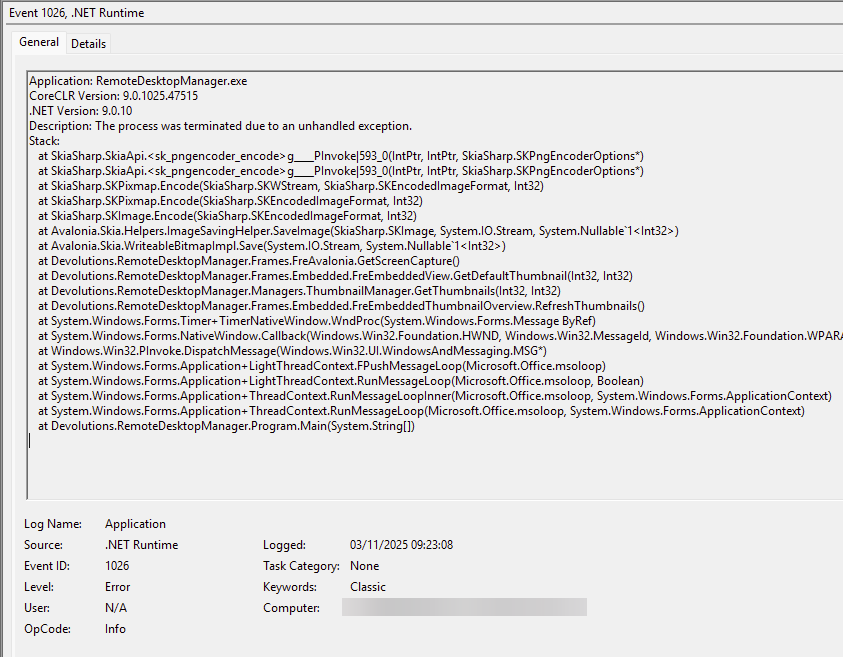
Thanks
Iain
Version 2025.3.23.0 64-bit
Data Source SQL
537f49dd-ebd1-4976-924f-54a41d522503.png
Hi Iain
The tweak I've added here should be in 2025.3.21 so once it's released, please try again with that version. I'm not sure if something will change or not but your feedback is important either way.
I don't think the release will be that long from now; and appreciate your patience
Best regards,
Richard Markievicz
Hello,
Thank you for your patience!
I'm letting you guys know that version 2025.3.21.0 is now available. Could you please try the changes that my colleague Richard did and see if this works?
We appreciate your feedback and your collaboration on this matter.
Best regards,
Maxim Robert
Hello,
Thank you for your patience!
I'm letting you guys know that version 2025.3.21.0 is now available. Could you please try the changes that my colleague Richard did and see if this works?
We appreciate your feedback and your collaboration on this matter.
Best regards,
@Maxim Robert
So far, so good with Power Automate reinstalled.
Yep looking good also, have had both thumbnail view and AD dashboard open without issue.
Thanks
Iain
Version 2025.3.23.0 64-bit
Data Source SQL
Hello
Thank you both for confirmation. I'm going to mark the thread "resolved" but please don't hesitate to post back with further questions or comments.
Kind regards,
Richard Markievicz