SSH terminal with authd authentication

Hi everyone,
We've started using authd and Microsoft Entra ID to login to some of our Linux VMs via SSH, but it doesn't seem to work well in RDM as the prompts (including the one-time device login code) aren't visible. This is how the process looks when started from Powershell and the built-in SSH client in Windows 11 (sensitive info redacted):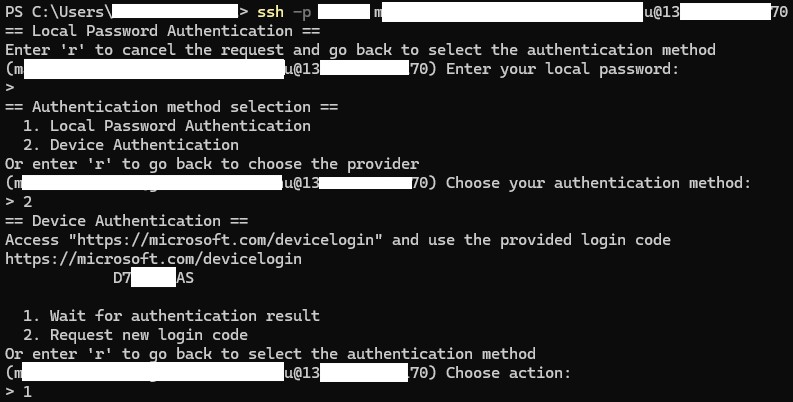
And this is how it looks in RDM: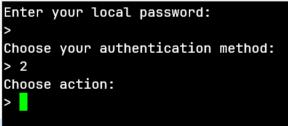
I can type in "r" and "2" and it reacts to my input, but the output from the server isn't visible. "Interactive authentication in terminal" is already set to "Yes".
Am I doing something wrong here or is this not supported yet? I'm using RDM 2025.1.34.0 2025.2.30.0 (Edit: Updated)
Thanks in advance!
0dffdae5-e8a5-4970-a943-9c78f194a7c3.png
authd_redacted.jpg
All Comments (3)
Hello,
Thank you for contacting Devolutions Support.
Could you please let us know if the issue also occurs in another application?
I’ve requested a similar setup from our IT department, and I will let you know if I’m able to reproduce the issue once I have access to it.
Best regards,
Carl Marien
Hello,
Thank you for contacting Devolutions Support.
Could you please let us know if the issue also occurs in another application?
I’ve requested a similar setup from our IT department, and I will let you know if I’m able to reproduce the issue once I have access to it.
Best regards,
@Carl Marien
Hi Carl,
No, I haven't encountered this issue in other applications. It works fine in Powershell and PuTTY.
Hello,
Thank you for your patience.
We were able to reproduce the issue and have created a bug report.
I will keep you informed of any progress regarding the internal case.
Best regards,
Carl Marien