Open a blank pain on launch

Wondering if there is a way to have a blank pain open up on launch?
I setup RDM on multiple monitors and I like my sessions to open on a secondary pain rather than the default.
However, I also have to launch a session first then move it to create the pain.
All Comments (3)
Hello,
Thank you for contacting us regarding this matter.
Just to confirm, are you referring to the RDM application itself, or to a specific entry within RDM that you would like to open on another screen?
In the meantime, could you please let me know which version of RDM you are using?
Feel free to include screenshots if that helps clarify the issue.
Best regards,
Tommy Sanders
Apologies for the delay, I hadn't realized I raised this on the wrong account so missed your reply!
RDM its self. So I have the main window and Navigation panel open to the side of me. When I open a session I then move that session (RDP, Web entry, SSH or anything) to my main monitor which creates a new pane. I can then launch further sessions and select which pane to open on: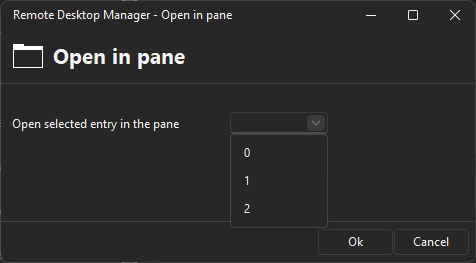
Ideally I was hoping I could launch RDM and configure it to open a blank pane?
Thanks
Iain
Version 2025.3.23.0 64-bit
Data Source SQL
3bb31c45-2b84-49df-849c-98c0b7a25b41.png
Hello,
Thank you for your response.
Unfortunately, I don't believe there's an option to configure that directly. However, you might try saving a window layout: arrange the screen as you prefer, then go to Window → Window Layouts and save the layout to see if that helps.
If that doesn't work, it appears that RDM may not support this functionality.
Best regards,
Tommy Sanders