After exporting and importing the datasource, it is impossible to view the certificate.
After exporting and importing the datasource, it is impossible to view the certificate.

RDM 2025.2.29.0 64-bit (JIT)
New entry...
Certificate (X.509) (Credentials)
Importing the certificate.
Right button on entry - View cetrificate...
Everything is fine.
File - Export - Export vault (.rdm)
Another PC (or the same one). All settings and data source are identical.
File - Import - Import into vault (.rdm)
Right button on entry - View cetrificate...
Nothing is happening...
Right button on entry - Properties... - View certificate
"Unable to display the document" error.
Forgive me for my English, I use Google Translate...
All Comments (10)
Hello,
Thank you for reaching out on this matter.
I was able to reproduce the issue you are experiencing with the certificate export. I will report this bug to the development team, and they will begin working on a fix soon.
I will follow up with you as soon as a fix is deployed in a future update.
Best regards,
Jacob Lafrenière
Hello,
Thank you for reaching out on this matter.
I was able to reproduce the issue you are experiencing with the certificate export. I will report this bug to the development team, and they will begin working on a fix soon.
I will follow up with you as soon as a fix is deployed in a future update.
Best regards,
Hi Jacob,
have a similar problem with PDF. Create a new entry in RDM - all fine.
Export as .rdm and re-import at DVLS - attachment "visible" in list but broken.
Best regards,
Torben
Hello,
Thank you for the follow-up.
That part seems to be working well on my side. Could you please confirm if you are checking that setting when exporting as an .RDM file?
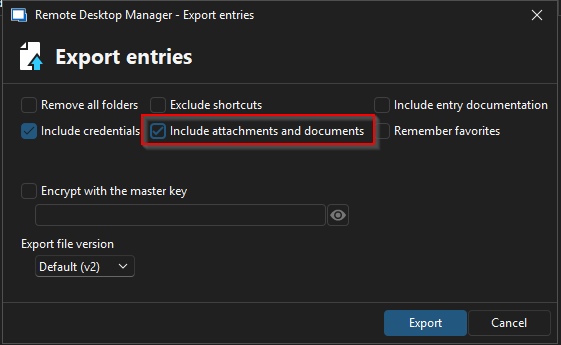
I look forward to your reply.
Best regards,
Jacob Lafrenière