Windows 11 workstation locks up when using RDM

I've been using RDM for several years. My prior workstation ran Windows 10 and there were never issues. Last year I upgraded to a new ASUS machine running Windows 11.
I'm find that occasionally (enough that I'm starting to keep detailed notes) that I'll have one or more of my servers connected, and when I try to connect to another server, that RDM suddenly locks up and I cannot do anything with it.
- Try to change tabs to one of the (previously) active servers, and it gets stuck. At that point I can no longer access any of the tabs for my servers.
- Try to use Task Manager to cancel RDM - nothing - still stuck.
- Eventually I have to force a power-down.
Anyone else experience this?
All Comments (29)
Hello
Sorry for the inconvenience.
I've moved your post to the RDM Windows support forum which is a better location I think.
When you get a freeze next time, please follow the instructions in this KB article to create a mini dump (follow the steps for Process Explorer). At the end of the steps is a link for submitting the file to our support team where we can take a look at it.
Please let me know if something isn't clear or you have other questions
Kind regards,
Richard Markievicz
Hello
I've taken a look at the core dumps you sent, and I see where this is happening but not why.
The first thing you can do is go to Settings > Entry Types > Sessions > Remote Desktop (RDP). and under "API Hooking" change "Enable API Hooking" to "Disabled". You'll need to save the changes and then restart RDM for that to take effect. Please let me know if the problem goes away after doing this.
Now, depending on what features you use in RDM or RDP this may or may not be a suitable workaround, but either way I'd like to get to the bottom of this.
Can you let me know:
- Your precise Windows version (a screenshot of Start > Run > winver would be good)
- Are you using an RDP version other than "Latest"? Again, there is a global option in Settings > Entry Types > Sessions > Remote Desktop (RDP) > Remote Desktop (RDP) > RDP; but it's also overridable at the session level (Advanced > RDP Version)
Please, let me know if something isn't clear or you have further questions
Kind regards,
Richard Markievicz
RDM continues to lock up on me, and I have sent additional mini-dumps on 9/21, 10/2 and 10/4. It's locked up again at this time and I'm sending to you a link to the latest mini-dump
Hello
I didn't receive any notification for additional mini dumps; did you send them to the support team or elsewhere?
Have you tried disabling the API hooking as I wrote above?
Please also confirm your precise Windows version.
Thanks and kind regards,
Richard Markievicz
I now see that I accidentally replied to your forum e-mail instead of service@devolutions.net. I've replied to your service address now.
Hi Greg
I've taken a look at what you sent, so thanks for that. It looks like you disabled the API hooking in RDM, but this seems to be a red herring. What I saw before was the application frozen while initializing the RDP ActiveX control, but one of your subsequent dumps shows the same thing with only the Microsoft DLLs loaded. The other dumps don't show a reason for the freeze.
First, it looks like you're running DisplayFusion. It's injecting a DLL and running code inside RDM, but I'm not sure to what purpose. Can you try disabling (I'm not familiar with the product or if it's possible to disable it for a single application or system wide) or uninstalling it and see if it mitigates the problem?
The other suspicion I have is something with the graphics driver. Can you check your graphics driver version and if there are any updates available?
Please, let me know if something isn't clear or you have further questions
Kind regards
Richard Markievicz
DisplayFusion is a simple application that I have used for as long as I've used your tool. Among other features, it allows for introducing a task bar on the 2nd browser.
I just did a search on their support forum for devolutions and find a few posts regarding your tool, but nothing similar to the issues I'm dealing with:
https://www.displayfusion.com/Discussions/Search/?Query=%22devolutions%22&SyntaxMode=1&Page=1&Days=0&SortNewest=1&ShowOnlyNewsPosts=0
I'll give it a shot and stop using DisplayFusion for a few days to see if anything changes. From your perspective, should I do that now, or shall I wait for a few days to determine if the following graphics driver updates made any difference?
As of this morning, the following driver was installed:
----------------------------------------------------------------------
Driver Provider: NVIDIA
Driver Date: 9/22/2025
Driver Version: 32.0.15.8142
Digital Signer: Microsoft Windows Hardware Compatibility Publisher
As of this moment, I have installed this:
-----------------------------------------------------
Driver Date: 10/29/2025
Driver Version: 32.0.15.8180
Hello
I agree that DisplayFusion is unlikely to be causing this, however it is loading and executing code inside RDM so it would be something I'd want to rule out. However I suggest running with updated drivers for a few days and seeing if that makes things better before tinkering with DisplayFusion.
Thanks and kind regards,
Richard Markievicz
I'm sending to you an e-mail with the latest mini-dump and details that led up to yet another crash.
Hello,
I wasn’t able to find the email you mentioned. Did you happen to receive a case number?
Best regards,
Carl Marien
Subject: RE: 00104825: RDM hung immediately
2 e-mails sent: Fri 12/5/2025 5:36 PM / Sun 12/7/2025 10:49 AM
Hello
I've taken a look at what you sent and I don't have a conclusive answer on this. What I can see is a lot of threads running from you graphics driver, and a lot of threads running in an RDM library that supports hardware acceleration for Avalonia (one of the UI toolkits we use). I also see RDP threads and some of them are waiting on UDP.
I'd like to suggest two things, and you can try them both at the same time and see if things are better.
First, in File > Settings > Performance > Avalonia, disable everything except for "Enable redirection surface composition mode" (see my screenshot). Save the changes and restart RDM to fully apply the change.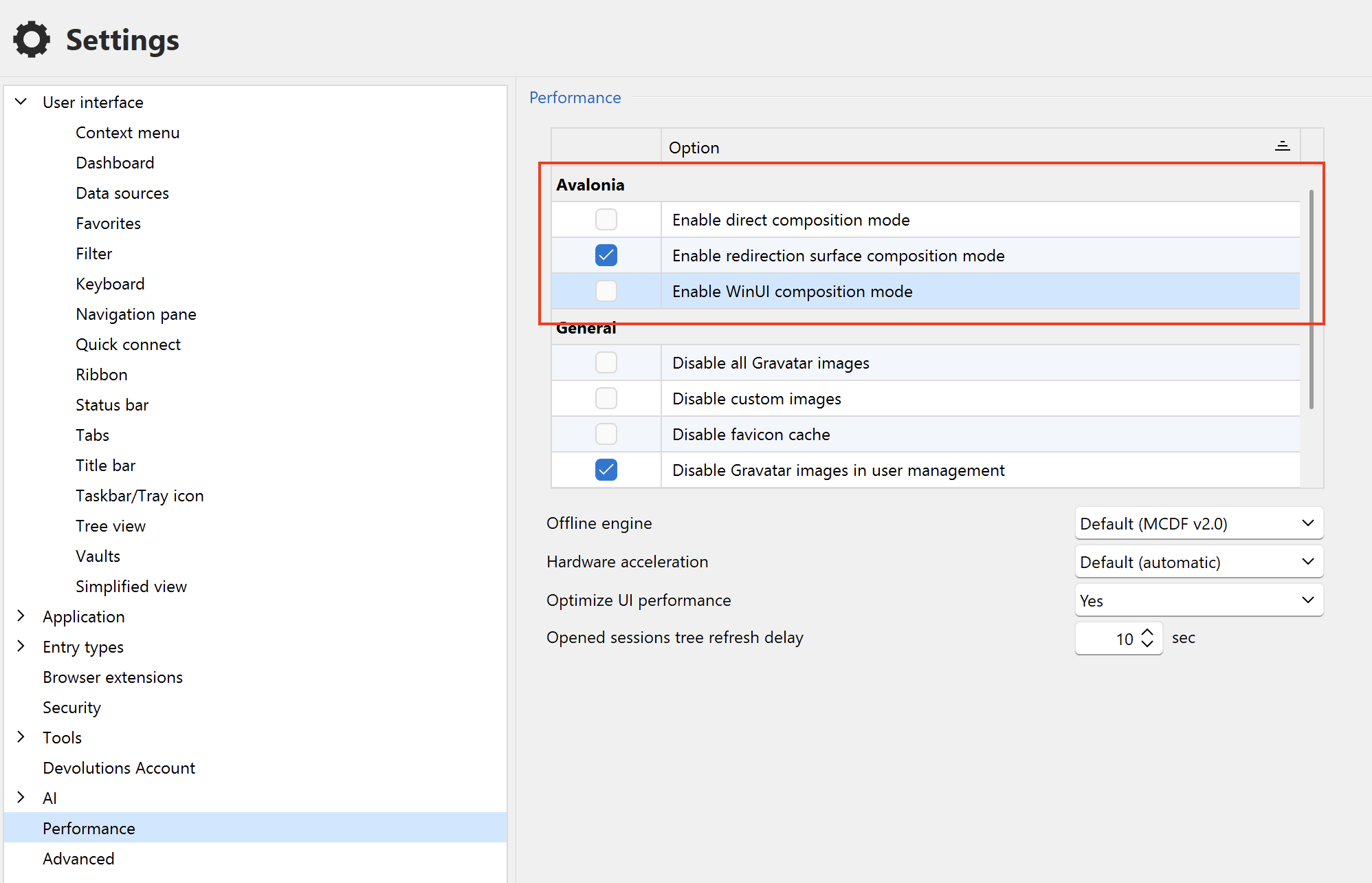
Second, in RegEdit, navigate to HKEY_LOCAL_MACHINE\SOFTWARE\Policies\Microsoft\Windows NT\Terminal Services\Client and create a new DWORD entry named fClientDisableUDP. Give it the value "1" (in decimal, that's 0x00000001 in hex). Then restart your computer when it's convenient. The usual disclaimers around editing your registry apply, but this is a safe change that can be easily reverted.
After that run RDM as normal and see if you still experience issues. I hope that one of these will resolve the problem for you. Please let us know.
Thanks and kind regards,
Richard Markievicz
Screenshot 2025-12-09 at 09.27.14.png
Screenshot 2025-12-09 at 09.23.59.png
ok, I have applied the changes. I'll let you know what happens.
That didn't take long. It hung again... What do I do now? This is getting old - I have critical work to complete, and I'm spending half my days restarting my workstation and reporting stuff to you folks. Is there a means of accelerating a resolution?
-------------------------------
I was away from the office much of the day. When I got back, Windows wanted an update for recent patches, so I went ahead and got that done. Once the reboot was done I opened RDM. That's as far as I was able to go - it was stuck before I could selectr the server I needed to open.
Let's make sure you are satisfied with how I am running the dump files.
C:\>cd program files
C:\Program Files>cd devolutions
C:\Program Files\Devolutions>cd remote desktop manager
C:\Program Files\Devolutions\Remote Desktop Manager>RemoteDesktopManager.exe /dump
Upon submitting the above, I got this:
Process with an ID of 48476 is not running.
2025.3.21.0 64-bit
Running since: 0 sec
Memory used 116mb
Arguement Exception.
ArgumentException - Process with an Id of 48476 is not running.
at System.Diagnostics.Process.GetProcessById(Int32 processId, String machineName)
at Devolutions.Utils.DebugUtils.CreateDump(String fileName, MiniDumpType dumpTypeDumpType, Nullable`1 processId)
at Devolutions.RemoteDesktopManager.Business.DebugHelper.ProcessArguments(String[] args)
at Devolutions.RemoteDesktopManager.Managers.ConsoleManager.ProcessArguments(String[] args)
at Devolutions.RemoteDesktopManager.Program.Main(String[] args)
------------------------ extended stack ------------------------
at Devolutions.RemoteDesktopManager.Forms.FrmErrorMessage.ShowErrorMessage(ConnectionEngine engine, Exception exception, String message, String title)
at Devolutions.RemoteDesktopManager.Forms.FrmErrorMessage.ShowErrorMessage(ConnectionEngine engine, Exception exception, String title)
at Devolutions.RemoteDesktopManager.Program.Main(String[] args)
I also tried this (pasted the line as-is into the CMD window) and got the same error:
"%ProgramFiles%\Devolutions\Remote Desktop Manager\RemoteDesktopManager.exe" /dump
Hello
Yes, I understand your frustration and I'm deeply sorry for the inconvenience. I want to get this resolved.
The dump files are fine, but they don't point at any place in our code that's frozen. This is not as simple as (for example) a threading bug in something we've written; there's an interaction going on with the third-party libraries and APIs we use, possibly alongside a hardware or software configuration, or - more likely - driver, on your particular machine that is causing the application to freeze. In terms of understanding why that is happening, it's extremely hard even with a debugger attached to the .dmp file - we simply don't have the proper debug information for all those libraries, and, even if we did - without knowledge of the internals it's really hard to say what's going on.
Let me explain what I see right now, and what my next step is.
At the UI level, RDM is a .NET WinForms application. Actually we use very little of WinForms itself, most of the UI is built using DevExpress which is built on top of WinForms, but is effectively so heavily customized it could be considered a separate thing. Over the past months we've been porting lots of our UI code away from DevExpress to Avalonia. You can read about that transition here. All that to say, there are at least 2 (or 3, depending on how you count) UI frameworks running RDM. Recent versions are using Avalonia far more heavily, prominently the dashboards were recently migrated away from WebViews to Avalonia.
When I look at your most recent dump file, I see:
- The UI thread _is_ blocked in a call from DevExpress to do some painting operation. It's not clear _why_ the call is blocked, just that it is, but this is why the application is frozen. It's asking Windows to repaint something in the application window, and Windows is not answering the call. It's not something that should block.
- Dozens of threads from Nvidia display driver, all apparently doing no work but inside a call to access the graphics adaptor
- Dozens of threads from the Avalonia ANGLE library (this is a thin shim library that translates OpenGL to DirectX and powers hardware accelerated rendering on Windows). I don't know what these threads are doing because I don't have debug information for them.
- Several RDP threads, apparently working normally but at least a few blocked in UDP.
The RDP stuff looks normal, but UDP has been known to cause freezes in other environments so disabling that was a low-hanging fruit to try.
Based on what's left, I have to assume there's an interaction between either (or both) DevExpress and Avalonia doing hardware accelerated rendering, and your particular graphics card and/or driver. My belief was that the changes I suggested to the Avalonia composition mode would force a software rendering path, but looking again that may not actually be the case. We need a way to force Avalonia to use software rendering and see if that improves things, but right now we don't have it.
I'm going to work today on getting that option into RDM and should have it in an upcoming minor update. In the meantime it would be worth seeing if forcing a software path for DevExpress makes things better, because perhaps we are seeing a conflict and it could be resolved only from that side. What we need to do is isolate this to either DevExpress or Avalonia, or a combination of them, and then I can take that back to them and say "when we use hardware accelerated rendering with this combination of libraries and this graphics adaptor and driver, it causes our application to freeze".
So, in the immediate case, please go to File > Settings and:
(1) Under "Performance", set "Hardware Acceleration" to "Disabled (GDI+)"
(2) Under "Entry Types > Sessions > Remote Desktop (RDP) > Advanced", uncheck "Enable RDP Hardware Mode" (if it's checked)
This might help, it might not; but the result will be important information. If you're still experiencing freezes at that point, which I would consider likely, the following step will be to wait for version that allows us to disable hardware rendering in Avalonia. I hope to get that in the next minor update, but I will post more information here.
In the meantime, thanks again for your patience. I understand how frustrating the problem is, it's frustrating on my side as well. Hopefully the insights above help to explain the work and thought processes on our side as we try to figure this out.
Please don't hesitate with other questions or problems
Kind regards,
Richard Markievicz
I waited until this morning to restart the workstation, since RDM was stuck. After restarting, I was hesitant to start RDM so I tried to open the Windows Remote Desktop app. That had worked in the past, and this time it did not. I caved in and tried opening RDM so that I could apply your proposed setting changes, and it hung immediately.
I'm forcing a restart yet again. As a note, I cannot generally rely upon selecting power down or restart. It hangs - I've gone so far as to wait for 30-60 minutes, and it's still reporting to be in progress. So I literally have to pull the power. Very disturbing. More news later.
I use crashplan.com to back up my workstation. After the first restart I performed this morning, crashplan would not connect - I got some vague error. In response to that, I rebooted, yet again and now crashplan as well as the Windows Remote Desktop app. To be clear, I have restarted my workstation 3 times this morning.
Unless there comes a reason to do so, I'm not going to start RDM again until you have a need for me to do so.
Hello
Ok, here is my recommendation without more experimentation that might put your system in a bad posture.
We need to wait for the 2025.3.28 release, I'm not sure when that will be but I imagine if it's not before the new year it will be very soon after. Once we have an internal build I could probably provide it to you in advance of the release if you'd like to try that. Either way, I've linked the development ticket to this forum post so we should be able to reach out once there's some news.
Once that's available, you can install it, but then pre-configure RDM before launching it. You'll find your RemoteDesktopManager.cfg file (typically that's in %localappdata%/Devolutions/RemoteDesktopManager) and open it in a text editor. The file is XML and contains the application settings. It might be wise to take a backup of the file before modifying it.
If you check the structure of the file, you'll see there's a top-level <Option> tag and then all the options are inside there, in alphabetical order.
You should already have
<AvaloniaEnableDirectComposition>false</AvaloniaEnableDirectComposition>
<AvaloniaEnableWinUIComposition>false</AvaloniaEnableWinUIComposition>
You will add these two options (don't need to be in order, but ensure they come before the closing </Option> tag at the end of the file)
<AvaloniaEnableWin32RenderingModeAngleEgl>false</AvaloniaEnableWin32RenderingModeAngleEgl>
<HardwardAcceleration>GDIPlus</HardwardAcceleration>
For example: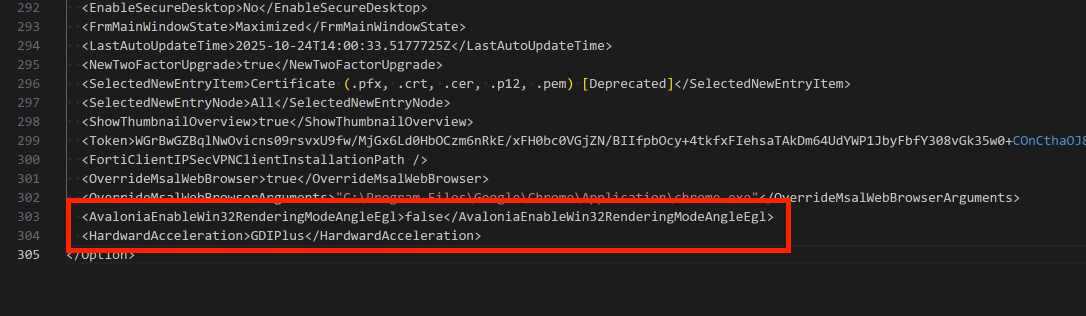
Save the file, make sure your system is in a state that if you still have issues it's as "safe" as it can be (i.e. no unsaved documents, that kind of thing) and run RDM. I hope that this will make an improvement but we'll depend on your feedback here.
Thanks again for your patience
Kind regards,
Richard Markievicz
Screenshot 2025-12-11 at 10.48.45.png
Hello,
Thank you for being so patient!
I'm pleased to inform you that a new version of RDM (2025.3.28.0) has been released, with the requested feature included.
Latest Version: Download RDM
Please let us know if this works or if you encounter any issues.
Best regards,
Maxim Robert
Hello,
regarding the issue described here, it seems to be a problem with one of the recent Windows updates.
I'm curious, have you figured anything more? Has the recent version changed anything except allowing for software rendering?
Hello @marcinlotecki
If you're experiencing a specific issue on your side, I'd suggest opening a new thread. I think that the issue described in OP is quite unique.
Thanks and kind regards,
Richard Markievicz
While I installed the program last week when I heard from you, I opted to NOT run it for a few days as I was focussed on something where I didn't need a distraction.
I went ahead and ran the program this morning. It lasted an hour or two... I have my 1st 2 servers (CP1 and CP3) connected. An hour or so later I wanted to look at CP5, and the moment I started that connection, it hung (very typical - this has happened repeatedly). And when I attempted to run a mini-dump, that tool threw an error. I have forwarded the details via e-mail.
I should also note that I have not been using DisplayFusion since we agreed to shut it down above.
Hello @marcinlotecki
If you're experiencing a specific issue on your side, I'd suggest opening a new thread. I think that the issue described in OP is quite unique.
Thanks and kind regards,
@Richard Markiewicz
Hello. Not quite. It's a longer story.
One of our clients is having issues that are identical to what you have described here but with our software, originally unrelated to your product.
That client, however, noticed that he was also having similar issues with your software, and that prompted us to investigate further and come here.
We've had the exact same path so far, at least from what I can judge from reading this topic. Weird freezes in a thread for windows XAML based rendering. We also suspected driver issues or other software causing this. But so far we could not pinpoint the exact cause. This happens on multiple devices too.
If true, it means this is not a unique case to one computer and may affect different users with time. The only thing we've noticed so far is that it seems to be related to one of the recent windows updates. probably 24H2 or 25H2 or both.
Anyway, we're in the same boat, so I thought we could share our findings.
If you happen to find anything more please share.
Kind regards,
ML
While I installed the program last week when I heard from you, I opted to NOT run it for a few days as I was focussed on something where I didn't need a distraction.
I went ahead and ran the program this morning. It lasted an hour or two... I have my 1st 2 servers (CP1 and CP3) connected. An hour or so later I wanted to look at CP5, and the moment I started that connection, it hung (very typical - this has happened repeatedly). And when I attempted to run a mini-dump, that tool threw an error. I have forwarded the details via e-mail.
I should also note that I have not been using DisplayFusion since we agreed to shut it down above.
@greg2
Hi.
Out of curiosity, since we're trying to connect the dots, if there are any common points with the problem we're having, are you running any antivirus programs and if so, which? It's a long shot.
Hello Greg2
Thank you for providing the logs. We've received them and have forwarded the details to our development team for further review.
Best regards
Carl Marien
Hello Greg2
Thank you for providing the logs. We've received them and have forwarded the details to our development team for further review.
Best regards
@Carl Marien
I'm confused. Did you receive logs from the latest crash? When I ran the dump tool, it crashed, which is what I reported above.
In terms of anti-virus stuff, I'm running the following:
- malware hunter
- malwarebytes
- windows defender (built into Windows 11?)
I should note that when I select "Settings", "Privacy and Security", the "Security" menu option appears, but when I click on that - nothing happens. I cannot get into that panel of the menu to see what happens next.
Hello Greg,
Apologies for the misunderstanding. We received an email containing logs that referenced this forum, and I initially assumed it was from you.
In any case, I will forward the logs to the development team for review.
Best regards,
Carl Marien
Hello @greg2
Ok, that's strange - due to the way we launch subprocesses to capture the mini dump out of process, error messages like what you got are largely "normal". However - since RDM is already unstable in your environment, I'd recommend not using it to capture the dump file. You can use Process Explorer instead.
- Run as administrator
- Locate the hung / frozen RDM process in the process list
- Right click > Create Dump File > Create Minidump
I apologize for the ongoing churn in this case. I'm eager to see an updated mini dump with the changes we made and I hope the picture will be more clear. I do think it would be safe to re-enable DisplayFusion, as it's clearly not causing this issue.
Thanks and kind regards,
Richard Markievicz
Hello @marcinlotecki
Absolutely the best thing you can do is, when RDM is frozen capture a minidump from it. I've put the instructions to do that with Process Explorer in the post immediately above this one. You can also see it here (following the steps for "Process Explorer").
Once you have a .dmp file to share, do not post it in the forum. Instead send an email to service@devolutions.net, mentioning this forum thread, and they will provide a secure mechanism for you to send the file to us. Please read the disclaimer for sending .dmp files.
Normally a .dmp file, if it doesn't directly show the problem, can give important clues. So I appreciate you going through that process and adding more data to this case.
Please let me know if you have any questions or something isn't clear
Thanks and kind regards,
Richard Markievicz