VMWare dashboard folder groups
1 vote

I don't know if im just not seeing the right location to enable this or if its not a feature yet, but I have all my VMs stored in separate folders and all my users have access to just the folder groups they need. When I use the VMWare dashboard it does not show the folder groups and just lists all the VMs the user has access to in one large list. Is there a way to break this out into the same folder tree form that is shown in VMWare workstation and vCenter?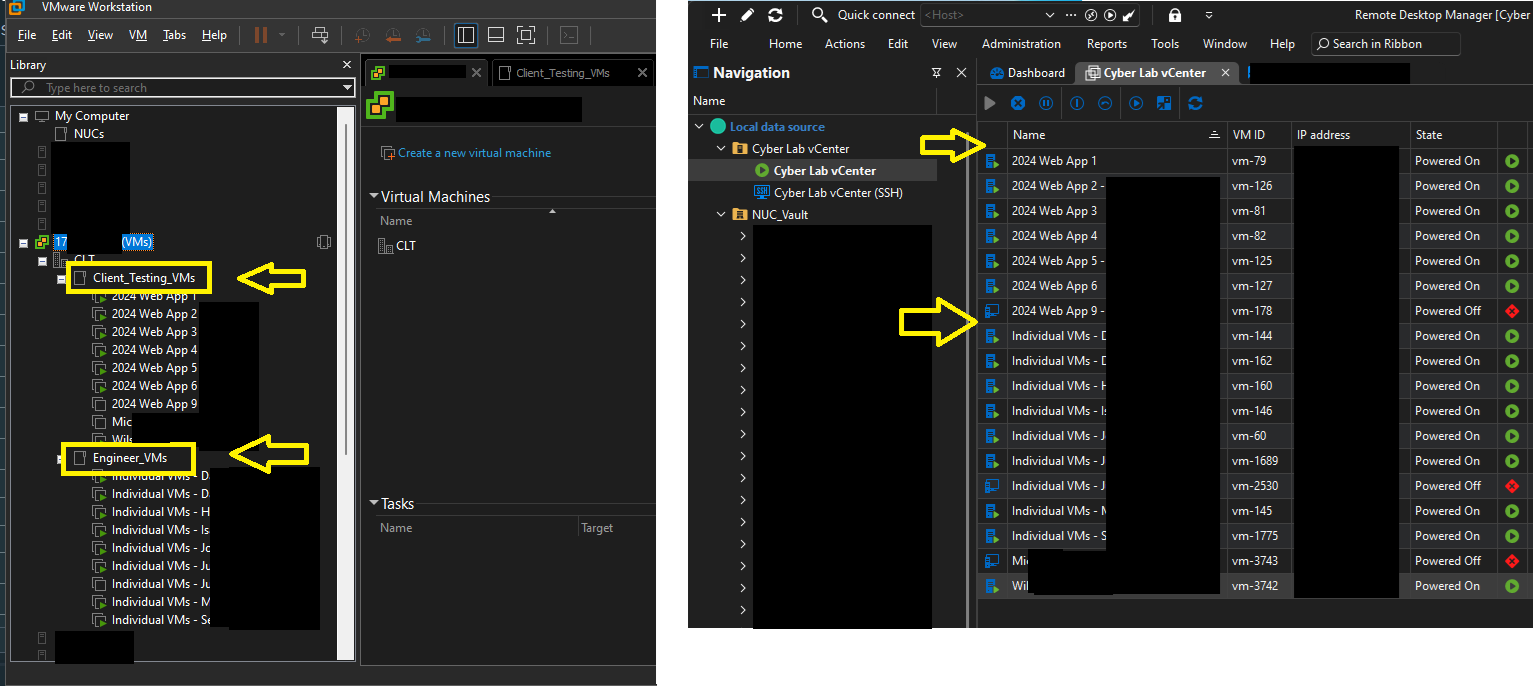
VMGroups.png
All Comments (5)
Hello,
I don't think it's a feature yet but it's a good point. I'll open a feature ticket on our end so we can add this.
Regards,
Hubert Mireault
Good news, it seems maybe this was added in a recent update? As mentioned on this thread - the VMware folder structure now shows up in the dashboard when connected to a vCenter:
https://forum.devolutions.net/topics/52811/vmware-dashboard
Only thing is, right now it seems both the VM list and search are filtered to only the direct contents of the selected folder - it doesn't seem to show or search through VMs in subfolders. Not sure if that's an option we can change or would need to be a separate feature request - I asked the question on the above linked thread.
David Willis
Hello David,
The folder navigation was added as part of the 2026.1 major release, so it's a relatively recent change.
As my colleague Carl mentioned in the thread you linked, the way it was implemented, it indeed doesn't list VMs in the sub-folders. Part of the reason was aiming to improve performance when there's a large amount of machines. But if you prefered the previous behavior, then it's reason enough to add an option to bring it back. We should be able to add a checkbox in the dashboard to toggle between the two "modes".
I have opened a ticket for this.
Regards,
Hubert Mireault
Thanks Hubert! Actually rather than having the option to revert to the old behavior (where it would just show all VMs all the time), I think it might be better to have an option to either include or exclude VMs from child folders under the selected folder. So that way, if someone wanted to see more VMs they could just select a folder higher in the tree.
The other piece to go with this, I think, would be to show the root of the vCenter itself in the folder list - currently it seems to only show VM folders starting with the datacenter level - a "datacenter" in vCenter appears as a folder in RDM with a slightly different icon, as circled in red here:
So if it could show the vCenter itself one level above the datacenters, then with the "include child VMs" option enabled, someone could select the vCenter root to show all VMs in the list (and presumably could then also search in the right pane to search all VMs in the vCenter). But if they wanted to limit the scope to a datacenter, folder or subfolder, they could easily do that as well. I think that would provide the most flexibility.
Thanks again for your consideration of this request!
Best regards,
David Willis
33907791-84a2-43d1-b89b-ded48fc189a4.png
Hello David,
Sorry, I wasn't clear. The checkbox will only change the way the information is fetched, meaning that the entirety of the data will be fetched if you have it checked, rather than only what's in that folder.
From there, you will still be able to filter by folder, and it will act like you describe, where clicking on folder X will show not only its content, but also the content from every folder it contains recursively. I believe we're aligned, I just didn't describe it very well. 🙂
So if it could show the vCenter itself one level above the datacenters, then with the "include child VMs" option enabled, someone could select the vCenter root to show all VMs in the list
I've added this note to our ticket as well.
Regards,
Hubert Mireault