Issues with Syntax Highlighting

Hello, I'm a new RDM user and I have created a few rules to try out syntax highlighting in RDM.
There are two issues I've come across - one is a UX issue, the other seems to be a bug.
To start with the user experience issue (and this seems to be a fundamental design issue with RDM itself, not just with syntax highlighting), you can't do anything in RDM when the settings dialogue window is open. So, for every change to any setting, I have to:
- Open settings
- Navigate to the item within settings (usually nested within some sub-tree) (for instance, it takes 8 mouse clicks to get to the syntax highlighting section, every single time, or 5 clicks if you search the settings for "colors")
- Make the changes, then save/close out of settings
- Test
This wouldn't be a poor user experience if I could keep the settings window open independently of the main UI to quickly make and test changes.
Now, the potential bug with the syntax highlighting is that rules with matching substrings seems to override each other. The UI has up/down arrows to imply order, and even the XML file from an older forum post with syntax highlighting rules suggests there was an order to rules, but in my testing, either the order is not respected, or there's a problem with the logic when it comes to parsing rules with the "Complete word" option checked.
        <SyntaxHighlightingItem>
          <BackColorString>#000000</BackColorString>
          <BackgroundColor>Transparent</BackgroundColor>
          <ForegroundColor>BlackBold</ForegroundColor>
          <ID>b474c0d9-2145-4672-a4dc-cf15258ab7ff</ID>
          <Keyword>administratively down</Keyword>
          <Name>admin down - administratively down</Name>
          <TextColorString>#000000</TextColorString>
        </SyntaxHighlightingItem>
        <SyntaxHighlightingItem>
          <BackColorString>#000000</BackColorString>
          <BackgroundColor>Transparent</BackgroundColor>
          <ForegroundColor>Red</ForegroundColor>
          <ID>21fa4909-63a2-4202-8ef0-1b84bcaf5d5e</ID>
          <Keyword>down</Keyword>
          <Name>interface down</Name>
          <TextColorString>#000000</TextColorString>
        </SyntaxHighlightingItem>
As you can see, there's a separate rule for `down` vs `administratively down`, with the former being defined first. Yet, in my terminal, the specific rule for `down` is taking priority over the earlier defined rule for `administratively down`.
Result in terminal: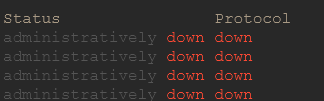
I would expect the string "administratively down" to match the rule named "admin down - administratively down" and use the ANSI Black Bold foreground color.
c02d5f72-8367-4400-8f26-1864f31b0a80.png
9b229fa1-8e30-49e7-ab75-afda06093654.png
Recommended Answer
Hello,
Thank you for reaching out to Devolutions Support.
Regarding your first issue, I understand your concern. However, due to the way WebView is implemented in RDM, it is unfortunately not possible to open a page and still have access to the previous one at the same time.
As for your second issue, it appears that the syntax highlighting engine might be selecting a rule at random. I’ve asked the developer if there is an underlying logic that I may have missed. In the meantime, a possible workaround would be to change the order of your rules to see if that makes any difference.
I’ll keep you updated once I receive a response from the development team.
Best regards,
Carl Marien
All Comments (3)
Hello,
Thank you for reaching out to Devolutions Support.
Regarding your first issue, I understand your concern. However, due to the way WebView is implemented in RDM, it is unfortunately not possible to open a page and still have access to the previous one at the same time.
As for your second issue, it appears that the syntax highlighting engine might be selecting a rule at random. I’ve asked the developer if there is an underlying logic that I may have missed. In the meantime, a possible workaround would be to change the order of your rules to see if that makes any difference.
I’ll keep you updated once I receive a response from the development team.
Best regards,
Carl Marien
Thanks for your response, Carl. Understandable regarding WebView.
I switched the order of my "interface down" and "admin down" rule, and it's working properly now, despite the "admin down" rule coming after the "interface down" rule.
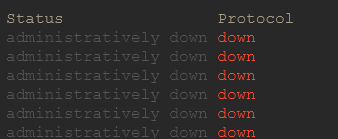
It would be helpful to hear back from the developers to understand the logic about rule ordering and priorities. I was assuming the list was priority-sorted, with higher rules taking priority, but it seems that maybe each rule is executed one after the other (top-down), so rules farther down in the list will essentially take priority over rules that appear earlier near the top of the list.
ac7806d1-bea1-447c-afe3-2523eebaae12.png
271a74d4-c20d-4dd8-bb21-4de5372155c6.png
Hello,
I’ve opened a bug report for this issue and will keep you updated on any progress in this forum.
Best regards,
Carl Marien