Add "Select full desktop / switch monitors" to VNC Toolbar

Hello,
whenever I connect to a computer with VNC, if the remote computer has 2 screens or more, I get all the monitors in 1 window, and it is very small.
Most of the time, I only need 1 of its monitors, so I have to right click on the tab and go to "Special commands" and click on "Select full desktop / switch monitors". Which is not very practical.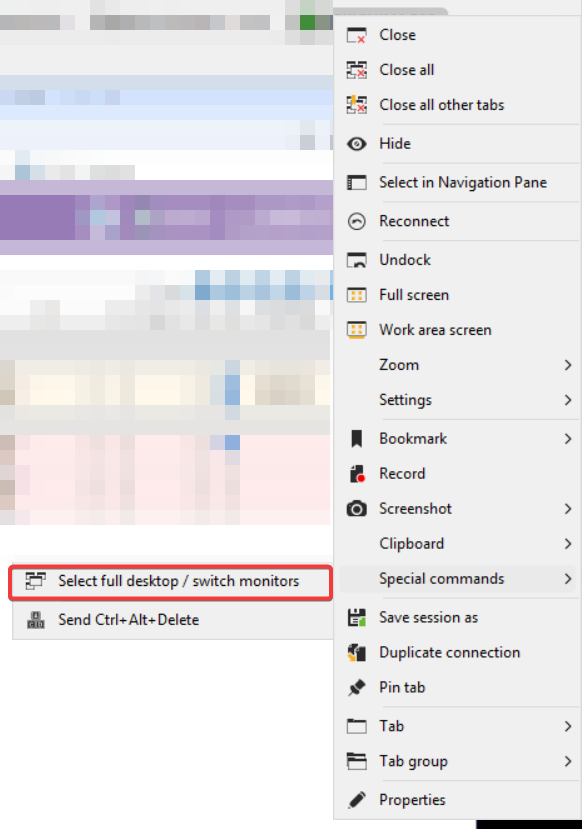
It would be so much more convenient if such icon would be directly accessible in the VNC toolbar next to the other ones (see screenshots). 
Is it possible to add it myself ? If not, can you offer such option ?
Thank you :)
20250904-165230_984-582x829.png
20250904-165020_860-298x49-RemoteDesktopManager.png
All Comments (19)
Hello,
This is a simple enough change.
We've added the Select full desktop / switch monitors to the VNC toolbar. You can expect these changes to take effect with the upcoming 2025.2.28 version.
Regards,
Jafran Majeau
Hello,
This is a simple enough change.
We've added the Select full desktop / switch monitors to the VNC toolbar. You can expect these changes to take effect with the upcoming 2025.2.28 version.
Regards,
@Jafran Majeau
this is such great news !!!
I'm glad I asked, should have asked months ago :p
I might open another topic, but are you aware of a clipboard issue when connected to a VNC host ?
I need to copy several times the remote text to get it to come to my local clipboard. It is random, sometimes it is copied on the first attempt, sometimes I need to do it 4 times to get it.
Never had such issue with regular VNC client, nor with RDP hosts.
thanks !
Hello
For your clipboard issue, I haven't seen that happen myself. Can you:
- Go to Help > Performance Profiling
- Switch to the "Debug only" tab
- Set the "Profiler Level" to "1"
- Leaving the profiler window open, reproduce the problem
- Then send me the profiler output - either by PM on the forum, or to service@devolutions.net mentioning this forum thread
Please let me know if something isn't clear or you have other questions
Kind regards,
Richard Markievicz
@Jafran Majeau just saw the update notification today, I tried 2025.2.28 and I can confirm the button is added and works perfectly. Thank you.
@Richard Markiewicz sorry I missed your reply. I'm going to try to reproduce the clipboard issue.
@Richard Markiewicz
I tried on a test computer, with a portable version of 2025.2.28 freshly downloaded.
I have managed to reproduce the issue as follow:
- on the remote computer (using VNC), I can select text and press Ctrl+C (or right click and Copy)
- on my local computer, the clipboard is updated
- I can redo steps 1 and 2 as many times as I want apparently
- If I now copy a text from my local computer, then I can paste it on the remote computer but I can't copy any more text from the remote computer.
Once I copy the text from my local computer, I can see in the debug log that "next update will be ignored".
Can you reproduce it ?
Please see the debug logs:
[Devolutions.Sessions][Debug][2025-09-10 18:44:14Z] [NewClipboardSession_OnClipboardUpdate] (1)
[Devolutions.Sessions][Debug][2025-09-10 18:44:14Z] [NewClipboardSession_OnClipboardUpdate] wrote 20 bytes to the clipboard
[Devolutions.Sessions][Debug][2025-09-10 18:44:14Z] [HandleClipboardMessage] WM_CLIPBOARDUPDATE (2)
[Devolutions.Sessions][Debug][2025-09-10 18:44:14Z] [HandleClipboardMessage] hClipboardOwner: 00160864 this.Handle: 00160864
[Devolutions.Sessions][Debug][2025-09-10 18:44:19Z] [HandleClipboardMessage] WM_CLIPBOARDUPDATE (3)
[Devolutions.Sessions][Debug][2025-09-10 18:44:20Z] [HandleClipboardMessage] hClipboardOwner: 001801f2 this.Handle: 00160864
[Devolutions.Sessions][Debug][2025-09-10 18:44:20Z] [HandleClipboardMessage] dispatching clipboard text, next update will be ignored
[Devolutions.Sessions][Debug][2025-09-10 18:44:37Z] [NewClipboardSession_OnClipboardUpdate] (4)
Hello
Thanks for the information. Can you also let me know what VNC server you are connecting to? The server name (.e.g TightVNC, UltraVNC, etc) and the version would be really helpful.
Thanks and kind regards,
Richard Markievicz
Hello
Thanks for the information. Can you also let me know what VNC server you are connecting to? The server name (.e.g TightVNC, UltraVNC, etc) and the version would be really helpful.
Thanks and kind regards,
@Richard Markiewicz
Hi,
I checked, the server is running UltraVNC 1.2.2.4.
Hope it will help.
Hello
Sorry for the delay.
I did reproduce your issue and I understand the problem. I will implement a fix for that and let you know here once it's done.
Thanks for your patience
Kind regards,
Richard Markievicz
Hello
Sorry for the delay.
I did reproduce your issue and I understand the problem. I will implement a fix for that and let you know here once it's done.
Thanks for your patience
Kind regards,
@Richard Markiewicz
thank you !!! :)
@Richard Markiewicz
by any chance, is it already added to 2025.2.29.0 ? Couldn't see it in the changelog so I guess no, but just to try my luck :)
Hello,
Yes, the fix should be included in version 2025.2.29 of RDM.
Have you updated to this version? If so, are you still experiencing the issue?
Best regards,
Carl Marien
@carl marien yes I updated, and the problem is still exactly the same.
This, plus the fact it is not mentioned in the changelog, make me doubt it is included.
Hello
Sorry for the radio silence here, it's been a busy week and this one slipped past me.
I've integrated a fix for this for RDM 2025.3; but I'm not sure if I can back port it to 2025.2. At this point, 2025.3 is just a few weeks away (mid October) and I'm not even sure there will be another 2025.2 release.
I do apologize for the inconvenience.
If it helps as a workaround: the problem is that, when send the clipboard to the remote server, some VNC servers see the change and immediately echo it back to the client. We need to be careful not to fall into a feedback loop of the client and server constantly updating each other's clipboard with the same string, which would completely break the clipboard.
In this case, Ultra is not echoing the clipboard back to the client which causes a problem for this loop detection. As I wrote, I've made a fix for that in 2025.3. What Ultra is doing, is looking at the text content of the clipboard and if it is unchanged, it doesn't send it back to the client. Since we drop the first update, copying the same text again doesn't work because Ultra thinks it already sent it.
However, you should find that server -> client clipboard is not totally broken when you fall into this issue. You can copy some different text, and it should get sent to the client. Then go back and copy what you originally wanted to copy (without copying on the client in the meantime) and it should get sent.
I understand it's not very ergonomic but hopefully it helps until the fix is out.
Please, let me know if you have some questions or something isn't clear
Thanks and kind regards,
Richard Markievicz
@Richard Markiewicz no worries, I do as you said for now, (copy different text to recover).
It is good to know it was indeed not included and also reassuring there will be a fix coming soon.
I'll be happy to try it once it is out.
Thank you again !
Hello,
The latest version of RDM is currently 2025.2.29.
Could you please use the link below to download it and check if the issue still persists?
https://devolutions.net/remote-desktop-manager/downloadenterprise/
Best regards,
Carl Marien
Hello,
The latest version of RDM is currently 2025.2.29.
Could you please use the link below to download it and check if the issue still persists?
https://devolutions.net/remote-desktop-manager/downloadenterprise/
Best regards,
@carl marien
Hi,
Hello,
It seems like your message was cut off. Did the update resolve the issue?
Best regards,
Carl Marien
Hello,
@Richard Markiewicz thank you for the fix, I couldn't see anything related to this in the changelog though, but it seems to be working fine, I can copy/paste as much as needed. Can you confirm it was added ? Should it be part of the changelog ?
@Carl Marien I don't know why, anytime I use this forum from my phone, the message is always truncated. Have you tested from a phone with the keyboard Swiftkey ?
What I wanted to say to sum up, is that the fix was announced for 2025.3 and it was said it won't be added to any 2025.2 release. So I said that your question didn't really make sense :) unless you had the info it was finally added to 2025.2 too ?
Thanks
Hello
This fix was added in 2025.3.15; if you have that version and everything is working well then this seems resolved.
It may not have been in the release notes unless someone explicitly added it (I don't think anyone did); this is because the change was purely in a dependency rather than the RDM codebase itself.
Please, let me know if you have any questions or comments
Kind regards,
Richard Markievicz