Scaling problem with different monitor sizes and zoom

Hi, RDM has a weird scaling problem which also can't be fixed using the compatibility settings when you right click the .exe with the "high dpi scaling" options, i tried all of them.
usecase:
open RDM on a laptop screen, e.g. 14" with 2560x1600, scaling 175%
then connect it to a docking station with a monitor, also 2560x1440 scaling 125%
-> the resizing and scaling happens, but everything is kind of blurry: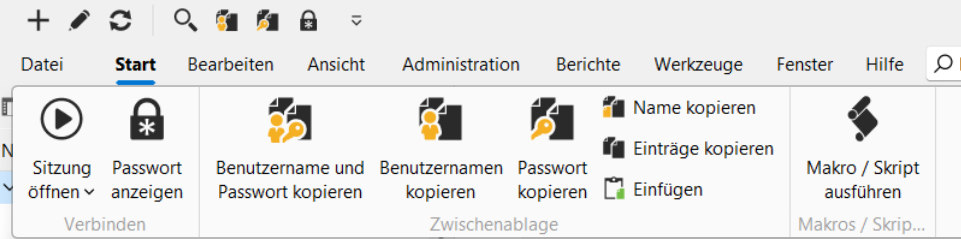
you can also reproduce this issue if you:
open rdm on any monitor
change the scaling option in windows to an other value
rdm looks like the screenshot
additional: this is not just an "annoying" behaviour, when you open a wesite in RDM, this website after the scaling can't be used any more, because somehow the buttons are in other places etc.
workaround: close and open RDM again
grafik.png
All Comments (3)
Hello,
Thank you for contacting us regarding this matter.
Could you please let me know which version of RDM you are currently using?
Also, did this issue begin after a specific change, such as an update or configuration adjustment?
I will be able to test this on Monday with my screens at the office, and having this information beforehand would be very helpful.
Best regards,
Tommy Sanders
Hello,
Thank you for contacting us regarding this matter.
Could you please let me know which version of RDM you are currently using?
Also, did this issue begin after a specific change, such as an update or configuration adjustment?
I will be able to test this on Monday with my screens at the office, and having this information beforehand would be very helpful.
Best regards,
@Tommy Sanders
Hi Tommy,
this behaviour is there since the beginning, I'm using the latest 25.2.27.
Also, you can reproduce the issue on any screen with the scaling option as i described.
Hello,
Thank you for your response.
I've been able to reproduce the blurriness and have reported the issue to our developers.
I will get back to you as soon as I receive an update from them.
Best regards,
Tommy Sanders