How to Configure macOS Remote Desktop Manager to Connect to Corporate Servers via a Jump Host Using the "bgo" Prefix Command
How to Configure macOS Remote Desktop Manager to Connect to Corporate Servers via a Jump Host Using the "bgo" Prefix Command

I want to use this software (Remote Desktop Manager) to connect to my company’s server. However, I need to connect to a jump host first before accessing the target server. Instead of using a direct SSH connection, I must add the "bgo" prefix to the command (i.e., use a command like "bgo ssh" instead of the regular "ssh"). What should I do to set this up?
All Comments (2)
Hello,
Thank you for your feedback.
Could you try to set the Local proxy command with the bgo command in the Proxy tab of the SSH entry? This is the only possible way to achieve this.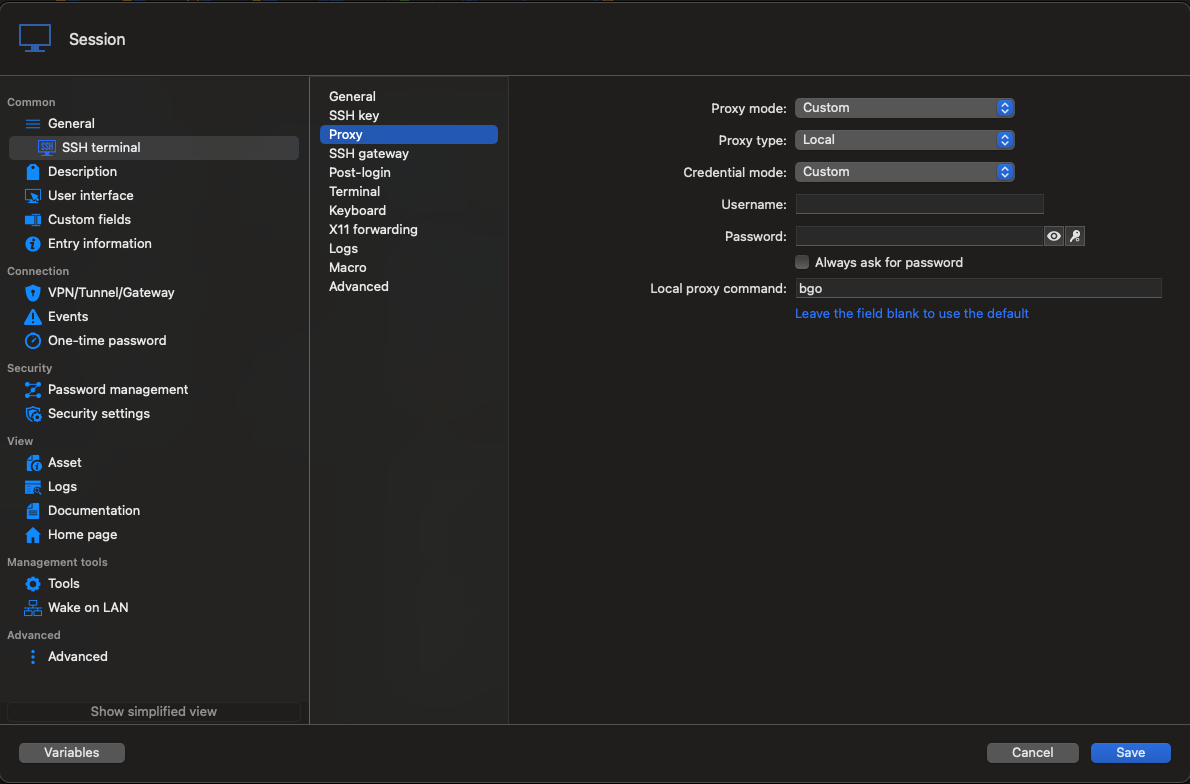
Let us know if that helps.
Best regards,
Érica Poirier
3fcb5423-05fe-4590-9e64-7079eccea73d.png
Hello,
Thank you for your feedback.
Could you try to set the Local proxy command with the bgo command in the Proxy tab of the SSH entry? This is the only possible way to achieve this.
Let us know if that helps.
Best regards,
@Erica Poirier
I regret to inform you that I have tried the method you provided, but it did not work. Fortunately, I have found alternative ways to connect to the server—for example, first SSH-ing into the jump host and then running a script to log in a second time. Thank you for your support. This issue can now be closed. Thank you, and wish you all the best in your life and work.