Resolution of variables in folders and sessions

Hello everybody,
I don't know if it's a bug, or a feature I don't understand.
I want to use the variable $HOST_WITHOUT_DOMAIN$ as name for a server folder, it works as expected at first view.
But If I create a second server folder with the same variable but different server, it's not possible (message with "same name").
Folder structure: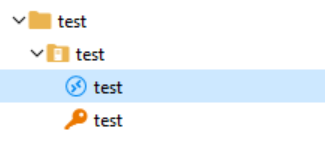
Server folder: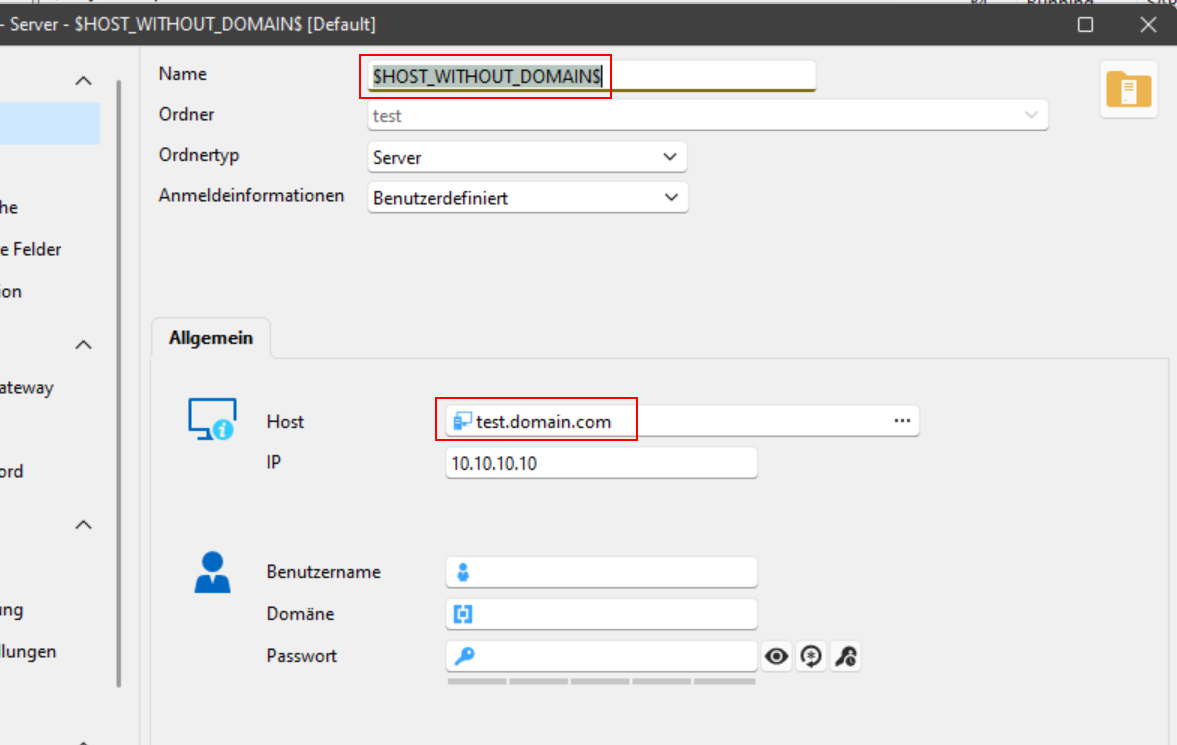
Credential: (here you can see the variable is not resolved)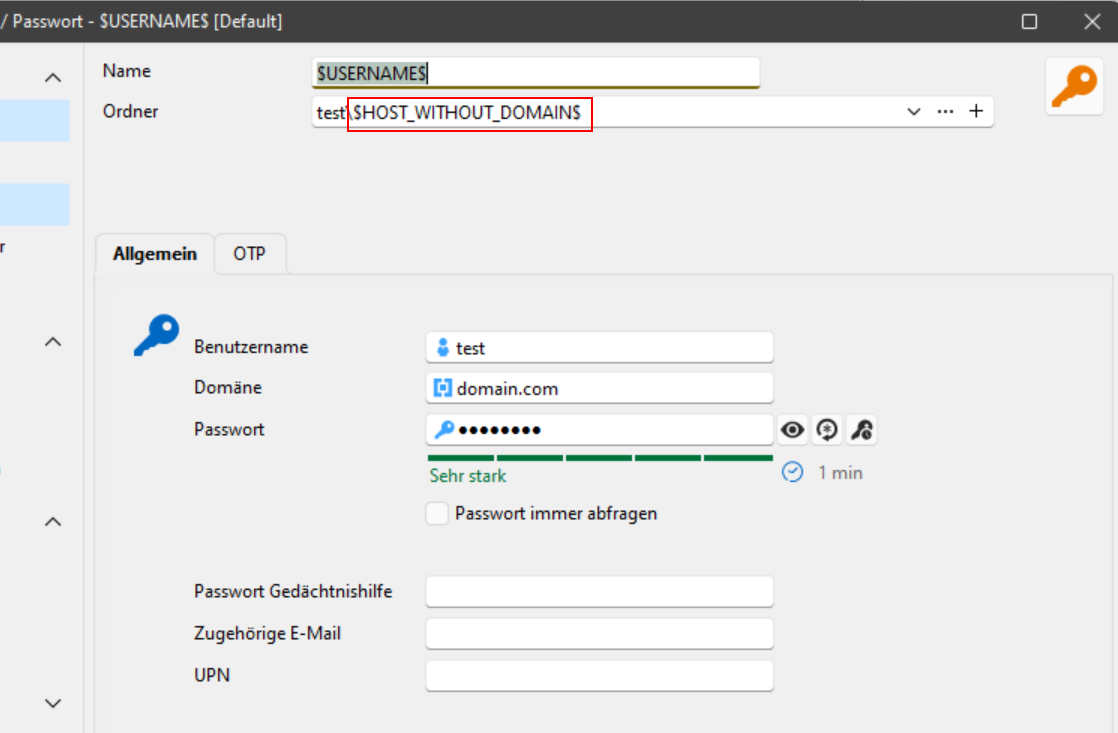
RDP session: (here you can see the issue "doubled" > folder variable is not resolved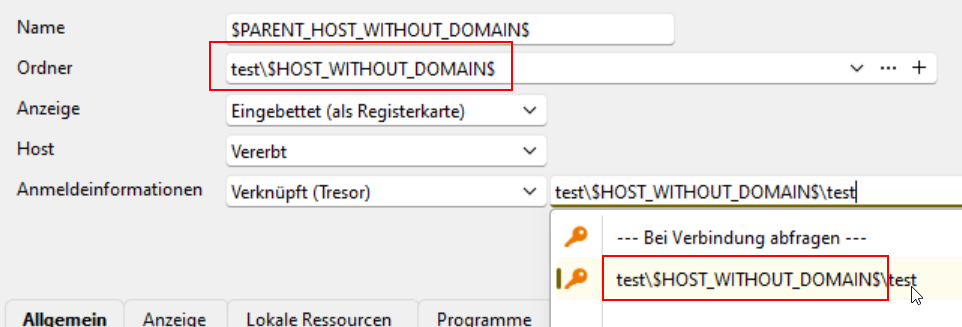
From my POV it's a bug or a missing setting, because the variable should be resolved.
Can somebody explain this behavior and may be recreate the simple setup to check how it looks on you side?
I'm using RDM Enterprise 2025.2.25.0 64-bit (JIT)
Thank you!
Best regards,
Tobi
bbe04f71-d3c8-4571-b024-0802a6f1e946.png
2ca93e6f-f238-46a1-9470-d59c247c0b78.png
e57e2790-dfd5-4443-8a00-260598ab161c.png
05b00517-1a0a-4311-af01-9336befa4f87.png
All Comments (9)
Hello Tobi,
As far as I can see, these are all test data without any confident content, right?
If so, could you please provide the whole structure as an RDM export? I want to do some tests on my side.
At first glance, the unresolved variable in the server folder properties is intended. (Second screenshot)
I agree that it should be resolved at the third and fourth screenshots (for the folder name)
Regards,
Min
Hi Min,
I would bet there is an option to export only this structure instead of the whole data source / tresor, right?
I missed also the option to copy /move the structure to my local data source.
If you need the .rdm file, I'll create a new DS with the structure and export it as .rdm.
But maybe you can use this copied settings:
<?xml version="1.0" encoding="utf-8"?>
<ArrayOfConnection>
  <Connection>
    <AppVersion>2025.2</AppVersion>
    <ConnectionType>Group</ConnectionType>
    <CreatedBy>Tobi</CreatedBy>
    <CreationDateTime>2025-08-13T18:51:39</CreationDateTime>
    <Group>test</Group>
    <ID>d3626420-3a47-4d6a-96f3-ddc1beba933e</ID>
    <Name>test</Name>
    <TemplateSourceID>c3b22a6f-7679-41ea-be81-cad8c669db30</TemplateSourceID>
  </Connection>
  <Connection>
    <AppVersion>2025.2</AppVersion>
    <ConnectionType>Group</ConnectionType>
    <CreatedBy>Tobi</CreatedBy>
    <CreationDateTime>2025-08-13T18:53:01</CreationDateTime>
    <Group>test\$HOST_WITHOUT_DOMAIN$</Group>
    <ID>49250ab2-56d5-4a93-b663-444eaf2ef4c9</ID>
    <Name>$HOST_WITHOUT_DOMAIN$</Name>
    <GroupDetails>
      <GroupType>Server</GroupType>
      <Host>test.domain.com</Host>
      <IP>10.10.10.10</IP>
    </GroupDetails>
  </Connection>
  <Connection>
    <AppVersion>2025.2</AppVersion>
    <ConnectionType>RDPConfigured</ConnectionType>
    <CreatedBy>Tobi</CreatedBy>
    <CreationDateTime>2025-08-13T18:54:24</CreationDateTime>
    <CredentialConnectionID>00000000-0000-0000-0000-000000000000</CredentialConnectionID>
    <CredentialConnectionSavedPath>--- Bei Verbindung abfragen ---</CredentialConnectionSavedPath>
    <Group>test\$HOST_WITHOUT_DOMAIN$</Group>
    <HostSourceMode>Inherited</HostSourceMode>
    <ID>142cf95b-39cd-4ba8-b018-81d2e31c0c60</ID>
    <Name>$PARENT_HOST_WITHOUT_DOMAIN$</Name>
    <OpenEmbedded>true</OpenEmbedded>
  </Connection>
  <Connection>
    <AppVersion>2025.2</AppVersion>
    <ConnectionType>Credential</ConnectionType>
    <CreatedBy>Tobi</CreatedBy>
    <CreationDateTime>2025-08-13T18:55:12</CreationDateTime>
    <Group>test\$HOST_WITHOUT_DOMAIN$</Group>
    <ID>ddc92cee-aba9-487f-840d-a3bdb6ec13ca</ID>
    <Name>$USERNAME$</Name>
    <Credentials>
      <Domain>domain.com</Domain>
      <SafePassword>+Hjd9aNOUfn4eN31o05R+TaIamynm9lFRN+3gxdY4Vg=</SafePassword>
      <UserName>test</UserName>
    </Credentials>
  </Connection>
</ArrayOfConnection>
Yes, the second screenshot was just to get you the full information about the structure. ;-)
Please let me know if you need the .rpm file, no problem, but tomorrow.
Good night!
BR,
Tobi
Hello Tobi,
No problem, the provided output is fine as well. Of course, it is also possible to export only the selection / folder structure - for the next time you can find this option here: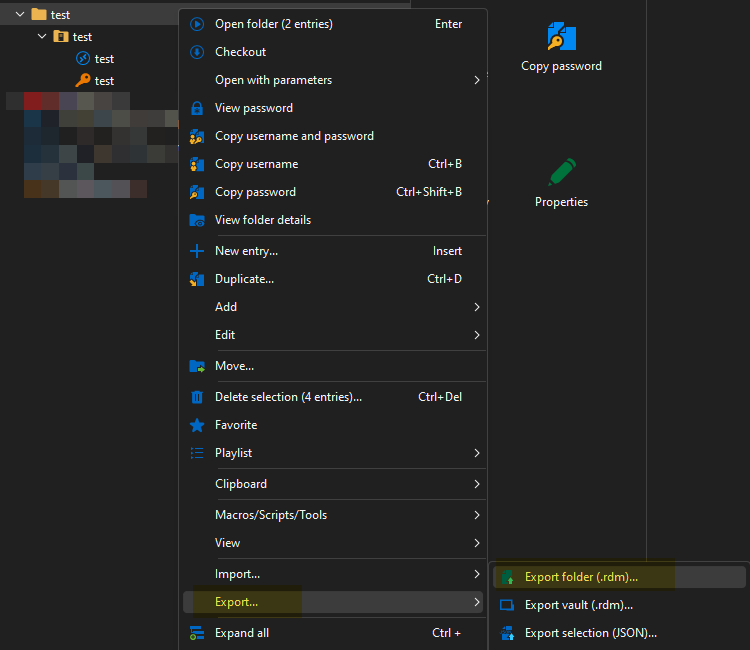
As I was able to import the structure, I'll perform some tests and keep you posted!
Regards,
Min
17ef2924-a33e-4950-a81e-ef208881776e.png
Hi Min,
Thank you for the screenshot, I knew there is an option, there is always an option :]
But it was missing in my RDM, because the option was disabled in the context menu .. *hmpf*
Take your time and thank you in advance!
BR,
Tobi
Hello,
Thank you for your patience.
The Credential Link variables not resolving is unexpected behavior. We’ve reported this as a bug to our development team and will keep you updated as soon as a fix becomes available.
We’ll notify you once the issue has been fully resolved.
Best regards,
Tommy Sanders
Hi Tommy,
Thank you for your feedback!
BR,
Tobi
Hello,
We've fixed the variable resolving in the credential selection. The drop down list will display resolved values, and the content of the box also will when the selection is made. It's worth noting that while making the selection (drop down being opened), the box itself will still display the variable name, but it will resolve once you've left the box selection.
You can expect this to take effect with the upcoming 2025.2.28 version.
Regards,
Jafran Majeau
Thank you for the feedback, I've one more question.
I have two "server" folders where I enter for both the FQDN and IP.
Now I want to use the entered Host as session name and want to use the variable "$HOST_WITHOUT_DOMAIN$".
For one of the folders that's working, but if I want to use this variable in the next server folder I still get the error message: (German) "Sie können keine Ordner mit dem gleichen Namen duplizieren."
Like: "You cannot duplicate folders with the same name." - Same name is the variable $HOST_WITHOUT_DOMAIN$
Is it correct, that I only can use this variable once?
I want to reorganize all our connections and make them more dynamical.
In the entries of the server folders (RDP or SSH) I'm using the variable "$PARENT_HOST_WITHOUT_DOMAIN$" multiple times, and this works.
Any idea if this is a bug too, or something I'm doing wrong?
To recreate this scenario, just use my export and duplicate the second/sub folder "test".
Thank you!
BR,
Tobi
Hello,
I have opened a task to investigate this. We will come back to you when we have more information.
Regards,
Jafran Majeau