Cisco ASDM

when i open up the addin i get a very small window, see attached.
however if i just click the desktop icon it opens fine?
James.
error.jpg
All Comments (20)
Hi
Are you using "Java Web Start" or "Local installation"?
Maurice
Local install,
with the jave i just get splash screen then "unable to find a window containing the title :ASDM-IDM
Hi,
The message "unable to find a window containing the title :ASDM-IDM" can be normal if the Wait time is too short (Default 1).
But even if that situation occurs you still can do a retry when the window finaly appears.
There is also the possibility that you have to choose (in session setting) the other Login title "Authentification required" depending of your ASDM version.
For the window position we will look into it.
Regards,
André Sanscartier
Hi,
Locally what's the ASDM version installed?
Regards,
André Sanscartier
v1.5(55)
i have tried various settings nothing get me connected.?
Hi,
This add-on had been develloped with almost the same version: v1.5(56).
Could you send me print-screens of the ASDM-IDM Launcher and the RDM ASDM session settings.
It would help me to figure out what to do to resolve your issue.
Regards,
André Sanscartier
attached.
error-cisco.jpg
Hi,
I suppose that you removed the host from your settings for security reason but here what I can say regarding your print-screen.
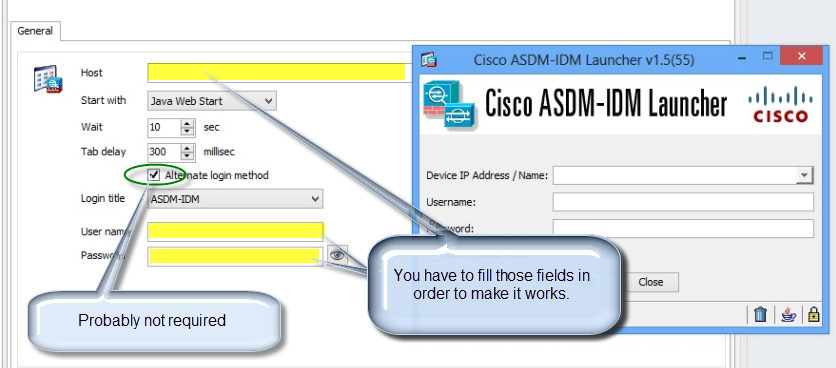
André Sanscartier
Cisco settings.png
Yes all arears in yellow are removed. i have tried without the tick.
I just realised that I didn't point out that you have to select "Locally installed ASDM" instead of "Java Web Start".
André Sanscartier
yes that is because the locally dosent work see 1st post.
Ok, do you still have the message "unable to find a window containing the title :ASDM-IDM" and if so what's happening at the same time ?
Is there a windows opening ? Java web start version should open a dialog to login. If so that's the print-screen I need.
André Sanscartier
so 1and 1-2
and 2-1 and 2-2 setting attached.
1.JPG
1-2.JPG
2-1.JPG
2-2.JPG
i have just the IP in the host?
e.g 123.123.123.123
Thanks to take the time to send me those print-sreens but it doesn't contain the login dialog that I need.
With Java web start you're supposed to see a window asking for credentials. I don't see that window in your print-screens.
Is Java installed & functional on your workstation ? Are you able to start it manualy.
For the locally installed version from what I can see from your print-screen, RDM detects the login window (when properly set to "ASDM-IDM" as Login Title) but because this window is empty the process hangs there.
Same question: Are you able to use it manualy ?
André Sanscartier
Yes that's the correct format. You can also use a host name like "AServerName.net".
André Sanscartier
Hi, the screen shot are all i see.
if i use https://4.3.2.1/admin/public/asdm.jnlp i get the window pop up and can connect.
i can use the ASDM program fine.
edited by James Dyke on 7/12/2013
Hi,
Your settings seem to be ok.
What's your windows version and do you have any particular settings (anti-virus, firewall) that could prevent an automatic start issued from RDM ?
Regards,
André Sanscartier
Hi, Sorry been on holiday.
windows 8 i have AVG Internet Security. The command must be working in some fasion?
James