Very High CPU usage on terminal server / VDI desktop

Hey All,
So we are running RDM on users laptops and also on Terminal servers and VDI shared desktops, we are seeing huge CPU usage due to RDM instances running, not quite sure if we missed something for this type of setup?
All Comments (12)
Hello
What's the OS of the terminal server? Can you try to follow the suggestion in this post and let me know if it helps?
Kind regards,
Richard Markievicz
Sorry - just to add - deep linking to specific posts doesn't always work quite right, so to prevent any confusion I'm talking about my post where I recommend changing the composition settings for Avalonia. Let me know if you have some questions.
Kind regards,
Richard Markievicz
Thanks for the quick reply, ok so i can make the change and untick all but the middle option, how do i enforce this to other users on the Terminal server as me making the change surely will only affect my instance of RDM ?
After restarting my RDM session my CPU useage dropped to 0.1%.
Oh and OS is Server 2016 and RDM version 2025.2.20.0 64-bit (JIT)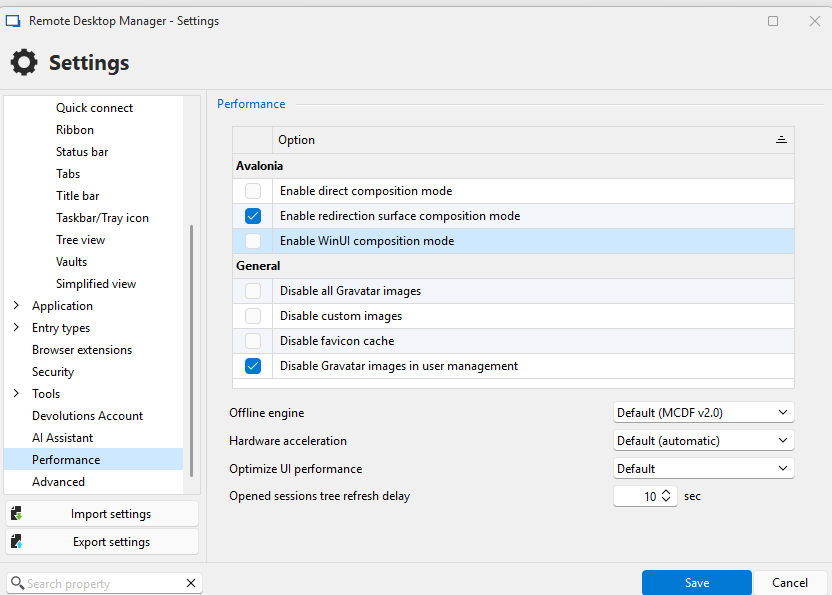
94520b09-fc51-4bf6-86cc-d88fa842cc48.png
Hello
I'm afraid that right now, the only option is for your uses to make the same changes. These options are in the RDM .cfg file, which is just XML, so if this leaves you in a difficult position in the short term we might be able to propose a solution where this can be changed by e.g. running a PowerShell script.
We're talking about this internally and we've seen this issue a few times recently, so we're discussing applying these changes automatically if your Windows build is equal to or older than 14393 (which is the cause of the issue here, newer versions of Windows won't exhibit this problem). I'm making a ticket for that and we'll post back once there's some more information.
Thanks and kind regards,
Richard Markievicz
Hey Richard,
Yes we are experiencing lots of issues now as users are getting to grips with RDM so i need a quick solution for now as we only just upgraded to this version 2 weeks ago and do not anticipate us updating again for another 6 months, i don't really want to have end users making the change as who knows what else they will touch if they start seeing all the settings :)
If you can give me the location and line of the XML that needs changing i can get a PS script to do this easy enough?
Hello
The file you need to change is RemoteDesktopManager.cfg; in a typical installation that would be found in %localappdata%\Devolutions\RemoteDesktopManager.
It's important that RDM isn't open when you edit this file, or the likelihood is that RDM will overwrite your changes.
You'll see it's just .xml, in the top level <Option> you need to add the elements:
<AvaloniaEnableDirectComposition>false</AvaloniaEnableDirectComposition>
<AvaloniaEnableWinUIComposition>false</AvaloniaEnableWinUIComposition>
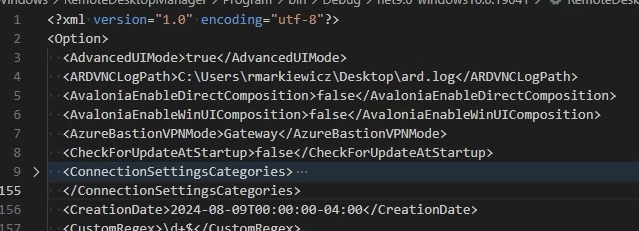
Please, let me know if you have some questions or need help tailoring a script for that.
Kind regards,
Richard Markievicz
Screenshot 2025-07-24 at 11.41.14.png
ok that shouldn't be a problem to change, if i export a new MSI from my setup will that change be injected into new users config file like the Vault address?
My concern now is new users will still need to have that change made?
Hello
If you're talking about the custom installer, yes it should pick up all the settings from your .cfg file.
When you say
My concern now is new users will still need to have that change made?
Is assume you mean existing users rather than new users?
Do you have the ability to run scripts on those users' machines?
Kind regards,
Richard Markievicz
Hello
If you're talking about the custom installer, yes it should pick up all the settings from your .cfg file.
When you say
My concern now is new users will still need to have that change made?
Is assume you mean existing users rather than new users?
Do you have the ability to run scripts on those users' machines?
Kind regards,
@Richard Markiewicz
ok so if i was able to push out a new update made from the custom installer to the terminal servers containing the config change we should be good, my concern was if we couldn't update using the custom installed then any user that logged on for the first time would have to have the change applied manually.
I will let you know if that helps us for now.
Hello
If you're talking about the custom installer, yes it should pick up all the settings from your .cfg file.
When you say
My concern now is new users will still need to have that change made?
Is assume you mean existing users rather than new users?
Do you have the ability to run scripts on those users' machines?
Kind regards,
@Richard Markiewicz
ok so if i was able to push out a new update made from the custom installer to the terminal servers containing the config change we should be good, my concern was if we couldn't update using the custom installed then any user that logged on for the first time would have to have the change applied manually.
I will let you know if that helps us for now.
Ok so i tried creating a custom installer twice and bot times the Avalonia settings are not changed on my existing install after installing?
Hello
I just tried this on my side (configure the Avalonia settings and make a custom installer); and the settings are there.
Can you tell me how you are creating the custom installer (e.g. what parameters and so on you are using)? You can also inspect the .rdi file that you're using - it's basically a .zip, so rename it with a .zip extension and inspect the .cfg file that's inside.
Thanks and kind regards,
Richard Markievicz
Hello
Just an update for you, this will be configured automatically on affected systems as of RDM 2025.2.23 - without adjusting the settings - which should be released in the coming weeks.
Kind regards,
Richard Markievicz