High CPU usage since update to Version

Dear Forum,
since we update to version 2025.1.24.0 64-bit the CPU usage of the RDM is a desaster. Our Admin-Jumpserver was used, before the update, from also 25 people at the same time. Since the update it´s not possible to work with more then 4-5 people. And the screenshot shows just the application startet, no connection, nothing ...
We work with local data sources, as we are just using the free edition and the experiance are not good to switch to a payed one ...
BR
Sascha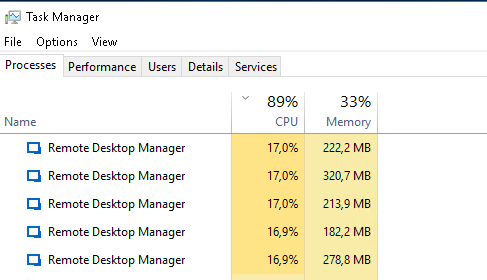
Bild.png
All Comments (22)
We will update to Version 2025.1.26 tonight
Hello,
Thank you for contacting us on that matter!
We will wait for you to update and see if the problem persists. If it does, please let us know.
In the meantime, If you have any other questions, feel free to let us know.
Best regards,
Maxim Robert
Dear Maxim,
the update doesn´t help and we are not happy at all now ... Any idea ?
BR
Sascha
Hello Sascha,
Thank you for your response! I am sorry for any inconvenience this is causing.
Could you please let me know if each user has a unique application data folder (roaming profiles or similar technologies)?
When using RDM in a Remote Desktop Services environment, it may be necessary to adjust the RDP entry settings to minimize resource usage and enhance the application's startup performance. Could you please follow the steps in Solution 3 of this helpful topic and see if it improves performance?
https://docs.devolutions.net/rdm/kb/troubleshooting-articles/startup-performance/#solution-3-prevent-internet-access
You can also limit the memory consumption of RDP entries. Please see the link below.
https://docs.devolutions.net/rdm/kb/knowledge-base/rdp-session-entry/memory-tuning-rdp-sessions/
Thank you for your patience. If you have any other questions, feel free to let us know.
Best regards,
Maxim Robert
Dear Maxim,
so far, no good news. We Update to 2025.1.29.0 and still high CPU usage ...
A plain application is consumming 13.2 % CPU, even with an empty Local Data Source and max. performance configuration.
Any other idea. The tool is more or less unusable ...
BR
Sascha
Hi,
We upgraded from 2024.3.10.0 to 2025.1.29.0 and are experiencing the same issue after upgrade on one of our terminal servers.
RemoteDesktopManager consumes about 12% CPU per user.
Server is is flatlining at 100% CPU use in total.
We use RDM on two more servers. On these servers CPU use is 0-1% per user.
Kr,
Kyron
Hello
The description of the issue implies something specific to the environment (we've not had many reports like this, and Kyron reports that just one server is affected).
The QA and support team will undoubtedly try to reproduce the problem, but without more data it will be hard to diagnose. RDM has some profiling tools but nothing that can capture runaway CPU when the application is effectively idle as seems to be the case here.
If you don't mind helping with some advanced troubleshooting, the following steps might help us to identify the problem:
- Download procdump from Microsoft / SysInternals
- Extract the download to a location on disk
- From an administrative command prompt, `cd` to the extracted procdump directory
- Run RDM (if it's not running already) and let it idle. We want it to be already running so we're capturing the idle state, not the startup cost.
- Back in the command prompt run `procdump64.exe RemoteDesktopManager.exe -c 10 -s 5 -n 10`. You may need to accept the license agreement which pops up.
This will instruct procdump to generate a minidump from RDM every time processor utilization exceeds 10% for 5 seconds, exiting after capture 10 minidumps. The command prompt will give some feedback as it generates the mini dumps. Based on your screenshots above I believe this should be an appropriate configuration.
procdump will write the dump files to the current directory and they'll be named like "RemoteDesktopManager.exe_{date}_{time}.dmp".
Once you've gathered these files please let us know and the support team can provide you an avenue to upload them to us. Do not post them here on the public forum. I encourage you to read the security disclaimer around dump files.
Please, let me know if you have any questions and I apologize for the inconvenience.
Kind regards,
Richard Markievicz
Dear Richard,
I create the file and can upload it. Please provide a link ...
And I read the disclaimer
BR
Sascha
Hi Sascha
Thanks a lot for the follow up. I've sent you a PM with some instructions. Please let me know if you have any question or you don't receive the PM.
Kind regards,
Richard Markievicz
Hi Richard,
file is uploaded as requested.
BR
Sascha
Hello Sascha
Thanks again for sending the files. I believe I've hit up what the issue is and I'm working on that.
In the meantime, Kyron can you tell me the exact OS and build number of the affected server in your case? You can get the information by running `winver` from the Start Menu or run dialog.
Best regards,
Richard Markievicz
Hi Richard,
Microsoft Windows Server Version 1607 (OS Build 14393.7876)
BR
Sascha
Hello
I've made a fix for this. I haven't been able to reproduce the issue on my side because I don't have a matching test environment, but I'm confident the fix is correct.
That will be available in the next version of RDM (2025.1.31).
Once the new version is available and installed, you'll need to navigate to File > Settings > Performance. Under the heading "Avalonia", uncheck all the options except "Enable redirection surface composition mode" (see screenshot below); save the changes and then relaunch RDM.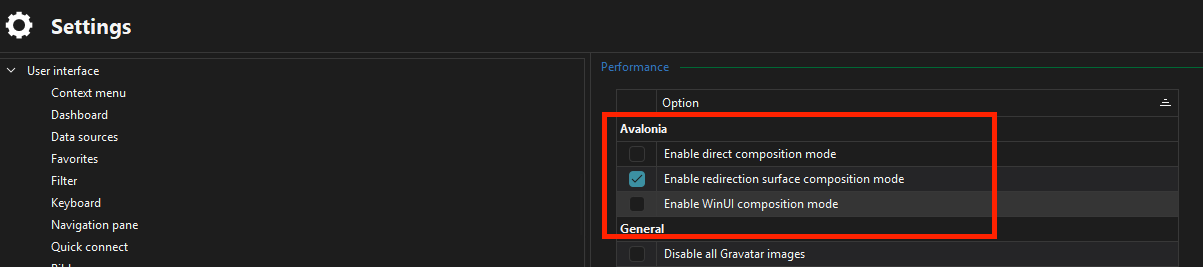
Thanks for your patience. In the meantime if you have other question or comments please don't hesitate to post back.
Kind regards,
Richard Markievicz
Screenshot 2025-04-09 at 11.26.04.png
Hi Richard,
Microsoft Windows Server Version 1607 (OS Build 14393.7876)
BR
Sascha
Hi Richard,
Same version here:
Microsoft Windows Server Version 1607 (OS Build 14393.7876)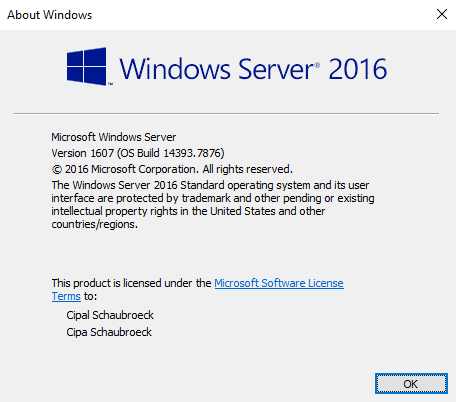
Kr,
Kyron
2025-04-10_08h29_37.png
RDM 2025.1.30, Windows Server 2016 and same issue: RDM takes ~10% of CPU time for one user
Hi Meelisn,
as Richard wrote: wait for 2025.1.31 ... I will wait till this version arrives.
BR
Sascha
Hello
Excellent, thanks for the confirmation everyone.
To extrapolate on the issue: we're migrating some of our user interface to a new UI toolkit. The toolkit is initialized at application startup. Even if you don't use any of the features using the new UI, it's not something we can disable. For example in the next major release, the dashboards will be built in this way.
There is an issue with the default display composition that affects the version of Windows which you all have. Once my fix is released and you change the settings as I wrote above, it will force a software compositor which shouldn't exhibit this problem of high idle CPU.
Thanks for your patience and in the meantime, don't hesitate with further questions or comments.
Kind regards,
Richard Markievicz
Dear Richard,
I can confirm that after the update and the performance settings, the RDM is back at 2% CPU usage :-)
Thank you for this big support ...
Br
Sascha
Hello Sascha
Excellent, thanks for the feedback. I'll mark the thread resolved but please post again if you have other questions or troubles.
Best regards,
Richard Markievicz
Hi, with this new version 2025.1.34.0 64-bit on same windows version 2016 1607 14393.7876 in VM (vmware) windows.
We have the same problem very high cpu usage 45% per session.
i unchecked in avalonia, but same thing.
We use local data source.
Do you have other idea ? thx
Hello
I wonder if this is related to running inside a virtual machine. Is the high CPU usage happening when the application is idle?
First, please can you double check you configured the Avalonia settings exactly like my screenshot above and that you restarted RDM after making the change.
Otherwise, I'll need you to follow the same troubleshooting steps I posted further up thread.
Please, let me know if something isn't clear or you have further questions
Kind regards,
Richard Markievicz
Hello
I've made a fix for this. I haven't been able to reproduce the issue on my side because I don't have a matching test environment, but I'm confident the fix is correct.
That will be available in the next version of RDM (2025.1.31).
Once the new version is available and installed, you'll need to navigate to File > Settings > Performance. Under the heading "Avalonia", uncheck all the options except "Enable redirection surface composition mode" (see screenshot below); save the changes and then relaunch RDM.
Thanks for your patience. In the meantime if you have other question or comments please don't hesitate to post back.
Kind regards,
@Richard Markiewicz
We had the same problem where we experienced RDM used up to 30% cpu.
After updating and following this fix, we are now below 2%.
Thank you very much for your help