Add Left-Click Only Option to Auto-Focus Tab on Item Select Setting
Add Left-Click Only Option to Auto-Focus Tab on Item Select Setting
1 vote

Hello,
This is a request that stems from a different thread discussing behavior of focusing sessions when selected in the navigation pane. Specifically, right now there is an "auto-focus tab on item select" option, which we can either check or uncheck. If checked, any click (left or right) on a connected session will immediately focus it. If unchecked, any click on a connected session will not automatically focus it, and instead the only way to focus the session from the nav pane would be to right-click the connected session and then click "focus session" from the context menu.
To clarify, this is the setting I am referring to: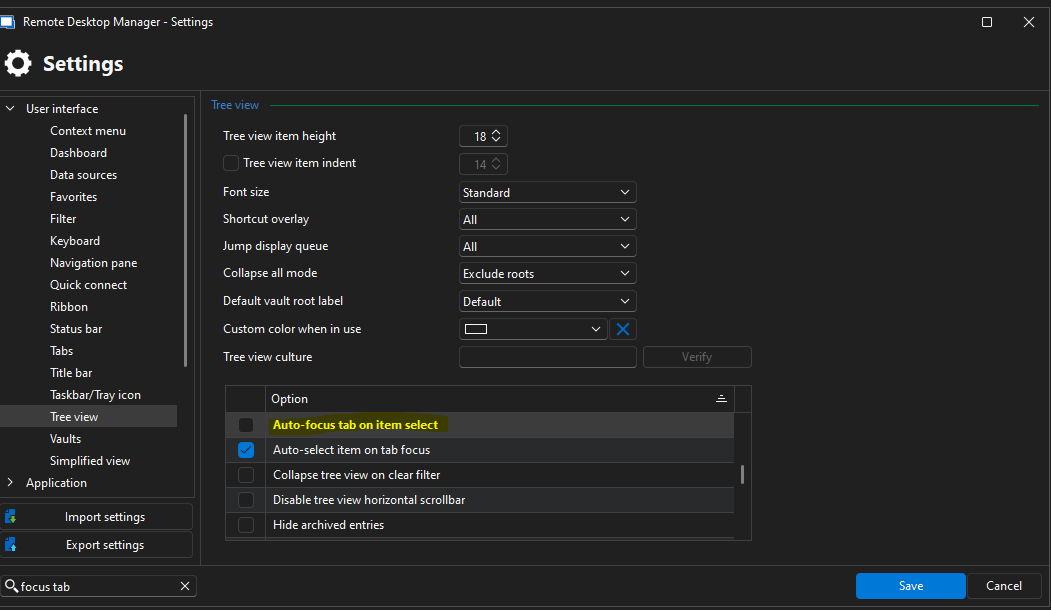
Ideally I'd like to have a scenario where a left-click will immediately focus a connected session, but a right-click will not (so that if I right-click I can choose a menu item without focusing the session if needed). It seems the easiest way to do this would be to convert the above mentioned setting ("auto-focus tab on item select") into a multi-choice, with choices of always/never/left-click only (similar to what the "auto-focus dashboard" setting already has, which controls the same behavior for disconnected sessions).
Of course, it should still be focused if someone were to choose "focus session" from the right-click menu.
It isn't really critical to me, more just a nice to have that I think would give the user experience more flexibility. If this is feasible without too big of a lift and could be added on the roadmap it would be very much appreciated. Thanks in advance for your consideration!
Best regards,
David Willis
2759a149-f9f1-4fca-afda-67d1b09a3548.png
All Comments (4)
Hello.
I agree with this, but would suggest another improvment: cleanup the settings.
Those two settings are in complete different locations and are named in different ways.
In my view, these should be grouped together.
Cheers.
Marcel
Thank you both for your feedback, we'll have to brainstorm how best to handle this.
@Marcel Gerber I think what you suggest with reworking them to at least be in the same place would make sense.
I also like the idea of there being a dropdown for these choices, but we would have to migrate the settings.
I've opened a ticket and we will monitor this thread for additional feedback as usual.
Regards,
Hubert Mireault
Hello,
I'm aware that those options are tricky and could be hard to change. That's why I've added them here in the right-click menu of the empty tab control space. This should simplify your usage. Let me know if you see any interesting settings I could bring closer to the main user interface.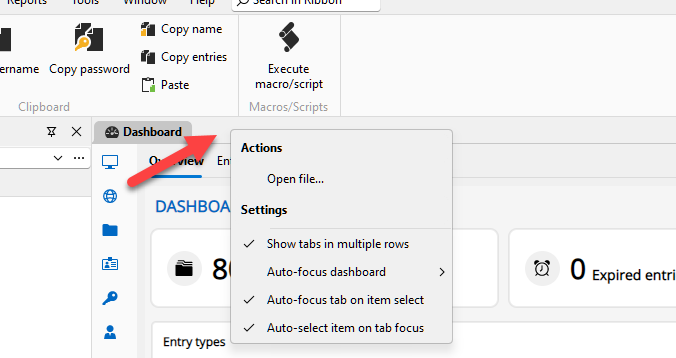
Regards
David Hervieux
de97c0de-a634-41aa-8382-57742a5e8195.png
Hello,
All 3 auto-focus related options have been moved to the Tree View section of the Settings. The Left click only will be the default settings for both options that support this feature.
You can expect these changes to take effect with the upcoming 2025.3 version this fall.
Regards,
Jafran Majeau