Right-clic in Navigation -> do NOT switch TAB
1 vote

Hello.
It's very annoying, when you have to right-click a different entry than the active one to copy a username / password or other secret because the the focus will switch from your active session to the entry's dashboard overview.
A right-click should not trigger that action, the focused tab should stay in focus.
I have a short video showing the issue, but don't seem to be able to upload it here.
Anyway, it might be better if it wasn't public, as it contains some company and personal information.
Best regards.
Marcel
Devolutions Server, RDM and GW admin.
All Comments (8)
Hello Marcel,
If you go in File > Settings > User Interface > Dashboard, you should see an option to change the way the dashboard focuses when clicking on another entry: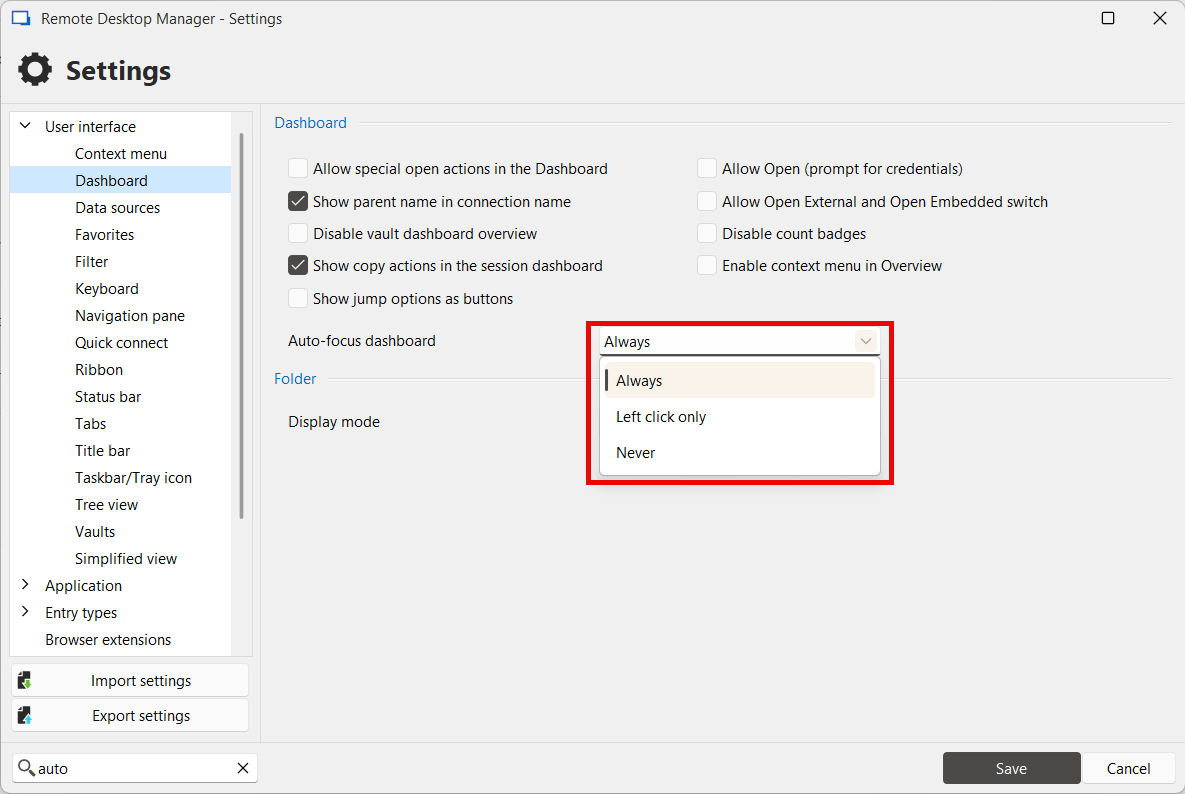
Depending on what you want, you can set this to "left click only" or "never".
Let me know if this works for you.
Regards,
Hubert Mireault
be33d574-5b90-4e15-b7f4-8b47683fec74.png
Hello Hubert.
That's exactly what I was looking for.
I didn't think to search the settings though.
Thanks for the tip !
Marcel
Devolutions Server, RDM and GW admin.
I'm glad this works for you! I'll mark this thread as resolved, if there's anything else we can help you with, don't hesitate.
Regards,
Hubert Mireault
Hello,
I'm having the same issue, however the setting noted above doesn't seem to help. Changed to "left click only", also changed to "never" (and tried closing RDM and reopening after making the change) and still, it doesn't seem to make any difference. Right-click of another entry in the Nav Pane will switch to that tab even with this set to either "left click only" or "never".
This is in the latest v2025.2.17, data source MS SQL.
Any suggestions?
Best regards,
David Willis
Just to update in case anyone else comes across this - it seems this was due to some confusion on my part. I was assuming it behaved the same way whether the entry being right-clicked was currently connected or not, but it appears that is not the case. If the entry being right-clicked is currently disconnected, then the "auto-focus dashboard" setting will control the behavior. However if the entry being right-clicked is currently connected, then the "auto-focus dashboard" setting does not seem to have an effect and instead, this setting becomes relevant: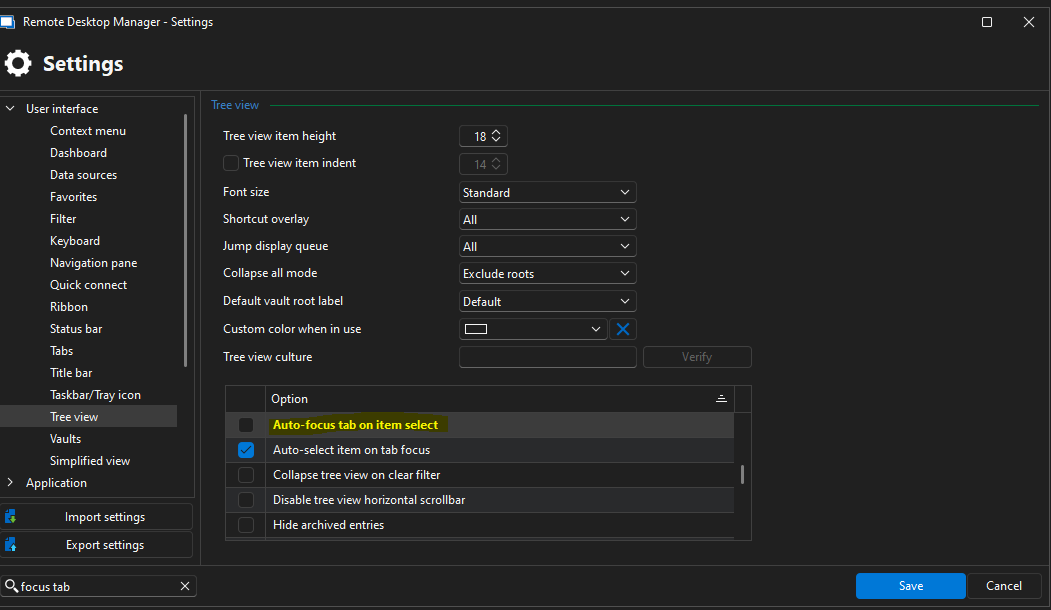
By unchecking "auto-focus tab on item select", I am now able to right-click an entry in the nav pane for a currently connected session and it will not switch focus to that session's tab unless/until I click "focus session" (which is what I want). The problem is, it applies to all clicks so now a simple left-click of a connected session also won't focus it. I guess I have to live with it one way or the other, but at least I have a better understanding how it works now.
What would be ideal is if this "auto-focus tab on item select" setting could be changed to have a "left-click only" option like the "auto-focus dashboard" setting does. I suppose I should probably post a separate feature request for this since this original topic was already marked "resolved".
Best,
David Willis
2759a149-f9f1-4fca-afda-67d1b09a3548.png
Nice find! Thanks for sharing.
Devolutions Server, RDM and GW admin.
Hello David,
Thanks for the feedback and sharing this. I would indeed recommend making a new feature request for this as it will be easier for us to keep track of it. Feel free to link back to your post in this thread as well as it will give us additional context.
Regards,
Hubert Mireault
Sure, request has been posted - here's the link in case anyone else is interested:
https://forum.devolutions.net/topics/50614/add-leftclick-only-option-to-autofocus-tab-on-item-select-setting
Best,
David Willis