Possible memory leak

We use RDM on RDS servers with multiple users running the Remote Desktop Manager software
We use SQL server as database with licensed version of RDM
When running for longer period of time ( some days ) we notice that in the user session RDM takes more and more RAM without any specific reason.
Sometimes a user clicks the RDS server connection away without logoff so the software keeps running overnight
When the ram goes around the 1Gb of usage the connections open in the RDM software start to react really slow.
We use mainly remote desktop connections to our on-premise servers and this is where we notice the slowness
When closing the RDM software when the RAM usage is over 1Gb the software will not close nicely and we have to force kill it. When we the restart the software it show around 200 Mb Memory usage and we can reconnect our connected servers without any issues
The version we are using is version: 2025.2.16.0 64-bit
If logging is needed please tell us where we can find it
Screenshot of running RDM software for 3 days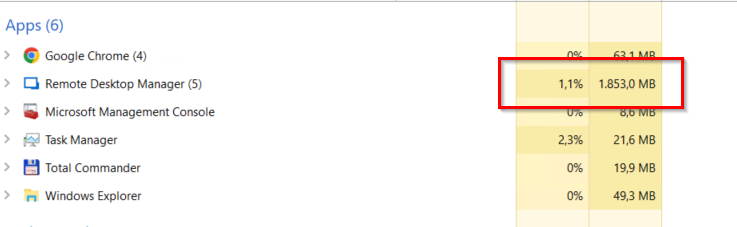
Screenshot when restarting RDM software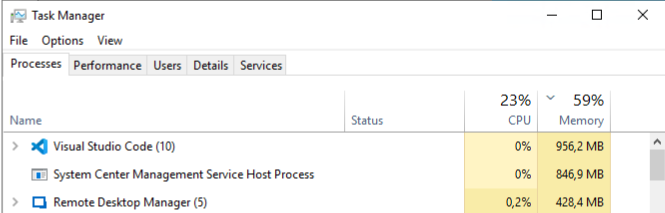
when running for 3 days.png
when starting rdm.png
All Comments (2)
Hello info01,
Thank you for reaching out to the Devolutions support team.
This looks related to this topic here:
High CPU usage since update to Version
Can you review your OS version and tell me if the workaround mentioned in the thread works for you?
Best regards,
Patrick Ouimet
Sorry for my late response, we use server 2019 and have 3 rds jump stations.
I enabled (disabled) the settings and we notice that at least start time is reduced significantly. I will keep eye on the cpu and memory usage to see if this resolved.