Username issue since the recent Update - 2025.2.17.0

Hi Team,
Since the recent update 2025.2.17.0, we're experiencing issue with any username begins with $ i.e $Username, as it will try to replace it with %Username% instead, hence leading to many incorrect login attempts, it was working fine until the recent updates.
We have attempted to recreate the RDP files or folders but to no avail, seems like it doesn't like the $ symbol Infront of the username.
All Comments (3)
Hello,
Thank you for reaching out to us regarding this matter.
Could you please provide a screenshot of the entry's properties, along with a screenshot showing the error or issue when the connection fails? This will help me attempt to reproduce the issue on my end.
Best regards,
Tommy Sanders
Hi jackli,
This is due to a recent change allowing for the resolving of Unix environment variables. Unfortunately, it appears that your username happens to follow that same template ($VARIABLE_NAME) and that RDM is trying to resolve it as a variable. To resolve this, we would suggest disabling this behavior. To access this setting, head to the options and type "NOUI" while holding the CTRL and ALT keys. A window called "Hidden settings" should appear and you will be able to turn off "ResolveUnixEnvironmentVariables".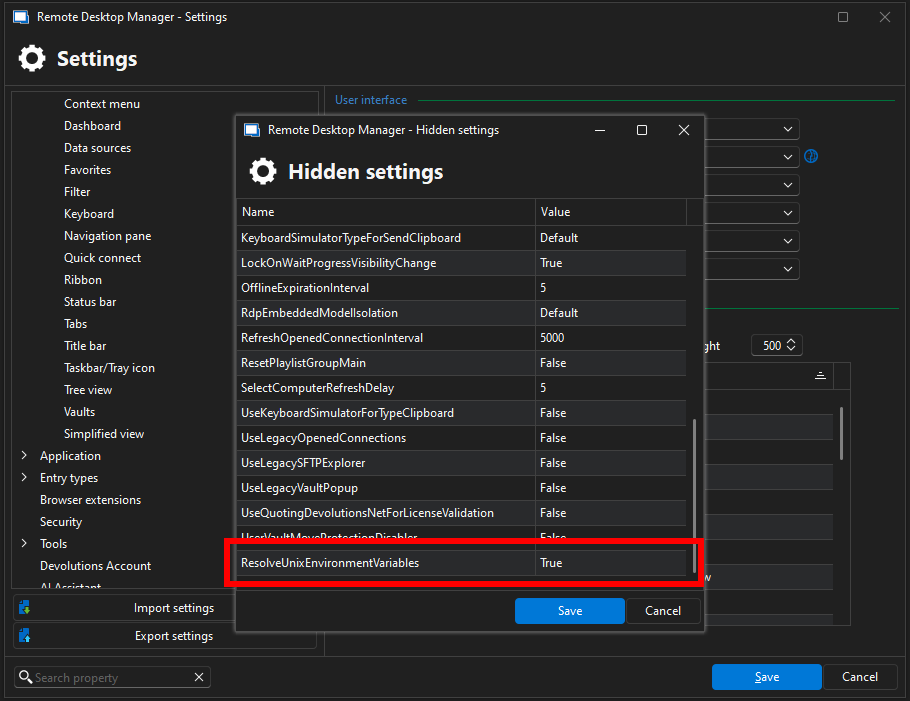
This should resolve the issue!
Best regards.
Nicolas Parr
var_resolving_setting.png
Hi Nicholas,
Thanks for your help, it worked after disabling the Unix environment Variables.
Regards