Connect to console when credentials are inherited

When you have an RDP connection that is set to inherit credentials then the console option is greyed out and cannot be selected. How can you set the RDP connection to connect to the console session when this is the case?
Also, could it be confirmed if the console option is the functional equivalent of /admin for mstsc?
All Comments (5)
Hello,
Thank you for reaching out regarding this matter.
I believe you're referring to the username and password fields that become greyed out when the credentials are set to "Inherited." If that's the case, this behavior is expected.
For more details, I recommend reviewing the following documentation:
https://docs.devolutions.net/rdm/commands/edit/entry-credentials-options/
Please let me know if this helps. If not, feel free to send me a screenshot along with any additional information so I can assist you further.
Best regards,
Tommy Sanders
Hi Tommy,
Thanks for the reply.
The inherited credentials greying out the credential fields I understand, this part makes sense. The part I'm asking about is how do you select Console when you are using inherited credentials?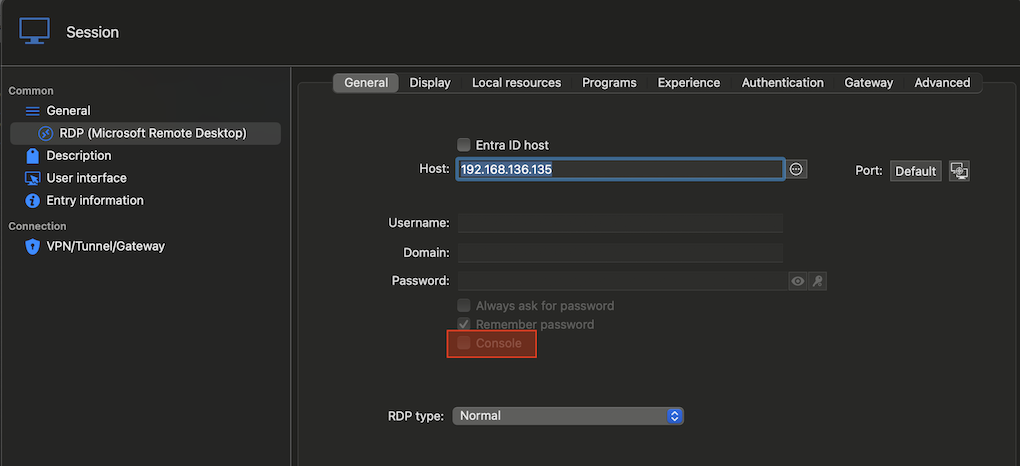
My second question is if the Console option is the functional equivalent of setting the /admin parameter on mstsc in Windows.
72af98e2-08f0-46cf-909e-b74219a1f8f2.png
Hello
This looks like a UI bug, I don't think there's any reason for that checkbox to be disabled with inherited credentials (like its sibling options are).
We will have to make a ticket for that but it seems like an easy fix. We'll come back to this thread with an update.
For a workaround in the short term, you can try (and I didn't test this, but I expect it to work) setting the credentials to "Username and password", checking the "Console" box, and then immediately switching back to inherited credentials. The setting should persist. If you have a lot of sessions that you need to change, let me know your datasource and I can probably recommend a quick workaround for that.
And to answer your second question, yes this is the equivalent of the /admin parameter in mstsc. At some point Microsoft renamed it from "Console" to "Admin" and we should probably reflect that at the same time as fixing this issue.
Please let me know if you have any other questions
Richard Markievicz
The workaround looks to be working, I'll monitor as time goes on. For context, this is to connect to RDS session host machines that belong to an RDS farm, when connecting to them without this set the RDS broker may redirect the session to another host. As you can imagine, if you are connect to perform some administrative tasks this could be a bit problematic.
If you rename the Console option perhaps consider renaming it to something like "Console/admin session", that ought to cover the bases :-)
Hello
Thanks for the update. I've made a ticket for the RDM Mac team to address this. The ticket is linked to this thread so you should be notified once that's fixed.
Thanks and kind regards,
Richard Markievicz