Console output to any device is garbled unreadable text

Hi,
Both two recent releases have broken local console access in the CLI, which results in garbled unreadable text output.
I have had to rollback to version 2025.1.41.0 as this is the only recent version that is ok.
Could you take a look into this and fix in the next release please.
Thanks
Adrian
All Comments (39)
Hello,
Thank you for contacting us regarding this matter.
Could you please send me a screenshot of the garbled, unreadable text output?
In the meantime, could you also let me know if this issue occurs during a specific action or workflow?
Best regards,
Tommy Sanders
The garbled/unreadable text appears in every local console session i initiate to devices ie, Cisco/Juniper etc.
I am currently using the older fixed version so will have to install the newest version to get you some screenshots.
Thanks
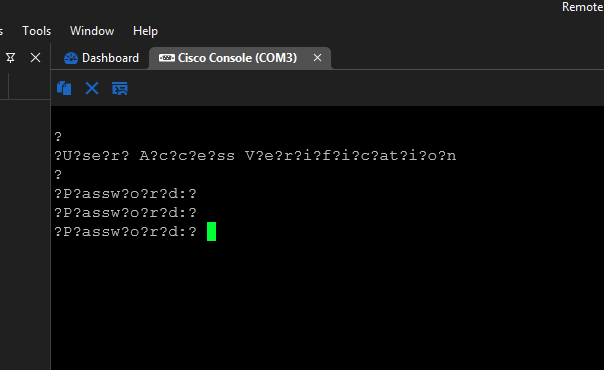 This is the unreadable text i get on the newest two versions of RDM.
Reverting back to 2025.1.41.0 and the problem has gone.
A bug has been introduced in the newest 2 versions somehow.
b2c9fa01-07c8-43c4-a7eb-db73a53ae0ec.png
Thats me back on the older version and all good: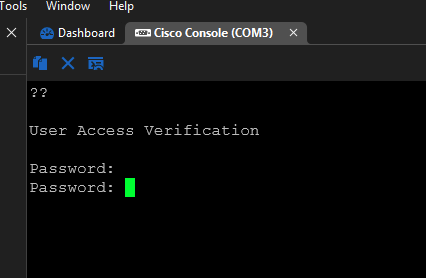
d7185a10-e19b-4518-8df3-d99564b4f9e7.png
Hello,
Thank you for your response.
The issue has been successfully reproduced, and our development team is currently working on a fix that will be included in a future version.
I will keep you informed as soon as the issue is resolved.
Best regards,
Tommy Sanders
Hi Tommy,
Many thanks for the update.
I see there is a new version out, has this one been fixed?
Thanks
I have just tried the newest version 2025.2.16.0 and it is still broken.
Hi @adrianabbott
You should be able to see text correctly in 2025.2.16.0 though there is still a known bug with this type of entry (that is already fixed and will be available in .2.17) But it also looks like I overlooked something. Could you tell me what kind of setup your serial entries have? What baudrate, stop bits, parity? Do you have data bits set to other than 8? Do you have Flow control other than none?
Sorry for the inconvenience and thanks for the info.
Regards
Denis Vincent
Hi Denis,
I use the default setup for serial rates (i never change this).
I have reverted back to the earlier working version again.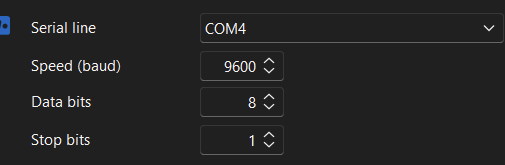
58990175-5717-4a5d-8249-4d0b8e1bfe82.png
Hi @adrianabbott
With your latest info, I am pretty confident that I found the problem. A fix will be available in the the next release which is coming shortly.
Regards
Denis Vincent
many thanks for the update
I am suffering from this same problem and wasted half a day trying to figure out why my serial comms from a ST development board suddenly stopped working, until I realised that I had recently updated RDM and tracked it down to breaking in 2025.2.13.1 (works fine in 2025.1.41.0), although there is no mention of anything to do with serial comms in the release notes. It is still broken in 2025.2.17.0.
Hi @simon4
Sorry for the trouble this bug has caused you. In order for me to investigate, could you send me what is the setup for your serial entry? A screen shot of the garbled output could also be useful.
Thanks for the infos
Regards
Denis Vincent
Ive not tried 2025.2.17.0 yet, but reluctant to after hearing about this.
Lost count the amount of times ive upgraded and had to go back to 2025.1.41.0 already.
I can confirm that local console access is still broken in 2025.2.20.0.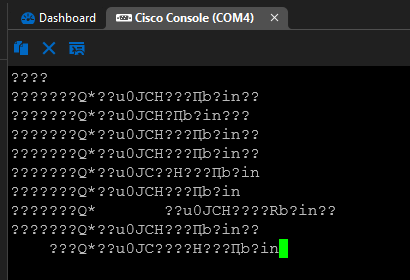
30ad6f6d-ccb6-4f4e-a0b8-11a2ec5125d2.png
I have reverted back to 2025.1.41.0 and all good again.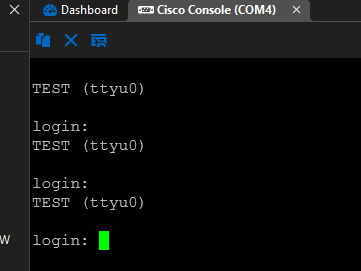
4d0894f6-03ce-482b-a7db-54ce0a33d7c1.png
@Denis Vincent sorry for the slow reply but I have very limited time to spend continuously updating and reverting software. My config item is as follows: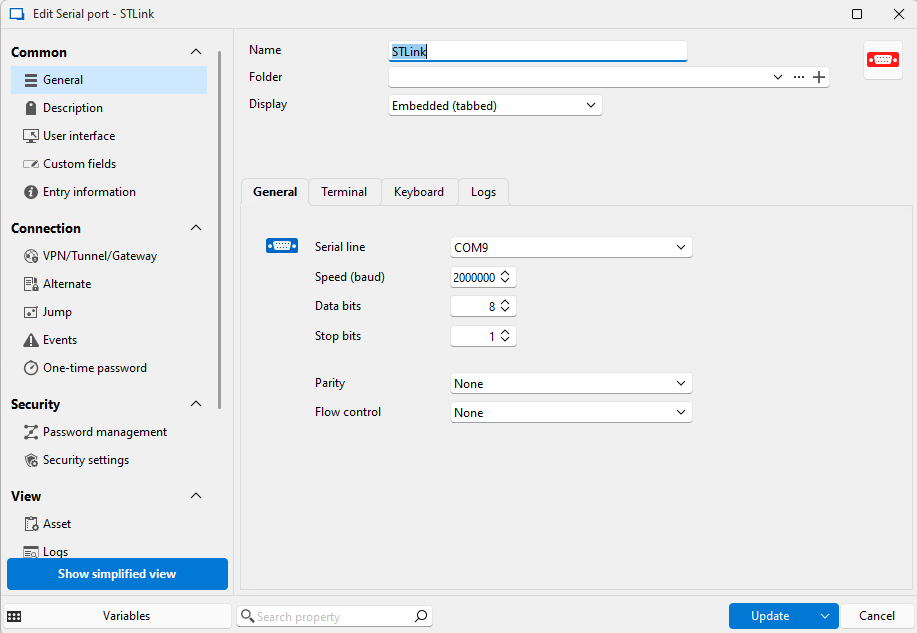
This works perfectly up until 2025.1.41.0 after that it is broken. Can I suggest that you go back and review the commits that were included in the release following 2025.1.41.0 as one of them is clearly the culprit. My output looks similar to above, missing or invalid characters.
9c332ba7-c70f-43a1-8634-09a065533c1e.png
Hello,
Thank you for your response.
To assist with the investigation, would it be possible for you to create a portable installation of the latest version of Remote Desktop Manager (RDM)? This approach will allow you to avoid uninstalling and reinstalling your production RDM.
Please follow the steps below:
- Download the .zip file from the following link:
- https://devolutions.net/de/remote-desktop-manager/download/thank-you/?platform=RDMbin&edition=team&os=windows
- Create a new folder on your Desktop.
- Extract the contents of the .zip file into the folder created in step 2.
- Navigate to this folder and run RemoteDesktopManager.exe.
- Connect to your data source.
Additionally, we would need a TRP file related to your issue. You can create it by following the instructions in this article:
https://docs.devolutions.net/rdm/kb/how-to-articles/record-ssh-session-terminal-playback/
Best regards,
Tommy Sanders
Thanks, i will try this tomorrow when i have some free time.
Hello,
Thank you, we will wait for your feedback.
Best regards,
Tommy Sanders
I have just tried that portable version 2025.2.21.0 and that is broken too: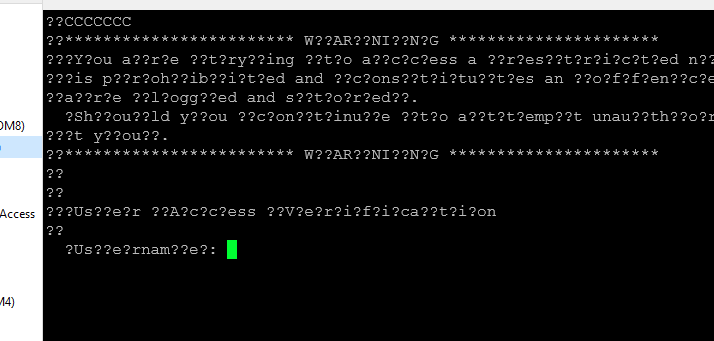
f406a483-0170-49bf-87a0-13f8fc6623db.png
when logged in the router, this is what happens when viewing interfaces: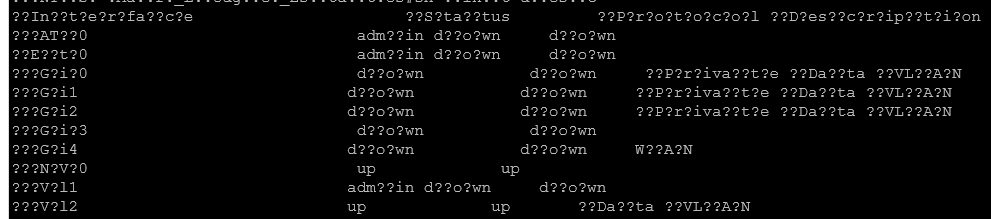
It is just displaying loads of "???" all over the cli output.
3c149acc-1c00-4390-9996-a8ed07055759.png
7edbb032-0a72-49f8-a9fc-c6f43a5c98f7.png
Back to 2025.1.41.0 and all good again.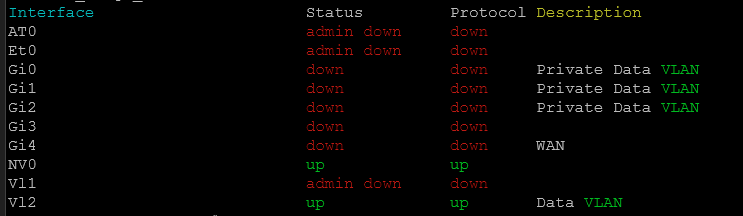
0ea0fa09-f171-476a-8383-33e530de2ecd.png
Hello,
Thank you for your response.
To assist us in further investigating the issue, could you please create a TRP (Terminal Recording Playback) file from the version where the problem is occurring?
You can follow the steps outlined in this guide to generate the file:
🔗 How to Record SSH Session with Terminal Playback
Please share the TRP file once it's ready.
Best regards,
Tommy Sanders
Im not using SSH when going in via console, it uses a COM port.
just made a video showing the issue, this is me trying to logon a Juniper router
Recording 2025-07-16 134149.mp4
and this is local console access working fine in the older version.
Recording 2025-07-16 134602.mp4
Im seeing this issue as well, latest version installed.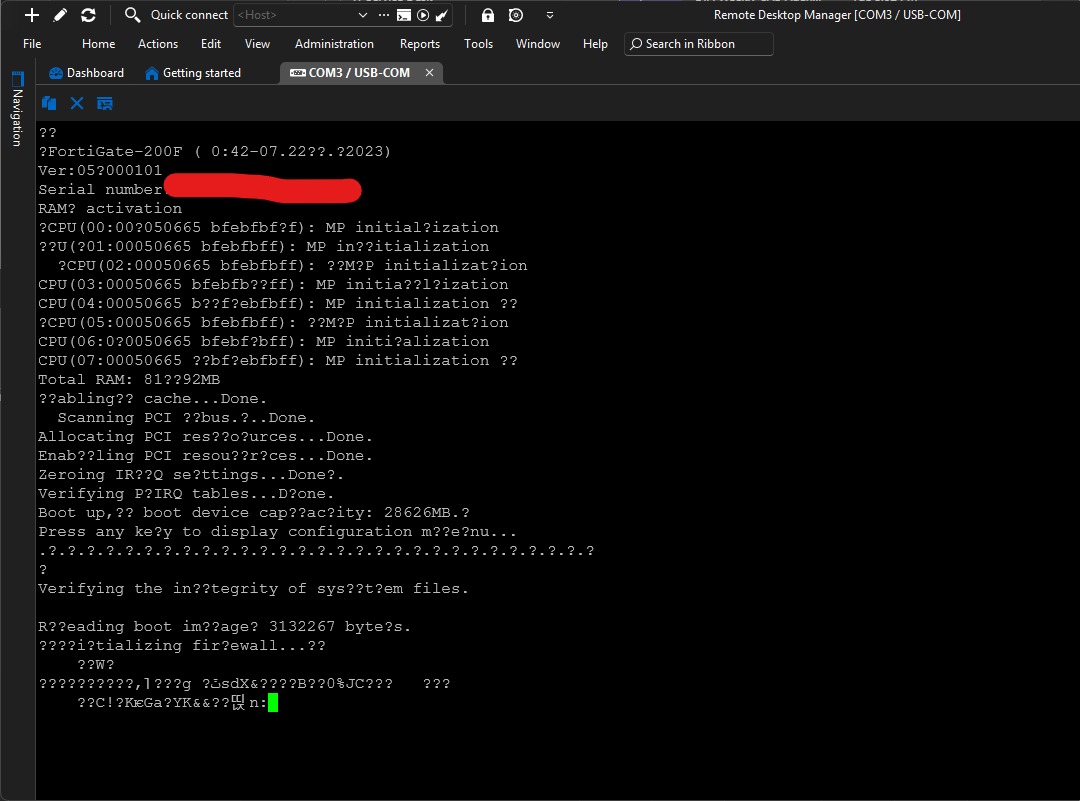
Compared to Putty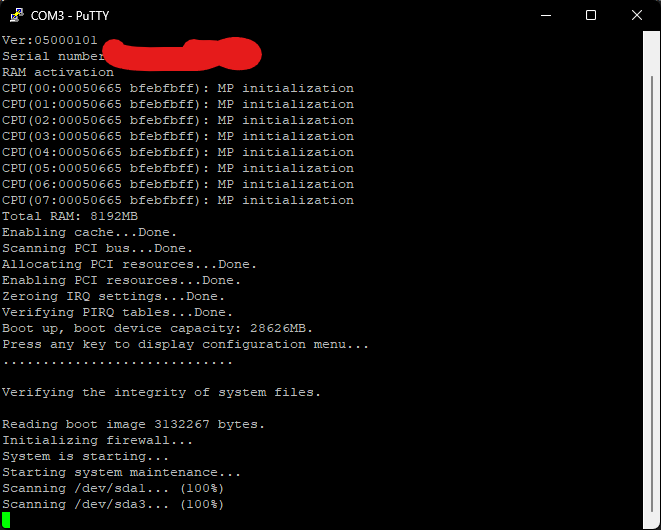
3ca3fec8-c186-4d38-aeb3-283828e9a4b8.png
e2558fa6-17e2-4896-9ceb-a9541c082d51.png
5e30e077-ed5a-4b9b-9a90-73f1153301f5.png
Hello,
Thank you for your follow-up.
I will investigate this behavior next week with our top agent specializing in SSH configuration and related issues. Unfortunately, I’m unable to look into it at the moment, as he is currently on vacation.
I will get back to you with more information as soon as I have an update.
Best regards,
Jacob Lafrenière
Just to be clear, this is not SSH, I see this is the 2nd mention of SSH in this thread by Devolutions Staff, but this has nothing to do with SSH.
This is Serial / COM Ports, physical connections, not IP based.
@Jacob Lafrenière as has been stated more than once, this problem has NOTHING to do with SSH, we are talking pyhsical com ports. I can't believe how hard this is to get anything done to fix it, or more to the point unbreak it as it used to work perfectly. As a software developer my first place to look would be to see what commits where made to the codebase in the release following 1.1.41 that have anything to do with the serial port code.
Simon
Hello,
Thank you for your response.
The issue has been successfully reproduced, and our development team is currently working on a fix that will be included in a future version.
I will keep you informed as soon as the issue is resolved.
Best regards,
@Tommy Sanders
is there any update on the fix please?
Hi,
To every one having problems with serial devices, I am deeply sorry for the inconvenience. I tried a multiplatform implementation to access the serial port, it is obviously not working, so I will be reverting to a per platform implementation. I am making this my top priority.
Also, I am sorry for the delay to respond, I was on vacation.
Regards to all
Denis Vincent
Hello everyone,
We have a tentative fix for this issue coming out in our next minor version, 2025.2.22.0. This version is currently going through QA testing. We would appreciate feedback once this new version is available, which should be by the end of the week if all goes well.
If this still doesn't work for you, please generate a log file with verbose level 2 and send it to us, it would be very helpful.
Regards,
Hubert Mireault
Hello,
Version 2025.2.22.0 is now out, I would encourage you to try it out and seeing if the issue is resolved. If not, we would really appreciate log files with verbose level 2 so we can further diagnose this.
As an additional note, if you're still on 2025.1, you might be interested in downloading the portable version of the application to perform this test before updating your installation, to avoid having to possibly revert to a previous version afterwards.
Regards,
Hubert Mireault
The issue appears fixed for me.
Thanks for the update.
I can confirm that the latest version 2025.2.23.0 is working fine.
Thank you for the feedback, we're happy to hear it. With all the positive feedback, I'll mark this thread as resolved.
Regards,
Hubert Mireault