FortiClient IPsec

I have installed RDM version 2025.1.41 and FortiClient version 7.4.3.1790. I can connect to the created VPN directly from the client without any problems, but when I try to connect from RDM, nothing happens. No error message is displayed. It seems that RDM does not cooperate with the client at all. What could be the problem?
All Comments (11)
Hello,
Thank you for reaching out to us regarding this,
Was this working for you previously?
We have the following knowledge base article regarding FortiClient:
https://docs.devolutions.net/rdm/kb/troubleshooting-articles/forticlient/
Best regards,
Samuel Dery
Hi.
This does not solve my problem. I have been using SSL VPN for a long time by calling FortiSSLVPNClient.exe from RDM.
But I need to solve IPsec and not SSL VPN. Fortinet has recently deprecated the use of SSL VPN tunnel mode across all FortiGate appliances starting with FortiOS 7.6.
Hello,
Thank you for the follow-up.
Here some documentation and topics on the forum that might help you look into this.
https://docs.devolutions.net/rdm/kb/troubleshooting-articles/forticlient/
https://forum.devolutions.net/topics/43877/update-to-work-with-forticlient-vpn-7-0-1-0083
https://forum.devolutions.net/topics/44396/forticlient-7-4--ipsec-connection-support
Let me know if you find anything of interest.
Best regards,
Jacob Lafrenière
Unfortunately, none of the links you provided solve my problem.
I am attaching the log, as advised in one of the links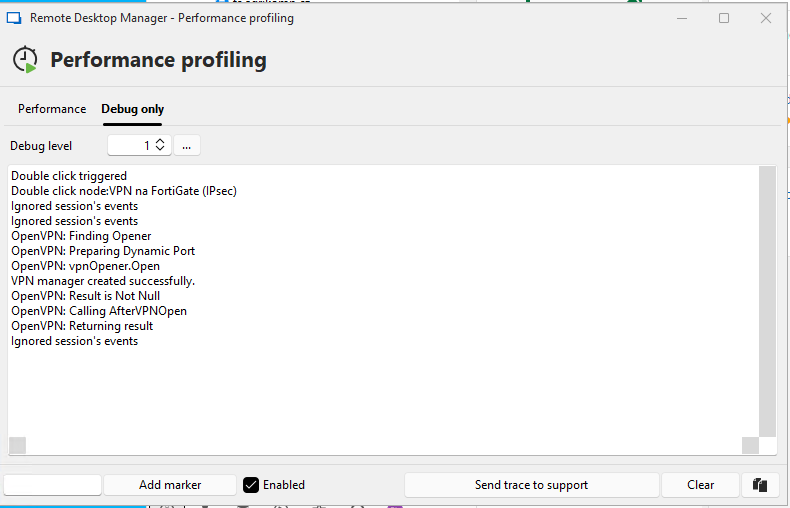
6c2b8bf4-1ce6-4819-aa06-46af0efdfe6b.png
Hello,
Thank you for the follow-up and for providing the profiler screenshot.
I will investigate this further with the development team and follow up with you shortly.
Best regards,
Jacob Lafrenière
Hello Jacob,
We are also having this issue with the following logging:
OpenVPN: Finding Opener
OpenVPN: Preparing Dynamic Port
OpenVPN: vpnOpener.Open
VPN manager created successfully.
OpenVPN: Result is Not Null
OpenVPN: Calling AfterVPNOpen
OpenVPN: Returning result
Kind regards,
Joeri
Hello,
Thank you for the information.
I will include this in the ongoing investigation with the development team.
Best regards,
Jacob Lafrenière
Hello Jacob,
Any updates on this subject?
Kind regards,
Joeri
Hello,
Thank you for your follow-up.
The internal case regarding this issue is currently on the assigned developer’s to-do list. Unfortunately, I do not have an ETA at this time.
We truly appreciate your patience and understanding while we work on this.
Best regards,
Jacob Lafrenière
Hello,
I have the same problem, which is very disruptive because my users have to connect to the VPN manually, which partly negates the usefulness of using a tool like RDM. Could you please provide me with a solution to fix this problem as soon as possible?
Thank you in advance,
Keerstock Nicolas
Hi,
i use a workarond to solve this problem with ipsec
this is my situation
Forticlient 7.4.3.1790
RDM 2026.1.12.0 - portable in c:\RDM folder
Basically, these are the steps I took.
I create the following folders:
C:\rdm\Vpn-Ipsec\Config - where all the configurations will go
C:\rdm\Vpn-Ipsec\Script - where the two scripts for exporting and importing the configurations will go.
These are the two scripts used:
import-export.bat
- export my current configuration as a backup using FCConfig.exe
- import the client configuration chosen via parameters using FCConfig.exe
Restore.bat
- import the original configuration to return to the initial state.
I configure my empty client normally as if I were using the VPN, naming the configuration "ipsec."
Once I've tested its functionality, I export the configuration, setting a password, and place the customer.conf file under c:\rdm\Vpn-Ipsec\Config (where all the various configurations to be used will go).
Create an item like this where in the Tunnel name i put "ipsec" and fill Username and Password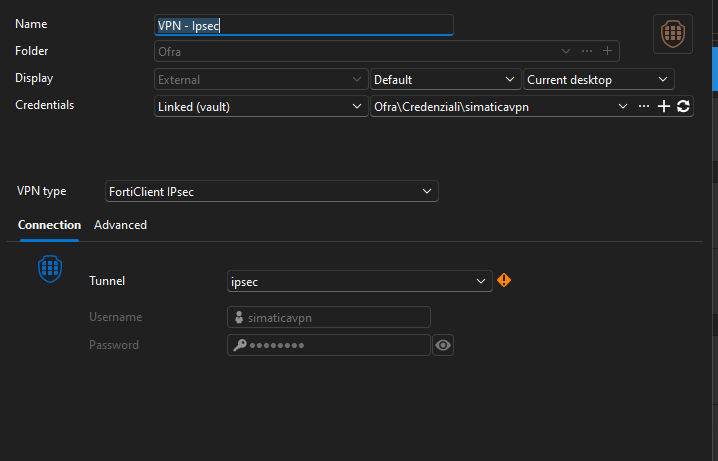
under "Event" in "Before opening" i call my import-export.bat using as parameter my file name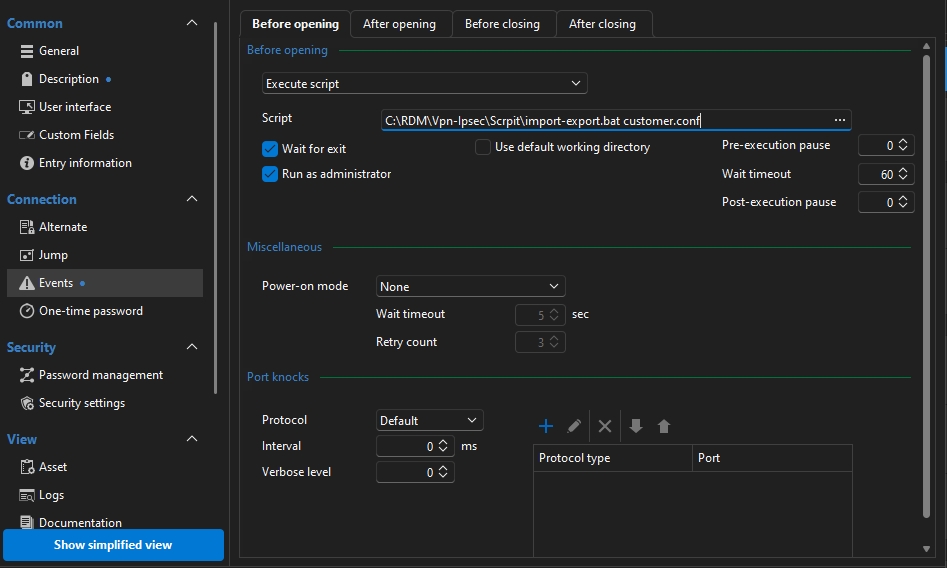
under "Event" in "After closing" i call my Restore.bat to restore all my configuration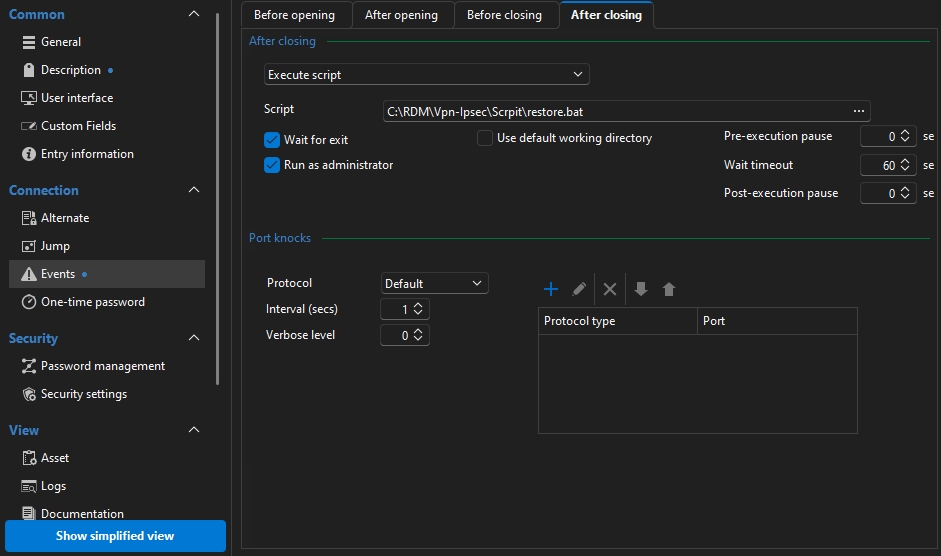
I've been using this system for over six months and everything works fine. The only problem I've encountered is that it only works with IkeV1 VPNs. So far, I haven't been able to get it to work with IkeV2. I'll have to take some time to test it further.
Since we're a team, I'm currently going to get the configurations from one of our FTP servers in the import-export.bat script. I need to try to improve security here.
I hope this helps you, if you have any suggestions or improvements, please let me know.
Bye
Stefano Fontanini
imm02.jpg
imm01.jpg
immagine.png