Update to work with FortiClient VPN 7.0.1.0083
1 vote

Currently there is a warning message when using FortiClient that the configuration only works w/ versions < 5.4. Can this be updated to work with the version 7.0.1.0083? I'm guessing this issue is on the FortiClient side.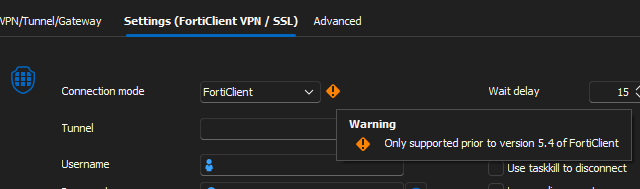
5f9d6db3-0a0c-46e2-945d-27a5edecbc99.png
All Comments (5)
Hello,
Unless things changed, they removed the possibility to send credentials with FortiClient in versions 5.4 and above, so there's not much we can do to improve this at the moment. If you have a command line that works and supports sending credentials, feel free to share it and we will see about improving our integration. Unfortunately we don't have access to FortiClient as we're not paying customers.
Regards,
Hubert Mireault
You have to use FortiSSLVPNcmdline with newer versions of FortiClient, those tools are available at fortigate for downloading. Please be aware, that you have to use the same version for the SSLVPMcmdlilne tools and FortiClient.
This post on the Fortinet forums seems to have some guidance on how to connect via the CLI.
https://community.fortinet.com/t5/FortiClient/Technical-Tip-How-to-use-FortiClient-SSL-VPN-from-the-CLI/ta-p/192581
Hello,
This is the CLI we have currently implemented in RDM, which is used with the "FortiSSL" mode. The "FortiClient" mode uses ipsec.exe which is what was deprecated since Forticlient 5.4 as far as we're aware. If you're looking to use the FortiSSLVPNClient.exe CLI through RDM, then you should use the "FortiSSL" mode.
Regards,
Hubert Mireault
Hello,
This is the CLI we have currently implemented in RDM, which is used with the "FortiSSL" mode. The "FortiClient" mode uses ipsec.exe which is what was deprecated since Forticlient 5.4 as far as we're aware. If you're looking to use the FortiSSLVPNClient.exe CLI through RDM, then you should use the "FortiSSL" mode.
Regards,
Ah, I think I misunderstood what option I was using. Thank you for the clarification