Various Problems with RDC

Hello,
I have been enjoying RDM for some time now, and everything seems to be working as expected and it's a high quality product. There are a few issues that I wanted to report to see if there are any workarounds, however:
- When joining an RDC for the first time (usually), the performance is highly degraded, almost as if software-rendering is enabled. Windows are very choppy as I drag them around. I have to disconnect and re-connect to get the expected connection. Note these machines are all local on the local network so this is not a network latency issue.
- When disconnecting via the above problem, I have noticed several connections take up to 30 seconds to disconnect before I can reconnect again. It would be valuable to see if something is happening here to reduce this time.
- This is rare-ish, but I am noticing that keystrokes do not work as expected after connecting to machines. I have to close down the machines to "reset" them in this regard. In the case of this issue, open full-screening (restore), it that keys such as CTRL and/or SHIFT (or others) are toggled as "pressed" and I have to go through all the keys and re-press them to make sure they are toggled into their proper state.
Please let me know if any further information is needed in any of the above and I will assist you in diagnosing.
Thank you,
Michael
All Comments (7)
Hello,
Thank you for reaching out on this matter.
Could you please confirm the version of RDM you are using, along with the data source type and its version?
Additionally, when you mention "RDC," are you referring to RDP entries within RDM?
Could you also let me know if all sessions are affected, or only a specific group?
Lastly, if you connect to the same remote machine using MSTSC, do you experience the same slowness?
I look forward to your response.
Best regards,
Jacob Lafrenière
Hi Jacob! Thank you very much for your investigation and reply, it is appreciated.
To start, I am using 2023.1.38.0 and have noticed this starting in previous versions. For data source type, everything is local (if that is what you mean -- please let me know otherwise).
> Additionally, when you mention "RDC," are you referring to RDP entries within RDM?
Correct. :)
> Could you also let me know if all sessions are affected, or only a specific group?
I have five primary sessions across three groups and they all seem to be impacted. When setting up my environment after a reboot I have to constantly open and close my five of my sessions in a particular order (due to another identified issue with RDM) until they render in "fast mode." Doing so takes a lot of time particularly when that delay hits.
Once everything is working, however, it's pretty awesome. 😀👍
Hello,
Thank you for the follow-up.
For any issue related to software performance, I always recommend starting with the latest version of the product.
Each major version of the software brings improvements in security, optimization, and stability—so it's worth upgrading!
If you'd like to try it out first, I suggest testing with a portable version of RDM. Here's a how-to guide to help you:
https://docs.devolutions.net/rdm/kb/how-to-articles/portable-rdm-installation/
If upgrading isn’t an option right now, I recommend reviewing the following documentation related to performance issues:
- https://docs.devolutions.net/rdm/kb/troubleshooting-articles/startup-performance/
- https://docs.devolutions.net/rdm/kb/troubleshooting-articles/microsoft-rdp-memory-perfomance-issues/
Let me know if this helps!
Best regards,
Jacob Lafrenière
Totally understandable Jacob and I probably should have forced an update before starting this thread. 😬 I did install .41.0 and was about to re-launch all my sessions as expected except the first one, which I had to try twice as the first time suffered from the "chunky" experience. I have noticed that once I "warm up" the sessions (start the VM, connect, and get a "fast" connection), that the issue doesn't happen as much. However, this still seems to occur in .41 on some level. Once I have to reboot (once/twice a month) I will have more data for you. 👍
Hello,
Thank you for the follow-up.
I’d like you to test something for me.
If you’re confident that you can consistently reproduce the issue, could you try connecting to the server using MSTSC and let me know if the problem persists? This might not be directly related to RDM.
I suspect this could be the case, as I reviewed your previous post on the forum and noticed you’re using an "External" type of entry. In such cases, Remote Desktop Manager simply leverages the native MSTSC client from Windows.
Let me know what you find and whether you’re able to reproduce the issue.
Best regards,
Jacob Lafrenière
Hi Jacob,
Thank you again for your assistance and professional patience as I figure this out. Indeed, I am able to reproduce the slowness in basic RDC connections as well, so this does not seem RDM-related. However, I will say that it took many attempts to experience the slowness in pure RDC. With RDM it happens pretty consistently so I wonder if there is a setting that is contributing to this.
Outside of this, I am apt to say that I may be experiencing Windows 11 issues with this feature and with the keyboard. I will continue to monitor as monthly updates roll out.
Thank you again for your assistance,
Michael
Hello,
Thank you for the follow-up.
Sounds good! If you’d like to test the new Ready-to-Run version of RDM, you can download it from our website here:
https://devolutions.net/remote-desktop-manager/downloadenterprise/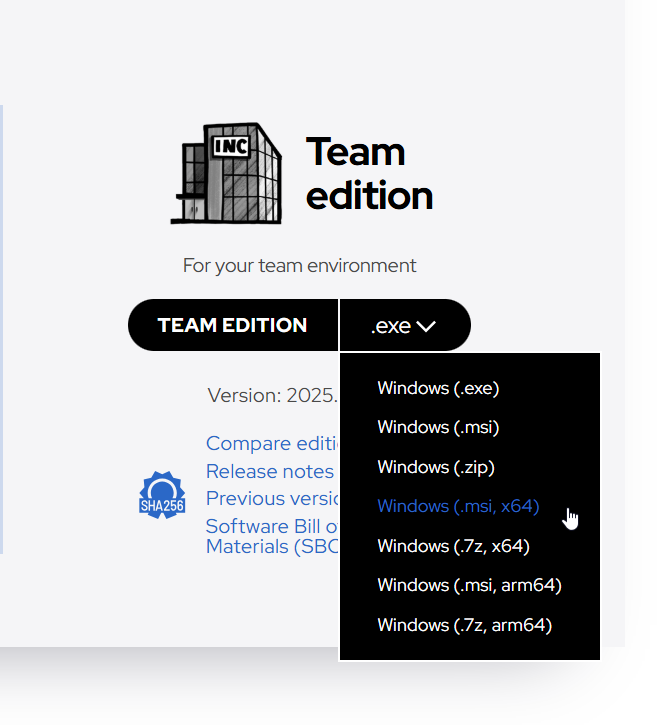
If you're already using the latest version, please uninstall your current installation before installing the Ready-to-Run version.
Let me know if this helps or if you need further assistance.
Best regards,
Jacob Lafrenière
d230f466-a9bf-4058-93c1-aaaa544a4218.png