Keyboard Shortcut to Open Session?
0 vote

Hey there all,
First off, amazing product! Very nice work with the development and design. I was using Remote Desktop Connection Manager for some of my connections and I got a referral from a colleague for this product which is much much better. Thank you for all the work you put into it.
I have pretty much everything configured. The one outstanding issue is that I would like to have keyboard shortcuts to open sessions. Is this possible? I asked Grok and I followed the directions but they didn't work, so I am here instead, the old-fashioned way. 😅
Thank you for any assistance you can provide.
All Comments (13)
Hello,
Thank you for reaching out to Devolutions Support.
Currently, it is possible to open an entry with parameters using the following macros:
- Open (Embedded/Tabbed): Ctrl + Enter
- Open (External): Shift + Enter
- Open Full Screen: Alt + Enter
However, I assume you are looking for a way to open entries without using the mouse at all, the macro could look like this:
Open entry = Ctrl + 1 (This would open the first entry in the navigation list.)
At the moment, this functionality is not supported. However, I will transfer this forum post to the feature request section so that our developers can review your suggestion.
Best regards,
Carl Marien
Hi Carl, thank you very much for your reply! And for the surprisingly bad news. 😅 I'm sort of shocked that I am the first person to suggest this. This seems like such an obvious feature for your awesome product and one of the first configurations I attempted to perform upon seeing its impressive interface.
It would be really valuable if you are able to add it. 🙏 Thank you for any consideration. 🙏🙏🙏
Hello,
Sorry for the delayed response, but I have a question regarding your request, so we can better understand your scenario.
I'd like to know the following:
- How many entries you have stored in your vault?
- Do you expect these shortcuts to be configurable manually in each entry's properties, or do you want the shortcuts to be applied automatically (e.g.: you have 5 entries in alphabetical order, and Ctrl-1 to Ctrl-5 are automatically mapped to these entries so you don't have to configure anything yourself)?
- Do you have an example of another similar application that implements something like this, to give us an example of how we could implement it?
I'm asking these questions because there are a lot of factors that can make a specific solution better or worse depending on how you use RDM. For example, if you're working with a team with Devolutions Server as a datasource, you risk having hundreds of entries (so mapping automatically will not work well), and configuring shortcuts on entries would also apply to other colleagues connected to that same datasource.
Regards,
Hubert Mireault
Hi Hubert, thank you very much for your time and analysis, it is appreciated!
So in my case I have 7 entries, 5 of which are used quite a bit and are undocked.
RDM is the 3rd spot on my Windows 11 Taskbar, so my initial thought was to do something like Win+3 (focuses RDM) then press CTRL-<num> for the session that I want. All it needs to do is focus (but it would be convenient to configure to full-screen/restore as well).
> Do you expect these shortcuts to be configurable manually in each entry's properties, or do you want the shortcuts to be applied automatically (e.g.: you have 5 entries in alphabetical order, and Ctrl-1 to Ctrl-5 are automatically mapped to these entries so you don't have to configure anything yourself)?
I could take or leave this, but it would be nice to conceptually map these to my own idea of what 1-7 should be like. 🙏
> Do you have an example of another similar application that implements something like this, to give us an example of how we could implement it?
Really it's based on the Windows + Number key as mentioned earlier as the starting point. It's basically bringing that to the sessions list. 👍
Please let me know if you have any further questions and I will do my best to assist you.
The good news is that I think we have half of what you need, and that it's hopefully the most important part to you.
We have a bookmark feature that allows you to switch to that entry with a keyboard shortcut, and an option to set these bookmarks automatically.
If you go in File > Settings > User interface > Tabs, you can configure the "set bookmarks automatically" option.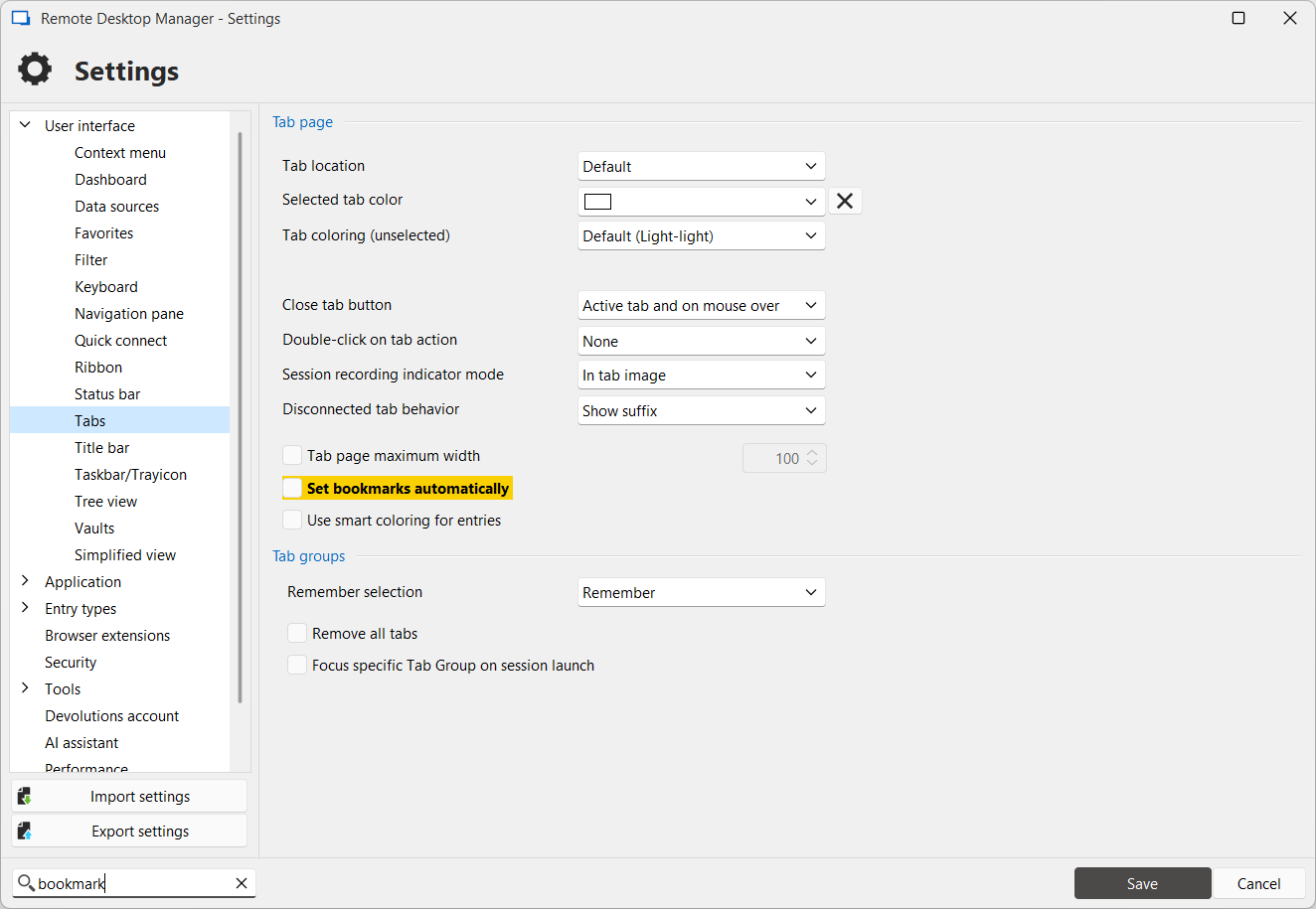
You can then go in the User interface > keyboard section to change the shortcuts associated with the "Goto bookmark" feature: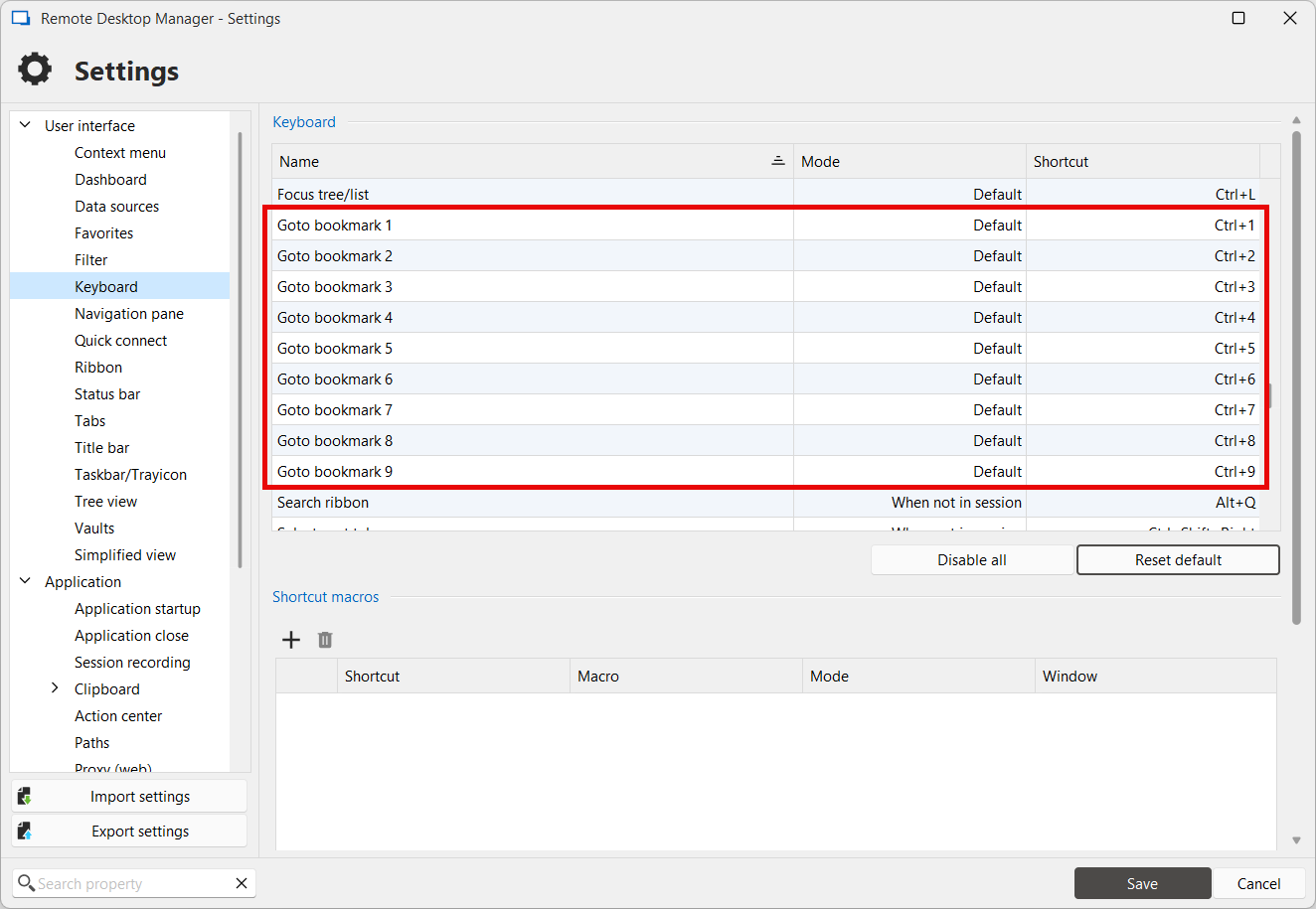
You will need to restart RDM for the shortcut changes to apply.
What this will do is, when you open a new tab, RDM will automatically bookmark it (denoted with the "[Bx]" in the tab title, where "x" is a number from 1 to 9). This will then allow you to switch between these tabs by pressing the associated shortcut key.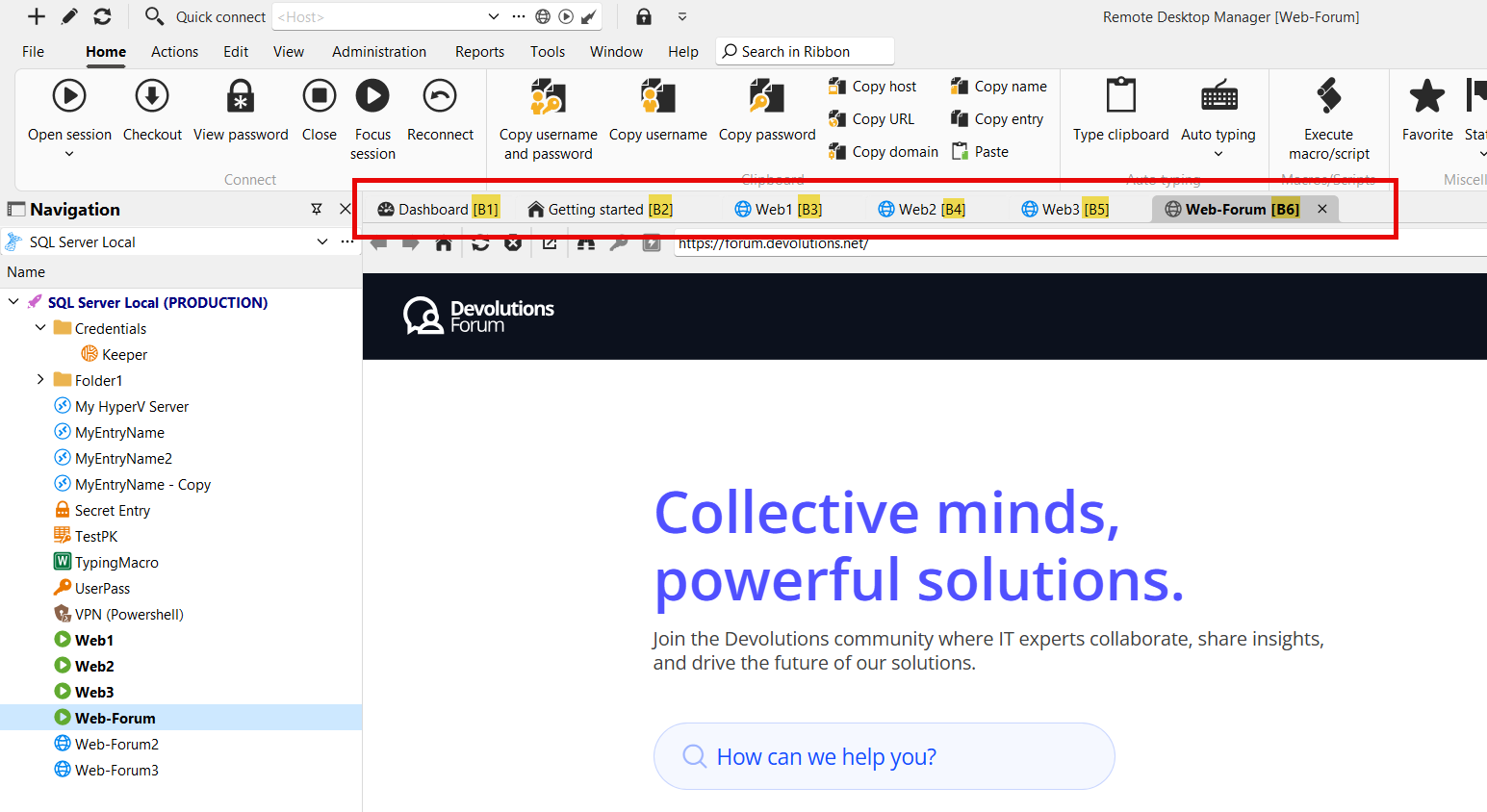
So for your point about focusing entries with a keyboard shortcut, I think this solves it.
Unfortunately this doesn't help you start the entries more easily, but since you don't have many of them, hopefully this current solution gets you most of the way to a smooth experience. Let me know what you think.
As an additional point too, if you always want to start all your entries, we have playlists that could simplify this even more for you (playlists open a list of entries one after the other): https://docs.devolutions.net/rdm/commands/edit/play-list/play-list-management/
Regards,
Hubert Mireault
ca13a3cc-5712-44e9-b717-78d5a8958000.png
6a0909cd-0903-4a26-9baf-235f2a67fdd9.png
f959a9d1-64a3-4f21-a7a2-089ba077d9ca.png
Pardon the confusion here Hubert but I am not using tabs except for two of the 7 instances. While the bookmarks may work for them, the remaining 5 instances are external windows. Do I have something misunderstood? Thank you for any further assistance you can provide.
No, you understand everything perfectly, I just assumed you were using embedded windows since that's the typical scenario, so that's my bad! The "undocked" feature is still considered to be windows with RDM as the parent, so they should work with the bookmark feature, but actual external windows, where we open an entirely different application, are not. I don't think it would be possible for those windows to be focused automatically with a shortcut since they are outside of RDM, so your best bet would be the native Windows shortcuts that you mentioned (Win+number).
In this case, since this doesn't answer your need, we'll keep the thread opened for a way to start specific entries with a shortcut within RDM. At the moment I don't have a great solution but we will monitor this thread for further feedback and to help us prioritize this request.
Regards,
Hubert Mireault
Thank you for your continued support and assistance Hubert. 🙏
> but actual external windows, where we open an entirely different application, are not
Indeed, these are the kind that I am using.
> I don't think it would be possible for those windows to be focused automatically with a shortcut since they are outside of RDM
I am a little confused on this as if I double-click the session in the Navigation pane, the window does indeed open and gets focus through RDM. As such, it seems it does have access to this window, or at least enough knowledge of it to focus it. What is different between this and a keypress?
> so your best bet would be the native Windows shortcuts that you mentioned (Win+number).
Unfortunately, this does not work at the moment. To start, RDC sessions get added to the end of the taskbar list. In my case that is 7 currently, and this may change if I add more applications. Win-7 is a bit more of a reach than Win-1 (which I would make if I could). Secondly, once Win-7 is pushed, a list of windows opens but there's no easy way to select them. I have tried several keypresses but it looks like Windows is made to click/press the windows as they are open. This is hardly ideal.
It would be super valuable to be able to simply press Win-1 -> 1/2/3/4/5/6/7 to select my configured instance. Thank you for any consideration towards this request. 🙏
Can you let me know what entry types you're using? Maybe a screenshot of your tree view as well (feel free to blur out sensitive information), that would give me an idea if there's any specific structure to it.
Thank you for all the additional information as well, this helps paint a clearer picture of what your needs are and how we can best address them.
Regards,
Hubert Mireault
Sure thing, Hubert! Thank you for your continued analysis and investigation. It is appreciated.
To start, can you explain what you mean by entry types? I can get this for you but I am unclear what the ask is.
As for the navigation, I can give you a redacted example with some explanation: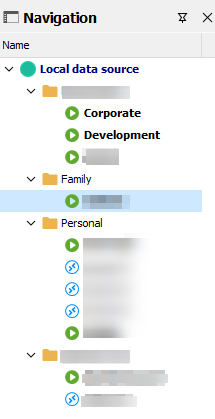
"Corporate" and "Development" were general enough to leave in and are not the names of the machines. 😁 The first and last folder nodes are the names of my businesses. You can see that I have the 7 open and active, and others that can be used (but far unfrequently).
If there is anyway to get those 7 configured so that they are accessible by keyboard it would be greatly valued and appreciated.
Thank you for your further consideration.
294efa01-7f60-475f-93e7-7123acbbf2cd.png
Thank you for the additional information! By entry type I meant RDP, SSH, Websites, etc, and I think the screen capture answers my question, you're mainly (only?) using RDP entries.
We'll have to see what we can do for this and how we can provide a satisfactory solution not only for your scenario but also keeping other users in mind and how they can have various vault sizes, etc.
Rereading your thread though, if you're using external sessions, I think you at least have a workaround for this. You said the following:
Secondly, once Win-7 is pushed, a list of windows opens but there's no easy way to select them. I have tried several keypresses but it looks like Windows is made to click/press the windows as they are open. This is hardly ideal.
Through my testing, if you press the shortcut multiple times while not letting go of the Win key, it will toggle between these windows. When you release the Win key, it will switch to the selected window: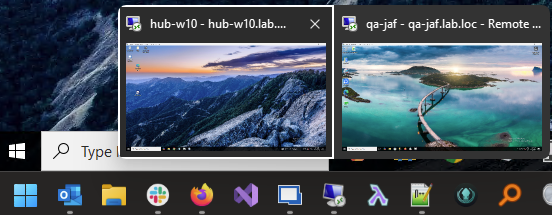
While it's not as convenient as having mappings for Win+1-7 for getting to the specific RDP session, this hopefully will help you in the mean time. Let me know what you think.
Regards,
Hubert Mireault
dbf7a05b-4c03-430f-8177-39bc7f2d40ad.png
Hi Hubert, thank you for that tip! Yes, I can see now there is a selection toggle if I continue to press the number after invoking the menu. This is a marginal improvement over ALT-Tabbing as it is the same experience but filtered to the RDP windows.
As you stated it is not as ideal or efficient as pressing number keys. The windows will change each time I open them (unless I deliberately open them in the same order each time), so there is no guarantee of order and efficiency like number keys would deliver.
Thank you for any continued consideration you can provide towards this feature idea. I am hoping that going forward the more you toggle/switch between your own sessions, the more you'll get the feeling there should have been a keypress there to get to it quicker, too. 🤓
I'm glad this workaround improves your experience somewhat. As I mentioned we'll keep track of this thread for additional feedback and upvotes to help us prioritize this.
Regards,
Hubert Mireault