Navigation tree not showing correctly

Version: 2025.1.37.0 64-bit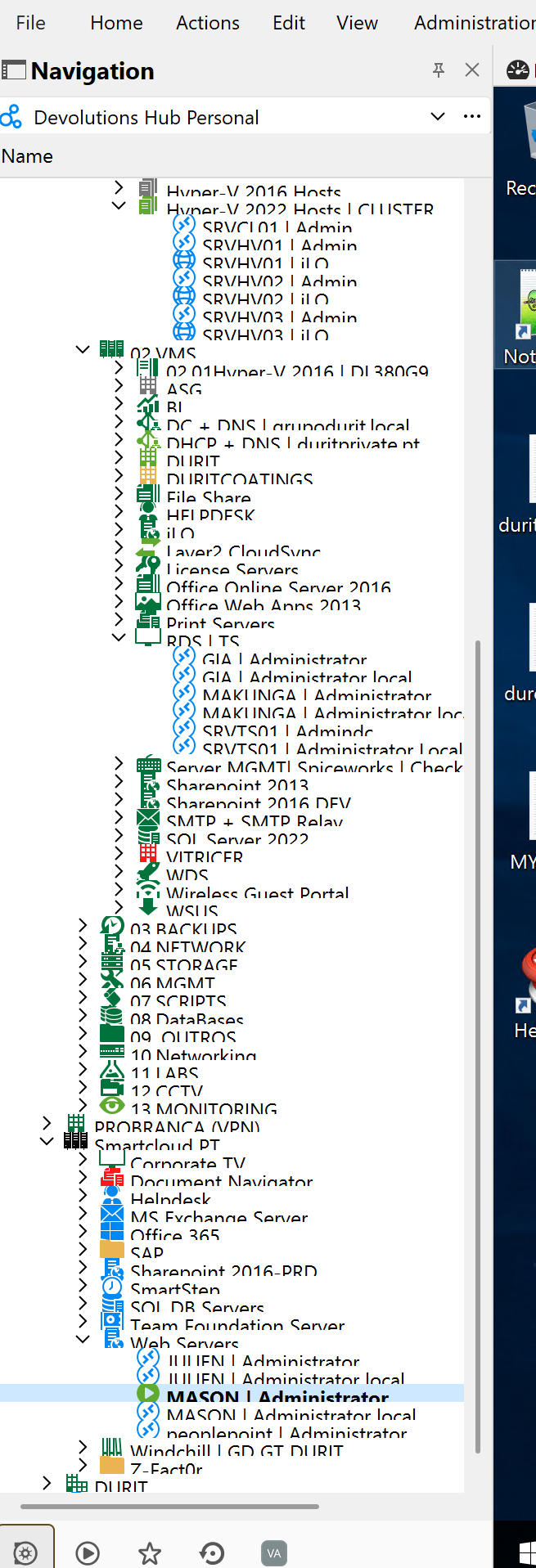
9a5213fa-8253-4003-83fa-4e701c3f33e1.png
All Comments (7)
Hello,
Thank you for reaching out regarding this issue.
Could you please try resetting the layout? You can do this by navigating to Window → Reset Layout.
Best regards,
Tommy Sanders
hi, same issue with the reset layout.
when i open the app its shows everything fine, but this happens when i make one rdp session.
best regards,
vasco
Hello,
This issue is most likely due to something in the local configuration of your RDM instance.
For this reason, I would recommend to reset your local configuration.
To do so, please do the following:
1- Close RDM
2- Go under your %localappdata% -> Devolutions folder
3- Rename the "RemoteDesktopManager" folder into "RemoteDesktopManager.old"
4- Start RDM
5- Connect to your data source
Once you are connected to your data source, the issue should no longer occur.
Best regards,
Tommy Sanders
hi, it doesn't worked for me. same thing.
my computer is a Microsoft surface book 2, can be anything related with that?
i tried in one different pc (HP) and it seems ok...
vasco
Hello,
Thank you for your response,
Could you please let me know if there is a difference between the OS? What are the OS on the both please?
Best regards,
Tommy Sanders
Various builds of Win 11.
Hello,
Unfortunately, we do not have a Microsoft Surface Book 2 available for testing, and it may potentially be the source of the issue.
Could you please try uninstalling and reinstalling RDM? If the problem persists, we can schedule a remote session to investigate further.
Please let me know the outcome.
Best regards,
Tommy Sanders